





 I paid for the Apple TV subscription and watch my favorite series on it, but DRM encryption prevents me from even taking a simple screenshot or recording a clip to share with a friend - the screen just goes black. Does anyone know a way to remove DRM and use DRM protected content without a limit?
 — Real user feedback from Reddit
If you enjoy digital media files, you may know that most of them are protected by DRM (Digital Rights Management) and encoded in special formats. DRM is a security measure used by platforms, like iTunes, Apple TV, Discovery Plus, Apple Music, Spotify, Kindle books, Audible audiobooks, and more, to control how their content is accessed, used, and distributed. In 2026, DRM (Digital Rights Management) has evolved beyond simple encryption, now utilizing Widevine L1 hardware-level protection and dynamic FairPlay licensing. While this protects creators, it severely limits the "Fair Use" rights of paying consumers.
Are your files protected by DRM, making simple screen recording or playback obsolete? "How to bypass DRM?" This article gathers the best DRM protection removal software to remove DRM protection from the most popular video and music files. You can use your content without restrictions.
Part 1. The 2026 DRM Landscape: Why DRM Will Be More Difficult to Bypass?
In 2026, DRM has become harder to bypass due to a shift from simple software encryption to a multi-layered, hardware-locked ecosystem. Here are the four primary technical reasons:
- Hardware Isolation (TEE): Decryption now happens in a secure, isolated part of the CPU/GPU. The operating system cannot "see" the raw data, making software-based screen recording impossible.
- Secure Video Path (SVP): Data is encrypted from the server to your screen's pixels. Even with "admin" access, the unencrypted stream never enters the system's reachable memory.
- Dynamic Licensing: Protocols like FairPlay 5.x use short-lived keys that expire in minutes and require constant "check-ins" with a server to maintain playback.
- Forensic Watermarking: Invisible, account-specific IDs are embedded in the audio and video. If you bypass the lock (e.g., via a capture card), the file still contains hidden data that identifies your account as the source.
Part 2. How to Bypass DRM Protection from iTunes Movies (Purchases and Rentals)
Purchased and rented iTunes movies, TV shows, and extras come with Apple's FairPlay DRM protection, which locks content in M4V format. This content can only be played on up to 5 authorized Apple devices. If you want to watch iTunes movies on non-Apple devices, you'll need to remove the DRM protection from video files.
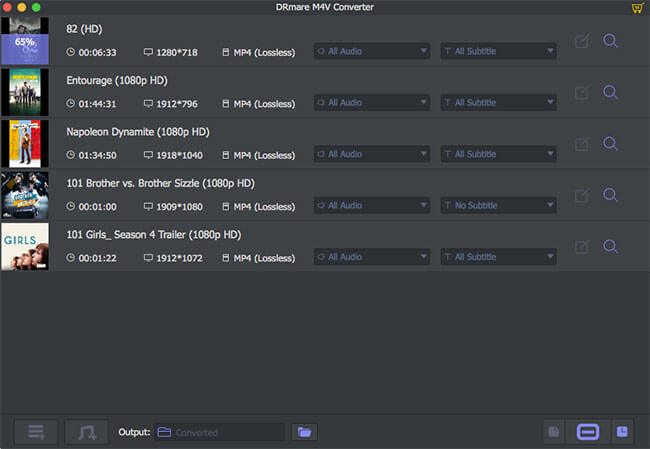
DRmare M4V Converter is one of the most efficient DRM protection removal tools. It offers 100% lossless quality and a conversion speed of up to 30X. With DRmare M4V Converter, you can remove DRM from iTunes movies, edit iTunes movies, like adding watermarks, and save them in a variety of formats to use offline on any device.
How to Remove DRM Protection from iTunes Video Files
Step 1. Download, install and launch the DRmare M4V Converter.
Step 2. Click on the 'Load iTunes Library' button to upload downloaded iTunes videos to DRmare M4V Converter.
Step 3. Hit on the 'Format' icon to start to alter the output iTunes video parameters you want. You can change the video audio format, devices and more.
Step 4. Touch the 'Convert' button. This DRM protected removal will start to unlock DRM-protected iTunes video files and save them to the common format you set. Then you can head to the 'history' icon to find them on your computer. And then you can move the local iTunes videos to any device you want to play.
Part 3. How to Remove DRM Protection from Apple TV Video Files
The above DRM converter only allows you to bypass protection from iTunes purchases and rentals downloaded to your library. What if you are subscribing to an Apple TV plan to watch streaming content? Here, you have to use another DRmare Software, namely DRmare Apple TV Downloader.
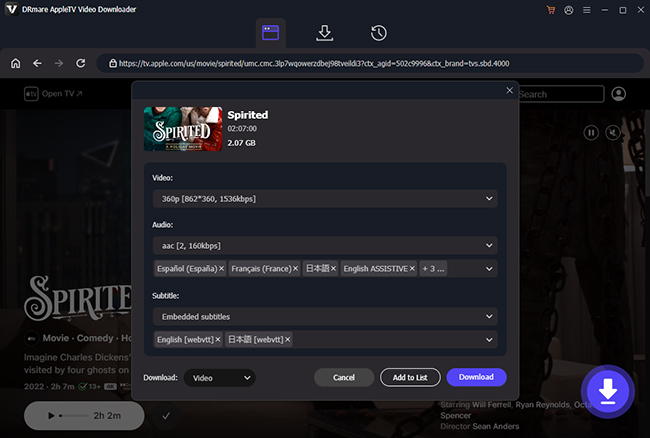
It uses a built-in browser to play the content and captures the video data as it streams, stripping the DRM at the same time. It supports 1080p HD and keeps Dolby Digital Plus 5.1 surround sound. After that, you can keep all files forever and watch them on Android, Linux, or smart TVs that don't have the Apple TV app. As you know from your video library, logging out of Apple usually wipes your downloads, but these DRmare-processed files stay safe on your hard drive.
How to Convert DRM-protected Apple TV Files to Unprotected Ones
Step 1. Open the DRmare Apple TV Downloader on your computer. You will see an interface that looks like a web browser and features the Apple TV Web Player. Click the 'Sign In' button and enter your Apple ID credentials.
Step 2. Before you start downloading, click the 'Menu' icon (three horizontal lines) and select 'Preferences'. In the 'Download' section, you can choose MP4 for maximum compatibility or MKV for high-quality archival, select video quality as High (1080p), and choose your preferred language and whether you want to keep the 5.1 surround sound track.
Step 3. Use the built-in search bar or browse the Apple TV categories to find the series or movie you want to save. Once you open the page for a specific show, a Download icon will appear on the right side. Tap it and click the 'Download' button to get rid of the DRM and save the files at up to 37X speed.
Part 4. How to Get Around DRM Protection from Apple Music
Although Apple has eliminated DRM protection from iTunes songs since 2009, songs purchased before that, as well as Apple Music streaming content, still have DRM. In additional, Apple Music's Hi-Res Lossless tracks present a new challenge for DRM removal.
DRmare Apple Music Converter is an excellent DRM encryption removal tool specifically engineered to capture the full 24-bit depth, ensuring your offline library sounds exactly like the original stream. It works well for Apple Music and iTunes M4P songs. Also, it runs at up to 30X faster speed to convert DRM-protected files in batches. You can modify the output audio formats for your Apple Music songs. And you can reset the output audio channel and so on you like.
How to Remove DRM Protection from Apple Music Files
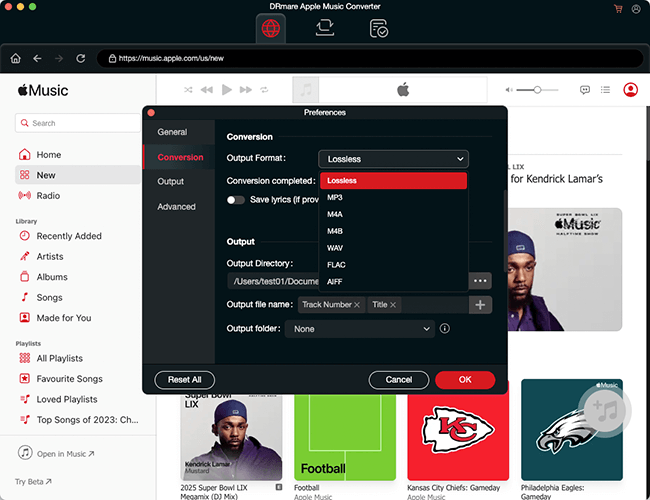
Step 1. Install and open the DRmare Apple Music Converter on your Windows or Mac computer. Authorize your Apple ID to browse your library and add Apple Music songs for avoiding DRM protection by clicking the "Add" > "Add to List" button.
Step 2. Click on the 'menu' > 'Preferences' > 'Conversion' icon to set the output audio formats for your music files. And you can alter the codec and more audio parameters for the audio files. After then, hit on the 'OK' button.
Step 3. Press the 'Convert' button to start to remove DRM protection from Apple Music. Then you will get the local audio files on your computer for use anywhere.
Part 5. How to Bypass DRM Protection from Spotify
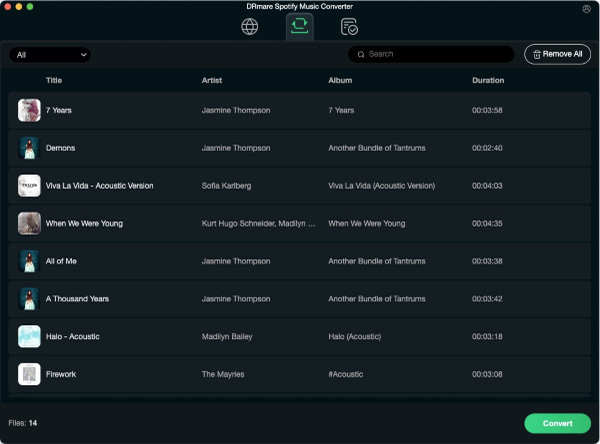
Spotify is another popular streaming music platform. Unlike Apple Music, it offers both free tier and premium tier services. That is why it attracts a lot of subscribers. Spotify's OGG files are DRM-protected and can only be played through its official app. To enjoy Spotify music on other devices, you need a DRM protection removal tool.
DRmare Spotify Music Converter is one of the most recommended software for Spotify files. It allows you to not only remove DRM from Spotify but also to convert Spotify tracks to common audio formats like MP3, FLAC, or WAV, while retaining high sound quality. So, you can enjoy Spotify audio files anywhere and anytime after using this tool.
How to Break DRM Protection from Spotify Music
Step 1. Set up the DRmare Spotify Music Converter from your computer and you will see its built-in Spotify Web Player. Log into your free account and locate the Spotify songs that you want to unlock DRM protection and convert to plain audio.
Step 3. Click the 'Add' > 'Add to List' button to load Spotify tunes. Or put the link address of the Spotify songs on the search bar on DRmare. Then hit on the 'Download' icon.
Step 4. Click on the Menu icon and choose 'Preferences'. Then on the Preferences window, reset the output audio parameters for Spotify music you want.
Step 5. Hit on the 'Convert' button on DRmare tool. It will start to get past DRM restrictions from Spotify. After then, you will get the common audio files from Spotify for use on any device.
Part 6. How to Get Rid of DRM Protection from Audible Audiobooks
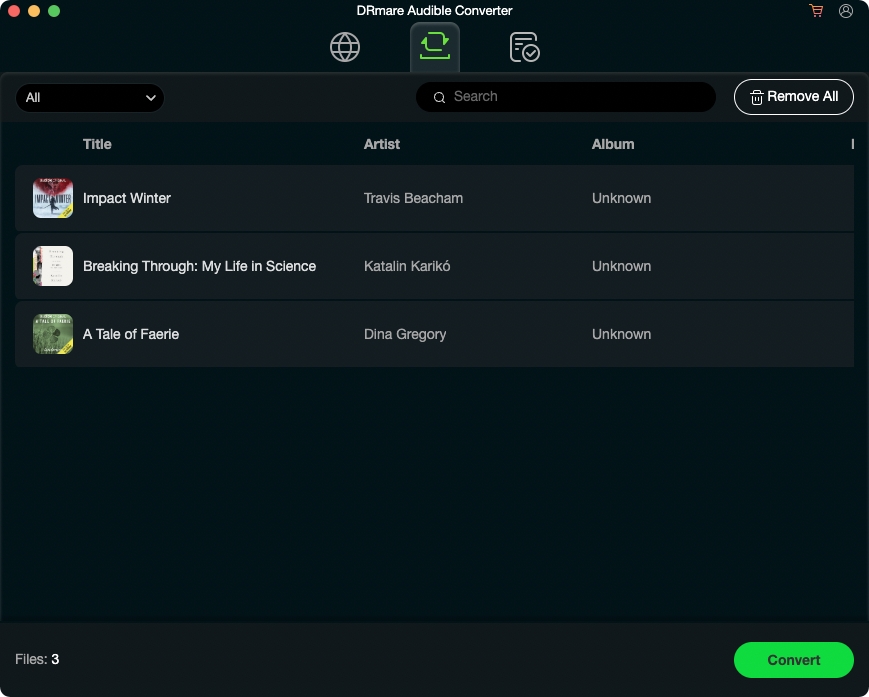
Audible, Amazon's popular audiobook platform, provides millions of audiobooks in its proprietary AA/AAX formats, which are protected by DRM. While Audible audiobooks offer a convenient way to enjoy books, DRM restrictions limit playback to specific authorized devices. If you want to listen to your audiobooks on any device, you will need to break the DRM protection.
Audible's 2026 security updates often break older converters. Fortunately, DRmare Audible Converter's unique AAX-decryption algorithm ensure your audiobooks are ready for any MP3 player in seconds. This tool can easily decrypt and convert Audible audiobooks into common formats like MP3, M4A, FLAC, and more at 100X faster speed. Before disabling DRM protection, it allows you to split Audible files by chapters, customize ID3 tags, and change the audiobook playback.
How to Open DRM Protected Audible Files
Step 1. Launch DRmare Audible Converter on your Windows or Mac computer. Once opened, it will prepare to process your Audible audiobook files. Click on the 'Add Files' button to browse and select your downloaded Audible files from your computer.
Step 2. Click on the 'Format' icon to open the settings window. You can select the desired output format, such as MP3, M4A, FLAC, or WAV. You can also choose to customize additional settings, like splitting audiobooks, adding ID3 tags, etc.
Step 3. Once everything is set up, click on the 'Convert' button. DRmare Audible Converter will start decrypting Audible DRM and converting the Audible audiobooks into the selected format.
Part 7. How to Break DRM Protection from Tidal
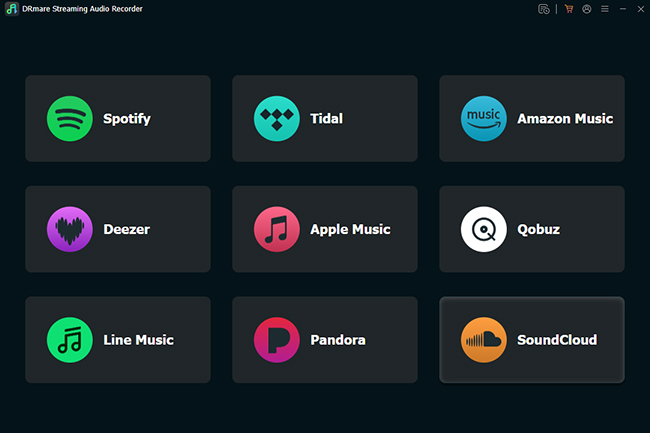
Like other music streaming services, Tidal also has protection for its songs. So, here we will introduce the DRmare Streaming Audio Recorder for you to hack DRM protection files from 24-bit Hi-Res Tidal tracks. By the way, it's an all-in-one DRM protected removal program that supports Tidal, Spotify, Apple Music, Amazon Music, Deezer, Pandora, SoundCloud, Line Music, and Qobuz.
With this program, you can alter the Tidal song's output audio parameters you want. And it will save the lossless audio quality of Tidal music tracks. Then you can get the local audio files of Tidal on your device for use offline.
How to Remove DRM Protection from Tidal Audio Files
Step 1. Download and launch the DRmare Streaming Audio Recorder on your PC or Mac. It will show available apps.
Step 2. Click the 'Tidal' icon to open Tidal DRM removal software, search for the tracks you want to remove DRM protection from Tidal Web Player. You can click the 'Add' > 'Add to List' button to load them.
Step 3. Click the 'Menu' icon in the DRmare tool, then select 'Preferences'. In the new window, navigate to the 'Conversion' tab where you can customize the output parameters for your Tidal tracks, such as format, bit rate, and sample rate.
Step 4. Press the 'Convert' button to start deleting DRM protection from the Tidal songs. The tracks will be converted into common audio formats. Once the conversion is complete, you can find the DRM-free files in the 'Converted' section, and they will be saved to your specified location on your computer.
Part 8. How to Remove DRM Restrictions from Amazon Music
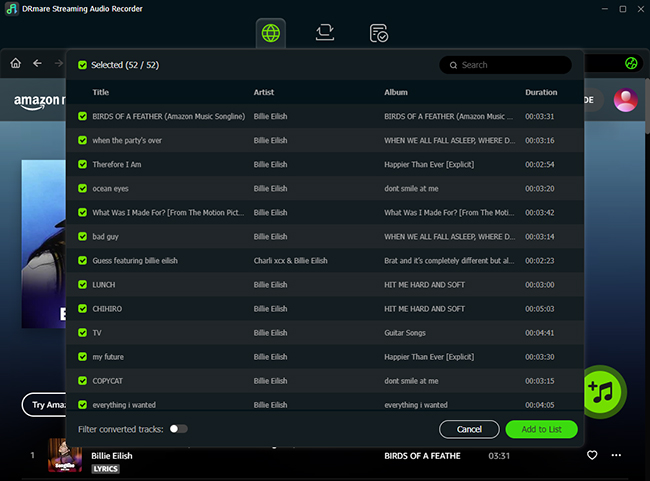
If you use Amazon Music and want to remove digital rights management protection from it, then you can also try DRmare Streaming Audio Recorder. It's compatible with Amazon Music platform. Both Amazon Unlimited Music and Amazon Prime Music users can easily get past DRM.
With this Amazon Music DRM removal, the output audio formats of Amazon Music can be adjusted and the output audio quality can be altered you want. It not only can convert Amazon Music to MP3 but also other formats. After then, you can save the Amazon Music files on your computer forever. And you can listen to Amazon Music without protection on your device.
How to Get Pass DRM Restrictions from Amazon Music File
Step 1. Open the DRmare Streaming Audio Recorder and click the Amazon Music option to launch Amazon Music DRM removal.
Step 2. Authorize your account and browse your Amazon Music library. Click the 'Add' > 'Add to List' button to import protected songs. Or put the song's URL to the search box on DRmare and hit on the 'Download' icon.
Step 3. Head to the 'Menu' icon and choose 'Preferences'. And then hit on the 'Convertsion' tab. You can go on to reset the output audio parameters for Amazon Music.
Step 4. Click on the big 'Convert' button, it will begin to get pass DRM protection and download Amazon Music at a faster speed. At last, the Amazon Music songs will be saved on your computer for use.
Part 9. Part 9. How to Get DRM Protected Removal from Any Source
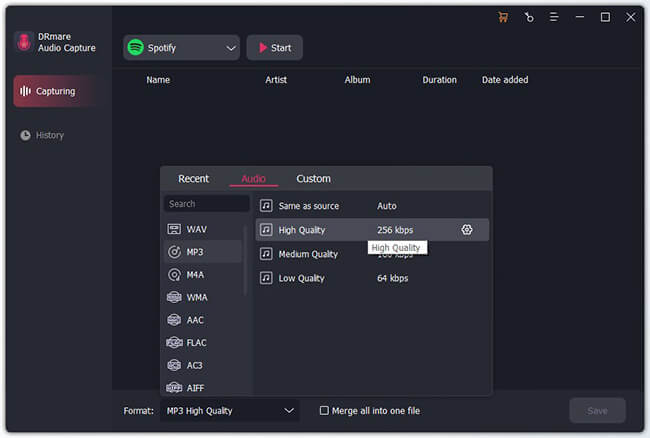
In the last part, we will introduce a DRM removal software for you to crack DRM protected files from any source. This tool is DRmare Audio Capture. It uses the recording method to get any audio playing from your computer. At the same time, it will break DRM protection from the files. Then you will get the plain audio tracks.
This tool can get sound from lots of source. It supports video websites, games audio, music services and so on. And you can customize the audio parameters for them you like. Also, you can trim or cut the unwanted audio track after recording.
How to Disable DRM from All Protected Media Files
Step 1. On the DRmare Audio Capture, click on the 'Format' icon. Here you can reset the output audio formats.
Step 2. Back to its main screen, choose the 'Select/Add an App' to select the target source that you want to play audio from.
Step 3. Click the 'Start' button, DRmare Audio Capture will turn into Recording Mode. You can play a file and it automatically begins to detect and record it with DRM-free protection.
Step 4. Click on the 'Stop' and 'Save' button to keep the audio on your computer. Then find the tracks via the 'history' icon.
Part 10. DRM Compatibility Matrix: What Are You Unlocking?
| Content Type | Protection Technology | The 2026 Solution | Key Benefit |
|---|---|---|---|
| iTunes Videos | FairPlay (4K/HDR) | DRmare M4V Converter | 30X Speed / Lossless 4K |
| Apple TV+ Videos | FairPlay (4K/HDR) | DRmare Apple TV Downloader | 37X Speed / Lossless |
| Spotify | Encrypted OGG Vorbis/FLAC | DRmare Spotify Music Converter | 24-bit Lossless Audio |
| Apple Music | Encrypted AAC | DRmare Apple Music Converter | 24-bit Hi-Res Audio |
| Audible Books | AAX Encryption | DRmare Audible Converter | 100X Speed / Chapter Split |
| Tidal/Amazon Music/Qobuz/Deezer/etc. | Multi-Layer DRM | DRmare Streaming Audio Recorder | All-in-One Hub (FLAC/WAV) |
| All Audio Sources | Multi-Layer DRM | DRmare Audio Capture | Support Any Music Source |
Part 11. FAQs about DRM Bypass
What Is DRM Protection?
DRM-protected means that the digital content is secured by Digital Rights Management (DRM) technology, which imposes restrictions on how the content can be processed. This protection is intended to prevent unauthorized copying, distribution, or modification of the content. For instance, DRM-protected videos can be watched on unsupported devices or shared with friends.
What Is DRM Protected Content?
Content with DRM protection refers to digital media files, including music, movies, eBooks, and software. Examples of DRM-protected content include:
- iTunes Movies and TV Shows: Restricted to Apple devices or authorized users.
- Apple Music, Spotify, Amazon Music, Tidal and Other Streaming Songs: Only playable within their respective apps.
- eBooks: Sold on platforms like, Audible, Kindle or Adobe, often limited to specific readers.
- Streaming video services: Such as Netflix, Apple TV, and Amazon Prime Video, which restrict offline downloads to authorized devices.
What Is DRM Protection Removal?
DRM protected removal refers to the process of bypassing or removing DRM encryption restrictions on digital content such as music, movies, eBooks, or software. To do this, you have to use a professional DRM removal tool.
How to Open DRM Protected Files??
To view protected content as intended by the provider, you must use their specific ecosystem. For example, you have to use the Kindle app (iOS/Android/PC/Mac) or a Kindle E-reader for Kindle books. If you need to open files on unauthorized devices , you must remove the DRM layer.
Does Removing DRM Reduce Video or Audio quality?
It depends on the method used. Tools that utilize "Lossless Conversion" logic (such as DRmare M4V Converter) do not impact quality because they strip the encryption layer without re-encoding the stream. However, tools using "Recording" logic (such as Audio Capture) depend entirely on your system's sound card settings and the selected sample rate during the capture process.
Why Did My DRM Remover Suddenly Stop Working?
In early 2026, Google and Apple rolled out significant updates to their cloud authorization protocols. If the software you are using hasn't been updated recently, it likely cannot handshake with these new security layers. It is recommended to check for the latest version of DRmare; their engineering team typically adapts the underlying decryption algorithms within 48 hours of a major platform update.
Part 12. Sum Up
Bypassing DRM protection allows you to enjoy digital content on any device, giving you more flexibility. Whether it's iTunes movies, Spotify, Apple Music, Tidal, Amazon Music, etc., using the right tools can simplify the process. Now, you can start to unlock your media and enjoy it without limitations.
Legal Note:
DRM removal tool are intended for personal backup and interoperability (Fair Use). Always respect copyright laws and do not share converted files publicly.

 Home
Home




If you are subscribeing to Apple TV streaming service, you can use it to remove DRM from Apple TV movies and TV shows with zero video quality loss.