





For music enthusiasts who want to enjoy their favorite indie tracks offline, finding a reliable SoundCloud MP3 downloader is often a top priority. Klickaud has emerged as one of the most prominent web-based extraction tools. In this review, we will dive deep into its core features and audio quality to see if the Klickaud SoundCloud downloader remains reliable. We'll also introduce some modern alternatives worth considering.
Part 1. Overview and Guide to Klickaud Converter
Klickaud steps in as a convenient tool designed to help people to get SoundCloud music quickly. In the following sections, we will break down exactly what this tool is and provide a clear walkthrough on how to use it to secure your favorite tracks for offline playback.
What is Klickaud SoundCloud Downloader
As an online SoundCloud to MP3 downloader, Klickaud offers a seamless way to save your favorite tracks for offline use. It empowers users to bypass streaming limitations by extracting audio data directly from a track's URL, effectively converting cloud-based streams into permanent local files. This browser-based approach ensures that whether you are on Windows, macOS, or using a mobile device, you can secure your favorite SoundCloud discoveries with just a few clicks, making it one of the most accessible tools for on-the-go music saving.
Pros
 Completely Free: No subscriptions, accounts, or hidden fees.
- No Installation: Works instantly in your web browser.
- Ad-Free & Easy: Clean interface for quick, distraction-free use.
- Cross-Platform Compatibility: Smooth experience on mobile and desktops.
Cons
 Format Limitations: Restricts audio output exclusively to MP3.
- No Playlist Support: Requires manual, one-by-one downloads.
- Lower Audio Quality: Rarely delivers true 320kbps output.
- Premium Track Failures: Fails to extract SoundCloud "Go+" protected URLs.
Note:
The platform has historically operated across multiple domains, including klickaud.co and klickaud.net, which may still appear in search results. However, its official domain has now been updated to klickaud.org, so it's better to access the service through this latest address to ensure reliability and security.
How to Use Klickaud to Download SoundCloud to MP3
If you have found a must-have track on SoundCloud and want to keep it in your local library, you can do so easily with the Klickaud SoundCloud MP3 Downloader. Below is a streamlined, step-by-step walkthrough to help you navigate the process efficiently and secure your MP3 files from SoundCloud in seconds.
Step 1. Start by opening SoundCloud on your device and finding your favorite songs. To capture the track's URL, simply tap the "Copy Link" option beside it.
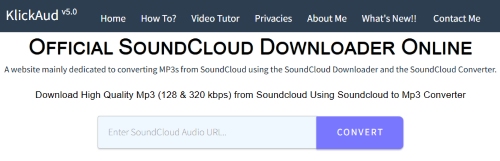
Step 2. Launch a new tab in your web browser and navigate to the Klickaud website. Just make sure you land on the latest main page, then paste the SoundCloud audio link directly into this text field. Click the "Convert" button to command the Klickaud downloader to start parsing the audio data.
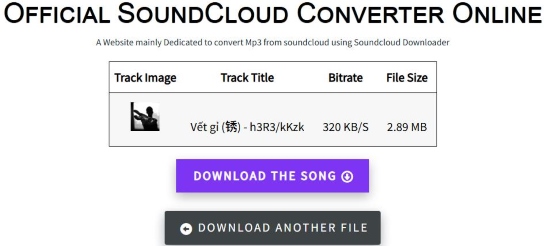
Step 3. And the interface will refresh to show the track details along with a final download option. Simply click the "DOWNLOAD THE SONG" button, and your MP3 file will be saved directly to your computer or mobile storage.
Note:
Klickaud fails to download SoundCloud Go+ tracks. Because it is a basic, web-based utility, it lacks the advanced technology required to bypass the platform's encrypted premium restrictions. If you frequently need to save SoundCloud Go+ content, you should turn to a more powerful and reliable desktop solution--DRmare Streaming Audio Recorder.
Part 2. Klickaud Downloader Audio Quality Analysis
To provide an objective assessment of Klickaud's extraction capabilities, we ran a downloaded track through a professional audio analyzer. The resulting metrics paint a clear picture of what actually happens to a song's fidelity when processed through this web-based tool.
While the "Overall Quality" score of 90/100 indicates it is structurally intact and fully playable, the deeper acoustic data reveals a compromised reality. The metrics expose significant compression flaws, characterized by a severe lack of stereo width and a notably low signal-to-noise ratio. These technical limitations confirm that the platform relies on aggressive, lossy compression. Rather than extracting a high-definition master file, it simply rips the standard streaming source.
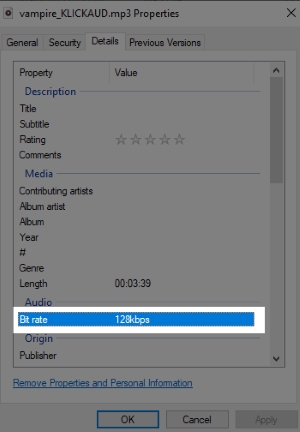
Ultimately, Klickaud cannot deliver the high-fidelity audio it advertises. Its claim of providing pristine 320kbps MP3s is simply inaccurate, as the final output is strictly limited to 128kbps.
Part 3. Top Alternatives to Klickaud SoundCloud to MP3 Converter
Given Klickaud's limitations in audio quality and playlist handling, you may want to explore more reliable options for saving SoundCloud music. If you've encountered frequent issues, here are some top alternatives to consider, from an online SoundCloud downloader to a desktop SoundCloud converter.
Free Online Downloader Alternative to Klickaud Converter
Cobalt is an open-source tool designed for users who value privacy and high-fidelity media extraction. It operates with a clean, single-page interface that functions as a secure proxy without storing personal data. As a versatile online downloader, it supports seamless downloads from major platforms, including SoundCloud, YouTube, and TikTok. Instead of re-encoding and potentially degrading the file, Cobalt extracts the original, raw audio stream directly from the source. This ensures you receive the highest possible quality for every download and avoids ad-heavy alternatives.
Step 1. Head to the SoundCloud website or app and find the song you want to download. And press the "Copy Link" button to save the SoundCloud track's URL to your clipboard.
Step 2. Visit the Cobalt website. Before pasting your link, click on the "Settings" button. Here, you can customize your audio format and select your preferred bitrate for the best possible sound quality.
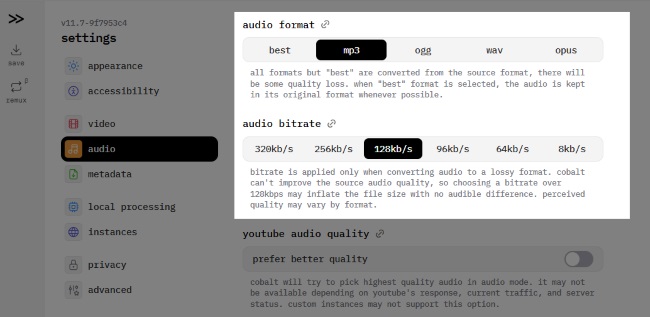
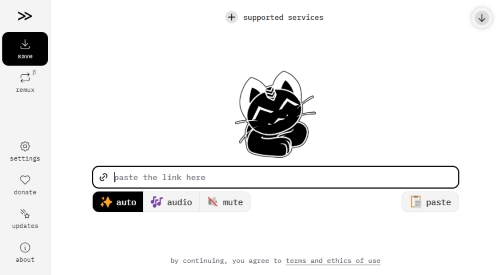
Step 3. Return to the main interface and paste the SoundCloud URL into the central input field. You will typically click the right-pointing arrow inside the box to trigger the link processing.
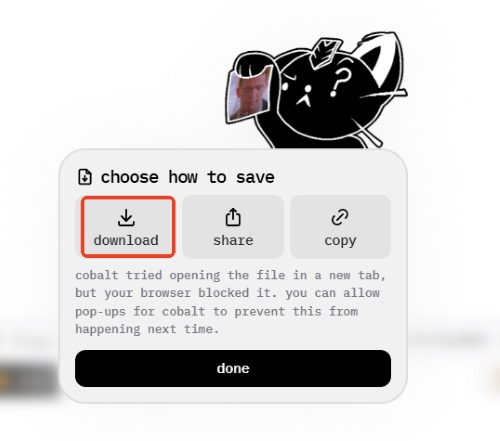
Step 4. Choose the way you want to save. You can then tap the "Download" button to save the audio directly to your device. The file will be processed instantly without any intrusive ads or tracking.
Pros
- Privacy-First: 100% open-source; zero ads or trackers.
- Lossless Remux: Fixes compatibility without re-encoding quality.
- Modern Formats: Supports WAV, OGG, and OPUS effortlessly.
- Minimalist UI: Lightning-fast, distraction-free experience.
Cons
- No Batch Downloads: Cannot process playlists; single tracks only.
- Server Latency: Peak traffic can cause processing queues.
- Limited Metadata: Cannot add missing track info.
- Parsing Errors: Occasionally fails on region-locked content.
Best Desktop Alternative to Klickaud SoundCloud Downloader
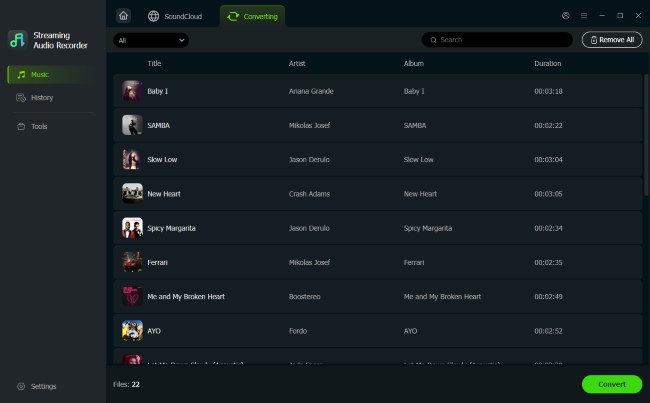
When online tools inevitably suffer from server downtime or domain bans, transitioning to a stable desktop solution becomes the reliable path for music collectors. DRmare Streaming Audio Recorder stands out as the premier alternative. Instead of being restricted to single-link downloads, it supports simultaneous batch downloads of SoundCloud playlists or albums. The SoundCloud Downloader ensures lossless quality, saving audio in formats including FLAC, WAV, MP3, M4A, AIFF, and M4B. Unlike web-based tools that often strip files of their identity, DRmare automatically preserves and embeds full metadata, ensuring every track is saved with its original info and even lyrics for a perfectly organized offline library.
- Step 1Adjust Audio Output Parameters
Launch the DRmare software and navigate to the "Settings" menu. Within the "Music" tab, you can select your preferred output format as MP3, WAV, or FLAC, etc. This is also where you can fine-tune bitrate and sample rate to ensure the highest acoustic fidelity. Once configured, select the SoundCloud icon from the homepage to open the integrated web player.

- Step 2Import SoundCloud Tracks or Playlists
Log in to your account via the built-in player and locate the music you wish to save. DRmare allows you to drag-and-drop individual songs or use the "Add>Add to List" function to import SoundCloud playlists instantly. This batch-processing capability significantly reduces the time spent on manual link pasting.
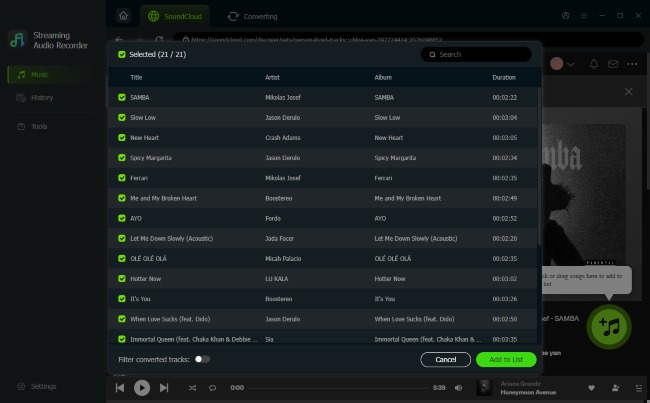
- Step 3Download SoundCloud Songs
With your queue finalized, click the "Convert" button to process and save the files in your chosen format. You can find your completed files in the "History" section, where they are organized and ready for transfer to any offline device.
Pros
- Universal Platform Support: Seamlessly extracts audio from 10 services, including Tidal, Spotify, and SoundCloud.
- Bypass Encryption: Successfully downloads "Go+" tracks that online converters cannot parse.
- ID3 Tagging: Automatically identifies and embeds metadata.
- Lossless Output: Supports true FLAC and WAV formats.
Cons
- Software Installation: Requires a local installation on Windows or macOS.
- Paid License: While a free trial is available, the full feature set requires a premium purchase.
Part 4. Comparison between Klickaud and Alternatives
| Feature | Klickaud | Cobalt | DRmare |
|---|---|---|---|
| Tool Type | Online | Online | Desktop |
| Price | Free | Free | Free Trial |
| Max Audio Quality | 128kbps | Up to 320 kbps | Up to 320 kbps |
| Output Formats | MP3 Only | MP3, OPUS, OGG, WAV | FLAC, WAV, MP3, M4A, AIFF, M4B |
| Batch Downloading | ❌ | ❌ | ✅ |
| Metadata (ID3 Tags) | ❌ | ✅ | ✅ |
| SoundCloud Go+ Support | ❌ | ❌ | ✅ |
| Ads-free | ✅ | ✅ | ✅ |
| Best For | Quick, one-off downloads | Privacy & high-quality single tracks | Long-term & high-fidelity libraries |
If you need a fast, zero-cost download for a single song and don't mind lower audio quality, Klickaud or Cobalt are excellent choices. However, for music lovers who demand verified 320kbps quality, automatic ID3 tag organization, and the ability to download entire playlists, DRmare Streaming Audio Recorder is the most robust and reliable investment for your offline SoundCloud music library.
Part 5. FAQs About Klickaud SoundCloud Downloader
Is KlickAud safe?
Klickaud is safe for basic use because it operates in your browser without requiring a software installation. Klickaud itself is a web-based tool that is generally safe from direct viruses. To stay safe, avoid clicking on fake websites and consider using an ad-blocker while on the site.
Is KlickAud legal?
Using Klickaud to download copyrighted music without permission from the artist violates SoundCloud's Terms of Service and may infringe on copyright laws. We recommend using these tools only for tracks labeled as "Free Download" by the artist or for personal use purposes.
Does KlickAud support playlist downloads?
No. Klickaud is designed exclusively for single-track extraction. If you paste a playlist URL, the tool will either fail to identify the song. For downloading entire playlists efficiently, a desktop solution like DRmare Streaming Audio Recorder is much more effective as it supports automated batch processing.
Why does my Klickaud download fail sometimes?
There are several factors that Klickaud fails to download. Frequent API updates from SoundCloud that temporarily break third-party parsers, regional restrictions on specific songs, or interference from aggressive browser ad-blockers. Since Klickaud relies on a fragile web-link extraction method, these external changes often lead to errors or stuck conversion bars.

 Home
Home





User Comments
Leave a Comment