





If you often find yourself wanting to save your favorite tracks from SoundCloud for offline listening, web-based tools like SoundCloudMe offer a quick and effortless solution. It provides a simple copy-and-paste method to convert SoundCloud tracks to MP3 in seconds without installation. But is SoundCloudMe truly safe? Does it preserve original audio quality? In this in-depth review, we break down how SoundCloudMe works, its pros and limitations, and compare it with a more reliable desktop solution for lossless SoundCloud downloads.
Recent tests reveal that this tool severely compresses original audio quality and introduces noticeable digital distortion. This significant loss in fidelity and certain security risks makes it an unreliable option for everyday use. For a secure and truly high-fidelity alternative, consider the following lossless music solution--DRmare Streaming Audio Recorder in Part 3.2.
Part 1. What Is SoundCloudMe
SoundCloudMe, recently rebranded as DownCloudMe, is a highly accessible web-based utility that serves as a powerful SoundCloud downloader online. It allows you to convert SoundCloud to MP3 and save everything from indie tracks and DJ mixes to full playlists and podcasts. Catering to users who value fast, safe, and high-quality audio, the platform can extract files at up to 320kbps directly to your local storage.
The primary appeal of this SoundCloud tool is its completely zero-commitment user experience. It operates entirely within modern web browsers like Chrome, Safari, and Firefox, eliminating the need for bulky software installations, hidden subscription fees, or tedious account registrations. Providing free and unlimited access, it works seamlessly across PC, Mac, Android, and iPhone devices, making it incredibly simple to keep your favorite music permanently on hand.
Pros
 Playlist URL Extraction: Successfully reads and displays all individual tracks when you paste a complete playlist link.
-
Clean Interface: Delivers a secure user experience that is free from disruptive ads or hidden malware.
-
Alternative Download Options: Offers secondary server links to ensure you can access the file even if the primary source fails.
Cons
 No True Batch Processing: Forces users to manually save each song within a playlist rather than downloading them all at once.
-
Missing Metadata: Fails to preserve ID3 tags like artist or cover, leaving you with disorganized files labeled with random numbers.
-
Restricted Premium Tracks: Fails to unlock exclusive SoundCloud Go+ content, leaving you with only a 30-second preview snippet instead of the full song.
Part 2. How to Use SoundCloudMe to Download SoundCloud
Step 1. Copy the Track URL: Open SoundCloud in your browser or mobile app and locate the specific song you wish to download. Click the "Share" button beneath the track and select "Copy Link". Ensure you are copying the link to an individual song rather than a set or a playlist.
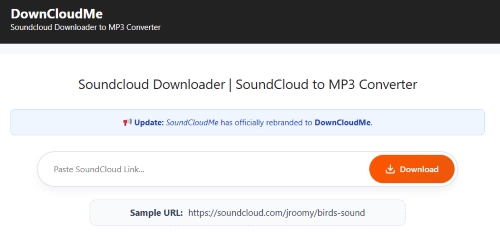
Step 2. Paste and Initiate Parsing: Navigate to the SoundCloudMe website. Paste the copied link directly into the central input field on the homepage. Once the URL is visible, tap the "Download" button to allow the system to analyze the link and retrieve the audio file.
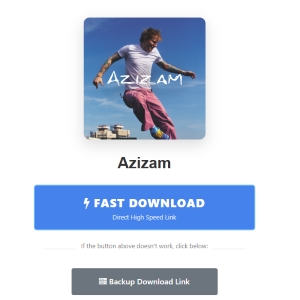
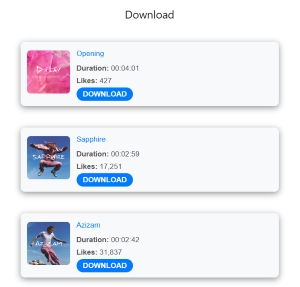
Step 3. Execute the Download: Once the track details and cover art appear, press the "FAST DOWNLOAD" button to start the process. Your browser will automatically begin saving SoundCloud as MP3 files on your device.
Download Issues:
Be aware that clicking the "Fast Download" button could trigger unwanted page redirects. Additionally, occasional server instability might cause your downloads to fail. If you experience these interruptions, simply refresh the page or click the alternate "Backup download link" icon to save your SoundCloud tracks.
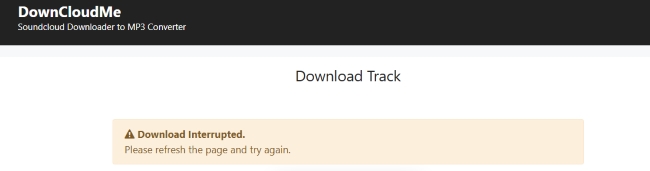
Step 4. SoundCloud Playlists Download: The process for downloading playlists is essentially the same. Simply go to SoundCloud, copy the URL of the playlist or album, and paste it into the SoundCloudMe input box. However, you must click the "Download" button manually for each song, as it does not support true one-click batch downloading.
Audio Quality Evaluation of SoundCloudMe
A quick listening test reveals that the track sounds noticeably muffled and compressed. Instrument separation is weak, and vocals blend with the background, creating a flat and muddy listening experience.
To verify the actual quality loss, we analyzed the downloaded file from SoundCloudMe using Spek. The results clearly show significant limitations in the extracted audio. The file has a bitrate of only 117 kbps, which is far below the 320 kbps standard commonly associated with high-quality MP3 files. More importantly, the spectrogram shows a clear frequency cut-off at around 15 kHz, with almost no audio information above this point. This indicates that much of the high-frequency detail has been removed during compression.
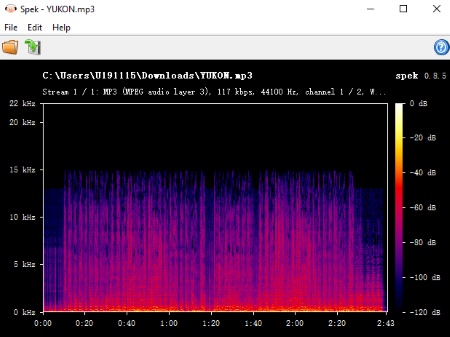
This loss of frequency range explains the lack of clarity, brightness, and depth in the track. The low bitrate also affects overall resolution, making the bass sound less defined. In addition, the extracted file fails to preserve important metadata, reducing its usability for a proper music library.
Overall, this SoundCloudMe file is a heavily compressed version of the original audio and if you are looking for a high-quality or lossless listening experience, try the DRmare SoundCloud Music Converter.
Part 3. Best Alternative for SoundCloudMe Online Downloader
When SoundCloudMe falls short, particularly regarding audio fidelity and missing metadata, finding a reliable substitute becomes essential for music lovers. Fortunately, there are a variety of solutions ranging from more powerful web-based platforms to high-resolution desktop apps. Let's explore the top alternatives in both the online and desktop categories to help you build your offline SoundCloud library effectively.
Picking the right tool really just depends on what matters most to you: quick convenience or keeping your music sounding great for the long haul. Web-based tools are super handy for grabbing a quick song on the fly, but they often miss the mark if you're trying to build a proper music collection. While dedicated desktop apps do take a minute to install and set up, they totally pay off by giving you lossless sound quality and perfectly organized files.
Online Alternatives to SoundCloud Music Downloader
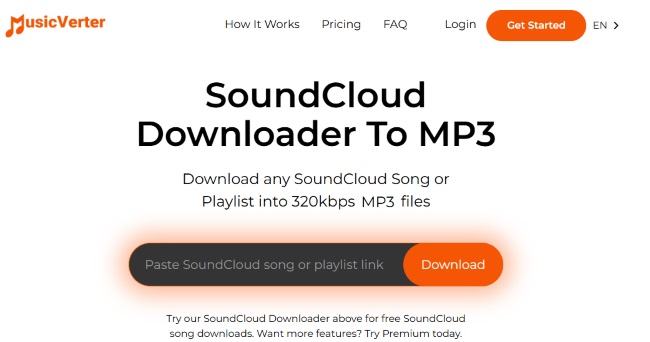
MusicVerter presents a remarkably clean and minimalist alternative, which is designed specifically for casual users who only need to grab an occasional track. Its straightforward operation flow promises to seamlessly convert your favorite SoundCloud songs directly into high-quality 320kbps MP3 files. While the website does technically support batch processing for full collections, this capability comes with strings attached. The highly sought-after playlist downloading feature is exclusively reserved for premium members, meaning casual visitors cannot access it.
Pros
- Premium Unlocks: Paid accounts can batch-process playlists and access exclusive Go+ tracks.
- Paywalled Tools: Essential features like playlist downloading require a Premium subscription.
Cons
- Ad-Free UI: Streamlined, clutter-free design with almost no pop-up ads.
- Format Limits: Restricts all output exclusively to lossy MP3 files, offering a 128kbps stream.
Test Result:
Analysis reveals that MusicVerter does not provide true high-definition audio. Instead, the tool captures the standard, low-quality 128kbps SoundCloud stream and applies a destructive volume boost. This forced upscaling introduces severe digital clipping and distortion.
Desktop Alternatives to Download SoundCloud Tracks
If you're frustrated by the audio degradation and network errors common with the free SoundCloud online tools, upgrading to a dedicated desktop program is highly recommended. Because they interact directly with the streaming source, desktop SoundCloud downloaders guarantee a much cleaner and significantly more reliable extraction process.
DRmare Streaming Audio Recorder stands out as an exceptional alternative by directly addressing these fidelity issues with true lossless quality. It prevents artificial volume boosts and digital distortion, perfectly preserving the acoustic integrity across versatile output formats like MP3, FLAC, WAV, M4A, AIFF, and M4B. Furthermore, the software automates metadata capture, enabling you to save track lyrics and easily edit ID3 tags after downloading. This ensures your offline music collection remains perfectly organized and fully customizable.
Keep SoundCloud with DRmare SoundCloud Downloader
- Step 1Adjust Your Audio and Output Settings
Start by launching DRmare and opening the "Settings" option from the menu. Under the "Music" tab, you can select your preferred output format to convert SoundCloud to lossless FLAC or WAV, such as lossless FLAC or WAV. You also have full control over advanced audio parameters like the sample rate and bit rate to guarantee pristine acoustic integrity. Once your settings are locked in, click the SoundCloud icon to access the web player and sign into your account.

- Step 2Batch Load Your SoundCloud Playlists
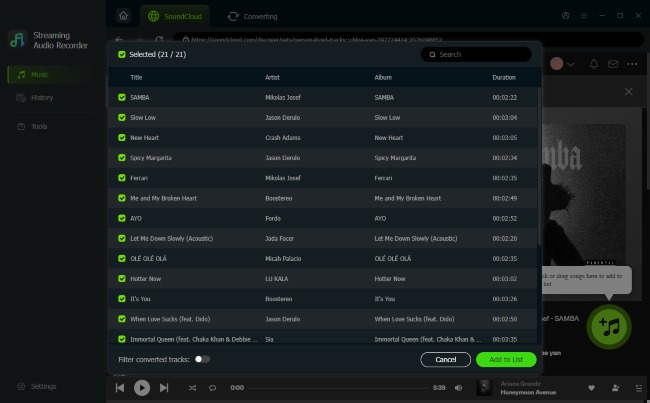
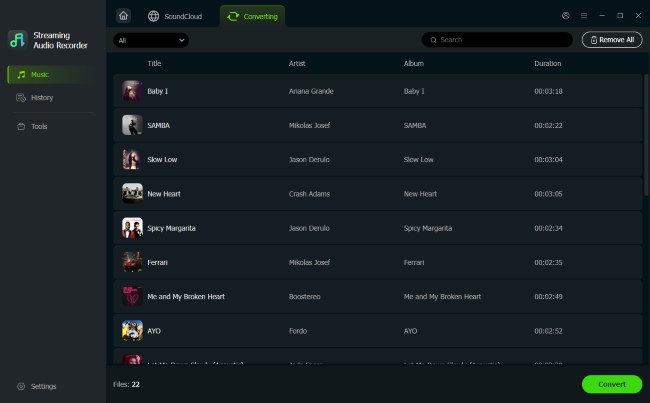
Navigate through the SoundCloud web player to locate your desired playlists. Unlike SoundCloudMe, which forces you to process playlists one by one, DRmare allows you to use the "Add > Add to List" function to queue up dozens of songs simultaneously, making the process incredibly efficient.
- Step 3Execute the Lossless Extraction
With your music queued up, hit the "Convert" button to initiate the download process. It will save the audio files exactly as they are broadcast, completely bypassing the digital distortion. When the extraction finishes, simply open the "History" section to access your perfectly organized music files, ready for offline playback.
Pros
- Supports high-quality output formats including MP3, FLAC, and WAV
- Enables true batch downloading for playlists and albums
- Preserves full metadata such as artist, title, and cover art
Cons
- Paid software (free trial has feature limits)
- Requires installation on Windows or Mac
- Setup takes slightly longer than instant web tools
Here is a detailed breakdown of how SoundCloudMe and its alternatives for downloading SoundCloud music compare across essential features.
| Feature | SoundCloudMe | MusicVerter | DRmare Streaming Audio Recorder |
|---|---|---|---|
| Platform Type | Web-based browser tool | Web-based browser tool | Desktop application |
| Audio Fidelity | Degraded (artificial volume boost) | Degraded | High Fidelity |
| Output Formats | MP3 only | MP3 only | MP3, FLAC, WAV, AAC, M4A, M4B |
| Batch Processing | Manual one-by-one downloading | Yes | Automated playlist and album processing |
| Metadata & ID3 Tags | No | No | Fully preserved (Artist, Title, Cover Art) |
| Ads | No | No | No |
| Cost | Free | Paid (Free version has limited features) | Paid (with a free trial available) |
Part 4. FAQs About SoundCloudMe Downloader
Is SoundCloudMe safe to use?
SoundCloudMe is generally not associated with direct malware, but there are concerns: Online downloaders process files on remote servers, which may log IP addresses, track activity, or use cookies for data collection. For improved privacy, desktop tools like DRmare that process audio locally do not send download data to third-party servers.
Can I download SoundCloud tracks in original quality using SoundCloudMe?
No. SoundCloudMe typically captures compressed 128kbps streams and may artificially amplify the audio. This does not preserve the original sound quality and can reduce dynamic range while introducing distortion.
Why do some SoundCloud links fail to be parsed by online downloaders?
There are three primary reasons why a downloader might fail to process a specific track.
- Copyright or geo-restrictions may block online tools from accessing the stream.
- Private tracks cannot be accessed by public web downloaders.
- API updates or anti-scraping measures from SoundCloud may cause outdated tools to fail.
Part 5. Conclusion
SoundCloudMe provides a quick, installation-free way to download SoundCloud tracks, making it suitable for single-song downloads occasionally. However, it is limited to MP3 output, lacks true batch processing, and does not preserve original audio quality and metadata. For users aiming to build a well-organized offline library with reliable sound fidelity, online downloaders like SoundCloudMe or MusicVerter may not be sufficient. A desktop solution such as DRmare Streaming Audio Recorder offers higher audio integrity, multiple formats and playlist support, delivering better long-term value for serious music collectors.

 Home
Home





User Comments
Leave a Comment