





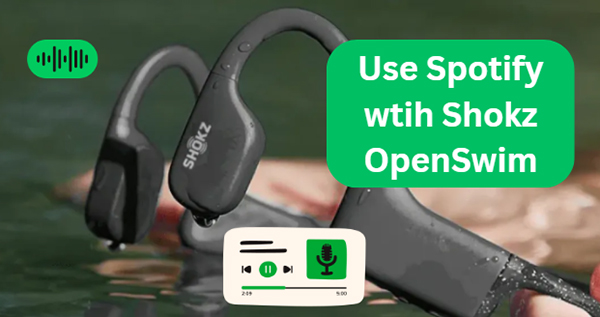
The Shokz OpenSwim headphones are a revolutionary choice for swimmers who want to enjoy music while in the water. With their unique bone conduction technology, these headphones transmit sound through your cheekbones, leaving your ears open to ambient sounds — perfect for maintaining awareness while swimming. Because of this powerful technology, many simmers want to use Spotify with Shokz OpenSwim underwater headphones.
With the newer release of the Shokz OpenSwim Pro, users now enjoy a dual-mode experience: Bluetooth for land and MP3 for water. However, a major hurdle remains: Spotify does not work underwater. Because water blocks Bluetooth signals, you cannot stream Spotify directly from your phone while in the pool. To swim to your favorite beats, you must bridge the gap between streaming and local storage. But don't worry! There's still a way to download music from Spotify to Shokz OpenSwim Pro for offline playback while swimming. In this article, we'll walk you through how to how to achieve this. Let's take a deeper look.
Part 1. Can You Use Spotify with Shokz OpenSwim Headphones While Swimming?
Shokz headphones excel in providing a clear and safe listening experience for swimmers. Because of the lack of streaming functionality, you cannot directly play Spotify or any other music service through the underwater headphones while swimming.
However, the Shokz OpenSwim does offer a great feature: local storage for swimming (32GB for OpenSwim Pro, 4GB for OpenSwim). It supports storing local music files in various formats like MP3, WAV, WMA, AAC, or FLAC. This means you can download and add your Spotify music to the device, provided the files are in a compatible format.
Since Spotify music is often protected by DRM (Digital Rights Management) in Ogg Vorbis or FLAC format, you'll need to download and convert it into one of the supported formats, like MP3 and then transfer it to the Shokz OpenSwim. This can be done with the help of third-party software.
Tips:
If you own Shokz OpenRun, Shokz OpenFit, or the newer Shokz OpenSwim Pro, you can easily play Spotify music directly via Bluetooth for land use. Simply pair the headset with your mobile device, and once connected, select your Shokz headphones as the audio output in the Bluetooth settings. However, you can't stream Spotify on Shokz OpenRun, OpenSwim Pro, or OpenFit during swimming. Because Bluetooth uses a 2.4GHz radio frequency, which is absorbed by water molecules within inches, Bluetooth signals do not transmit effectively underwater.
Spotify on Shokz: Bluetooth Mode vs. MP3 Mode
| Feature | Bluetooth Mode (OpenRun/OpenFit/OpenSwim Pro) | MP3 Mode (OpenSwim/OpenSwim Pro) |
|---|---|---|
| Underwater Usability | ❌ Unusable. Signal drops due to water molecule interference. | ✅ Perfect. Runs flawlessly via internal local storage. |
| Spotify Connection | Direct streaming from the Spotify App. | Requires DRmare Spotify Music Converter to download and convert tracks. |
| Recommended Scenarios | Jogging, Gym, Daily Commute. | Pool Laps, Open Water, Diving. |
| Audio Quality | Limited by Bluetooth codecs (SBC/AAC). | High-Fidelity. Supports Lossless FLAC/WAV. |
Part 2. How to Download Music from Spotify to Shokz OpenSwim Pro
When it comes to downloading and converting Spotify music for use with your Shokz OpenSwim headphones, DRmare Spotify Music Converter is the perfect tool to make it happen. It is the gold standard for swimmers who demand high-fidelity sound even through bone conduction. This powerful software enables you to remove protection from Spotify workout playlists and convert them to MP3, FLAC, WAV, and M4A that can be stored on your Shokz OpenSwim. It provides much clearer audio than standard MP3s when vibrating through bone.
Plus, it runs at up to 15X faster conversion speed in batch with the intact quality of your music remained. Whether you want to enjoy your favorite playlists while swimming or enhance your workout with motivational tracks, DRmare Spotify Music Converter provides a seamless way to get the music you love directly onto your waterproof headphones.
How to Download Spotify Music to Shokz OpenSwim-Supported Files
- Step 1Add Spotify music to DRmare Software
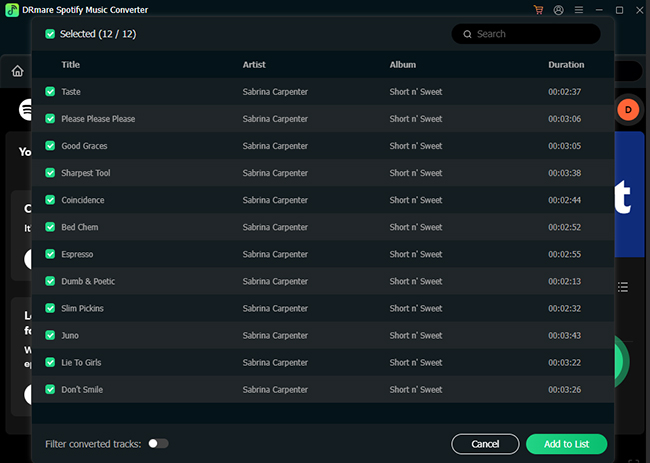
Install and launch DRmare Spotify Music Converter on your computer, and you will see the built-in Spotify Web Player. Browse Spotify library and select the playlists, albums, or songs. Click the Add > Add to List button to load them. Alternatively, you can copy the URL of the Spotify track or album and paste it into the program.
- Step 2Adjust Spotify output format for Shokz OpenSwim Pro
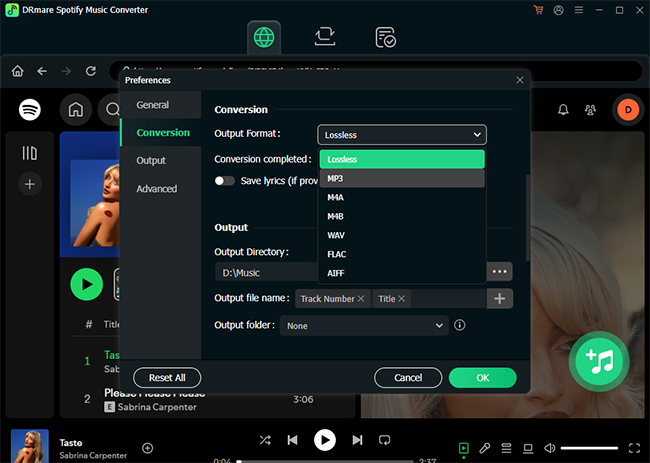
To customize the output format of Spotify tracks as Shokz OpenSwim-compatible one, you can click the menu > Preferences > Conversion option to open the settings window. You can choose the output format as MP3, WAV, AAC, or FLAC and customize the other output parameters, such as bit rate, sample rate, and channel.
Tips:
During our 1,500m pool test, we noticed that sound resonance changes significantly underwater. For the best Spotify experience, we recommend using the 'Swim Mode' EQ setting on your Shokz (hold the mode button for 2 seconds). Also, converting your Spotify tracks to WAV or FLAC via DRmare instead of standard MP3 makes a noticeable difference in clarity when heard through bone conduction while wearing earplugs.
- Step 3Download music onto Shokz OpenSwim from Spotify
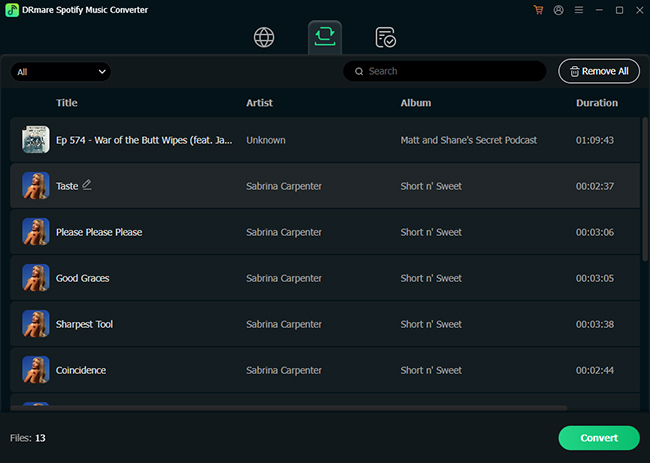
When all settings are ready, click Convert to begin downloading and converting your Spotify music to your computer at 15X speed. Once the process is complete, you'll have Spotify music in the desired format in the output folder, ready to transfer to your Shokz OpenSwim headphones.
Part 3. How to Put Spotify Music on Shokz OpenSwim Pro/Shokz OpenSwim
It's time to load Spotify tracks to your Shokz OpenSwim headphones for an uninterrupted musical experience in the pool. The headphones feature internal storage that can hold up to 8000 songs for OpenSwim Pro and 1,200 songs from OpenSwim, which you can fill with your favorite Spotify tracks. Here's how to do it:
Tips:
With the OpenSwim Pro’s 32GB storage, you can store roughly 8,000 songs. If you are a long-distance swimmer, we suggest creating high-bitrate (320kbps) MP3s to balance file size and audio fidelity, ensuring your motivation never drops during a 2-hour session.
How to Add Spotify Music to Shokz OpenSwim
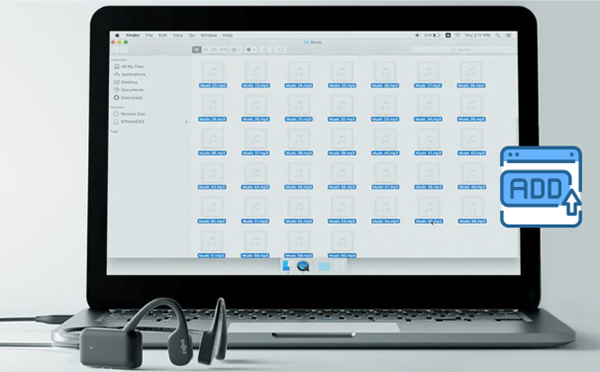
Step 1. Use the USB cable that comes with the Shokz OpenSwim to connect the device to your computer. The headphones will appear as a storage drive, similar to a USB flash drive.
Step 2. Open the folder containing the converted Spotify music files on your computer. Select and upload music to the Shokz OpenSwim storage folder. We recommend creating sub-folders like "Cardio," "Lap Timing," and "Cool Down".
Step 3. Once the files are transferred, safely eject it from your computer.
How to Listen to Spotify on Shokz OpenSwim
Step 1. Power on your Shokz OpenSwim headphones by holding down the power button. You'll hear a voice prompt indicating that the device is ready. Double-click the multi-function button to toggle from Bluetooth to MP3 mode.
Step 2. Navigate through your music using the buttons on the side of the headphones:
- Play/Pause: Tap the button to play or pause the music.
- Next/Previous Track: Hold the button to skip to the next or previous track.
- Volume Control: Use the buttons to adjust the volume.
Tips:
- Shuffle Mode: Since you can't see a screen while swimming, hold the Volume+ and Volume- buttons for 2 seconds to enable Shuffle Mode.
- Swim-Capped Security: For the best sound, tuck the hooks of the Shokz under your swim cap to ensure a tight seal against your cheekbones.
Part 4. FAQs about Using Shokz OpenSwim and Spotify
Can I play Spotify on Shokz OpenSwim Pro?
It works for land use through Bluetooth. But you cannot stream Spotify directly while swimming because Bluetooth does not work underwater. To listen, you must first download your Spotify songs as MP3 files onto a computer and then transfer those files to the OpenSwim Pro's 32GB internal storage to use its built-in MP3 player.
How to listen to music while swimming in the pool?
The most reliable method is to use waterproof headphones that have a built-in MP3 player, such as bone conduction models like the Shokz OpenSwim Pro. Simply connect the headphones to your computer, drag and drop your music files onto the device's storage, and you are ready to swim without needing any other device.
Does the OpenSwim Pro support Spotify's "Lossless" tier?
Yes! By using DRmare Spotify Music Converter to convert Spotify Lossless to FLAC, you can enjoy the highest possible fidelity through your OpenSwim Pro's improved bone conduction transducers.
Is Bluetooth unusable in the water?
Yes. Even a thin layer of water will cause audio to stutter or disconnect. Always use MP3 mode for a seamless experience.
Part 5. In Conclusion
The Shokz OpenSwim headphones offer a great way to listen to music while swimming. Ready to hit the pool with your favorite tunes? Now with the help of DRmare Spotify Music Converter, you can also swim to the beat of your favorite Spotify songs on Shokz OpenSwim without interruptions or distractions. Enjoy the freedom of music underwater!

 Home
Home





User Comments
Leave a Comment