





Open-source Spotify downloaders have become increasingly popular among users who want more control over their music libraries, offline listening without subscription, and media management workflows. Among these projects, SMD Spotify Music Downloader has gained attention because of its GitHub-based development model, cross-platform ambitions, and community-driven approach.
However, the landscape of these GitHub repositories has shifted dramatically recently, leaving many users confused about which version actually works in 2026. This review takes a deep technical look at how SMD works, its architecture, installation complexity, feature set, development status, security considerations, and the real-world limitations users should understand before trying it.
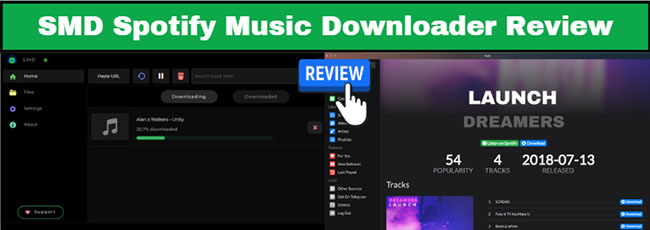
Part 1. What Is SMD Spotify Music Downloader on GitHub?
SMD (Spotify Music Downloader) is a prominent open-source automation framework hosted on GitHub. Rather than a single monolithic tool, SMD exists as an evolving software ecosystem.
- artyshko/smd: Developed by Mykola Artyshko. This is an older, highly popular legacy project (with over 1.5k stars on GitHub). Originally started and famously utilized as a Spotify downloader Telegram Bot backend and a Command Line Interface (CLI) tool written in Python. Users would feed the bot Spotify links, and it would handle the downloading logic. This development branches artyshko/smd/tree/dev_ea-0.
- noahweasley/SMD-Desktop: Developed by Noah Wesley. A dedicated, graphical Desktop Application built for Windows, macOS, and Linux. It features a complete visual user interface where you can search for songs, view lists, and manage downloads inside a standard desktop window instead of interacting with a command line or a chat bot.
Part 2. Does SMD on GitHub Still Work?
What Happened to the Original Artyshko SMD?
The original repository created by Artyshko originally offered a highly convenient Telegram bot alongside a desktop interface, supporting downloads not just from Spotify, but also Deezer and YouTube Music. Unfortunately, the developer was forced to freeze the primary repository due to a strict DMCA takedown notice.
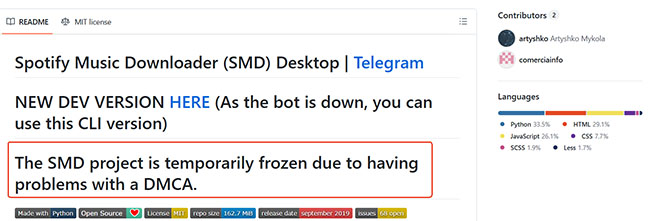
With the main graphical interface and bot out of commission, many users struggled to keep the software running. Older versions suffered from severe dependency issues, such as errors building PyQtWebEngine on Ubuntu and continuous installation failures on macOS.
The dev_ea-0 CLI Fallback
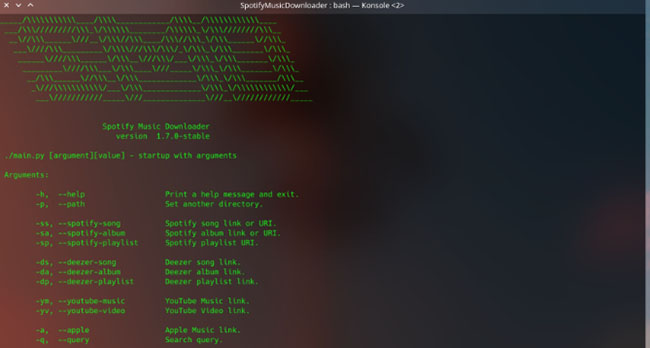
To keep the project alive during the freeze, development pivoted slightly. The dev_ea-0 branch emerged as a functional Command Line Interface (CLI) fallback for users who still wanted core downloading capabilities. While it lacks the visual appeal of a standard application, this developer branch remains a viable option for power users comfortable with terminal commands.
Active Noah Weasley's SMD-Desktop
As a modern response to the breakdown of older Python implementations, noahweasley/SMD-Desktop offers a completely rewritten, operational alternative. Built on an entirely different architecture, leveraging JavaScript, Node.js, and Electron, it bypasses the legacy script breaks that crippled the original project.
Summary Comparison of SMD GitHub Projects
| Feature | artyshko/smd (Main Branch) | artyshko/smd (dev_ea-0 Branch) | noahweasley/SMD-Desktop |
|---|---|---|---|
| Primary Interface | Telegram Bot / GUI Wrapper | Command Line Interface (CLI) | Native Desktop Graphical UI |
| Main Language | Python | Python | JavaScript / Node.js (Electron) |
| Project Status | 🛑 Frozen (Abandoned via DMCA) | ⚠️ Legacy Fallback (Sporadic fixes) | 🟢 Active (Maintained) |
| User Experience | Automated chat interactions or broken desktop layouts. | Text-only terminal commands and scripting automation. | Visual playlist browsing, integrated search, and active queue windows. |
| Dependencies | Heavy (Requires PyQt, PyQtWebEngine, and system notification layers). |
Lightweight (Strips GUI needs; requires core Python modules and ffmpeg). |
Zero compilation friction (Ships as pre-compiled executable binaries). |
| Target Setup | Historical reference / Legacy chat bot instances. | Headless servers, Docker container scripts, and Linux terminal setups. | Standard consumer PCs (Windows, macOS, Linux desktop). |
| Authentication | Brittle web-scraping / Session injection. | Manual configuration / Token parsing scripts. | Official Spotify Developer API credentials (Client ID/Secret). |
Note:
Next, we will shift our core focus to noahweasley/SMD-Desktop that remains actively maintained and delivers an exceptional user experience.
Part 3. How to Use SMD Desktop Spotify Music Downloader
SMD-Desktop repository seamlessly integrates with the Spotify API, allowing users to discover, manage, and download their favorite songs from a unified platform. By focusing strictly on a clean desktop experience across Windows, macOS, and Linux, it provides a much lower barrier to entry for the average listener.
How SMD Desktop Actually Works
To avoid the common misconception that this software directly decrypts or rips files from Spotify's servers, it is crucial to understand its actual architecture. Spotify encrypts its streams using digital rights management. To circumvent this without legal liabilities or instant user account bans, SMD-Desktop functions as an automated metadata-matching client.
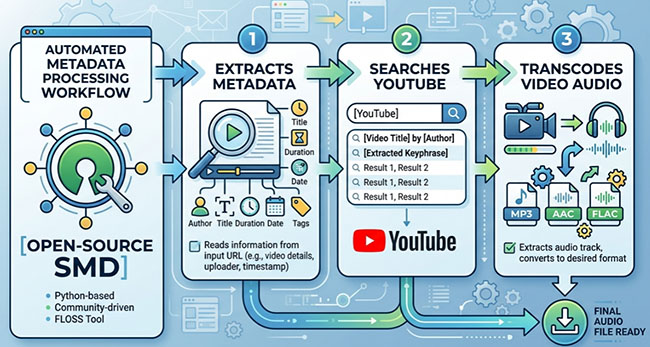
Step 1. Spotify Metadata Retrieval: Pasting a Spotify URL triggers the Spotify Developer API to scrape track details, such as titles, artists, album names, and cover art. No actual audio data is requested at this stage.
Step 2. External Audio Matching: Armed with the metadata, the app searches public platforms like YouTube and YouTube Music. It uses title similarity and strict duration filtering to discard irrelevant videos or long cinematic intros.
Step 3. Audio Downloading & Conversion: Once matched, a background engine downloads the public audio stream. A local FFmpeg instance immediately transcodes the raw stream into your chosen format, usually a 128-192kbps MP3 or M4A.
Step 4. Metadata Tagging: Finally, a built-in tag editor embeds the original Spotify ID3 tags (artist, album, track number) and high-res artwork into the local file, ensuring seamless compatibility with media players and DAPs.
The Reality of Cross-Platform Matching:
Because the software relies on third-party algorithmic matching, anomalies can occur. Rare remixes, live bootlegs, regional acoustic sessions, or tracks with identical titles by different artists can occasionally trick the scanner into downloading the wrong version.
How SMP Desktop Downloads Spotify Music
Before running the application, it helps to understand its underlying architecture. The client is built using a modern desktop stack:
- Frontend Design: Rendered via standard HTML/CSS utilizing the Photon CSS framework to give it a native, clean desktop appearance.
- Application Core: Driven by Node.js and wrapped in Electron.js, which allows JavaScript to run as a standalone executable on desktop operating systems.
- Local Database: Powered by a lightweight SQLite instance to index your local download queues, history, and configuration preferences.
To deploy and use the software on your computer, follow these steps:
Step 1. Because Electron cannot natively transcode audio files, you must ensure FFmpeg is installed on your system. Windows users need to download the FFmpeg binaries and manually add the path to their system's Environment Variables so the Node.js backend can call it.
Step 2. Navigate to the official SMD-Desktop Releases Page on GitHub. Download the pre-compiled executable matching your operating system (.exe for Windows, .dmg for macOS, or .AppImage/.deb for Linux) and run the installer.
Step 3. Launch the desktop application. You can use the built-in search bar to browse tracks directly, or paste a specific Spotify track, album, or playlist URL into the interface. Click the download trigger to start the metadata retrieval and matching process.
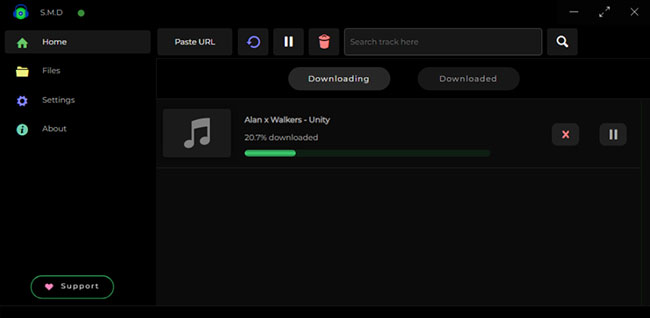
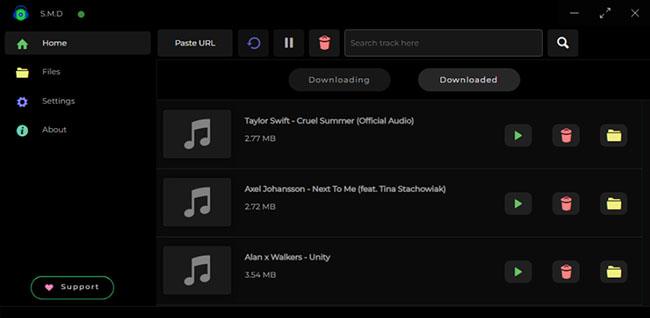
Step 4. Once FFmpeg finishes converting the audio stream, navigate to the Downloaded tab in the sidebar view. Here, you can view your active download history, manage your local files, and verify that the ID3 metadata has been correctly embedded.
Part 4. Best Alternative to SMD Spotify Downloader
While open-source tools like SMD-Desktop offer a cost-free entry point into music automation, they come with significant functional compromises. For users tired of manually configuring FFmpeg environment variables, dealing with broken web-scraping scripts, or accepting lower-quality audio streams matched from public video platforms, a professional-grade solution is required.
The premier alternative to the SMD GitHub ecosystem is DRmare Spotify Music Converter. By integrating a native, secure built-in Spotify Web Player, it allows both Free and Premium Spotify users to download audio directly from the source ecosystem without relying on fragile third-party scrapers.
SMD vs DRmare Spotify Music Converter
| Feature | SMD-Desktop (GitHub Open Source) | DRmare Spotify Music Converter |
|---|---|---|
| Audio Quality | Restrained by public sources (often transcoded 126k-160k audio) | True HiFi Output (Up to 320kbps MP3 or 24-bit/44.1 kHz lossless FLAC) |
| Download Speeds | Real-time parsing and individual video stream scraping | Up to 15X batch conversion speed via hardware acceleration |
| Format Flexibility | Limited default options (primarily MP3/M4A) | Extensive container support: MP3, FLAC, WAV, M4A, M4B, AIFF |
| Matching Accuracy | Variable error rates (risk of grabbing live clips, remixes, or wrong tracks) | 100% Exact Matching directly derived from target Spotify catalog items |
| Deployment Complexity | High (Requires compiling dependencies, node modules, and binary paths) | Zero setup friction (One-click installer for Windows and macOS) |
How to Use DRmare Spotify Music Converter
Step 1. Download and launch DRmare Spotify Music Converter on your Windows PC or Mac. Using the integrated Spotify Web Player component, click the login button to securely authenticate your Spotify Free or Premium account details.
Step 2. Open the application's top-right menu and select Preferences, then click the Conversion tab. Here, customize your target codec (e.g., FLAC or MP3), set your sample rate, and adjust the bit rate up to 320kbps to match your high-fidelity hardware player requirements.
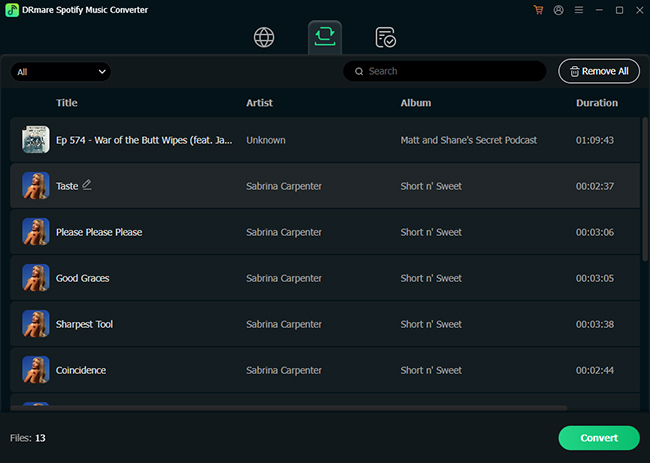
Step 3. Browse your personal music library or search for content directly inside the integrated web player interface. When viewing an album or playlist, drag and drop the items directly into the floating + button and tap the Add to List to stage your batch queue.
Step 4. Click the Convert button, and the software will download your items in batch at up to 15X speed, automatically preserving intact ID3 tags, artist arrays, and embedded high-resolution album artwork.
Disclaimer:
Downloading copyrighted music through third-party tools directly violates the Terms of Service of Spotify. Always prioritize supporting artists through official channels and use these tools strictly for personal, educational, or fair-use testing purposes.
Part 5. FAQs About SMD on GitHub
Is SMD Spotify Downloader safe?
From a software standpoint, yes. Because SMD is an open-source project, its code is public and routinely reviewed by the community, making it highly unlikely to contain malware.
Does SMD download directly from Spotify?
No. SMD generally uses Spotify metadata and matches tracks from external sources such as YouTube or YouTube Music.
Can SMD download entire Spotify playlists?
Yes. You can paste the link or URI of a full Spotify playlist or album into the downloader, and it will parse the metadata for every song in that collection, queueing them up to download sequentially.
Is SMD Spotify Downloader free?
Yes. The project is completely open-source and available for free through its various GitHub repositories (such as Noah Weasley's desktop fork or Artyshko's legacy CLI branches). There are no paywalls or premium features.
Part 6. In Conclusion
SMD Spotify Music Downloader remains a popular open-source Spotify downloader project for users who prefer transparency and customization. While the original Artyshko version became unstable after DMCA-related disruptions, the newer SMD-Desktop project continues active development with a cleaner desktop experience.
Although it relies on external audio matching instead of direct Spotify ripping, SMD still offers useful playlist downloading and metadata tagging features for advanced users comfortable with GitHub-based tools. If you'd like to download music from Spotify directly, try its best alternative, DRmare Spotify Music Converter.

 Home
Home





User Comments
Leave a Comment