





When searching for a Spotify downloader for MP3 or M4A, one name that frequently appears in search results is SpotiSongDownloader. The service claims to let users download Spotify songs, playlists, and albums online without installing software.
But does SpotiSongDownloader actually work well? Is it safe? This comprehensive SpotiSongDownloader review will analyze the tool's actual performance through our hands-on testing, its safety features, and its hidden limitations. By understanding exactly how this web-based converter operates, you can decide if it is the right solution for your digital Spotify audio needs.
Quick Verdict:
SpotiSongDownloader works for occasional Spotify downloads and does not require a Spotify account. However, our testing revealed strict daily limits, mandatory human verification, unstable ZIP downloads, and signs of audio re-encoding. While convenient for light users, it is not an ideal solution for building a large offline music library (Better for using a dedicated Spotify converter).
Part 1. What Is SpotiSongDownloader?
Basic Info:
- Link: https://spotisongdownloader.com/en2/
- Availability: Mac, Windows, iOS, and Android
- Support Music Content: Songs, Playlists, Albums,Artists
- Download Output: MP3, ZIP, M4A
- Recommend Level:⭐⭐⭐
SpotiSongDownloader is an entirely online tool designed to extract audio from Spotify links to MP3 or M4A. Unlike desktop software, it requires no installation, making it a popular choice for mobile users on iOS and Android or those on restricted work computers.
One of its most appealing aspects is its commitment to privacy and ease of access. You do not need to log into your Spotify account or create a new profile on their website to initiate a download.
Key Features of SpotiSongDownloader
- Browser-Based Convenience: It works across all platforms (Windows, Mac, Mobile) via a standard web browser.
- Format Support: It provides MP3 (advertised at 320kbps) and M4A outputs.
- Metadata: It successfully embeds basic ID3 tags (Title, Artist, Album Art) into most single-track downloads.
- ZIP Archiving: It can bundle multiple Spotify tracks into a single ZIP file for easier management.
Note on Deceptive Promotions
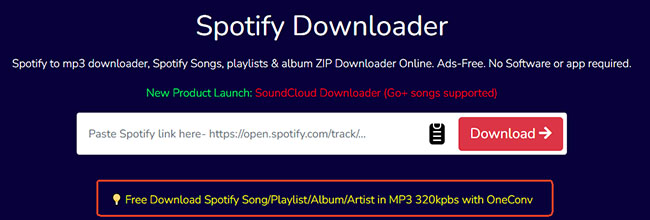
While navigating the site, you may encounter a prominent promotional banner stating: "Free Download Spotify Song/Playlist/Album/Artist in MP3 320kbps with OneConv." We recommend avoiding this link, as it serves as a redirect to a premium desktop software rather than the online converter. For those who prefer a dedicated desktop solution without these redirects, DRmare Spotify Music Converter remains a highly efficient alternative for capturing lossless audio from Spotify at 15X speed.
Part 2. The Critical Limitations Discovered on SpotiSongDownloader
Based on the real-world performance tests, SpotiSongDownloader is a convenient, quick-fix tool, but it falls short for users seeking high-quality or high-volume downloads. While many superficial reviews overlook the practical downsides, our technical analysis identified five major deal-breakers that impact the user experience:
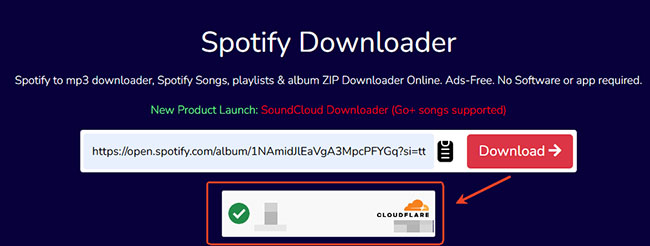
- Human Verification Hurdles: Unlike previous iterations, the 2026 version forces a manual verification check for every individual song download, significantly hindering productivity.
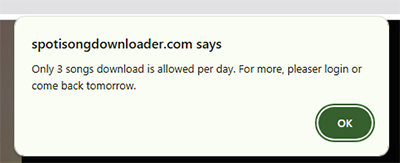
- Restrictive Daily Caps: Free users are currently limited to only 3 songs per day, making the tool useless for transferring entire albums or playlists.
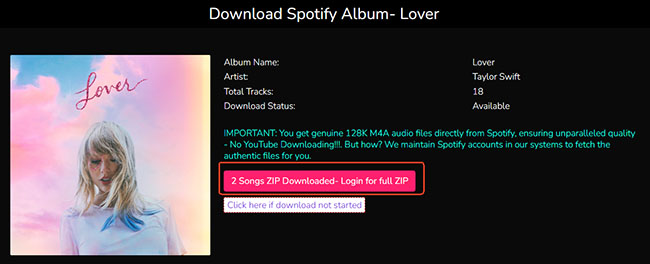
- The "2-Track" ZIP Bug: Although the site advertises bulk playlist downloads via ZIP files, our tests showed the system frequently glitches, often including only 2 tracks in the final archive regardless of the original playlist length.
- Server Instability: We experienced frequent "Server Busy" and "Timed Out" errors during peak hours, indicating that the platform's infrastructure often struggles under heavy traffic.
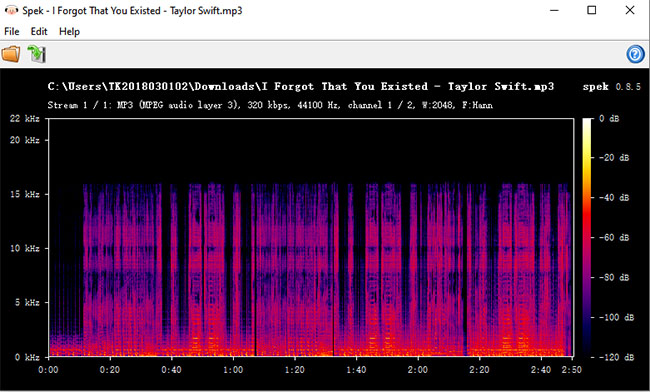
- Upscaled Audio Quality: The Spek Spectral analysis based on the image below confirms a hard frequency cut-off at 16 kHz. This strongly suggests that the audio originates from a lower-bitrate source and has been re-encoded as a 320kbps MP3 file.
Pro-Tip: Removing Limitations via Subscriptions
If you find the free version's restrictions too limiting, SpotiSongDownloader offers several premium tiers to bypass the daily download caps and verification hurdles. The current pricing structure is as follows:
- Monthly Subscription: $7.99 per month.
- Annual Subscription: $15.99 per year (Recommended as the best value for frequent users).
- Lifetime Access: $23.99 for a one-time permanent license.
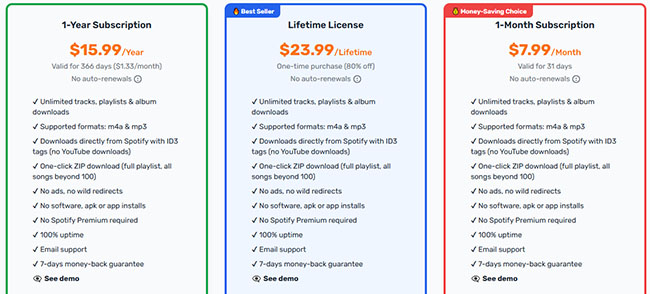
By upgrading, you can eliminate the 3-song daily limit and the constant requirement for human verification checks.
Part 3. The Pros and Cons of SpotiSongDownloader
No web tool is perfect, and it is important to weigh the benefits against the technical drawbacks before relying on it for your entire music library.
Pros
 No software installation required.
- Works well on mobile devices.
- Includes album art and ID3 tags.
- Simple, clean user interface.
Cons
 Mandatory human verification per song.
- Very low daily limit (3 songs).
- Server instability and slow speeds.
- ZIP downloads often fail or limit to 2 tracks.
- Low audio quality
- Need to subscribe to premium subscriptions to unblock limitations.
Part 4. How to Use SpotiSongDownloader to Convert Spotify to MP3/M4A Free
If you can accept the functional disadvantages and only wish to download a few tracks for personal use, follow this guide to using the service. The user interface is refreshingly clean and remains free from the deceptive "Download Here" banner ads that plague similar converter websites. Navigating the process is highly intuitive, making it accessible even for those who are not particularly tech-savvy.
- Step 1Copy the Spotify URL
Open the Spotify app or web player on your web browser and copy the direct URL of the specific song, album, or playlist you wish to save.
- Step 2Analyze the Spotify Link
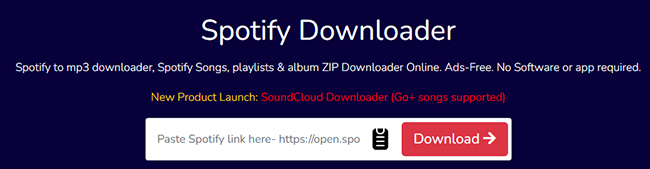
Navigate to the SpotiSongDownloader website, paste your copied Spotify URL into the main search bar, and click the "Download" button to initiate the system analysis. It requires you to finish the human verification.
- Step 3Generate the Download Link
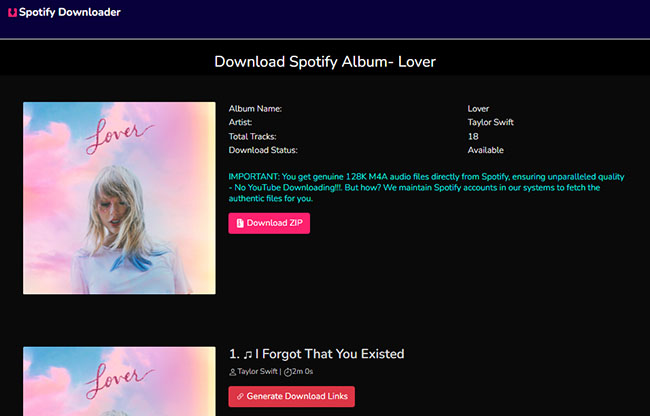
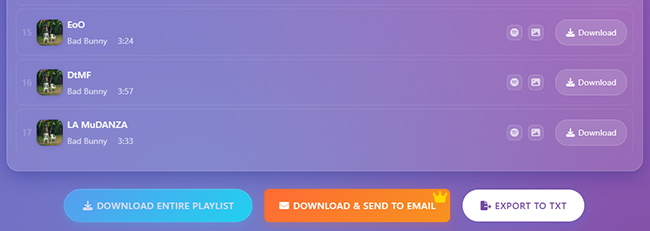
If you'd like to download the full Spotify playlist or album as a ZIP file, you can tap the "Download ZIP" button. For downloading individual tracks, you can click the "Generate Download Links" button.
- Step 4Download Spotify Songs to MP3 or M4A
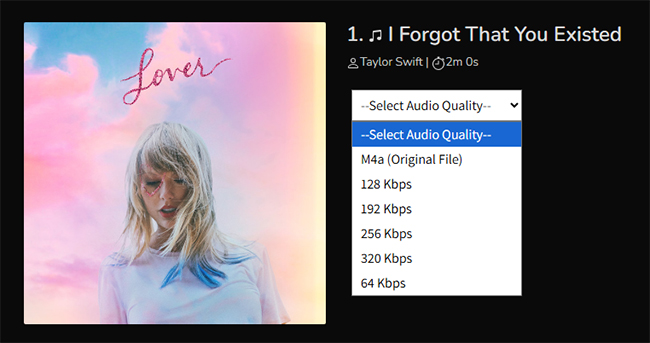
Now, select your desired audio format (MP3 or M4A) and quality from the available menu, it will automatically save the Spotify file as M4A or MP3 directly to your device's local storage.
Tips:
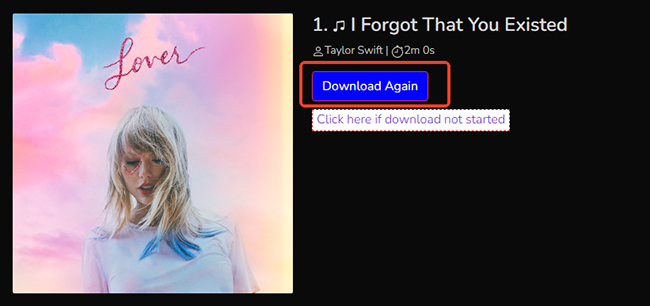
If the download process fails to initiate automatically, you can manually trigger it by clicking the "Download Again" button to retrieve your file.
Part 5. Best Alternatives to SpotiSongDownloader
If the daily caps, mandatory verification checks, and inconsistent audio quality of SpotiSongDownloader do not meet your needs, there are more robust alternatives available in 2026. Below are two highly recommended options based on professional performance benchmarks.
DRmare Spotify Music Converter (Professional Desktop Choice)
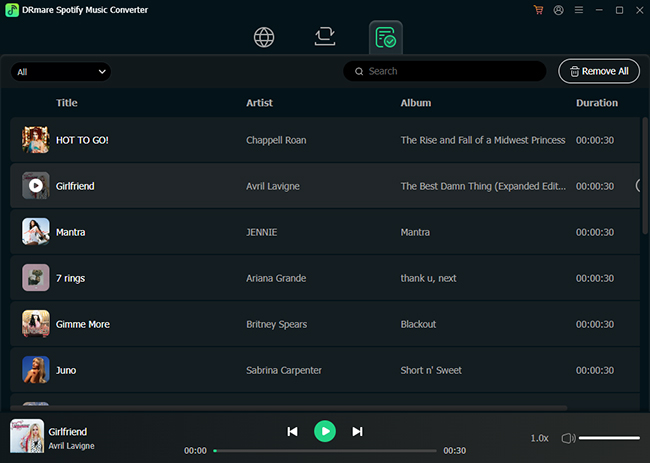
For users who prioritize high-fidelity sound and batch processing, DRmare Spotify Music Converter is the nice option. Unlike online tools that often upscale lower-quality audio, DRmare uses advanced decryption technology to capture the original stream.
- Lossless Audio Quality: Supports true 320kbps MP3 and lossless formats such as FLAC, WAV, and AIFF.
- High-Speed Batch Downloading: Features an industry-leading 15X conversion speed, allowing you to download hundreds of tracks simultaneously.
- Comprehensive Content Support: Beyond simple tracks, it can reliably download entire playlists, albums, podcasts, and even audiobooks.
- Full Metadata Preservation: Automatically keeps all ID3 tags intact, including artist names, album covers, and release dates, ensuring your library stays organized.
- Stable & Safe: Offers a clean, ad-free experience on both Windows and macOS, far more stable than server-dependent web tools.
2. SpotiSaver (Optimized Browser-Based Choice)
If you still prefer an online solution without software installation, SpotiSaver is a more reliable alternative to SpotiSongDownloader for quick, on-the-go downloads.
- Enhanced Server Stability: Designed to handle larger traffic loads, reducing the "Server Busy" or timeout errors common on other sites.
- Reliable ZIP Support: While other tools struggle with bulk downloads, SpotiSaver's ZIP generation is more consistent for full albums and playlists. And it supports downloading up to 100 tracks for free.
SpotiSongDownloader vs DRmare vs SpotiSaver
| Feature | SpotiSongDownloader | DRmare Spotify Music Converter | SpotiSaver |
|---|---|---|---|
| Type | Online Web Tool | Professional Desktop Software | Online Web Tool |
| Audio Quality | Fake 320kbps (Upscaled from 128kbps) | True Lossless 320kbps / FLAC / WAV | Fake 320kbps (Server-dependent) |
| Download Limits | 3 songs daily (Free version) | Unlimited Batch Downloading | Up to 100 tracks per playlist (Free version) |
| Conversion Speed | Slow / Server Dependent | Ultra-fast 15X Speed | Moderate / Browser Dependent |
| Friction Points | Mandatory Human Verification | None (Clean Desktop Interface) | Minimal (Optimized for Mobile) |
| Stability | Occasional Server Time-outs | High Stability (Built-in Player) | Reliable Server Infrastructure |
| Pricing | $7.99/mo | $19.95/mo | €2.00/mo |
| Rating | ⭐⭐⭐ | ⭐⭐⭐⭐⭐ | ⭐⭐⭐⭐ |
FAQs about SpotiSongDownloader Spotify to MP3/M4A Downloader
Is SpotiSongDownloader safe to use?
While the website does not require software installation, which minimizes the risk of malware, it is not entirely risk-free. Users may encounter misleading "Download" ads that redirect to premium software, as well as occasional popup ads.
Is SpotiSongDownloader legal to use?
SpotiSongDownloader is a third-party tool with no official affiliation with Spotify. While it is generally intended for personal-use utilities, downloading copyrighted music for redistribution or commercial purposes may violate local copyright laws. Users should always comply with the regulations in their specific country.
Can SpotiSongDownloader download Spotify playlists?
Yes, the tool supports playlist and album downloads via ZIP files. However, the free version is highly restricted and often only includes the first two tracks in the ZIP archive. Additionally, large playlists may occasionally fail or download inconsistently.
Do I need Spotify Premium to use SpotiSongDownloader?
No, a Spotify Premium subscription is not required. The tool works independently of your Spotify account; you simply need to copy the direct URL of a song or playlist and paste it into the website to begin the conversion process.
Is SpotiSongDownloader free?
The website provides basic free features, but they come with significant limitations, such as a 3-song daily download limit and mandatory human verification checks. To remove these restrictions, users can upgrade to monthly ($7.99), annual ($15.99), or lifetime ($23.99) subscription tiers.
Does SpotiSongDownloader work on iPhone and Android?
Yes. Because it is a browser-based utility, it is fully compatible with mobile browsers on both iOS and Android, as well as desktop systems like Windows, Mac, and Chromebooks.
Can SpotiSongDownloader provide true lossless Spotify audio?
No. Spectral analysis confirms that while the tool claims "320kbps," the audio is actually upscaled from 128kbps sources, with a hard frequency cut-off at 16 kHz.
Final Verdict and Conclusion
If you are a casual listener who needs to download just a few tracks for personal use on a mobile device or car USB, SpotiSongDownloader delivers a functional and safe solution.
However, if you are a heavy user who frequently needs to back up massive, multi-hour playlists with true high-fidelity audio, you must be prepared to either upgrade to their paid tiers ($7.99/month or $15.99/year) or invest in professional desktop software. For those seeking true lossless quality and unlimited batch processing without daily caps, DRmare Spotify Music Converter remains the superior professional alternative.

 Home
Home





User Comments
Leave a Comment