





While many online Spotify downloaders claim to download Spotify playlists, songs, and albums in high quality, the reality often involves malware-ridden interfaces, broken links, or hidden subscription fees. If you have been searching for a clean, functional solution, you have likely come across SpotiSaver. Before integrating it into your workflow, you might have a few key questions:
- Does SpotiSaver really work to download Spotify songs for free without techincal hurdles?
- Is SpotiSaver safe to use for my device and personal data?
- Does SpotiSaver deliver good audio quality?
In this comprehensive SpotiSaver review breaks down everything you need to know. We will look under the hood of this popular web-based Spotify to MP3 converter and explore its features, test its performance, and help you determine if it is the right tool to handle your Spotify music library.
At a Glance: SpotiSaver Quick Review & Verdict (TL;DR)
- Does it work free? Yes. SpotiSaver successfully downloads Spotify tracks, albums, and playlists completely online without requiring software installation or account registration.
- Is it safe? Highly safe. The platform is notably clean, remaining 100% free of intrusive malware, pop-up ads, or data privacy risks on its free tier.
- How is the audio quality? Caution advised. While files are delivered in a 320 kbps MP3 container, acoustic spectrum testing via Spek reveals a hard 16 kHz frequency cutoff. This proves the tool utilizes upscaled 128 kbps audio (fake transcode) sourced from public streams.
SpotiSaver is an exceptional, ad-free web utility for casual listeners who need quick, cross-platform downloads for mobile use. However, for audiophiles, professional DJs, or those requiring true lossless audio streams directly decrypted from Spotify, a dedicated desktop tool like DRmare Spotify Music Converter remains the gold standard.
Part 1. What Is SpotiSaver and How Does It Actually Work?
Basic Info:
- Link: https://spotisaver.net/en1
- Availability: Mac, Windows, Android, and iOS
- Support Music Content: Songs, Albums, Playlists, Artists, Podcasts
- Support Cover Art Content: Songs, Albums, Playlists
- Download Output: MP3, ZIP, TXT
- Recommend Level:⭐⭐⭐⭐
SpotiSaver is a fully web-based utility designed to convert Spotify tracks, albums, artists, and playlists into downloadable MP3 files. Because it operates entirely within your browser, there is no need to download bulky desktop software or register for an account to use the basic features.
How Does SpotiSaver Work? Revealing the Real Technology!
To understand the tool's performance, you need to understand its mechanics. SpotiSaver does not actually bypass or break Spotify's Digital Rights Management (DRM) encryption. Instead, it utilizes a metadata matching mechanism. When you paste a Spotify link, the system reads the track's metadata (artist, title, album). It then searches external, high-quality audio sources, like YouTube Music, to find the exact matching audio file and delivers that download to you.
Video Tutorial: Complete SpotiSaver Review
Part 2. Is SpotiSaver Safe and Legit to Use?
From a technical safety standpoint, SpotiSaver is remarkably clean. Unlike many shady competitors in the free download space, the site is free of intrusive pop-ups and malicious advertisements. Because you do not need to install any software or provide personal login credentials for the free tier, the risk to your device and data is virtually zero.
Legitimacy is a slightly different conversation. Because it sources audio from public platforms rather than hacking Spotify servers, it operates in a legal grey area common to most stream-ripping tools. It is strictly meant for personal, offline use.
Part 3. Key Features of SpotiSaver Online Spotify Downloader
SpotiSaver has carved out a niche in the crowded field of music downloaders by focusing on a no-frills and no-ads user experience. Below is a detailed breakdown of its primary features as of 2026.
- Multi-Format Spotify Content Support: SpotiSaver is designed to handle more than just individual songs. It effectively parses the complex URL structures of Spotify to allow:
- Single Tracks
- Complete Albums
- Full Playlists
- Artist
- Standardized MP3 Export: To ensure your Spotify music plays on everything from an old iPod to a modern car stereo, SpotiSaver defaults to converting Spotify songs to the MP3 format.
- Smart Batch Downloading (ZIP Support): Apart from clicking "Download" for every single song, SpotiSaver also supports batch download. Once a Spotify playlist or album is analyzed, you can click a single button to package all available tracks into a compressed ZIP archive.
- Metadata & ID3 Tag Preservation: SpotiSaver automatically embeds ID3 tags into every downloaded file, which includes Artist name, song title, and album title.
- Universal Browser & Device Compatibility: Because it is a web-based Progressive Web App (PWA), SpotiSaver does not require any software installation or developer mode settings. It works seamlessly on Chrome, Firefox, Edge, and Safari on Windows, macOS, Linux, Android, and iOS devices.
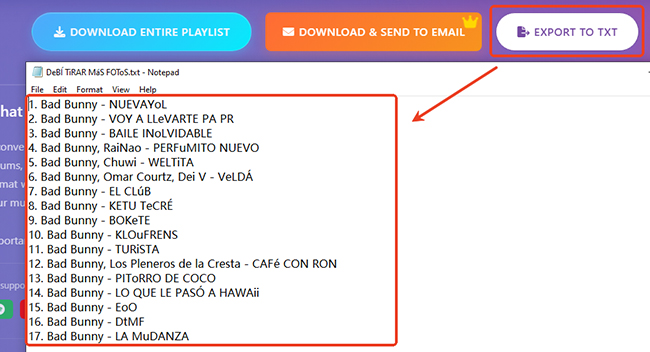
- Support Export to TXT: It can generate a plain-text list of your tracks, artists, and album names for quick sharing or backup.
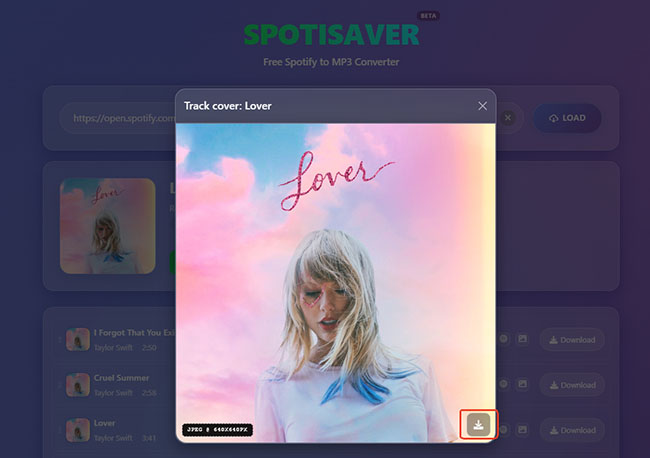
- Download Spotify Cover Art: It can download cover art from the Spotify playlists, albums, and single tracks.
Note:
For free users, there is a limit of 100 tracks per playlist, making it better suited to personal collections than massive library migrations. Besides, you can download one Spotify playlist at a time.
Note:
By default, files are named using the [Artist] - [Song Title] format. However, free versions append a small [spotisaver] tag to the filename.
Part 4. SpotiSaver Free vs. Premium
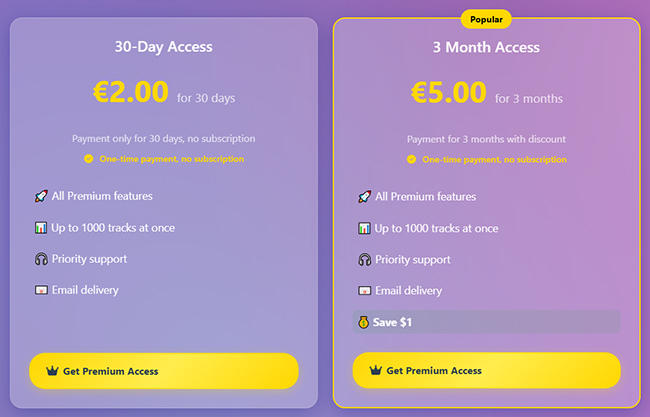
One of the most refreshing aspects of SpotiSaver is its transparent pricing model. The free tier is genuinely free, but it comes with limitations that heavy users will quickly notice. Free users can process only one playlist at a time, are capped at 100 tracks per batch, and must deal with a "Spotisaver" tag appended to their downloaded filenames.
The Premium tier eliminates these bottlenecks through a highly ethical payment structure. Instead of trapping you in an automatic recurring subscription, SpotiSaver uses Ko-fi for one-time payments. For just €2.00, you get 30 days of Premium access. It also provides the best value plan: Just €5.00 to get 3 months of uninterrupted access.
SpotiSaver Premium unlocks the following major benefits:
- Unlimited concurrent playlist downloads and up to 1,000 tracks per batch.
- Double the download speed and support for direct YouTube Music downloads.
- Custom filename templates without any promotional tags.
- Support emailing downloaded Spotify files.
| Feature | Free Version | Premium (€2 - €5) |
|---|---|---|
| Ads | No | 100% Ad-Free |
| Download Speed | Normal | 2X faster speed |
| Batch Download | Download a playlist at a time | Unlimited playlists |
| Download Number Limit | Up to 100 tracks per playlist | Up to 1000 tracks per playlist |
| Direct YouTube Music URL Download | No | Yes |
| Delivery | N/A | Instant Email Delivery |
| Filename | Include Spotisaver tag | No tag |
Part 5. How to Use SpotiSaver to Convert Spotify to MP3
Using the SpotiSaver platform is incredibly straightforward, making it highly accessible even for those who are not tech-savvy. Here is the complete user guide:
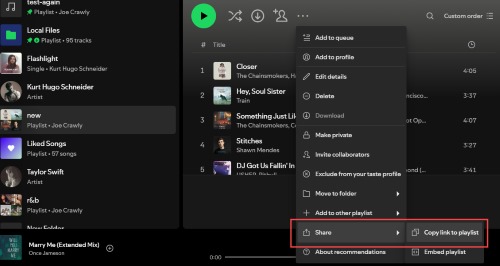
Step 1. Open the Spotify app or web player and navigate to the track, album, artist, or playlist you want to download. Click the three-dots > Share button and tap the Copy URL to Playlist/Album/Song to copy the link.
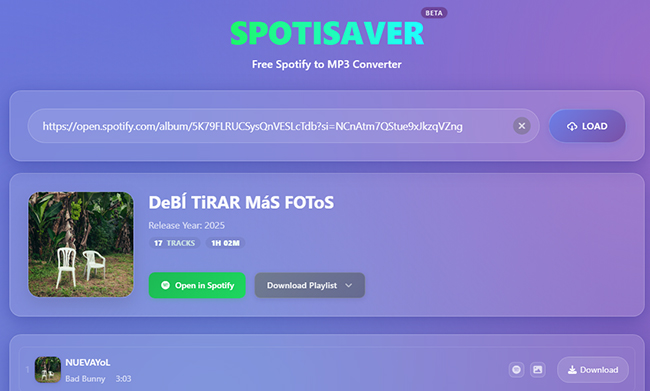
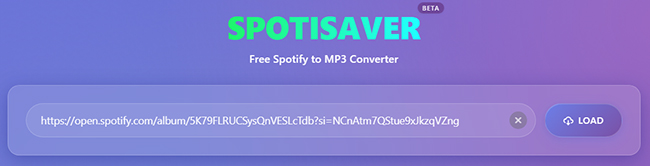
Step 2. Navigate to the SpotiSaver website. Paste your copied Spotify link into the prominent search box located in the center of the screen. Click the LOAD button. The site will analyze the link and retrieve the track information.
Step 3. Once the analysis is complete, you can start the download process:
For downloading single tracks: Click the Download button next to the track, it will automatically save the single track to your local device.
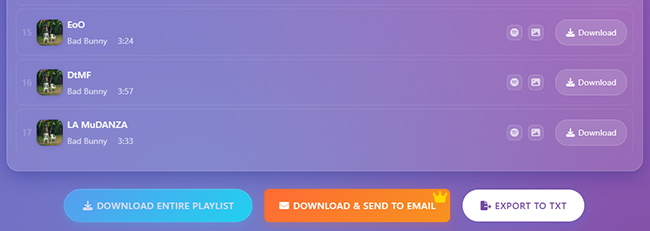
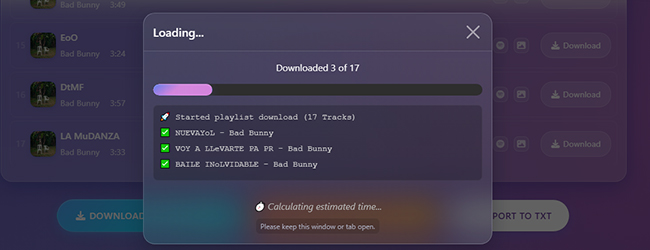
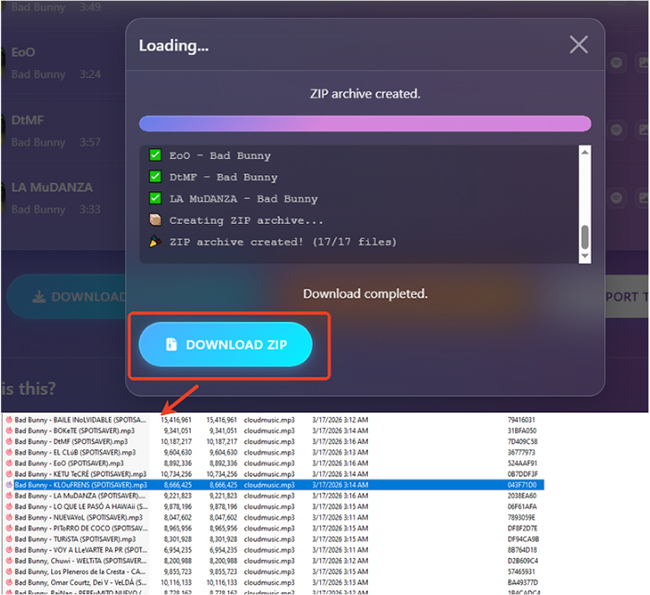
For downloading a full playlist or album: Tap the Download Playlist button or scroll down to the bottom and tap the DOWNLOAD ENTIRE PLAYLIST button. The system will package the files into a single ZIP folder for you to save to your device. You can click DOWNLOAD ZIP button to download your Spotify playlist to ZIP.
Part 6. SpotiSaver Real Performance Test: The Spek Spectrogram Truth
In practical application, SpotiSaver performs admirably for everyday music listening. During tests with mainstream pop and rock playlists, the matching algorithm was highly accurate, and the ID3 tags populated flawlessly in standard media players.
The limitations only become apparent when pushing the tool to its limits. Trying to download a massive, 90-track playlist on the free tier during high-traffic hours resulted in sluggish speeds and one timed-out connection.
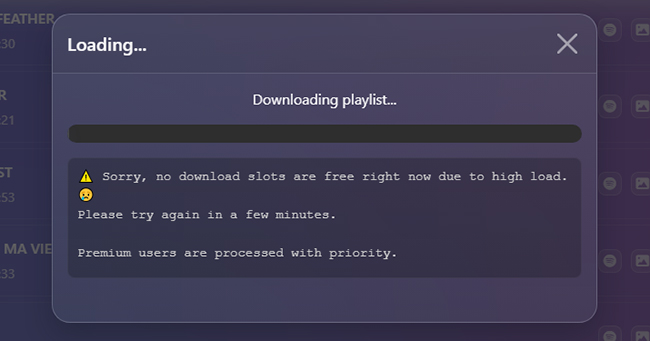
However, upgrading to the €2.00 Premium tier immediately resolved the speed throttling and allowed background downloading, which drastically improved the experience.
SpotiSaver Audio Analysis via Spek
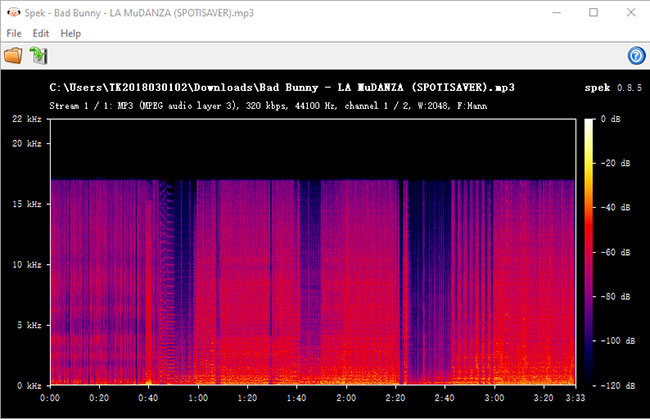
To provide true transparency, we didn't just rely on what SpotiSaver's interface claims. We ran a downloaded track—Bad Bunny's "LA MuDANZA" — through Spek (an acoustic spectrum analyzer) to look under the hood. The empirical data revealed a massive difference between the output file parameters and the actual audio fidelity.
Spek Test Data of SpotiSaver's Output File:
- File Container: MP3 (MPEG audio layer 3)
- Advertised Bitrate: 320 kbps
- Sampling Rate: 44,100 Hz
- Actual Track Duration: 3:33
- Audio Frequency Cutoff: 16 kHz (Hard Shelf)
Editor's Verdict on Audio Quality (Score: 55/100):
While SpotiSaver successfully exports files wrapped in a 320 kbps / 44.1 kHz MP3 container, our Spek spectrum analysis reveals that it is a fake transcode (upscaled audio). The audio frequencies suffer from a strict brickwall cutoff at 16 kHz, proving the tool rips compressed ~128 kbps source streams (likely from public YouTube assets) and re-encodes them into larger files. It is acceptable for casual mobile streaming but entirely unfit for audiophiles or professional DJ use.
The Technical Breakdown: Decoding the Spectrogram
- The 16 kHz Brickwall Limitation: Look closely at the Spek graph above. A genuine, studio-grade 320 kbps MP3 file should show vibrant harmonic frequencies extending smoothly up to 20 kHz or 22 kHz. SpotiSaver's output hits a dead stop at exactly 16 kHz. This indicates that the high-frequency "air" and sparkle of the music have been permanently filtered out during the metadata-matching process.
- Inflated File Sizes: Because the underlying stream is pulled from a lower-quality source and forced into a 320 kbps bitrate container, you are essentially paying a premium in storage space (larger megabyte size) for audio that inherently sounds like a standard 128 kbps clip.
- Standard CD Sampling Rate: The audio operates at 44.1 kHz with dual-channel stereo imaging. While the stereo panning is intact, the dynamic range feels compressed during complex rhythmic drops.
Part 7. Pros and Cons of SpotiSave Online Spotify to MP3 Converter
SpotiSaver stands out as a high-tier web utility, but like any browser-based tool, it balances convenience with certain technical trade-offs. It is crucial to look at both the strengths and weaknesses of this platform.
Pros
 Zero Installation & High Compatibility
- Clean, Ad-Free Interface
- Transparent "Ethics-First" Pricing
- Automated Metadata Handling
- Smart Batch Packaging
Cons
 The "Spotisaver" Filename Tag
- Free Tier Speed & Stability
- 100-Track Limit for Free Users
- Metadata Matching vs. Direct Ripping
- Low Quality Output for Free
Part 8. Best SpotiSaver Alternative You Can Use
While SpotiSaver is an exceptional web tool, it might not fit everyone's exact needs. The best solution for you depends on whether you prioritize instant browser access or absolute audio fidelity. Here are the top alternative to consider in 2026.
DRmare Spotify Music Converter (The Professional Choice:)
For users who require 100% accuracy and audiophile-grade quality, DRmare Spotify Music Converter is the gold standard. Unlike web-based tools that match metadata to external sources, it uses advanced decryption technology to download the direct digital stream from Spotify.
- Best For: Power users, audiophiles, and those with massive libraries.
- Key Advantage: It eliminates the risk of "mismatched" tracks (e.g., getting a live version when you wanted the studio recording).
- Performance: Supports 15X conversion speeds and preserves original lossless ID3 tags and metadata perfectly.
- Format Flexibility: Beyond MP3, it can export to FLAC, WAV, M4A, AIFF, and M4B.
Step 1. Download and install the software on your Windows or macOS computer. Once launched, you will see a built-in Spotify web player interface. Click the Log In button to access your account.
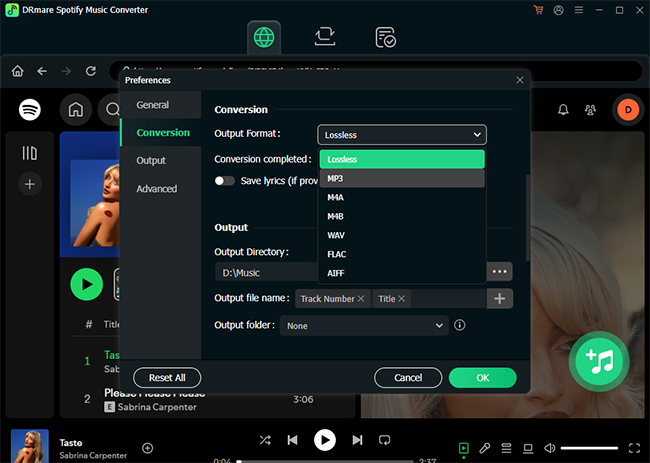
Step 2. Before adding music, define your quality standards: Click the Menu icon (three horizontal lines) in the top-right corner and select Preferences. Navigate to the Conversion tab, you can now choose the output format between MP3, FLAC, WAV, M4A, M4B, or AIFF and set the bitrate to 320 kbps and sample Rate to 48,000 Hz. Audiophiles can select 24-bit FLAC for lossless archival.
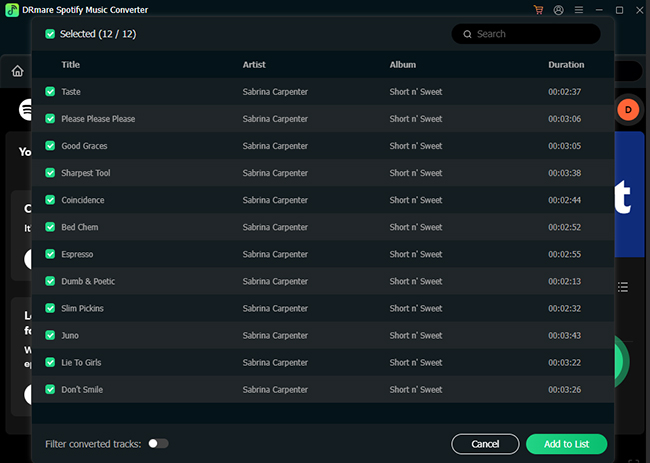
Step 3. Browse the built-in player for the songs, albums, or playlists you wish to download. To add a single track or an entire playlist, simply click the floating + (Add) icon located at the bottom right. A list of all tracks will appear; you can check or uncheck specific songs to customize your batch. Click Add to List to confirm.
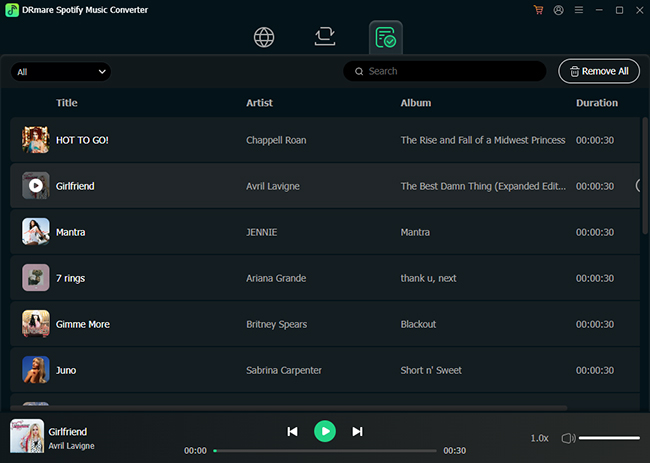
Step 4. Once your list is ready, click the Convert button. DRmare Spotify Music Converter will begin the decryption process at 15X speed, meaning a standard four-minute song takes only a few seconds to process. When finished, click the Converted tab to locate your files on your hard drive.
Note:
This is a desktop-based software (Windows/macOS) and requires a license for full functionality, but it is the most stable solution for long-term library management.
SpotiSaver vs DRmare Spotify Music Converter
| Feature | SpotiSaver | DRmare Spotify Music Converter |
|---|---|---|
| Audio Source | YouTube Music Matching | Original Spotify Stream |
| Audio Quality | Medium quality | High Quality |
| Batch Limit | Capped at 100 to 1,000 songs | Unlimited (1000+ tracks) |
| Stability | Depends on server traffic | Stable Desktop Performance |
| Download Speed | Up to 2X | Up to 15X |
| Best For | Quick, installation-free downloads | Long-term, massive library archiving |
Tips:
Based on quality and functionality, SpotiSaver is currently the best free online tool; therefore, there are no free online alternatives.
Final Verdict: Who Is SpotiSaver Best For?
SpotiSaver stands out in a crowded market of sketchy streaming converters. Its clean interface, excellent handling of metadata, and incredibly fair Premium pricing model make it a top-tier recommendation.
It is best suited for casual listeners who want a quick, painless way to grab a few playlists for a road trip or a flight. However, for audiophiles who listen to highly obscure artists, you can use DRmare Spotify Music Converter to avoid any external matching errors and get high quality.

 Home
Home




User Comments
Leave a Comment