





If you are looking for a way to get Spotify music as local FLAC files, SpotiFLAC is currently one of the most prominent open-source solutions. However, it is not a traditional music downloader that directly rips lossless audio from Spotify's servers. Instead, it uses Spotify links to scrape metadata, then relies on third-party extensions and providers to hunt down matching audio files across the web.
Because of this unique architecture, the SpotiFLAC ecosystem has splintered into three distinct projects: SpotiFLAC, SpotiFLAC Next, and SpotiFLAC Mobile. In this review, we'll look at how SpotiFLAC actually works, what separates the three projects, whether the resulting FLAC files can genuinely be considered lossless, and whether using SpotiFLAC still makes sense now that Spotify offers lossless streaming itself.
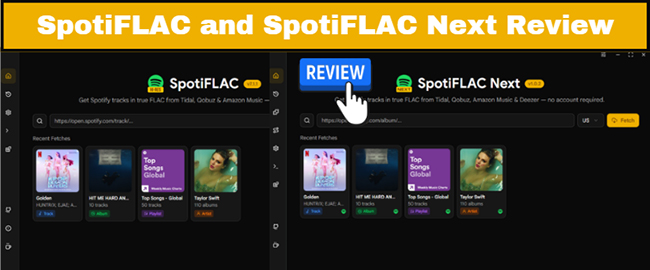
Quick Summary: SpotiFLAC Review
SpotiFLAC is an open-source local music downloader that can use Spotify links and metadata to identify tracks and obtain audio through supported providers. It should not automatically be described as a tool that extracts Spotify's own FLAC stream. SpotiFLAC Next focuses on a more advanced desktop workflow, while SpotiFLAC Mobile brings the project to Android and iOS.
Part 1. SpotiFLAC, SpotiFLAC Next, and SpotiFLAC Mobile on GitHub: What's the Difference?
These are not identical apps for different platforms. They should not be treated as three editions of the same application, and they are tailored to entirely different workflows.
| Feature | SpotiFLAC | SpotiFLAC Next | SpotiFLAC Mobile |
|---|---|---|---|
| Main platform | Desktop | Desktop | Android / iOS |
| Main purpose | Local music downloads | More advanced desktop workflow | Local music downloads on mobile |
| Supported Links | Spotify Only | Spotify, Tidal, Qobuz, Amazon, Deezer, Apple Music | Spotify, Tidal, Qobuz, Deezer |
| Supported Formats | FLAC only | FLAC, MP3, WAV | FLAC only |
| Music Downloader | Tidal, Qobuz, Amazon Music | Tidal, Qobuz, Amazon Music, Deezer, Apple Music | Tidal, Qobuz, Deezer |
| Lyrics Sources | LRCLIB | Musixmatch, Spotify Web, LRCLIB | LRCLIB and related services |
| Metadata Provider | MusicBrainz, Spotify Web | Spotify Web, MusicBrainz, Tidal, Qobuz, Amazon Music, Deezer | MusicBrainz, Spotify Web |
| Extensions/providers | Yes | Yes | Yes |
| Playlist downloads | Yes | Yes | Yes |
| Large-library workflow | Basic | More advanced | Mobile-oriented |
| Open-source project | Yes | Separate project | Yes |
| Free to Use | Yes | No, (Ko-fi/Patreon Backers) | Yes |
| Installation | Desktop application | Desktop application | APK / IPA |
| Best suited to | Users wanting a straightforward desktop workflow | Power users and larger libraries | Users who want local files on a phone |
The biggest difference is therefore not simply the number of features. It is how each project fits into your workflow.
Editor's Verdict:
If you manage your music library on a computer and want a free tool, go with SpotiFLAC Standard. If you want a more robust desktop manager that accepts Apple Music/Tidal links and you don't mind tipping the creator, get Next. If you want to download songs straight to your phone storage for offline mobile listening, Mobile is your best bet.
Part 2. What Is SpotiFLAC and How Does It Work?
Basic Info:
- SpotiFLAC Repo on GitHub Link: https://github.com/spotbye/SpotiFLAC
- Fork: 560
- Star: 10.9k
It operates as a metadata-matching engine rather than a direct stream ripper. SpotiFLAC uses a Spotify URL to scrape identifying metadata, such as the track title, artist, and album. It then leverages a network of third-party providers and extensions to locate and process a matching audio file from alternative web sources.
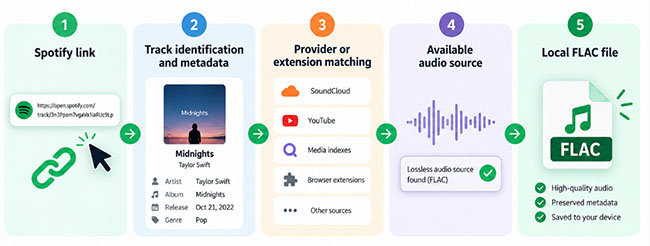
Because the actual audio is sourced externally, the success and quality of the final download rely entirely on provider availability. This indirect workflow explains why regional catalog restrictions, broken extensions, or missing third-party releases can cause downloads to fail or produce varying results, making it crucial for users to understand that they are not downloading native Spotify files.
Key Features of SpotiFLAC:
- Lossless FLAC Downloads: Download Spotify songs, playlists, and albums in high-quality FLAC format. It relies on a native Go engine for tagging, fetches lyrics via LRCLIB, and pulls FLAC tracks strictly from Tidal, Qobuz, and Amazon Music.
- No Spotify Premium Required: Unlike Spotify's official offline mode, SpotiFLAC doesn't require a Premium subscription.
- Cross-Platform Compatibility: Available on both Windows and macOS.
- Open-Source: Completely free to use, with the ability to modify and contribute to the project.
Part 3. What Is SpotiFLAC Next?
Basic Info:
- SpotiFLAC Next Repo on GitHub Link: https://github.com/afkarxyz/SpotiFLAC-Next
- Fork: 33
- Star: 1.8k
SpotiFLAC Next is an updated version of the standard SpotiFLAC repository, designed to address the limitations of the original tool. It's a separate, supporter-exclusive project designed as a reward for users who back the developer on Ko-fi. SpotiFLAC Next builds on the core functionality of its predecessor while introducing several enhancements to improve the user experience and performance. It's an upgraded option for users who want faster downloads, more format choices, and a cleaner user interface.
Key Features of SpotiFLAC Next:
- Support for Multiple Formats: In addition to FLAC, SpotiFLAC Next allows users to download Spotify music in MP3 and WAV formats.
- Expanded Source Support: It integrates Deezer as both a metadata provider and a direct download source.
- Universal Link Compatibility: You are no longer restricted to just pasting Spotify URLs; the software accepts direct links from Tidal, Amazon Music, Qobuz, Deezer, and Apple Music.
- Improved Speed: Faster download speeds thanks to optimizations made in the new version.
- Modern User Interface: A refreshed, more intuitive interface that simplifies the user experience.
- Bulk Downloading: Download entire playlists or multiple albums at once with enhanced support for bulk downloads.
- Metadata Retrieval: Automatically fetches track metadata, including album artwork and song details.
- Advanced Tagging: It ditches the basic Go engine in favor of TagLib, which provides significantly more structured, accurate, and robust metadata handling.
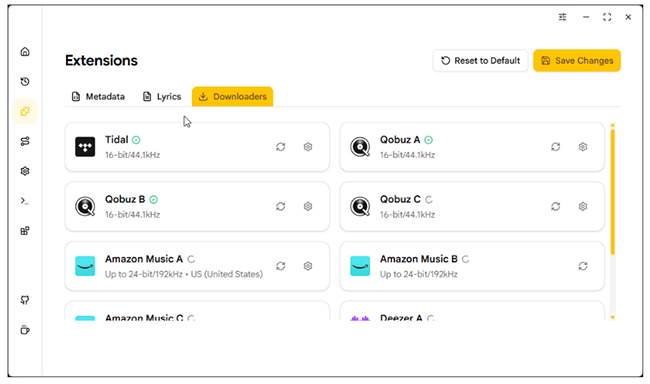
-
SpotiFLAC Extensions: It has several extensions, such as Metadata, Lyrics, and Downloaders.
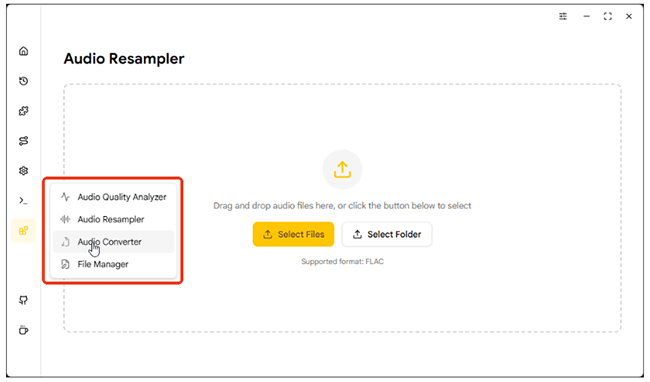
- Extra Audio Toolbox: It includes advanced utilities like an Audio Quality Analyzer, an Audio Resampler, an Audio Converter, and the ability to automatically generate M3U8 playlist files.
Part 4. What Is SpotiFLAC Mobile?
Basic Info:
- SpotiFLAC Mobile Repo on GitHub Link: https://github.com/spotiflacapp/SpotiFLAC-Mobile
- SpotiFLAC Mobile Official Website: https://spotiflac.com/
- Fork: 284
- Star: 6.2k
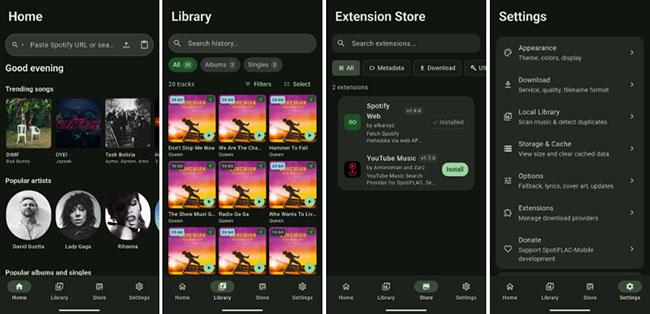
SpotiFLAC Mobile is an innovative, open-source mobile application built with Flutter and Go that allows you to download Spotify music directly to your smartphone. Whether you are commuting, traveling, or curating a high-fidelity library for your mobile device, this app provides audiophiles with an elegant, on-the-go solution for permanent, uncompressed offline listening.
Key Features of SpotiFLAC Mobile:
- Pocket-Sized Lossless Extraction: Download individual tracks, curated playlists, and full albums straight to your phone's local storage in bit-perfect FLAC format. It leverages a robust, multi-threaded Go backend to silently map and extract uncompressed audio from companion servers like Tidal and Qobuz.
- True Mobile Cross-Platform Compatibility: Designed from the ground up for modern mobile ecosystems, it delivers a fluid, native-feeling UI experience on both Android (via direct APK installation) and iOS (through IPA sideloading frameworks like AltStore).
- Ad-Free & Extension-Driven: Completely open-source and entirely free of intrusive mobile advertisements. Furthermore, it features a unique integrated Extension Registry, allowing users to easily install community-built plugins to customize lyric sources, enhance metadata mapping, and unlock new download APIs.
Part 5. How to Use SpotiFLAC, SpotiFLAC Next, and SpotiFLAC Mobile
All SpotiFLAC tools are designed to make downloading Spotify music a straightforward process. In this section, we'll walk you through the simple steps of using original SpotiFLAC, the updated SpotiFLAC Next, and the SpotiFLAC Mobile.
How to Use SpotiFLAC on GitHub
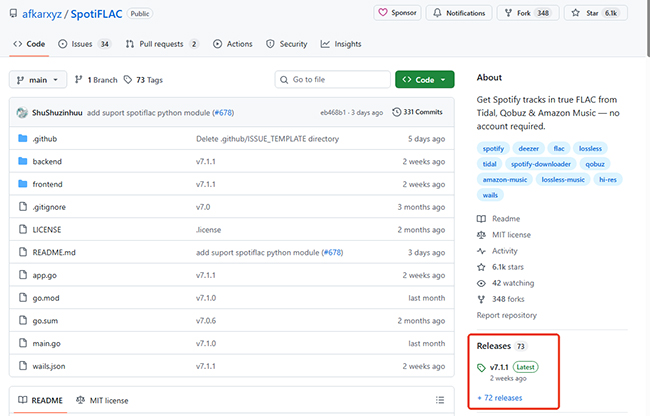
Step 1. Navigate to the official afkarxyz/SpotiFLAC GitHub repository and head to the "Releases" section.
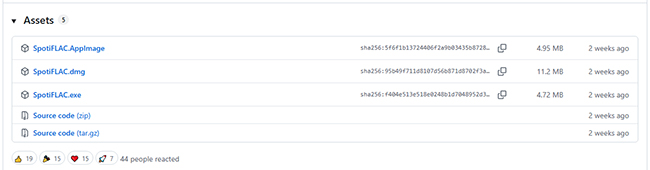
Step 2. Download the version compatible with your operating system (e.g., SpotiFLAC-Windows.exe for PC users) under the Assets section.
Step 3. Extract the file to a dedicated folder on your computer. If your antivirus flags the file, remember that this is a common false positive due to the UPX compression used to bundle the app.
Step 4. Once installed, copy the Spotify link of the album or playlist you want to download and paste it into SpotiFLAC. Tap the the "Fetch" button, the tool will then scrape the metadata and begin fetching the corresponding FLAC files from available hi-res providers.
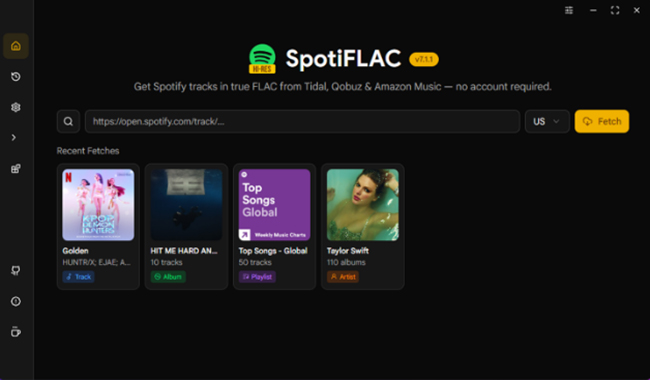
Step 5. Select the target source and click "Download" button, and let SpotiFLAC extract the audio in FLAC format, preserving the highest quality.
How to Use SpotiFLAC Next on GitHub
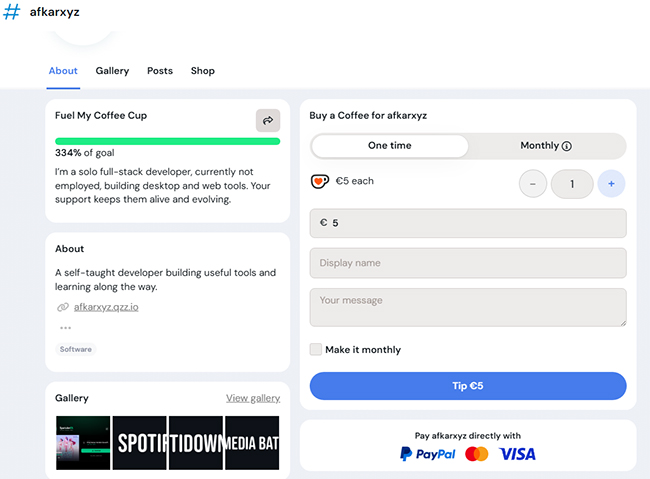
Step 1. Support the developer through their Ko-fi page to receive access to the private repository or the specialized "SpotiFLAC Next" download link.
Step 2. Download the SpotiFLAC Next executable on Windows, macOS, and Linux. Run the application. Because Next uses more advanced libraries like TagLib, it may require a brief moment longer to initialize on its first run.
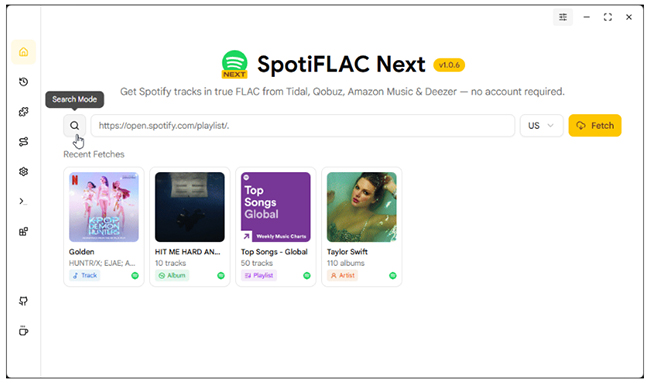
Step 3. Just like the original version, you can paste a Spotify playlist or album link into SpotiFLAC Next. Or type the song title to find favorite tracks. You can also directly paste the links from Deezer, Tidal, and Qobuz.
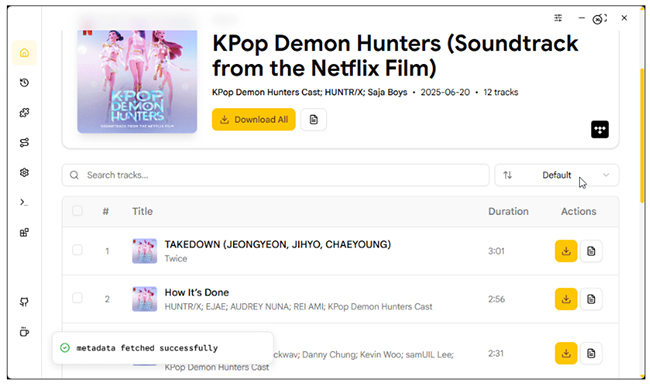
Step 4. With the new auto-convert optimizations, your files will be downloaded faster, and metadata will be automatically fetched.
How to Use SpotiFLAC Mobile on Android/iOS
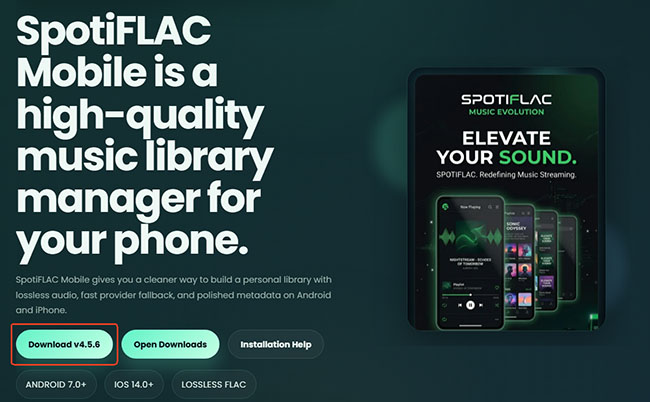
Step 1. Android users can install the compiled .apk package directly. iOS users must side-load the .ipa package using tools like AltStore, SideStore, or an enterprise certificate.
Step 2. Upon the first launch, you must grant the application full local storage read/write access. Because the Go-based multi-threaded downloading engine fetches audio fragments concurrently in the background, blocking storage access will cause the app to crash.
Step 3. Tap "Share" inside your official Spotify app, copy the link, and open SpotiFLAC Mobile. The app automatically grabs the clipboard contents for instant parsing.
Part 6. Is SpotiFLAC/SpotiFLAC Next/SpotiFLAC Mobile Safe and Legal to Use?
SpotiFLAC Safety:
SpotiFLAC's open-source nature provides some transparency, but it should not be treated as a guarantee that every download or extension is risk-free. The most important factor is where you obtain the software.
For desktop versions, use the project's official repository and release assets where possible. For Mobile, the same principle applies to APK and IPA files. Avoid modified packages from random download sites, particularly when the source or release history cannot be verified.
Extensions also deserve attention. Because the extension system can connect the application with different providers and services, users should understand that an extension introduces another component into the overall software chain.
The practical approach is simple: keep the application and extensions up to date, download them from known project channels, and avoid giving unnecessary account credentials or permissions to unofficial builds.
SpotiFLAC Legality:
Safety and legality are separate questions. Whether creating a local copy of music is permitted depends on factors such as the source of the audio, your rights to the content, applicable copyright law, and the terms governing the service involved.
The fact that a tool is open source does not determine whether every possible use is permitted. For that reason, it is better to treat SpotiFLAC as a technical tool rather than assume that downloading a particular track is automatically allowed simply because the software can process it.
If you intend to use downloaded files commercially, redistribute them, or share them with other people, the legal considerations can be considerably different from maintaining a personal music library.
Part 7. SpotiFLAC Alternative: When a Desktop Converter Makes More Sense
SpotiFLAC, SpotiFLAC Next, and SpotiFLAC Mobile are appealing if you are comfortable with open-source software and provider-based workflows. It may be less attractive if you prefer a conventional desktop application with a more controlled interface and fewer technical components to manage.
If the technical hurdles of GitHub tools are becoming a bottleneck, DRmare Spotify Music Converter is a highly reliable alternative. It is designed to bypass the common "Cons" associated with open-source downloaders, such as length limitations and lack of batch support.
Rather than relying on external providers, it utilizes a built-in web player to record audio directly from Spotify. It maintains true lossless audio quality and ID3 tags (including lyrics), works at up to 15X speed, and outputs seamlessly to FLAC, WAV, or MP3.
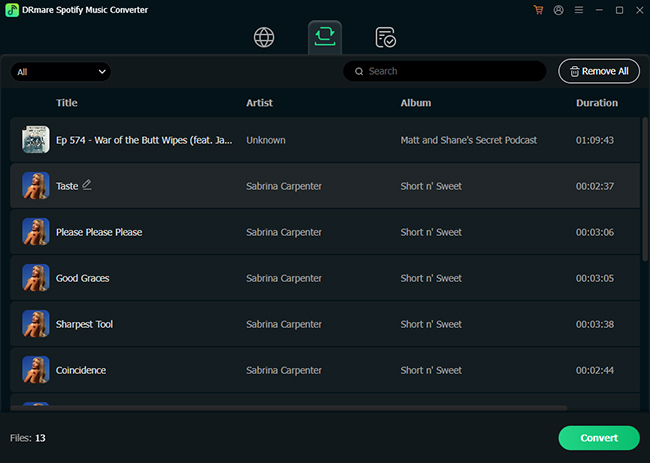
DRmare Spotify Music Converter vs SpotiFLAC/SpotiFLAC Next
| Feature | SpotiFLAC | DRmare Spotify Downloader |
|---|---|---|
| Ease of Use | Technical (Requires GitHub/CMD) | Intuitive (Drag-and-Drop) |
| Batch Support | Limited or Manual | Full Playlist/Album Support |
| Stability | Dependent on API/Server updates | Frequent professional updates |
| Format Variety | FLAC, MP3, WAV | FLAC, MP3, M4A, WAV, etc. |
Part 8. FAQs about SpotiFLAC, SpotiFLAC Next, and SpotiFLAC Mobile
Does SpotiFLAC really download lossless FLAC?
Not always. Because SpotiFLAC relies on third-party providers rather than downloading directly from Spotify, the true audio quality depends entirely on the source file supplied by that provider.
Can using SpotiFLAC get my personal Spotify account banned?
Using a third-party tool can carry account or policy risks that cannot be ruled out. SpotiFLAC's lack of a Spotify account login does not justify a guarantee of zero risk.
How to fix SpotiFLAC not working?
If you encounter issues during your first few sessions, try these common fixes:
- API 429 Errors: This means you have been rate-limited. Wait and retry later, reduce request frequency, and check whether the provider or extension is currently available.
- Failed Matches: If a song downloads the "Live" version instead of the "Studio" version, try searching for the specific album URL instead of a playlist link.
- App Won't Open: Ensure you have the latest Visual C++ Redistributable installed on Windows, as the Wails-based GUI requires it to render correctly.
Is the SpotiFLAC Next upgrade worth it?
For casual listeners, the free version is sufficient. However, for power users and collectors managing large libraries on DAPs or media servers like Plex, SpotiFLAC Next is a justified investment.
Why does SpotiFLAC Mobile keep stopping mid-download in the background?
This is caused by aggressive mobile operating system battery management (especially on Android devices). Because SpotiFLAC Mobile runs a high-performance Go multi-threading backend inside a Flutter wrapper, the system assumes it is an rogue power-draining process and forces a shutdown. To resolve this, add SpotiFLAC Mobile to your device's "Battery Optimization Whitelist" and permit unrestricted background activity.
Part 9. Final Verdict
SpotiFLAC remains an interesting option for users who want to build a local music library and are comfortable with an open-source, provider-based workflow. But choosing SpotiFLAC, SpotiFLAC Next, or SpotiFLAC Mobile depends on your specific workflow:
- SpotiFLAC Next: The clear winner for power users, offering advanced metadata tagging, multi-format support (FLAC/MP3/WAV), and faster download speeds.
- SpotiFLAC (Standard): A reliable, no-frills desktop solution for users who only need a straightforward, free tool for basic FLAC downloads.
- SpotiFLAC Mobile: The ultimate go-to application for smartphone users wanting permanent, high-fidelity offline playback on the move.

 Home
Home




User Comments
Leave a Comment