





Want to use Spotify without an internet connection or stop the app from staying offline? Spotify Offline Mode lets you restrict playback to content that's available offline, which can be useful when you're traveling, conserving mobile data, or dealing with an unreliable connection.
One thing that often confuses people: You don't necessarily need to turn on Offline Mode on Spotify just because you're listening without internet. Downloaded Spotify content can normally continue playing when the connection disappears. Offline Mode is more useful when you want Spotify to stay within your downloaded or otherwise available offline content. This optimized guide will walk you through everything you need to know about how to use Spotify Offline Mode effectively across all your devices.
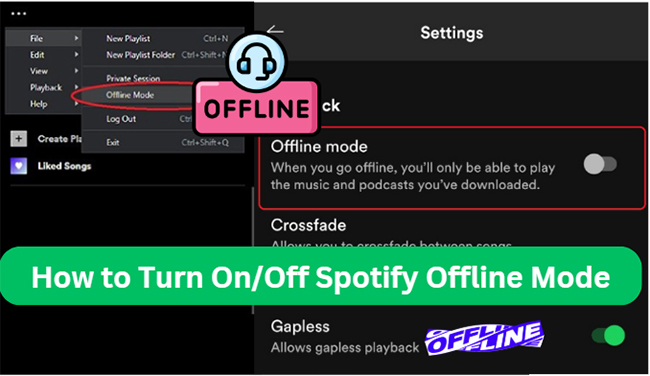
Quick Reality Check: Do You Need Spotify Offline Mode?
Spotify Offline Mode is a setting that tells the app to operate without relying on its normal online connection. When it is enabled, content that isn't available offline will appear grayed out, while downloaded content remains available for playback.
You do not need to enable Offline Mode on Spotify simply because you lack an internet connection. Downloaded songs and playlists play automatically when your connection drops. Offline Mode is strictly a control switch to prevent Spotify from attempting online streaming in the background.
Spotify Offline Mode vs. Downloaded Music
| Feature | Offline Mode | Downloaded Music |
|---|---|---|
| Core Purpose | Restricts app strictly to offline content | Makes selected music available offline |
| Requires Downloads? | Generally yes (otherwise nothing plays) | Yes |
| Prevents Online Streaming? | Yes, entirely while enabled | No (streams online if connection exists) |
| Account Requirement | Available on all Premium tiers | Music downloads require Premium |
Spotify currently allows Premium subscribers to download albums, playlists, and podcasts for offline listening. Free accounts can download podcasts on Spotify, but they cannot use the global offline switch.
How to Turn On Offline Mode on Spotify
Enabling Offline Mode on Spotify is a straightforward process, but the steps vary slightly depending on the device you're using. Below, we'll guide you through the process for Android, iPhone, PC, and Mac.
On iPhone/Android:
Step 1. Launch Spotify app on your mobile device and then log in with your Spotify Premium account and password.
Step 2. Find the playlists or albums that you want to download. Open the playlist and tap the "Download" button. Then you will see the spinning widget icons indicating it is downloading.

Step 3. To go to Offline Mode on Spotify, tap your Profile picture, select Settings and privacy and open Data-saving and offline. Find Offline Mode and turn the setting on.
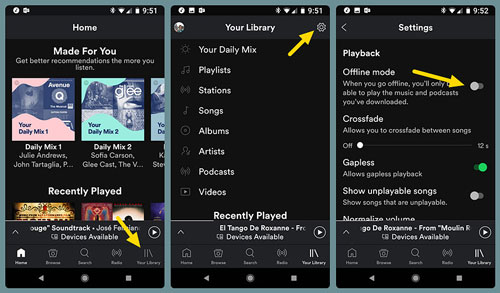
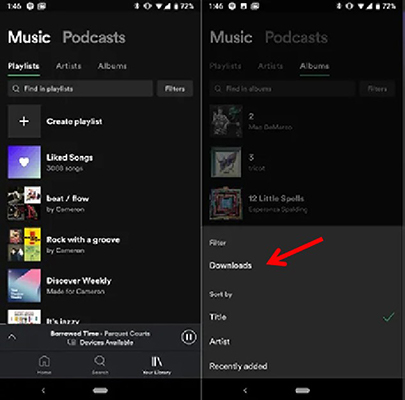
Step 4. After setting Spotify to Offline Mode, you can find the downloaded music from "Your Library" > "Downloads" and start to play music offline on Spotify.
Note:
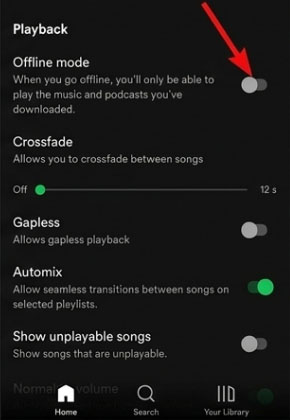
If Offline Playback is unavailable there, check the Playback section and find the Offline option depending on your app version.
On Windows PC/Mac:
Step 1. Launch the Spotify app from your Mac or Windows computers. Then log in with your Spotify Premium.
Step 2. Search and navigate to the albums, podcasts, or playlists you want to download. Then switch the "Download" toggle button on.
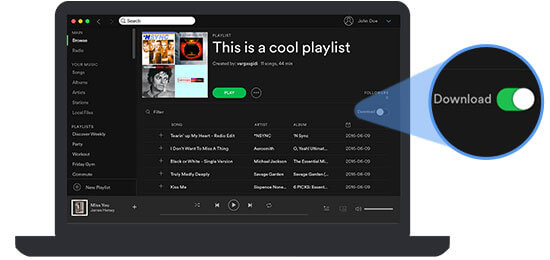
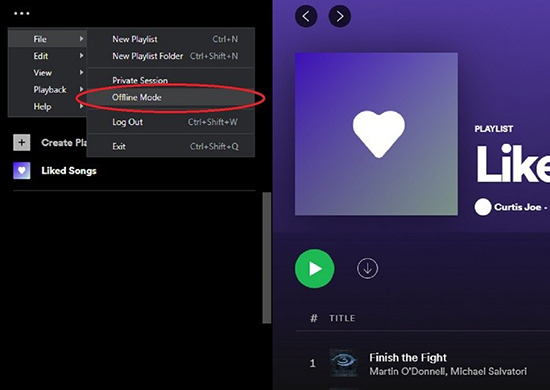
Step 3. To put Spotify in Offline Mode on PC, click the "three-dot" icon at the top-left corner of the main interface. Tap the "File" > "Offline Mode" to activate it. For Mac, choose the "Spotify" option from Apple menu and click the "Offline Mode" to switch it. Now, you can go offline in Spotify.
Author's Real-World Experience:
As someone who frequently relies on Spotify during 10-hour flights and remote road trips, I've discovered a hidden benefit to Offline Mode: it drastically saves battery life. When your phone isn't constantly hunting for cell towers or streaming heavy audio data, your battery lasts significantly longer.
How to Turn Off Offline Mode on Spotify
If you no longer need Offline Mode and want to switch back to online streaming, disabling Offline Mode in Spotify is just as easy. Here's how to do it on different devices.
Take Spotify Off Offline Mode on iPhone/Android
Step 1. Open the Spotify app and tap on your "Profile picture.
Step 2. Go to "Settings and privacy", open "Data-saving and offline", and turn "Offline Mode" off.
Step 3. Your app will now reconnect to the internet, allowing you to stream music and access all of Spotify's features.
Get Spotify Off Offline Mode on PC/Mac
Step 1. Launch the Spotify app on your computer and authorize your account details.
Step 2. Click on the "File" menu (Windows) or "Spotify" (Mac) in the top-left corner. Uncheck "Offline Mode" to disable it.
Step 3. Once Offline Mode is turned off, you can stream music online and explore new content.
Troubleshooting: When Downloaded Songs Turn Grey
Even with Offline Mode properly enabled, you might occasionally find your downloaded tracks greyed out and unplayable. In my experience testing the app across various iOS and Android updates, this frustrating glitch usually happens when the mandatory 30-day online check-in fails to sync properly in the background. You can try this quick manual sync:
- Toggle Offline Mode off in your settings and connect your device to a stable Wi-Fi network.
- Play any previously downloaded track for a few seconds to force the server to verify your active Premium status.
- Return to your settings and toggle Offline Mode back on.
Your library should immediately unlock, allowing you to listen to your cached music without starting the download process all over again.
How to Put Spotify in Offline Mode for Free
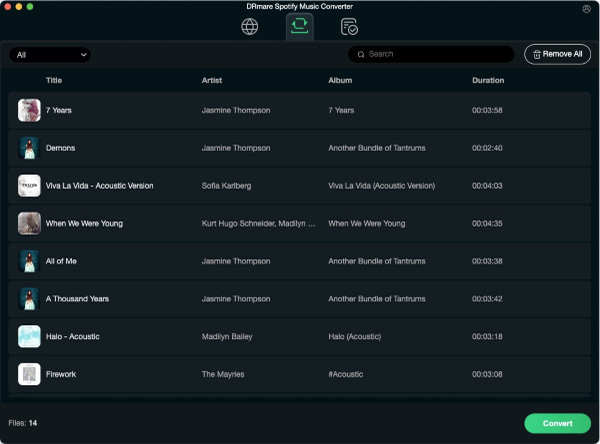
Because offline downloading is locked behind Spotify Premium, free-tier users cannot natively save music within the app. If you want to listen offline without a subscription, you will need to explore third-party workarounds. Software tools like DRmare Spotify Music Converter can help get rid of this restriction by allowing free users to download and convert Spotify songs into MP3, FLAC, WAV, and other formats for offline playback.
It can keep 100% original audio quality for perfect offline listening on all devices and run at 15X faster speed to save time. With it, you can play Spotify music on any device without needing the Spotify app or an internet connection.
How to Play Spotify in Offline Mode for Free
Step 1. Download and install DRmare Spotify Music Converter on your computer. Open the software and log in to your Spotify account.
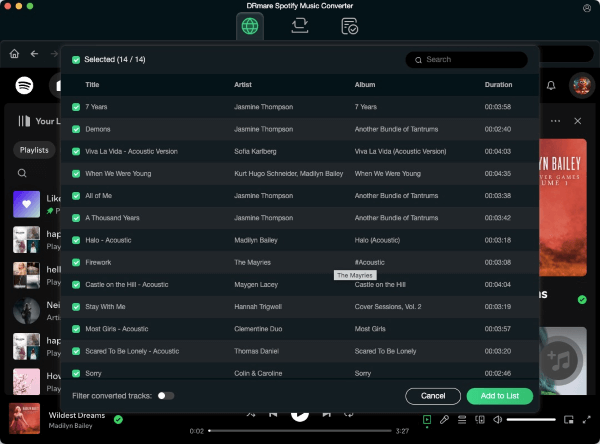
Step 2. Browse your Spotify music library and click the "+" > "Add to List" button to load them.
Step 3. Click the "Preferences" > "Conversion" button to choose your preferred output format (e.g., MP3) and quality settings.
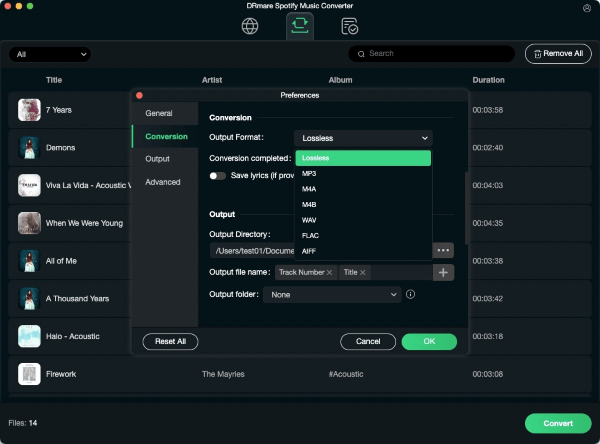
Step 4. Press the "Convert" button to start the download process at 15X faster speed. Once the conversion is complete, you can locate Spotify files in "Converted" folder, transfer them to your device and listen to them offline without Premium.
Spotify Offline Mode vs. Offline Backup
Spotify now also has a feature called Offline Backup, which is different from traditional downloads. Spotify Offline Backup can provide Premium users with music for offline playback without requiring them to deliberately download every track. Spotify describes it as a collection built from music already stored in the device's cache, including eligible recently played and queued music. It is available on supported mobile devices, Android Auto and CarPlay. The difference is easier to understand this way:
| Features | Downloaded Music | Offline Backup |
|---|---|---|
| How it is created | You deliberately download content | Spotify builds a collection from eligible cached listening |
| Best for | Music you know you want offline | Extra listening when you forgot to download something |
| Requires Offline Mode? | Not necessarily | Spotify says Offline listening must be enabled |
| Can you choose exactly what is included? | Yes | Not in the same way |
| Intended as a backup? | No | Yes |
Offline Backup shouldn't necessarily replace downloading a specific playlist before a trip. Spotify notes that it may not appear if there isn't enough eligible listening history, available storage, or cached content, or if the cache has been cleared or the app has been reinstalled.
FAQs about Using Offline Mode on Spotify
What are the key rules for offline listening?
- 30-Day Rule: Connect to the internet at least once every 30 days to keep your downloads active.
- Device Limits: Download up to 10,000 tracks per device on a maximum of 5 devices.
- Storage: Maintain at least 1 GB of free space to avoid download errors.
Does Offline Mode save mobile data?
Yes. Enabling Offline Mode stops background streaming and restricts playback to local content. (Note: For actual downloading, check your "Downloads over cellular" settings to avoid using mobile data).
Can I use offline features with a Free account?
No. Offline music downloading and offline mode are exclusive to Premium subscribers.
Can I use offline mode in a web browser?
No. Offline playback and downloads are only supported on the Spotify mobile and desktop apps, not the Web Player.
Do I need to turn on Offline Mode to play downloaded music?
No. Downloaded content plays automatically when your internet drops. Offline Mode is only needed if you want to explicitly block online streaming.
Why does Spotify say I'm offline when Wi-Fi is connected?
- Check if Offline Mode is accidentally turned on.
- Test your network connection with another app.
- Switch between Wi-Fi and mobile data, or check your desktop firewall settings.
- Update the Spotify app to the latest version.

Will reinstalling Spotify delete my downloads?
Yes. Reinstalling the app clears all locally stored downloads, meaning you will need to re-download them.
Final Thoughts
Think of Spotify Offline Mode as a strict data-saving safeguard, rather than a requirement for playing downloaded tracks. For the best offline experience, download your music in advance, connect to the internet every 30 days to keep files active, and rely on Offline Backup as a fallback if you forget to prep.

 Home
Home





User Comments
Leave a Comment