





Saving YouTube videos and music for offline access often starts with a free online downloader. Among the many options available, YT1s has gained popularity for its browser-based approach, allowing users to convert YouTube videos to MP3 or MP4 without installing additional software. But is YT1s actually worth using? In this review, we'll examine how the platform works, test its download quality, evaluate the overall user experience, and explore the best YT1s alternatives available.
Part 1. What is YT1s
YT1s is a free online YouTube downloader that allows you to download and convert YouTube videos without installing software. Often referred to as a YT1s YouTube downloader, the platform supports converting YouTube videos to popular formats such as MP3 and MP4 directly from a browser.
However, because multiple YT1s domains and mirror sites now exist online, the available features, download performance, and overall user experience can vary significantly from one version to another.
Key Feature of YT1s Video Downloader:
- Multiple Media Formats: Claims to support extracting YouTube content into formats like MP4, MP3, M4A across different quality tiers.
- No Account Required: Use the service without creating an account, logging in, or providing personal information.
- Free to Use: Most YT1s mirrors allow users to convert and download videos without subscription fees or usage charges.
- Cross-Platform Compatibility: Works on Windows, Mac, Android, iPhone through a standard web browser.
Part 2. How to Use YT1s to Download YouTube Videos and Music
Navigating online video downloaders can be risky, especially with the growing number of YT1s mirror sites available today. If you decide to use YT1s, following the correct steps can help you download your desired YouTube video or audio file while minimizing exposure to misleading ads and other potential security risks. Below, we'll show you how to use the YT1s YouTube to MP3/MP4 converter on desktop and mobile devices.
Step-by-Step Guide to Using the YT1s Downloader
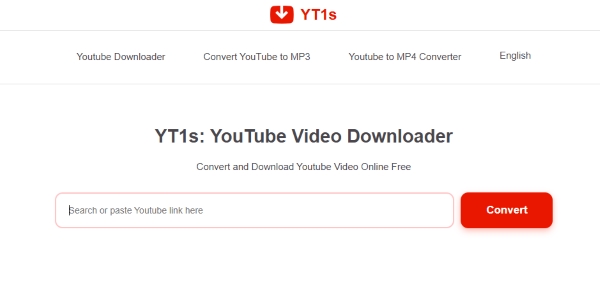
Step 1. Copy the specific YouTube video URL from your browser's address bar or the "Share" button on the app, then paste the link directly into the input box on the homepage.
Step 2. While there is usually a "Convert" button next to the input box, you don't actually need to press it; as long as you paste the link into the box correctly, the YT1s YouTube downloader will automatically begin parsing the video data on its own.
Step 3. Review your file type options, keeping in mind that the platform only supports MP3, M4A, and WebM/Opus for an audio track, and MP4 for a YT1s video download. Select your preferred quality tier for the YouTube download, ranging from 64kbps up to a claimed 320kbps, and then click the initial "Download" button.
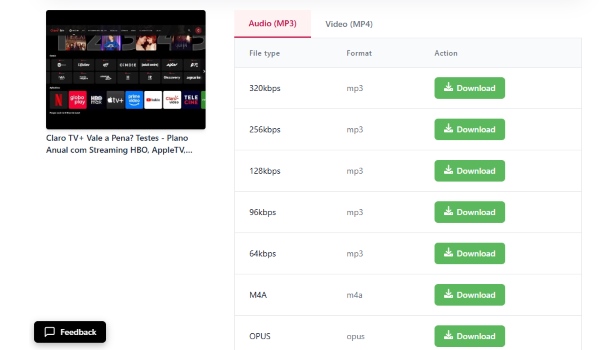
Step 4. Watch for a new pop-up window to appear on your screen, and click the final "Download Now" button within that specific prompt to send the file directly to your local storage.

Navigating the Mobile Experience and Shortcuts
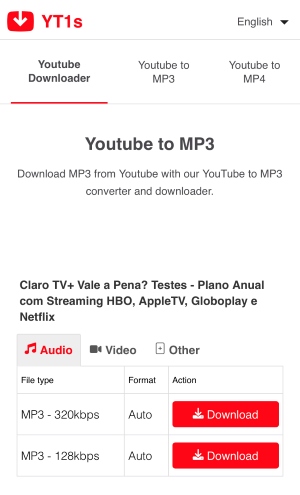
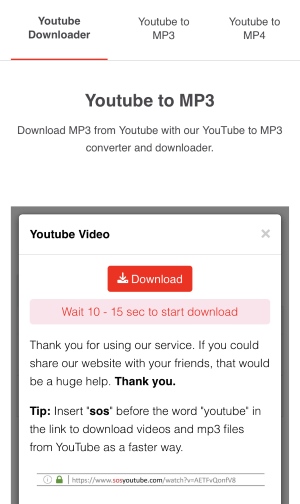
If you are trying to grab a YT1s download on your smartphone, the overall process remains identical, but you will need to navigate a few quirks. On mobile browsers, the format and quality options are often more limited, and the platform typically enforces a mandatory 10-to-15-second waiting period before the server actually triggers your file transfer.
For users looking for a slightly faster routing trick, you can open the video URL in your browser and insert the letters "sos" directly before the word "youtube" in the web address (e.g.www.sosyoutube.com/watch?v=82-jTNka3uc), the script will automatically download videos and audio files from YouTube at a faster speed.
Editor's Real Use Experience:
While the technical steps are simple, using the yt1s converter can be incredibly frustrating. The site relies on an overwhelming number of ads and hidden redirect scripts. During three download attempts, clicking the main download controls opened an advertising redirect. This made the workflow considerably more frustrating than the three-step conversion process suggests.
Part 3. Real-World Performance Testing for YT1s Downloader
Many free online downloaders claim to deliver stunning 1080p HD video and premium 320kbps audio. However, by carefully analyzing the downloaded files and spectrograms, we can uncover the truth behind these numbers. To evaluate YT1s's actual media performance, we conducted hands-on tests using an 11-minute review and a 5-minute highly produced music video. The results reveal a massive gap between what YT1s promises and what it actually delivers.
How We Tested YT1s:
Because several unrelated websites currently use the YT1s name, the results below apply specifically to the domain tested for this review. Other mirrors may behave differently.
- Device: Windows 11 Browser: Chrome
- Audio Formats: MP3 320kbps
- Video Quality: 1080p
- Tools used: Spek + MediaInfo
Does YT1s Really Deliver 320kbps Audio? Our Spek Test
- YT1s simply scrapes the basic 128kbps audio stream from the underlying YouTube video, regardless of the original production quality, tricking your media player into displaying a high-res label without actually improving the sound.
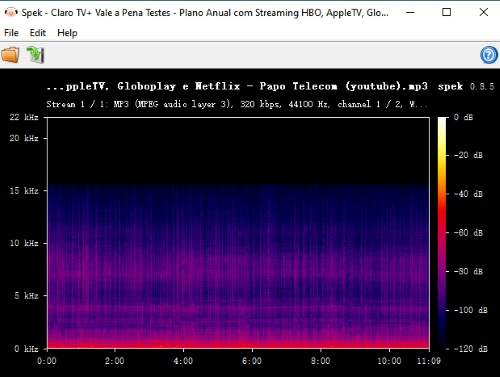
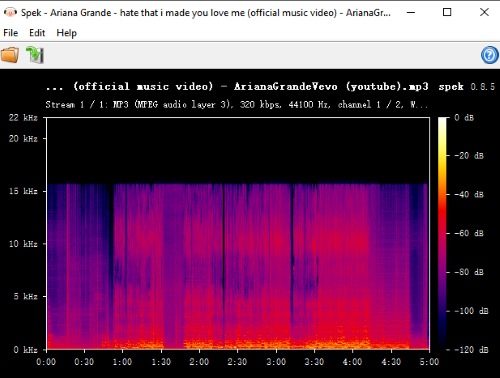
- The downloaded MP3 was encoded and reported as 320kbps, but the spectrogram showed a sharp high-frequency cutoff at around 15kHz. This suggests that converting the file to 320kbps did not restore the audio detail typically associated with a higher-quality source.
When inspecting the native audio track of our initial 11-minute video, we found a basic 128kbps bitrate. This standard spec is perfectly fine for casual vlogs, but it falls completely short of high-fidelity sound. YT1s heavily promotes premium 320kbps MP3 extractions, so we tested an official Ariana Grande music video to see if it handled high-quality source material better.
While the downloaded MP3's metadata proudly claimed 320kbps, loading the file into a Spek spectrogram analyzer told a different story. A genuine 320kbps file preserves rich, high-frequency details well up to 20kHz or higher. However, our Spek chart revealed a harsh, flat horizontal cutoff right at the 15kHz mark. That abrupt cliff is the universal fingerprint of heavily compressed, 128kbps audio.
The Illusion of High-Definition Video
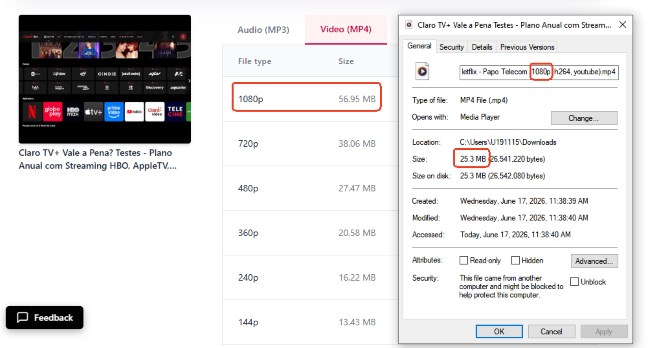
Beyond the audio deception, YT1s also severely exaggerates its video quality metrics. During our test, the download option clearly stated 1080p, and the resulting file properties proudly displayed a 1920x1080 resolution alongside a 4877kbps total bitrate. However, the actual file size doesn't match. If an 11-minute video truly maintained a bitrate near 5 Mbps, the resulting file size would sit around 400MB.
Instead, our downloaded file was a mere 25MB. This massive discrepancy means the true average video bitrate has been heavily compressed down to roughly 300kbps. It practically guarantees a muddy picture with heavy pixelation and noticeable smearing during high-motion scenes.
Part 4. Is YT1s Safe? Risks and Precautions
The YT1s mirror we tested raised several usability and security concerns because download actions repeatedly triggered advertising redirects and misleading buttons. We did not test every site using the YT1s name, so the risks may vary between mirrors. Still, you should remain cautious, as some YT1s sites may expose you to unsafe redirects, deceptive ads, or potentially harmful pages. YT1s originally exploded in popularity due to its simple interface and free YouTube conversion. However, many of the original YT1s domains have disappeared or changed over time, leading to the emergence of numerous unofficial mirrors and lookalike websites.
Today, when searching for terms like yt1s.com may encounter multiple domains operating under different extensions, such as yt1s.ltd and similar variants. Since these sites are run by independent operators, the user experience and security standards can vary significantly.
The Hidden Risks of YT1s Clones
Many YT1s clone sites rely heavily on advertising revenue rather than subscriptions or paid services. As a result, users may encounter several potential risks while downloading videos or music.
- Malicious Redirects: Clicking the "Download" or "Convert" button may open unexpected pages, including scam websites, fake security warnings, or unrelated promotional content.
- Misleading Download Buttons: Some mirrors display fake "Download" buttons, making it difficult to identify the actual media download link.
- Excessive Advertising: Pop-ups, auto-opening tabs, and intrusive ads can negatively affect the browsing experience and increase the risk of accidental clicks.
If you choose to use a YT1s mirror, proceed with caution. Installing a reputable ad blocker can help reduce pop-ups and block many unwanted redirects. For users who value reliability, privacy, and consistent download quality, dedicated desktop downloaders and other well-established alternatives are generally a safer long-term option.
Pros
 No Sign-Up Needed: Download YouTube content without creating an account.
- Web-Based Tool: Works instantly without installing software.
- MP3 & MP4 Support: Convert YouTube videos to audio or video formats.
- Free to Use: No subscription or payment required.
- Cross-Platform Access: Compatible with desktop and mobile browsers.
Cons
 Misleading Quality Claims: Actual output quality may be far lower than advertised.
- Security Concerns: Many mirrors contain intrusive ads and redirects.
- Unreliable Mirrors: Features and availability vary across unofficial domains.
- Poor User Experience: Frequent pop-ups and fake download buttons.
- No Official Support: No verified developer or customer assistance.
Part 5. Best YT1s Alternative for High-Quality YouTube Music Downloads
While YT1s platforms offer a quick fix, they often plague users with intrusive ads, heavily compressed audio, and length restrictions. If you are looking for a robust and reliable way to curate your YouTube Music collection without these drawbacks, a dedicated desktop tool is a massive upgrade. DRmare Streaming Audio Recorder serves as an excellent alternative by eliminating the security risks and fake quality metrics.
Unlike browser-based tools that secretly compress your files, this software ensures a completely ad-free experience with no restrictions on track length. It allows you to save your favorite music in high quality across multiple formats, including MP3, FLAC, WAV, M4A, AIFF, and M4B, while avoiding the additional low-bitrate compression we observed in our YT1s test. Furthermore, it automatically preserves full ID3 tags, ensuring your local music library remains organized.
How to Save High-Fidelity Tracks from YouTube Locally
Step 1. Launch the application on your computer and open the "Settings">"Music" window from the main menu to customize your target audio parameters. Within these settings, select MP3 as your desired format and fine-tune the sample rate, channel, and bitrate up to a genuine 320kbps.

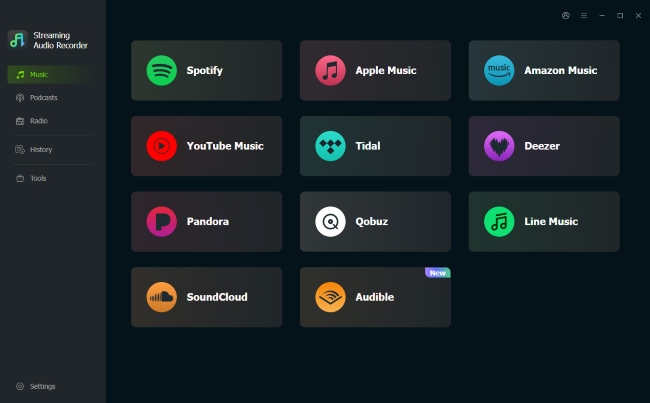
Step 2. Head back to the primary dashboard to view the list of compatible music platforms and select the built-in YouTube Music option. Simply log into your account through this secure, isolated interface to view your personal library and saved playlists. By keeping the entire browsing process inside a closed desktop environment, without worrying about the threat of malicious pop-ups and accidental redirects.
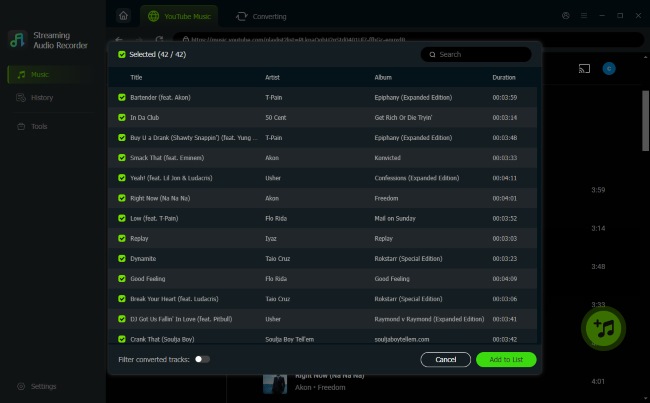
Step 3. Explore your music collection to find the specific songs you wish to store. Once you locate a track, use the "Add" option to load the files into your active processing list. This queue system allows you to manage multiple tracks simultaneously via "Add to List" features.
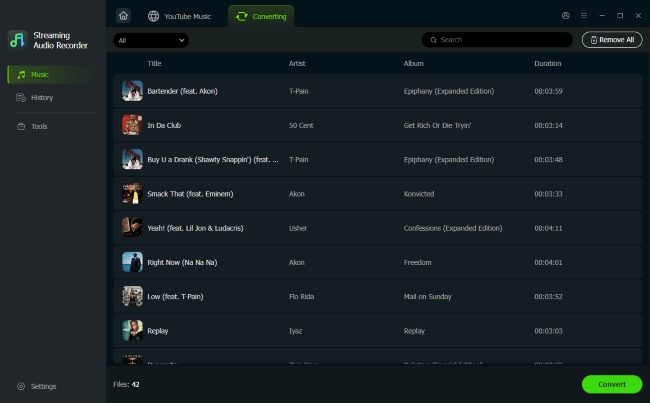
Step 4. Click the "Convert" icon to trigger the automated downloading and recording process for your queued songs. The software will extract the stream and encode it into your pre-selected format without a single drop in acoustic fidelity. Once the process wraps up, you can find your tagged files neatly stored inside the "History" tab.
Part 6. Final Verdict
While online platforms like YT1s offer a quick shortcut for casual downloads, they ultimately compromise on both media quality and user security. Navigating the constant ad pop-ups and dealing with heavily compressed files simply isn't worth it. If you want to build a high-fidelity music library, switching to a secure DRmare YouTube Music downloader provides a far safer, ad-free, and lossless experience.

 Home
Home




User Comments
Leave a Comment