





As streaming platforms continue to dominate the way people consume music, the demand for converting online content into local audio files has grown significantly, especially for platforms like YouTube Music. As a result, NoteBurner YouTube Music Converter is gaining increasing attention among various tools. But how well does it actually perform? In this review, we'll take a closer look at its overall capabilities and the best alternative options to help you make an informed decision.
Part 1. NoteBurner YouTube Music Converter Overview
NoteBurner YouTube Music Converter is a specialized desktop application engineered to liberate your favorite audio from the confines of YouTube Music Platforms. This tool allows you to securely download YouTube Music songs, playlists, podcasts, and even music videos directly to your computer. You can build a local media library that is under your control and accessible at any time.
Key Features and Highlights
NoteBurner connects directly with the streaming source to capture high-fidelity files. Based on its official specifications, it offers a robust set of features designed to make offline listening effortless.
- Versatile Formats & High Fidelity: You can export tracks as standard MP3 and AAC files, or opt for lossless FLAC, WAV, ALAC, and AIFF while perfectly preserving the original 256kbps audio quality.
- Metadata Retention: It automatically identifies and saves crucial ID3 tags, ensuring your downloaded files keep their original album art, artist names, track titles, and release years.
- Built-in Web Player: There is no need to install the official YouTube app, as the software features an integrated browser for seamless music discovery and selection.
- 10X Speed & Utility Toolbox: Beyond processing bulk downloads at an impressive 10X speed, the program includes free built-in utilities like an audio format converter, CD burner, and an ID3 tag editor.
Pricing and Subscription Plans
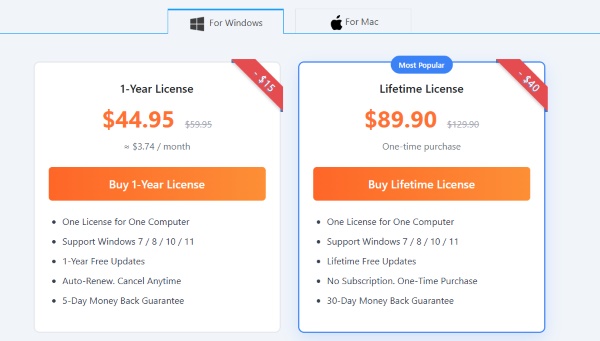
When it comes to purchasing the YouTube Music Converter, the software adopts a straightforward approach by eliminating monthly billing cycles. Users can choose between two evergreen pricing tiers: a yearly subscription or a one-time lifetime license. The program also offers excellent cross-platform compatibility, smoothly running on Windows 7, 8, 10, and 11, alongside macOS 11 through 26. And each purchase provides a single license that is strictly limited to one computer.
Note:
Software pricing is subject to frequent fluctuations due to limited-time promotions, such as their current 20th Anniversary Exclusive discounts. It is recommended to check the official checkout page for the most up-to-date pricing.
Part 2. Real Test on NoteBurner YouTube Music Converter
To provide an accurate assessment, we tested the software extensively on both Windows and Mac environments using a standard free account. Our goal was to see if the tool truly delivers on its promises of quality.
Conversion and Output Audio Quality
NoteBurner YouTube Music Converter captures the original 256kbps AAC stream with impressive accuracy. While it offers "lossless" output options like FLAC or WAV, it's important to note that these will not upscale the audio beyond YouTube's native 256kbps ceiling. However, for everyday listening, the exported tracks are virtually indistinguishable from the official live stream, featuring no noticeable compression artifacts or distortion.
Note:
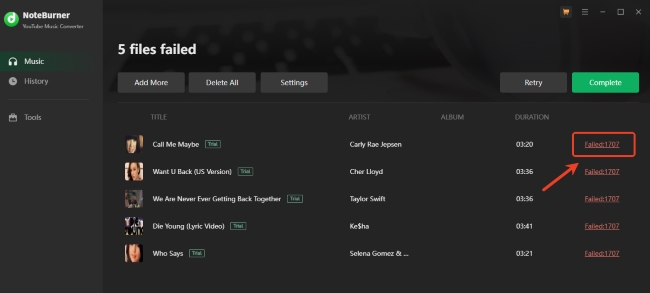
While our overall testing process was smooth, we occasionally encountered a "Failed 1707" error during multi-track conversions. To avoid this interruption, double-check that you are actively signed into your YouTube Music account within the software's built-in web player before you hit the convert button.
Real User Feedback
To provide the most objective assessment, we reviewed hundreds of genuine user experiences on Trustpilot regarding NoteBurner. Overall, the software boasts an impressive 4.5/5 rating. Most people love how straightforward and stable NoteBurner is, praising the crisp audio quality and the fact that their customer support is surprisingly quick to help out. But it's not totally without its headaches. The biggest warning from users is that ripping hundreds of songs too fast can actually flag your YouTube account and lead to a temporary ban. Also, a handful of people have grumbled about the billing side of things, mentioning that the auto-renewal and cancellation process can feel a bit overly complicated.
Here are the most representative core feedbacks based on real customer experiences:
 "I primarily use it for YouTube content, and it has been consistently reliable and efficient. The quality of the output is excellent, and I really appreciate the flexibility it offers when it comes to saving files."
— Alberto D.
"I've used Noteburner for years and love it. I've worked with their support several times, primarily for license issues when I get a new computer. They get back to me within hours with exactly the right information."— Ed
"The product is good and does what it's meant to do. However, this software and its functionality inherently contravenes streaming platform's Terms of Service and lead to account suspension. This is not disclosed on their website."— Rina T.
Part 3. How to Use NoteBurner YouTube Music Converter
Operating the NoteBurner YouTube Music Converter remains a user-friendly experience. The entire audio extraction process is streamlined down to just a few intuitive clicks, requiring no steep learning curve. The following step-by-step guide will walk you through the exact workflow of downloading playlists from YouTube Music.
- Step 1Launch the Application and Log In
Once you have installed the NoteBurner program on your Windows or Mac computer, open the application. You will immediately be greeted by the integrated YouTube Music web player. Simply sign in using either your Free or Premium YouTube account credentials to grant the software access to your personal library.
- Step 2Customize Your Audio Preferences
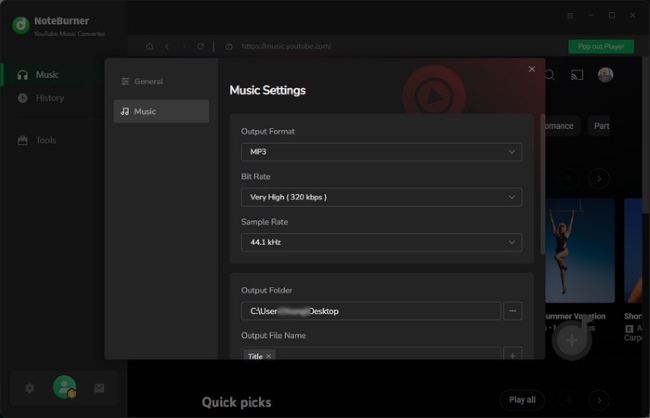
Before initiating any downloads, click the gear-shaped "Settings" icon to configure your ideal output profile. Here, you can define your preferred file format and designate a specific local folder where the exported files will be saved.
- Step 3Select Your Desired Playlists or Albums
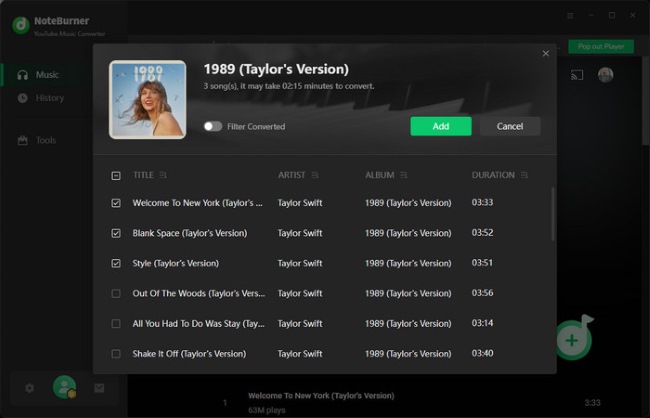
Once you are on the target music page, click the floating "+" icon suspended on the interface. A pop-up window will appear displaying the available tracks; simply check the boxes next to the songs you want and click "Add" to place them in your queue.
- Step 4Initiate the Conversion Process
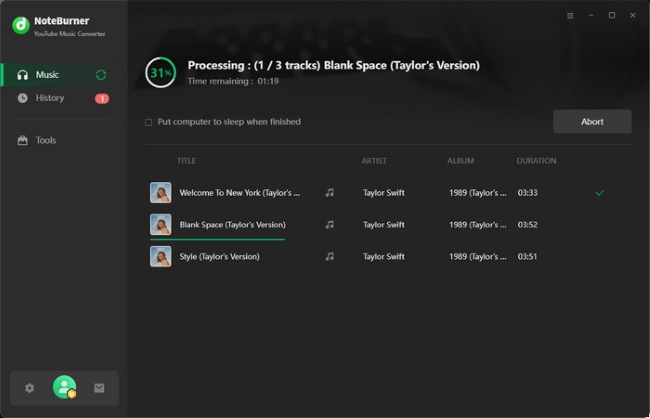
With your music successfully queued up and your parameters set, click the "Convert" button to start ripping audio from YouTube Music. After the progress bar completes, navigate to the "History" tab and click the small "Folder" icon to view your converted YouTube Music tracks.
Part 4. Ultimate Alternative to NoteBurner YouTube Music Converter
If your listening habits span across multiple platforms like Spotify, Apple Music, or Tidal, buying a separate converter for each service quickly becomes incredibly expensive. This is where DRmare Streaming Audio Recorder steps in as the perfect all-in-one solution. Rather than limiting you to one ecosystem, DRmare acts as a universal audio downloader that supports ten different streaming platforms through its built-in web players. It boasts a 30X download speed, making it a highly efficient way to build a massive, high-fidelity offline library without juggling multiple software subscriptions.
How to Download YouTube Music with DRmare Streaming Audio Recorder
Step 1. Launch DRmare and navigate to "Settings" via the bottm-left menu, then click on the "Music" tab. Just like NoteBurner, DRmare completely bypasses the audio compression issues. DRmare provides a more robust engine for high-fidelity output across various services. Simply select an uncompressed format and fine-tune the bitrate to perfectly match your needs.

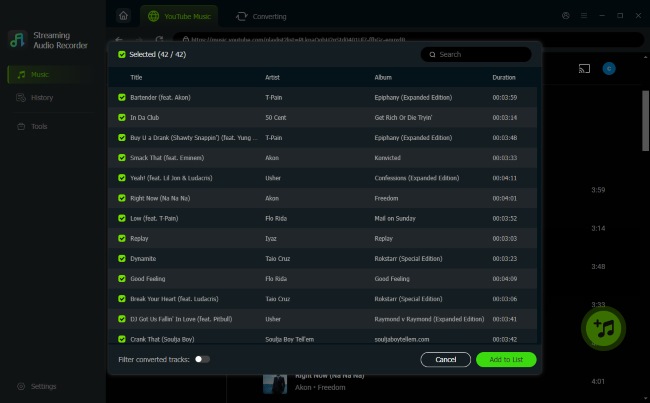
Step 2. Select the YouTube Music icon from the main interface to launch the integrated YouTube Music web player. Logging into your account here is highly encrypted. Locate your target playlist, click the "Add" button in the bottom-right, and choose "Add to List" to queue the batch.
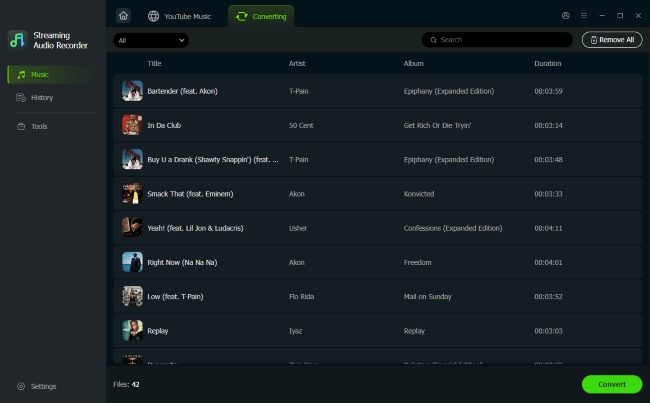
Step 3. Click the "Convert" button to rip your lossless files at a 30X speed. Once complete, you will find your permanent tracks neatly sorted in the "History" history tab, fully prepped for offline playback on any mobile device, console, or car stereo.
Comparison between DRmare and NoteBurner
| Feature | NoteBurner YouTube Music Converter | DRmare Streaming Audio Recorder |
|---|---|---|
| Primary Focus | Dedicated YouTube Music downloader | All-in-one recorder for 10 platforms |
| Supported Services | YouTube Music | YouTube Music, Spotify, Apple, Amazon, Tidal, etc. |
| Output Formats | MP3, AAC, WAV, FLAC, AIFF, ALAC | MP3, FLAC, WAV, M4A, AIFF, M4B |
| Conversion Speed | Up to 10X | Up to 30X |
| Batch Downloading | Yes | Yes |
| ID3 Tag Preservation | Yes | Yes |
| Download Content | Songs, Podcasts, Playlists, Music Videos | Songs, Albums, Playlists, Podcasts, Artist |
| Price(Yearly) | $44.95 | $79.95 (Monthly $29.95) |
Part 5. FAQs on NoteBurner YouTube Music Converter
Is NoteBurner YouTube Music Converter safe?
From a technical perspective, the official application is entirely secure. However, you must ensure you download it strictly from the official NoteBurner website. There is a potential risk to your YouTube account. downloading hundreds of songs in a very short timeframe could trigger Google's risk-control mechanisms. This unusual activity might lead to account warnings or even a permanent ban.
Does NoteBurner YouTube Music Converter require a Premium account?
No, a Premium subscription is not necessary. NoteBurner is fully compatible with both Free and Premium YouTube Music accounts. If you log in with a free account, the software will automatically filter out the embedded audio advertisements during the conversion process.
What is the limitation of the free trial version?
The free trial allows you to test the software's functionality, but it heavily restricts your output. You are only permitted to convert the first one minute of each audio track. To unlock full-length downloads and batch processing capabilities, you must purchase a valid license key.
Part 6. Final Verdict
Overall, NoteBurner YouTube Music Converter is a robust and user-friendly application that does exactly what it promises. If your digital music life exists exclusively within the YouTube ecosystem, it is a highly recommended investment. However, if you are looking for high-quality experience and maximum value, the DRmare Streaming Audio Recorder stands out as a vastly superior alternative.

 Home
Home





Download Lossless YouTube Music tracks to WAV, MP3, FLAC, M4A, AIFF, or M4B offline on any device without a YouTube Premium subscription.