





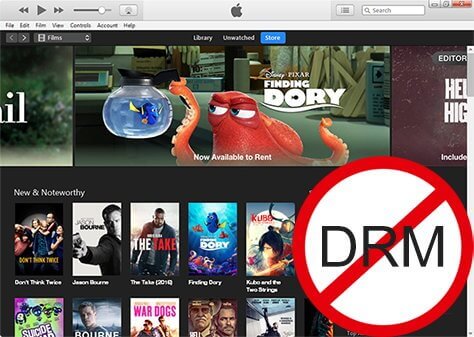
Can you remove DRM from iTunes movies and Apple TV movies? Apple has built one of the largest digital video ecosystems through iTunes purchases, the Apple TV app, and Apple TV website. However, many users eventually discover that their purchased or subscribed movies cannot be played freely outside Apple-approved devices.
Apple FairPlay DRM limits where purchased and rented videos can be played. Users researching DRM removal are usually looking for better device compatibility, personal backups, or ways to manage their legally purchased media library. iTunes Store purchases and rentals are protected with Apple FairPlay DRM and are usually stored as M4V video files, while Apple TV content uses streaming-based DRM protection. Because these two types of content work differently, the available solutions are also different.
Fortunately, there are several professional and powerful iTunes movie DRM removal and Apple TV DRM removal available that can remove DRM from Apple movies. This guide will walk you through the process safely and legally.
Legal Disclaimer:
This guide is intended for personal use and archiving only. We do not condone the unauthorized distribution or piracy of copyrighted content. Always ensure you are complying with your local fair-use regulations before proceeding.
Part 1. How to Remove DRM from iTunes Movies
To rip iTunes movies and TV shows as unprotected videos, you need a professional DRM removal for iTunes movies. Among multiple similar iTunes DRM remover, DRmare M4V Converter remains the one commonly used solution for lossless conversion.
With advanced iTunes video decryption technology, it can remove DRM from both purchased and rented iTunes movies and TV shows. The software supports accelerated conversion speeds, although actual performance depends on hardware and video length. It preserves lossless quality, including AC3 5.1 Dolby audio tracks, subtitles, closed captions, and more. The output resolution remains identical to the original files, supporting 1080P HD.
DRmare M4V Converter can also convert iTunes M4V videos to a variety of common formats like MP4, MOV, MKV, AVI, and more. This flexibility allows you to play your Apple movies on any device or player, such as Windows Media Player or Android phones, without the need for the iTunes app.
Moreover, DRmare offers extra features like the ability to preview and edit iTunes movies. You can add watermarks, apply audio effects, and customize your videos according to your preferences. In short, this software not only removes playback restrictions from iTunes movies but also enhances your viewing experience with its versatile editing tools.
How to Use the Best iTunes DRM Removal for Movies
To use the iTunes video DRM removal, first, please download and install it on your PC or Mac. The software supports both Windows and Mac computer. And it offers the free trial for you to try it out. Here we will take the Windows version as an example.
Note:
DRmare M4V Converter for Mac doesn't work with the latest macOS 26 Tahoe, so you can only use it on 10.12 and lower. Or you can switch to the Windows version, which is applicable for a wide range of Windows OS, including Windows 11, 10, 8, and 7.
- Step 1Launch DRmare M4V Converter
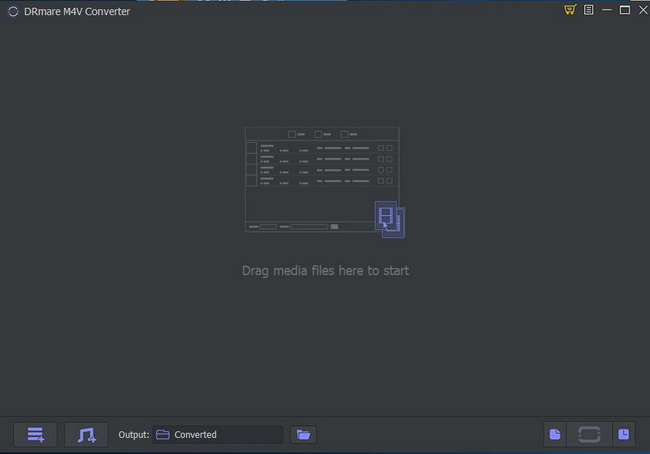
- Double click the DRmare M4V Converter program icon on the desktop to launch it. Then you will see the beautiful and user-friendly interface of it. And iTunes app will be launched at the same time automatically, which aims to help you add DRM-protected videos quickly.
- Step 2Add iTunes DRM movies to DRmare M4V Converter
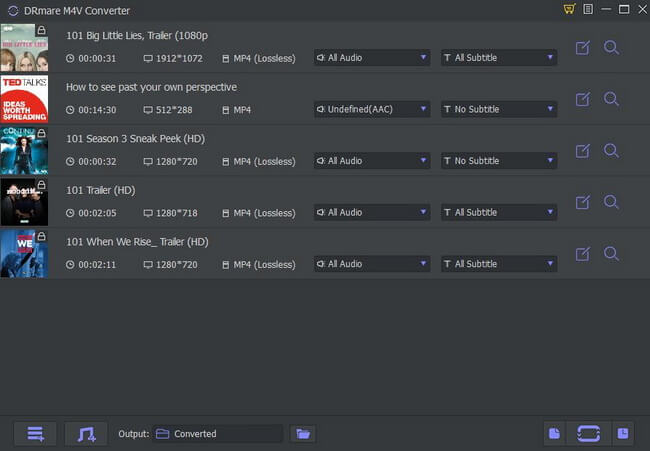
- You can click the second "Load iTunes Library" button from the bottom left to add DRM iTunes video files. You can either browse the iTunes library or computer folder to choose and import your iTunes M4V movies. Apart from that, you can also drag and drop the iTunes videos to the main screen of this excellent iTunes DRM removal.
- Step 3Choose lossless MP4 format for iTunes movies and TV shows
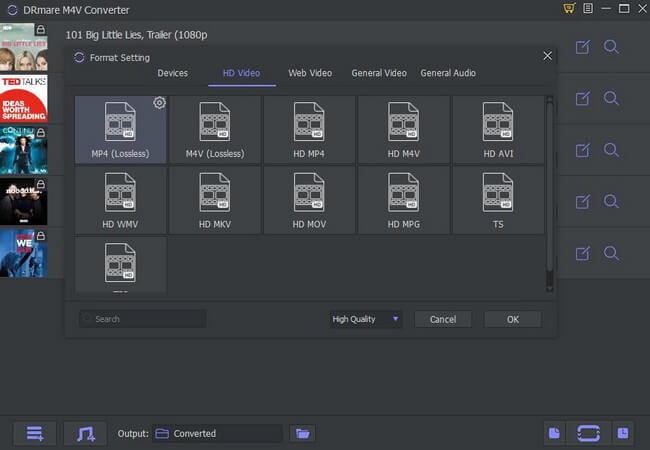
- To keep the original quality, we would suggest you to choose the original iTunes video format lossless M4V or MP4. It won't change any quality of your video content but just remove DRM from Apple movies. Besides, you can edit the iTunes videos such as adding a watermark, so as to make it look more personalized.
- Step 4Remove DRM from iTunes movies
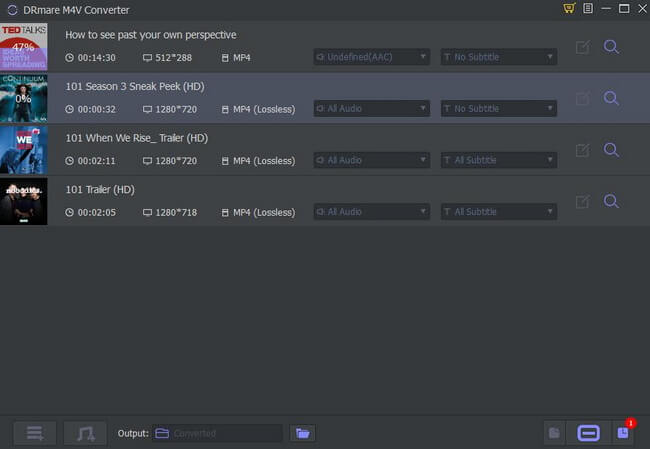
- The settings won't take effect unless you click the "Convert" button at the bottom right. Please just simply tap it. The software will remove Apple DRM from movies and convert iTunes files to MP4 at up to 30X speed in batch. Afterwards, you can locate the DRM-free iTunes video files on the history folder and then watch iTunes movies offline on any device or player as you like.
Video Tutorial: How to Remove DRM from iTunes TV Shows/Movies
Part 2. How to Remove DRM from Apple TV Movies and Shows
Apple has officially unified its video ecosystem. The "iTunes Movies" and "TV Shows" branding has been retired in favor of the all-encompassing Apple TV app.
- On macOS: iTunes is a thing of the past. Video content is now managed exclusively by the standalone Apple TV app, while music has moved to Apple Music.
- On Windows: While legacy iTunes is still available for purchased movies and TV shows, Apple now encourages Windows 11 users to use the native Apple TV app (available on the Microsoft Store) for a modern, 4K-capable viewing experience.
The Apple TV app now serves two purposes:
- The Store: Where you can still buy or rent individual blockbuster movies (the successor to the iTunes Store).
- Apple TV+: A subscription-based streaming service for Apple Originals like Severance or Ted Lasso.
Historically, DRmare M4V Converter was the go-to solution for removing DRM from content downloaded directly from the iTunes library (M4V files). However, as Apple shifted to the "Streaming First" model, the way videos are encrypted has evolved.
Modern streaming content, especially Apple TV originals isn't stored as a simple file on your hard drive. This is where the DRmare Apple TV Downloader becomes essential for 2026. This software is designed to directly address the streaming-based DRM restrictions of Apple TV. It operates by utilizing the built-in Apple TV web player interface, allowing it to download the video stream and simultaneously strip the encryption, saving the content as an unprotected MP4 or MKV file. You can keep and watch them forever on any device, without the 30-day re-verification limit.
How to Use the Best Apple TV DRM Removal
- Step 1Launch and Sign In to Apple TV within DRmare
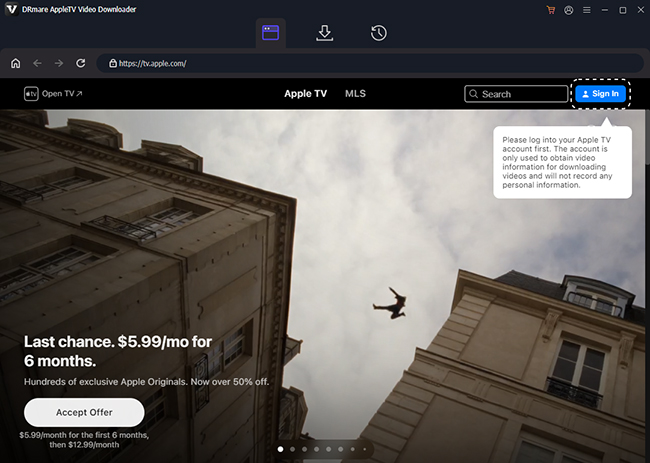
Download, install, and open the DRmare Apple TV Downloader. The software features a built-in browser that connects to the Apple TV web player. Click the "Sign In" button to log in to your Apple ID with an active Apple TV subscription.
- Step 2Select and Customize Apple TV Video Output
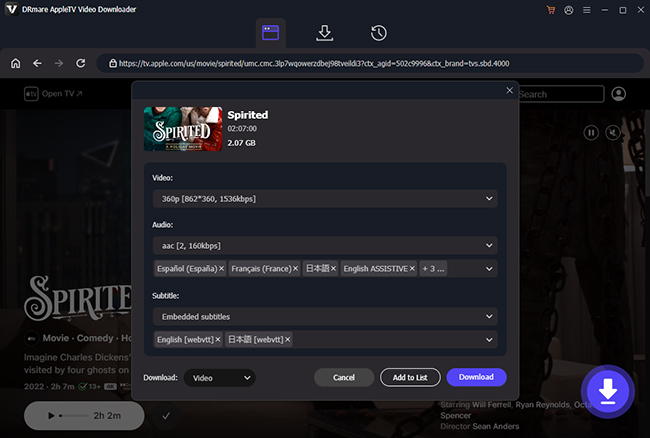
Navigate to the Apple TV movie or show you wish to download. Click the "Download" button. A settings window will pop up where you can choose the video format (MP4 or MKV), select your preferred video quality (e.g., 1080P), and choose which audio tracks (like 5.1 surround sound) and multilingual subtitles you want to keep.
- Step 3Start to Remove Apple DRM from Movies
Click the big "Download" button, DRmare Apple TV DRM removal will begin analyzing the video and quickly download and convert the Apple TV content to your chosen MP4 or MKV files. Once complete, you can find the videos in the output folder and enjoy them offline on any device, without any limitations.

Part 3. Compare 2 Ways to Remove DRM from Apple Movies
To evaluate how these tools handle Apple video conversion, we focused on several practical areas instead of only looking at feature lists.
Test Environment:
- Operating system: Windows 11 Pro
- Processor: Intel Core i7
- Memory: 32GB RAM
- Network connection: High-speed broadband
- Test content: Purchased iTunes movie sample
This article explores two effective methods for removing DRM from Apple shows and movies, whether you've purchased, rented, or subscribed them. We'll compare these two DRM removal tools in detail, helping you choose the best option to unlock your iTunes and Apple TV files and enjoy them freely.
| Features | DRmare M4V Converter | DRmare Apple TV Downloader |
|---|---|---|
| Best for | Legacy iTunes Purchases/Rentals | Streaming Apple Movies and Shows |
| Supported macOS | macOS 10.12 or below | macOS 10.13 or above |
| Supported Windows OS | Windows 11, Windows 10 | Windows 11, Windows 10 |
| Supported iTunes version | 12.13 | Not Need |
| Main content type | Local M4V files | Apple TV streaming content |
| video resolution | 480P, 720P, 1080P | 480P, 720P, 1080P |
| Keep subtitles and meta info | ✔ | ✔ |
| Output video formats | MP4, MKV, M4V, AVI, etc. | MP4 or MKV |
| Remove DRM from iTunes rentals | ✔ | ✘ |
| Easy to use | ✔ | ✔ |
| Rates | ⭐️⭐️⭐️⭐ | ⭐️⭐️⭐️⭐⭐ |
Quick recommendation:
- Purchased iTunes movies stored locally: Choose an M4V converter.
- Modern Apple TV content: Choose a tool designed around the Apple TV workflow.
- Only watching within Apple devices: The official Apple TV app remains the simplest option.
Part 4. FAQs about iTunes/Apple TV DRM Removal
The following are the frequently asked questions we have listed from our users, you can also take a look.
How to Remove DRM from iTunes Movies Free?
If you are on a strict budget, Requiem is an open-source tool to remove DRM from iTunes movies for free, but it comes with significant compatibility hurdles.
- Requirements: Requires iTunes 10.7 and Java.
- Limitations: It does not support 1080P (capped at 720P) and cannot handle iTunes rentals or any content purchased after 2023.
- Verdict: Only recommended for technical users with access to a dedicated legacy "bridge" PC.
Are iTunes Movies DRM Free?
No, iTunes movies and TV shows have DRM protection. DRM, or Digital Rights Management, is a technology used by content providers like Apple to protect their digital media from unauthorized copying and distribution. iTunes movies and TV shows are DRM-protected in the M4V format. These movies can only be played on authorized Apple devices or through iTunes.
Is It Legal to Use iTunes Movie DRM Removal and Apple TV DRM Removal?
Can You Crack iTunes Movie DRM on Mac 10.13 High Sierra or Above?
Unfortunately, you can't do that at least for the time being. Most similar iTunes DRM removal tools don't support 10.13 High Sierra and above macOS operating systems due to its deep encryption, so does DRmare M4V Converter and Requiem. It is highly recommended you to do this on a Windows PC or 10.8~10.12 Mac system.
Can I Remove iTunes Movie DRM with HandBrake?
No, HandBrake is not compatible with protected iTunes movies and TV shows.
What Benefits Are of Removing DRM Protection from Apple Movies?
- Watch your Apple movies on any Apple-unauthorized device or media player without the iTunes or Apple TV app installation.
- Back up Apple movies and store them on different devices.
- Freely edit Apple movies by adding some effects and watermarks, etc.
- Keep Apple rentals on your computer beyond 24 hours
Part 5. The Verdict
As Apple moves toward a strictly controlled streaming model, maintaining a personal offline backup is the only way to ensure your library remains accessible regardless of subscription status or internet connectivity.
For legacy purchases, the DRmare M4V Converter is your best bet. For modern streaming content, the DRmare Apple TV Downloader provides the ultimate freedom to watch your favorite shows on Android, Plex, or any non-Apple player.

 Home
Home





5X download Apple TV streaming movies and all episodes on show to WP4 or MKV with zero video quality loss and watch them offline on all devices without an Apple TV subscription.