





Qobuz has distinguished itself in the streaming landscape by prioritizing high-fidelity audio over heavily compressed formats. With a vast library of bit-perfect FLAC and Hi-Res music, Qobuz has become a favorite among audiophiles and serious music listeners. In this guide, we'll explore five effective ways to download Qobuz to FLAC, covering both official solutions and third-party Qobuz FLAC downloaders to help you play Qobuz offline without sacrificing audio quality.
Part 1. Does Qobuz Have FLAC
Yes, Qobuz supports official downloads in FLAC, ALAC, WAV, AIFF, WMA, AAC, and MP3 formats. Because Qobuz is natively built on the FLAC format, it delivers real, bit-perfect audio that faithfully preserves the original studio recording without the use of proprietary containers or lossy compression.
Furthermore, Qobuz also offers extensive 24-bit FLAC content. Millions of tracks are available in Hi-Res quality, ranging from 24-bit/44.1 kHz up to 192 kHz. This higher bit depth and sample rate result in a more detailed, dynamic listening experience compared with 16-bit FLAC or compressed MP3 files.
Part 2. How to Download Qobuz FLAC in Official Methods
Qobuz offers two official paths to save your Qobuz music in FLAC format: Importing for offline mobile listening and downloading for permanent ownership. While both paths utilize the FLAC container, they serve very different purposes depending on whether you want to stream Qobuz offline or build a lifelong digital archive.
| Feature | Qobuz Subscription | Qobuz Store Purchase |
|---|---|---|
| Download Format | FLAC, MP3 | FLAC, ALAC, WAV, AIFF, WMA, AAC, MP3, and even DSD/DXD |
| Audio Quality | Hi-Res 24-Bit/192 kHz | Hi-Res 24-Bit/192 kHz |
| File Flexibility | Encrypted (App only) | DRM-Free (Play anywhere) |
| Ownership | Rental (Access depends on active membership) | Permanent (Digital ownership) |
| Cost | Monthly/Annual Subscription Fee | Per Album or Per Track Price |
Download Qobuz FLAC with a Subscription
If you have an active Qobuz Studio or Sublime subscription, you can download Qobuz 24-bit FLAC files directly to your device. However, it is important to note that these files are DRM-protected and only playable within the Qobuz ecosystem.
On Computer
Step 1. Launch the official Qobuz desktop app and log in to your premium account. Use the search bar or your library to find the specific Qobuz FLAC list or track you wish to save.
Step 2. To begin the process, tap the "three-dot" icon next to the track or playlist and select "Import". Then choose "CD 16-Bit/44.1 kHz" or "Hi-Res 24-Bit/ up to 96 kHz" for your lossless quality from Qobuz.
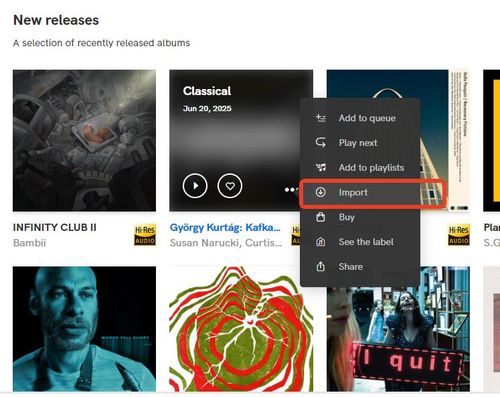
Step 3. To access your saved music, head to the "Offline Library" tab located in the app's sidebar. From here, you can enjoy your downloaded Qobuz FLAC files anytime.
On Mobile
Step 1. Open the Qobuz app on your iPhone or Android, and navigate to the Hi-Res album you want to download. Go to your settings and ensure they are configured to download in "Hi-Res" to get the full 24-bit FLAC experience.
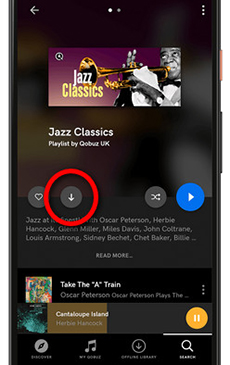
Step 2. Tap the "Download" icon near the playlist. Once the progress bar is complete, you can find all your offline content within the "My Qobuz" section under the "Offline Library" filter.
Purchase Qobuz FLAC Tracks from the Qobuz Store
While streaming is convenient, purchasing music from the Qobuz Store can help you build a high-resolution collection of Qobuz music forever. Unlike subscription-based downloads, these files are completely DRM-free, meaning you can transfer them to any device and play them freely.
Download Purchased Qobuz Music on a Computer
To download your permanent Qobuz FLAC files, you have two primary options: using the specialized Qobuz Downloader utility for larger batches or downloading directly through your web browser.
Step 1. Access the Qobuz website via your browser and sign in. Head to the "Download Store" section to find the Qobuz music you would like to keep locally.
Step 2. Once you've located your music, click the "Buy the album" button. You will be prompted to choose your quality—select Hi-Res to ensure you are getting the best Qobuz FLAC version.
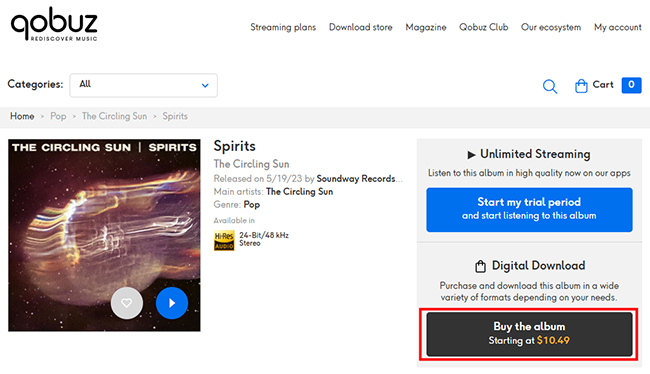
Step 3. Go to your profile and select "My Purchases", and you will see two main methods to retrieve your files: "Download with Qobuz Downloader" or "Download track by track".
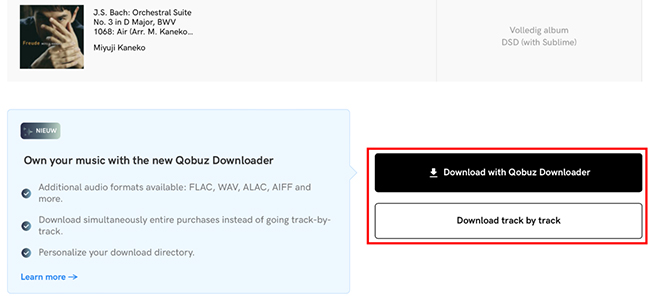
Using the Qobuz Downloader: Install it on your computer and select FLAC as your preferred format, then hit "Start download". It handles everything in the background and organizes your folders automatically.
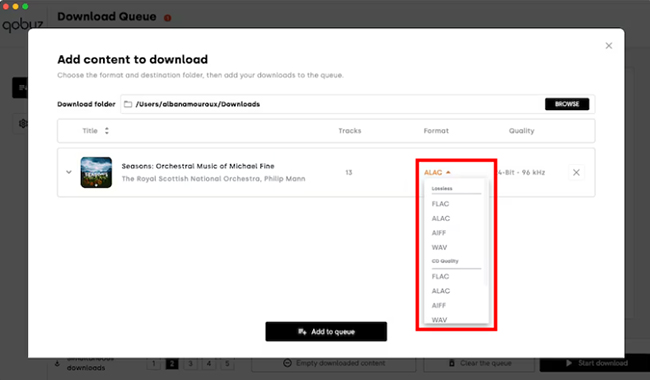
Manual Web Download: If you only need a few tracks, click the "Download" button. Use the dropdown menu to confirm the FLAC format before saving each file to your local drive.
Step 4. Once the download is finished, your DRM-free FLAC files are ready.
Note:
The Qobuz mobile app does not support downloading permanently purchased music files directly to a phone. To access your purchased Qobuz tracks on a mobile device, you need to transfer the downloaded Qobuz files from your computer to the phone via a USB cable or Google Drive.
Part 3. How to Download Qobuz to FLAC with Desktop Downloader🔥
While the official methods provide a solid solution, they often leave you feeling restricted. Subscription "imports" are locked behind DRM, preventing you from using them on media players. On the other hand, buying every album individually from the Store can be prohibitively expensive if you wish to build a large library.
This is where DRmare Streaming Audio Recorder becomes invaluable. These tools bridge the gap by allowing you to save your subscription streams as permanent, DRM-free FLAC files on your local drive. By utilizing the DRmare Qobuz FLAC downloader, you can bypass restrictive app-only limitations and preserve Hi-Res metadata with the original bit depth and sample rate, enabling you to get a truly portable Qobuz FLAC list without the high cost of individual album purchases.
Save Qobuz Music using DRmare FLAC Downloader
- Step 1Configure Your Audio Preferences
Begin by launching the DRmare software on your desktop. To ensure the highest quality from Qobuz, click the "Settings" icon in the lower-left corner. Within the "Music" tab, set your output format to FLAC. You can also adjust the bit depth to 24-bit and the sample rate up to 192 kHz to perfectly match the original Qobuz 24-bit FLAC source.

- Step 2Access Qobuz via the Built-in Interface
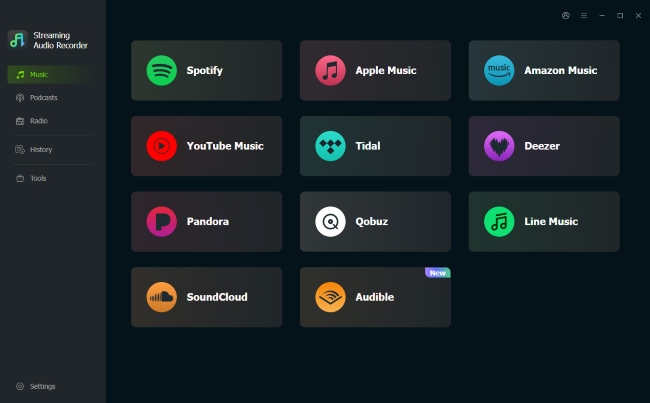
Return to the main dashboard and click on the Qobuz icon from the list of available streaming platforms. Then log in to your Qobuz account on the built-in browser window, which allows the software to communicate directly with the streaming server for a more stable download Qobuz FLAC experience.
- Step 3Add Your Qobuz Tracks to Conversion Queue
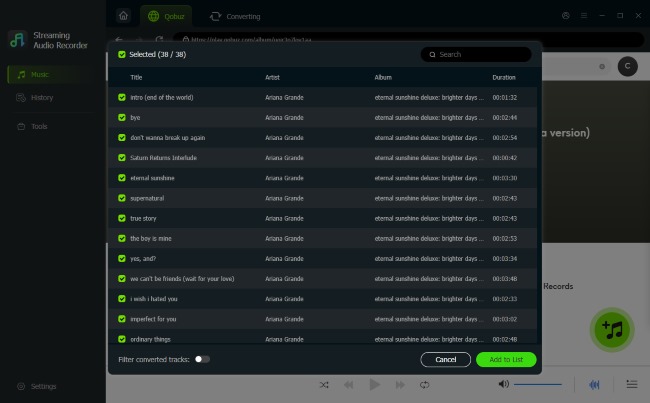
Find your favorite Hi-Res albums or tracks from Qobuz. Once you have located your music, click the "Add" (+) button on the interface. After reviewing your selection, click "Add to list" to move these tracks into the final conversion queue.
- Step 4Download the Qobuz FLAC List
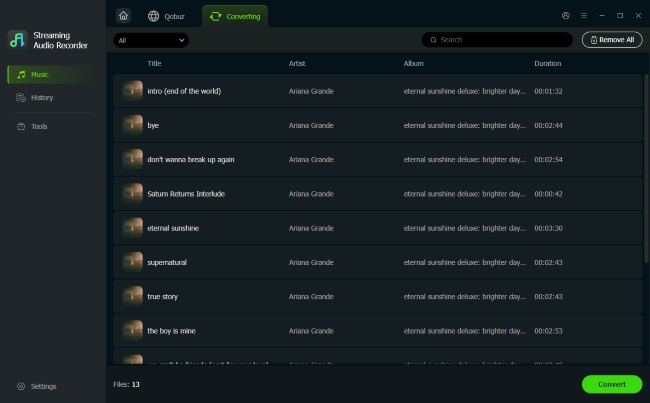
With your queue ready, simply click the "Convert" button. The software will efficiently process the Qobuz to FLAC conversion, preserving all original metadata and ID3 tags. Once finished, you can find your unprotected Qobuz files under the "History" tab and transfer them to any media player.
Part 4. Convert Qobuz to FLAC via Free Online Tools
If you prefer not to install desktop software, you can attempt an online Qobuz to FLAC converter like Lucida. These sites act as "rippers" that fetch the audio data directly from the streaming servers.
Get Qobuz to FLAC Free Download via Online Tools
Step 1. Copy the URL of the Qobuz track from the Qobuz web player or app.
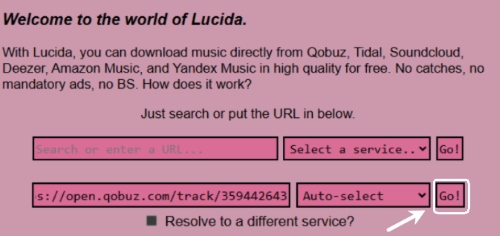
Step 2. Open the Lucida website, paste the link into the search bar, and click "Go" to load the content.
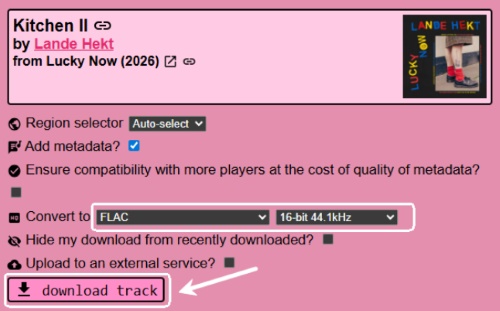
Step 3. Choose FLAC as the output quality, then click "Download Track" to begin the download process.
Test Result:
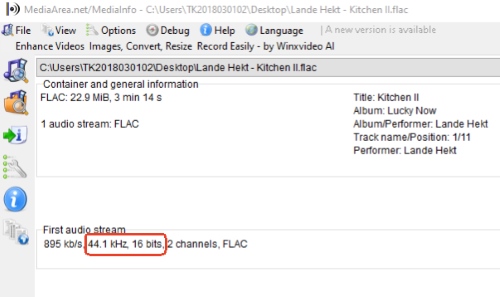
Actual testing has demonstrated that Lucida's Qobuz-to-FLAC conversion consistently delivers on its promises. By analysis on the downloaded files, the audio maintains in 16-bit FLAC without loss or re-compression.
Part 5. Get Qobuz FLAC by Command-Line Qobuz Downloader
If you want to build a large offline FLAC library, you may shift from official options to free and open-source tools. Among them, Qobuz-dl stands out as a powerful choice for tech-savvy audiophiles. This command-line downloader connects directly to Qobuz's internal API, enabling you to download raw FLAC and 24-bit Hi-Res files. If you're comfortable using a terminal and managing music collections in bulk, Qobuz-dl delivers unmatched precision and flexibility.
Note:
You must have a valid Qobuz subscription to authenticate with the API and access the high-quality Qobuz FLAC streams.
Download Qobuz to FLAC via Qobuz-dl
Step 1. Ensure Python 3.6+ is installed on your system. Open your Terminal (macOS/Linux) or Command Prompt (Windows) and enter the following commands to install qobuz-dl via the pip manager:
Windows: pip3 install windows-curses pip3 install --upgrade qobuz-dl
macOS/Linux: pip3 install --upgrade qobuz-dl
Step 2. Link the tool to your subscription to access Qobuz 24-bit FLAC streams. Run the command:
Windows: qobuz-dl.exe
Mac/Linux: qobuz-dl
Then enter your email and password when prompted. You can also set your default download folder and quality at this stage. To reset these settings later, simply use the command qobuz-dl -r.
Step 3. Open the Qobuz web player or desktop app, find the album or playlist you want to archive, and use the "Share" button to copy the link to your clipboard.
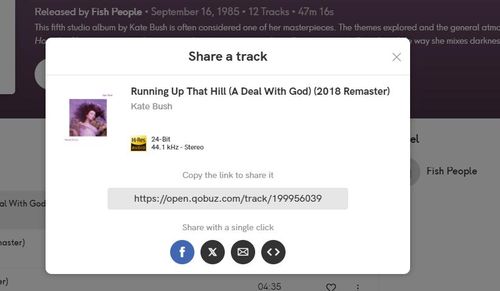
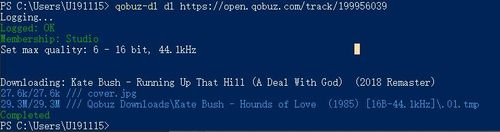
Step 4. Construct your command in the terminal using the quality flag to ensure you get the maximum 24-bit Hi-Res resolution:
qobuz-dl dl {Paste Your URL} -q 27
Part 6. Comparison of Qobuz FLAC Downloader
| Method | Audio Quality | Supported Format | Platforms | DRM-Free | Price |
|---|---|---|---|---|---|
| Official Subscription | Up to 24-bit/192kHz | FLAC, ALAC, WAV, AIFF, WMA, MP3, AAC | Windows, macOS, iOS, Android | No | Monthly Fee |
| Qobuz Store | Up to 24-bit/192kHz | FLAC, WAV, AIFF, ALAC, DSD, DXD, MP3, AAC | Windows, macOS, Web Browser | Yes | Per Album Price |
| Drmare | Up to 24-bit/192kHz | FLAC, MP3, WAV, M4A, AIFF, M4B | Windows, macOS | Yes | Software License |
| Lucida | 16-bit/44.1kHz | FLAC, MP3, M4A AAC, WAV, OGG | Web Browser | Yes | Free |
| Qobuz-dl | Up to 24-bit/192kHz | FLAC, ALAC, AIFF, WAV, WMA, DSD, DXD, MP3, AAC | Windows, macOS, Linux | Yes | Free |
Depending on how you prefer to listen to and manage your music, the five methods above offer different ways to download Qobuz in FLAC. Official options provide stability and guaranteed quality, but they often involve DRM limitations or higher costs. In contrast, third-party downloaders focus on flexibility, allowing you to build a fully portable FLAC library that works across any device.

 Home
Home




User Comments
Leave a Comment