





If you are looking for a way to export a Spotify playlist to CSV, you will come across Exportify. However, you will quickly realize that two entirely separate open-source projects share the same name: Exportify.app and Exportify.net. While both leverage Spotify's Web API to extract playlist information into CSV spreadsheets, they serve entirely different workflows:
- Exportify.app (maintained by watsonbox): Optimized for playlist backup, library management, and bulk exporting.
- Exportify.net (maintained by pavelkomarov): Built for music analytics, statistical exploration, and Python-driven visualization.

This Exportify review breaks down how both tools function under Spotify's API framework, compares their capabilities side-by-side, and helps you choose the right project for your needs.
Quick Verdict: Which Exportify Should You Use?
- Choose Exportify.app if your primary goal is to back up your Spotify library, export multiple playlists at once into a ZIP archive, or search your collection using advanced query filters.
- Choose Exportify.net if you want to analyze your listening habits, examine audio attributes (valence, tempo, popularity), or run statistical scripts via Jupyter Notebooks.
Part 1. Exportify.app Review: The Ultimate Playlist Archival & Backup Tool
Exportify.app is the more feature-complete utility for everyday users and music collectors who want a reliable snapshot of their Spotify collection. Its GitHub repository describes it as a tool for exporting or backing up Spotify playlists through the Web API, and the project has developed considerably beyond a simple CSV exporter.
The application runs in the browser and uses Spotify authorization to access the playlists available to the signed-in account. It does not save the user's data.

Key Capabilities of Exportify.app
Bulk Export & ZIP Bundling: The standout "Export All" feature retrieves every playlist associated with your Spotify account and packages them into individual CSV files inside a single ZIP download.
Advanced Search Syntax: Rather than manually scrolling through large collections, you can filter playlists using native query parameters:
-
public:true/public:false— Filter by visibility. -
collaborative:true/collaborative:false— Separate shared playlists. -
owner:me— Isolate playlists created by your account.
Extensive Metadata Extraction: Captures essential track properties, including Track URI, Track/Artist/Album Names, Duration, Release Date, Explicit status, ISRC codes, and the date/user responsible for adding each item.
Modern UI & Privacy: Features a responsive interface with dark mode and multi-language support (10+ languages). It operates completely client-side in your browser via Spotify OAuth, meaning your credentials and tokens are never stored on external servers.
Exportify.app Testing Experience
In practical use, Exportify.app feels closer to a dedicated playlist backup utility than a developer-oriented data project. The interface makes the basic workflow straightforward: authorize Spotify, select a playlist, choose the desired export options, and generate the CSV.
The Export All function is particularly useful for users with many playlists, although larger collections naturally require more API requests. Exportify itself warns that exporting a large number of playlists or very large playlists can take some time.
One limitation is that the result is still a metadata file rather than a collection of playable music files. The CSV can preserve Spotify track URIs, which can make it useful for reconstructing playlists, but it does not turn the Spotify songs into MP3, FLAC, WAV, or other local audio files.
Exportify.app Pros and Cons
Pros
 Supports individual and bulk playlist exports
- Useful playlist search and filtering
- Rich CSV metadata options
- Browser-based workflow
- Open-source project with an active development history
- Supports multiple languages and dark mode
Cons
 It exports playlist information rather than audio files
- Large exports can take longer because of API requests
- Some documented fields depend on what Spotify's current API makes available
- Spotify playlist folders cannot be exported through the Web API
Part 2. Exportify.net Review: The Data Science & Analytics Sandbox
Exportify.net takes a different approach. The project describes itself as a way to export Spotify playlist metadata for analysis or safekeeping. While it still exports your music, its main attraction is an included Jupyter Notebook. This allows users with basic Python knowledge to run complex data visualizations on their listening habits right out of the box.

Key Features of Exportify.net
Integrated Jupyter Notebook Workflow: The core value of Exportify.net is what happens after the CSV is generated. The repository includes a pre-configured Python notebook designed to parse and plot playlist data.
One-Click Cloud Launch (MyBinder): You can launch the analytics environment directly in your browser via Binder without installing Python, Pandas, or Matplotlib locally.
Statistical Visualizations: Built specifically to plot artist distribution, genre frequencies, release-year histograms, track popularity scores, key signatures, and audio feature correlations.

Exportify.net Testing Experience
The main difference becomes apparent after the CSV export. Exportify.net is less about managing a large playlist library and more about turning playlist data into something that can be analyzed.
The browser-based export itself is relatively straightforward, while the analysis stage requires either the supplied notebook or the Binder workflow. That extra step may be appealing to technically minded users but can feel unnecessary if the only goal is to preserve a playlist list.
Exportify.net Pros and Cons
Pros
- Exports useful playlist metadata
- Includes data suitable for music analysis
- Provides a Jupyter Notebook
- Can be used through Binder
- Open-source and inspectable
Cons
- Less focused on bulk playlist management
- The analysis workflow is more technical
- The interface is relatively simple
- Current Spotify API changes may affect some historically documented fields
Part 3. How to Export Your Spotify Playlists with Exportify
The extraction process is designed to be user-friendly and requires no technical expertise to complete.
Step 1. Navigate to the official Exportify website (exportify.net or exportify.app) and click the Get Started button.

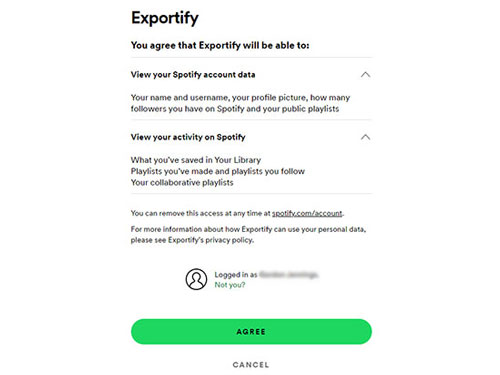
Step 2. Log in using your Spotify credentials when prompted by the official secure authorization screen, and click the Agree to agree to the read-only permissions.
Step 3. Browse your loaded library on the dashboard. For Exportify.app, you can use the search bar to filter by specific moods or collaborative statuses.
Step 4. Click the Export button next to an individual playlist, or choose the Export All option at the top of the page.
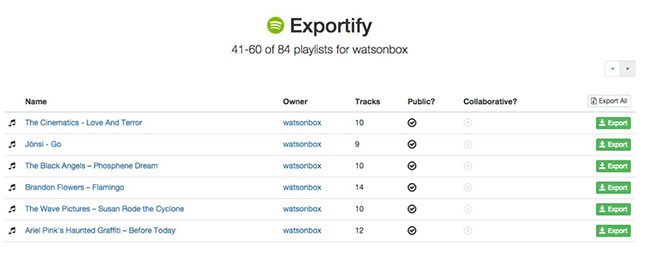
Step 5. It will save the resulting CSV or ZIP file to your local device. You can visit and use them as you like.
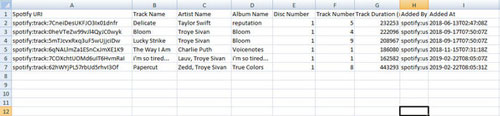

What Can You Actually Do with the Exported CSV?
- Disaster Recovery: Reconstruct lost or accidentally deleted playlists using your local text backup.
- Spreadsheet Curation: Open the file in Excel or Google Sheets to sort and filter tracks by release decade, artist, or custom criteria (e.g., DJ setlists).
- Platform Migration: Feed track metadata into third-party conversion tools to rebuild your library on a different streaming service.
Part 4. Side-by-Side Comparison: Exportify.app vs. Exportify.net
The two projects share the same basic idea, but their priorities are different.
| Feature / Capability | Exportify.app (watsonbox) | Exportify.net (pavelkomarov) |
|---|---|---|
| Official website | exportify.app | exportify.net |
| GitHub | https://github.com/watsonbox/exportify | https://github.com/pavelkomarov/exportify |
| Primary Focus | Playlist Backup & Library Management | Music Data Science & Visual Analytics |
| Stars | 4.2K | 721 |
| Forks | 535 | 80 |
| Bulk Export (ZIP) | ✅ Yes (One-click batch CSV export) | ✅ Yes (One-click batch zip export) |
| Search & Filtering | ✅ Advanced search syntax (owner:me, etc.) |
❌ None |
| Data Analysis Tools | ❌ None | ✅ Jupyter Notebook & Binder integration |
| User Interface | Modern, responsive, dark mode, 10+ languages | Minimalist / Developer-centric |
| Target Audience | General listeners, DJ collectors, archivists | Data analysts, researchers, Python developers |
Part 5. Is Exportify Safe to Use?
Safety is worth considering because both Exportify projects require Spotify authorization. Both applications are open-source and rely on Spotify's official OAuth 2.0 protocol.
- No Password Sharing: You authenticate directly on accounts.spotify.com. Third-party apps never see your login password.
- Access Scope: Exportify requests read-only permissions (such as playlist-read-private and playlist-read-collaborative) to fetch metadata.
- Revoking Access: You can remove third-party authorization at any time by clicking the Log Out button on both Exportify websites.
Part 6. The Best Exportify Alternatives
The right alternative depends entirely on what you want to achieve with your Spotify library. If a CSV spreadsheet doesn't fit your needs, here are the two best routes:
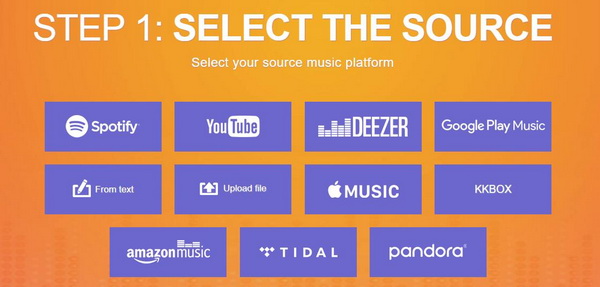
For Cross-Platform Migration: TuneMyMusic
If you just want to move your playlists from Spotify to another service like Apple Music or Tidal, skip the manual spreadsheet. TuneMyMusic directly transfers and syncs your library between streaming platforms automatically.
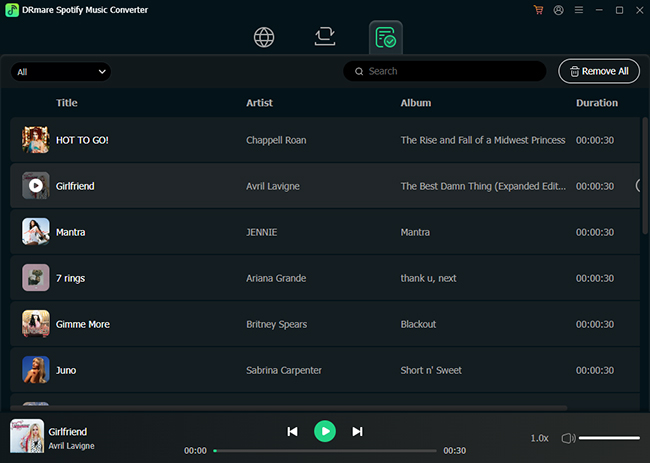
For True Offline Listening: DRmare Spotify Music Converter
Exportify only saves text metadata; DRmare Spotify Music Converter actually saves the music. If your goal is to get local audio files (like MP3, FLAC, or WAV), this is the tool to use. It operates entirely through a built-in Spotify Web Player, so you don't even need to have the Spotify desktop app installed to download your tracks.
Part 7. Final Verdict: Is Exportify Worth Using?
Exportify is worth considering if you want a straightforward way to preserve Spotify playlist information outside the Spotify app, but the two projects should not be treated as interchangeable.
- Go with Exportify.app if you want an intuitive, fast, and thorough backup of your Spotify playlists.
- Go with Exportify.net if you want to analyze your listening trends and explore your music data in Python.
Either way, keep the limitation in mind: Exportify exports Spotify data; it does not provide a local copy of the music itself.

 Home
Home





User Comments
Leave a Comment