





If you're a Spotify user looking for a way to convert your favorite playlists, albums, artists, or individual tracks to MP3, SpotDown (spotdown.org) might be the solution you're searching for. It has recently gained traction as a quick, no-installation solution for downloading Spotify music. But does it actually deliver on its promises?
To give you an accurate and helpful assessment, I bypassed the marketing fluff and put this tool through rigorous real-world testing. In this comprehensive SpotDown review, we will explore its actual features, pros, cons, uncover its hidden limitations, and alternatives to help you decide whether SpotDown is worth your time.
Tips:
SpotDown is acceptable for occasionally downloading a single track, provided you use a robust ad-blocker. For serious music collectors who want true 320kbps/lossless quality and effortless playlist batch downloads, you can use a premium desktop tool like DRmare Spotify Music Converter.
Part 1. What Is SpotDown?
Basic Info:
- Link: https://spotdown.org/
- Availability: Online Free
- Support Music Content: Songs, Albums, Playlists, and Artists
- Support Output Format: MP3 Only
- Recommend Level:⭐⭐⭐
SpotDown is a free, entirely web-based application designed to convert and download Spotify tracks, playlists, artist, and albums into MP3 format. Because it operates directly from your web browser, it requires no software installation or account registration. This cross-platform compatibility means you can technically use it on Windows, macOS, Android, and iOS devices with equal ease.
The primary appeal of the tool lies in its accessibility and zero-cost barrier to entry. Users are drawn to the promise of bypassing Spotify Premium's offline listening restrictions without paying for third-party desktop software. However, as with most free online Spotify downloaders, the underlying mechanics of how it sources this audio reveal a much more complicated reality.
Part 2. SpotDown Features with Real Tested Results
When evaluating SpotDown, we must look beyond the initial interface and examine how it performs under stress. Here is a breakdown of its core features based on real-world testing.
Note:
Testing was conducted on:
- Device: Windows 11 / macOS
- Browser: Chrome latest version
- Network: Standard broadband connection
- Content: Single track downloads and playlist-based batch attempts
Ease of Use and Interface
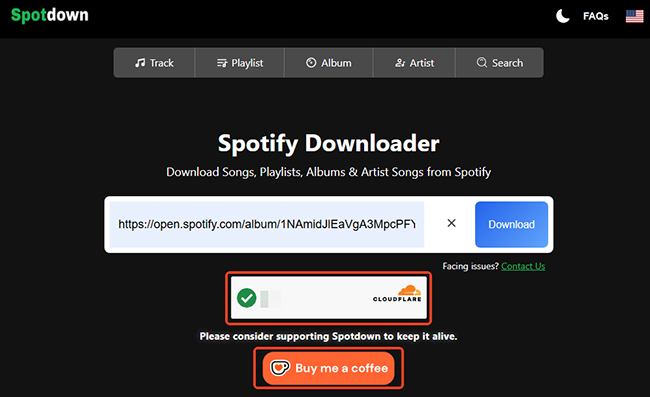
At first glance, SpotDown presents a deceptively clean and minimalist user interface. There are no immediate banner ads cluttering the homepage. It features only a simple search bar prompting you to paste a music link, along with a "Buy Me a Coffee" button for accepting donations. The intended workflow is incredibly straightforward for the average user.
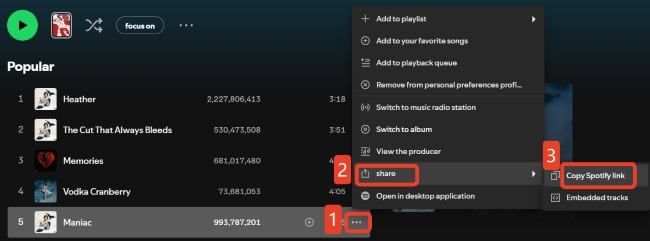
Step 1. Copy the URL of the specific track, album, or playlist directly from the Spotify app or web player.
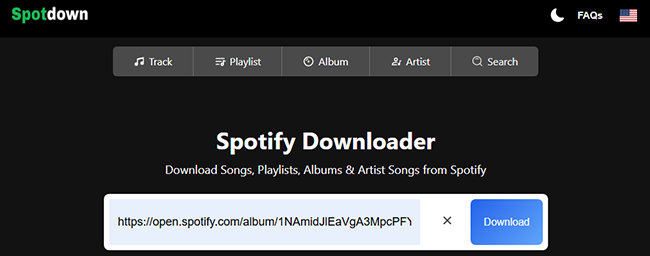
Step 2. Paste the copied link into the SpotDown search bar and click the "Download" button to initiate the fetch process.
Note:
Manual verification is required to proceed to the next step after tapping the Download button.
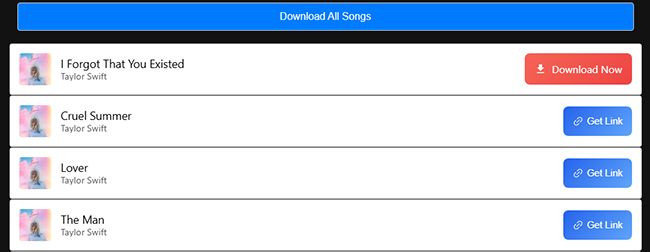
Step 3. Tap the "Get Link" button to generate the download link. After that, hit the "Download" button to save the Spotify file to your local device.
Editor's Real Test Result:
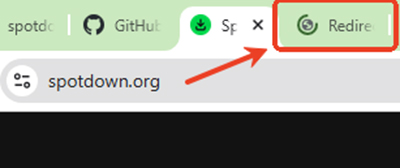
Unfortunately, this smooth workflow significant inconsistency observed once you click the Get Link or final Download button. Hidden triggers often launch aggressive redirect loops, sending you to unrelated and potentially malicious web pages instead of downloading your music. You have to click the buttons repeatedly to continue.
No Registration and Account Requirement
During the operating process, SpotDown really does not require registration or a Spotify account to function. This makes it a highly accessible option for those using the free version of Spotify who wish to download Spotify tracks without a Premium subscription.
Misleading Batch Download Function
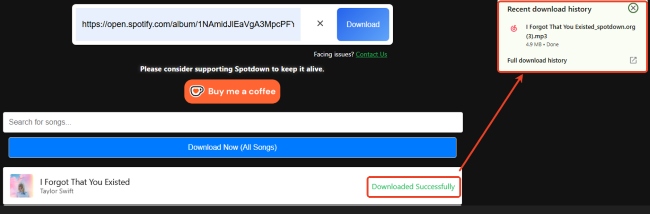
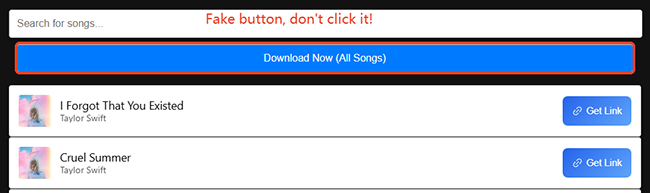
While a "Download Now (All Songs)" button is visible on the SpotDown website, clicking it redirects to a premium third-party website rather than initiating a local download. SpotDown lacks a native feature for batch downloading entire Spotify playlists, albums, or artists. Users must manually click "Get Link" followed by "Download" for every individual track in a collection.
Unstable and Inconsistent Quality: The 320kbps Myth
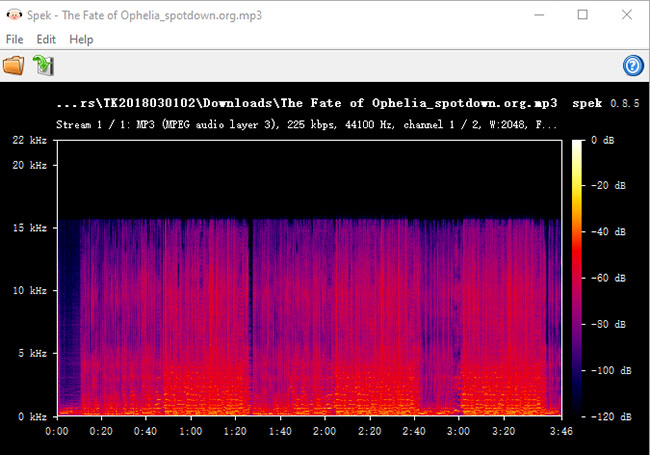
Based on the spectral analysis provided in Spek, the file downloaded via SpotDown is a classic example of low quality audio, specifically, a low-bitrate file that has been upscaled to a higher bitrate container. Here is the technical breakdown:
1. The "Brick Wall" Cutoff at 16 kHz
If you look at the Y-axis (frequency) of the spectrogram, there is a distinct, flat horizontal line at 16 kHz. In lossy audio compression (like MP3), a sharp cutoff at 16 kHz is the standard signature of a 128 kbps file.
2. Mismatched Metadata
The header in the image reports the file as MP3, 225 kbps. The file's "container" claims it is high bitrate, but the content inside is limited to 128 kbps quality. This means the file was force-transcoded. The software likely took a 128 kbps source and re-encoded it into a 225 kbps file.
Keep ID3 Tags
SpotDown successfully preserves essential ID3 tags, ensuring that details such as the song title, artist name, and album art remain embedded in the downloaded MP3 file. This is particularly helpful for keeping your local music library organized across different media players.
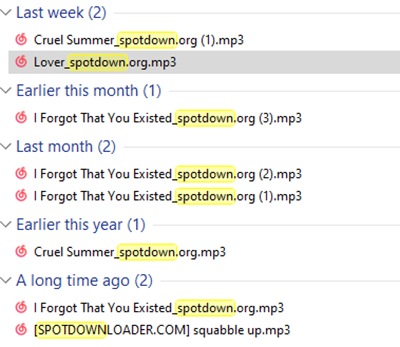
However, there is a notable drawback regarding the file naming convention. SpotDown automatically appends a "SpotDown.org" tag to the filename of every downloaded track. While the internal metadata remains intact, users who prefer clean file structures will need to manually rename each file to remove the website's watermark from the title.
Part 3. Is SpotDown Safe and Legit to Use?
Is SpotDown Safe?
From a cybersecurity standpoint, the SpotDown domain is free of inherent malware or viruses, and visiting the homepage poses no immediate threat. However, the download workflow utilizes hidden redirects that may funnel users toward suspicious third-party sites, potentially exposing them to security risks.
Risk Levels of SpotDown
Low Risk:
- No account required
- No installation needed
Medium Risk:
- Ads or external redirects may appear depending on session conditions
- Performance inconsistency during peak usage
Higher Risk:
- External download sources are not clearly disclosed
- Users may encounter misleading third-party pages
Is SpotDown Legit?
Using SpotDown to download content from Spotify can put you at risk of violating Spotify's terms of service. While it's a common practice to use such tools for personal use, distributing or using the downloaded tracks for commercial purposes could lead to serious legal consequences.
Part 4. Pros and Cons of SpotDown
To summarize the real-world utility of this tool, here is a balanced look at its strengths and weaknesses.
Pros
 Zero Cost & No Registration: The most significant advantage is that it is entirely free. You don't need to create an account, share an email address, or link your Spotify credentials, which protects your primary account from potential flagging.
- Platform Independence: Since it is a web-based tool, it works seamlessly across Windows, macOS, Android, and iOS without the need to install suspicious
.exeor.apkfiles. - Metadata Retention: Unlike many basic recorders, SpotDown successfully embeds ID3 tags (artist, title, and album art) directly into the file, saving users time on manual organization.
- Spotify Free Compatibility: It allows users on the Spotify Free tier to "download" music for offline use, a feature normally locked behind a monthly Premium subscription.
Cons
 Aggressive Redirects & Security Risks: The "Download" and "Get Link" buttons act as triggers for intrusive third-party redirects. These loops often lead to suspicious sites, creating a frustrating and potentially unsafe user experience.
- Lack of True Batch Downloading: Despite the "Download All" button, the tool does not support native bulk downloads. Users are forced to manually process every single track in a playlist, which is incredibly tedious for large collections.
- Inconsistent Audio Quality: Our technical analysis confirms that SpotDown uses "upscaled" audio. By matching metadata to third-party sources (like YouTube), the quality varies wildly (scoring as low as 75/100) and often suffers from a high noise floor and low SNR.
- Branded Filenames: Every download is watermarked with "SpotDown.org" in the filename. This requires users to use third-party renaming software if they want a clean, professional-looking music library.
- Unstable Performance: The requirement for "Manual Verification" and the frequency of server-side fetch errors make it an unreliable choice for users who need to download music quickly or in large volumes.
Part 5. The Best SpotDown Alternatives in 2026
If the aggressive redirects and low audio quality of SpotDown are dealbreakers for you, there are vastly superior options on the market. Depending on your technical comfort level and budget, consider these alternatives.
Premium Desktop Software: DRmare Spotify Music Converter
Basic Info:
- Link: https://www.drmare.com/
- Availability: Mac and Windows PC
- Support Music Content: Songs, Albums, Playlists, Podcasts, Audiobooks, and Artists
- Support Output Format: MP3, WAV, FLAC, M4A, M4B, and AIFF
- Recommend Level:⭐⭐⭐⭐⭐
For users who value their time and audio quality, dedicated desktop software is the gold standard. Unlike web tools, DRmare Spotify Music Converter uses advanced decryption technology to access the original Spotify data streams.
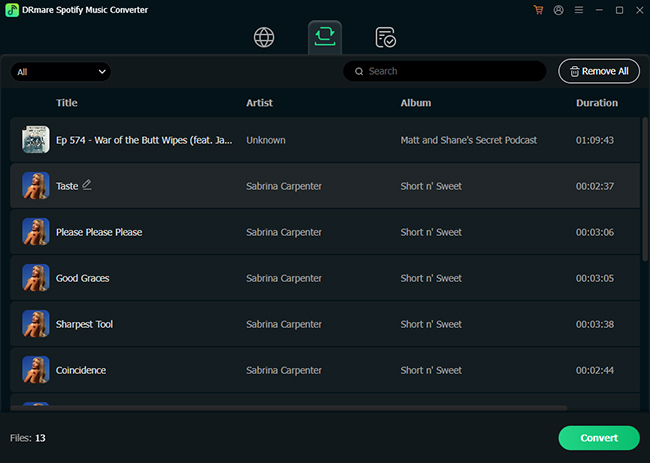
- True Lossless Quality: While SpotDown upscales low-quality sources, DRmare can capture original 320kbps MP3 or 24-bit Lossless FLAC directly.
- High-Speed Batch Downloading: Supports 15X conversion speeds, allowing you to download entire playlists of hundreds of songs with a single click, no manual "Get Link" clicking required.
- Clean & Secure: A local installation means zero redirects, zero ads, and zero risk of being funneled to malicious third-party sites.
- Full Metadata Control: Preserves all ID3 tags and album art without adding annoying watermarks like "SpotDown.org" to your filenames.
Alternative Web Tool: SpotiDown.co
Basic Info:
- Link: https://spotidown.co/
- Availability: Online Free
- Support Music Content: Songs, Albums, Playlists, and Artists
- Support Output Format: MP3, ZIP
- Recommend Level:⭐⭐⭐⭐
If you aren't ready to commit to desktop software and still prefer a browser-based solution, SpotiDown.co is currently a leading online choice.
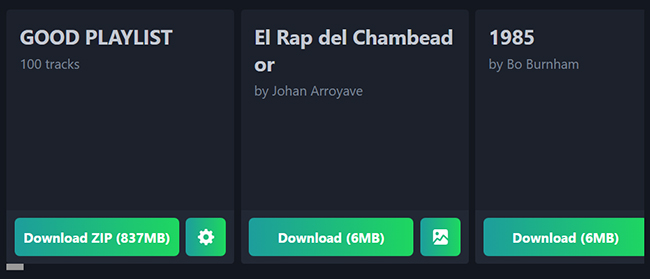
- Batch ZIP Support: One of the few free web tools that actually supports bulk processing. You can paste a playlist link and download the tracks as a single ZIP file.
- Improved Success Rate: It currently maintains more stable server connections than SpotDown, resulting in fewer "fetch errors" or 0KB file failures.
DRmare vs SpotiDown.co vs SpotDown.org
| Feature | SpotDown (Original) | SpotiDown.co (Web) | DRmare (Desktop) |
|---|---|---|---|
| Audio Quality | Inconsistent (75-90/100) | Moderate (Standard MP3) | Lossless / 320kbps |
| Batch Download | No (Manual Only) | Yes (One Playlist at Once) | Yes (Unlimited) |
| Security | Risky Redirects | Medium | 100% Safe & Clean |
| Filenames | Includes Website Tag | Original | Original & Customizable |
| Speed | Slow (Manual) | Moderate | Ultra-Fast (15X) |
| Best For | Quick single downloads for free | Playlist downloads with less than 50 songs | Long-term library building |
| Reating | ⭐⭐⭐ | ⭐⭐⭐⭐ | ⭐⭐⭐⭐⭐ |
Final Verdict: Should You Use It?
Overall, SpotiDown can be considered a lightweight option for occasional use, especially for users who only need quick access to individual Spotify tracks.
However, if you are looking to build a high-quality, permanent offline music library, the false 320kbps claims and failing playlist features will leave you severely disappointed. You are much better off investing time into an open-source alternative or purchasing a reliable premium software license.

 Home
Home




User Comments
Leave a Comment