





SpotiLab is a browser-based tool that processes Spotify links and generates downloadable audio files in formats such as MP3, WAV, and FLAC. It is designed for users who prefer not to install desktop software and want a quick way to access offline music files.
In this SpotiLab review, we will explore whether this popular online Spotify downloader actually lives up to the hype. We will dive into its core features, usability, safety concerns, limitations, pricing, and alternatives to help you make an informed decision.
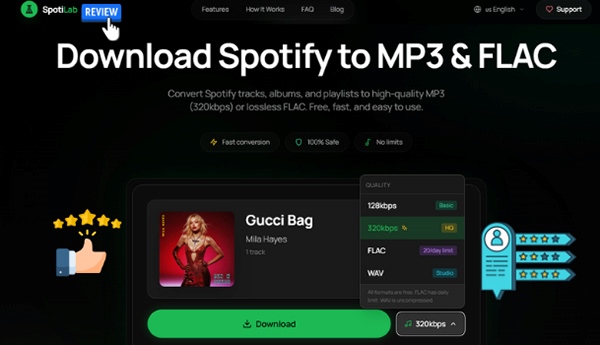
Important Update (June 2026):
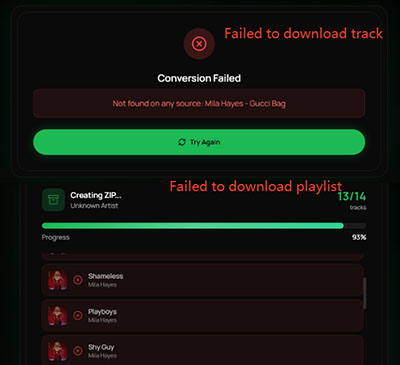
During repeated testing with previously working Spotify URLs, SpotiLab consistently failed at the final conversion step and returned a "Conversion Failed" message. This suggests that the tool may no longer reliably process Spotify links under current conditions. For users who still need a stable way to download Spotify tracks, a desktop alternative such as DRmare Spotify Music Converter is recommended.
Part 1. How Does SpotiLab Work?
SpotiLab operates as a server-side audio processing tool. When a Spotify link is submitted, the system extracts metadata such as track title, artist name, and duration, then attempts to locate a matching audio source from publicly available or third-party indexed media sources.
Instead of directly accessing Spotify’s encrypted streams, the platform relies on indirect matching based on metadata correlation. This means the output file is dependent on external source availability rather than original Spotify audio streams.
In practice, this introduces variability in output quality because the final file is determined by the best available match rather than a controlled source.
Part 2. SpotiLab's Key Features and Performance
In this section, we'll explore the functional highlights, from batch processing capabilities to automatic metadata integration, that define the SpotiLab user experience.
Multiple Format Support: MP3, FLAC, WAV
SpotiLab stands out for its ability to convert Spotify tracks into various formats. This feature is crucial for those who require different formats for their specific needs, such as compatibility with certain devices or a preference for high-quality audio.
Batch Downloading and Playlist Support
One of the major advantages of SpotiLab is its ability to batch download entire Spotify playlists or albums. Instead of manually downloading each song, users can save time by downloading multiple tracks in one go. This feature is especially useful for those who want to archive their Spotify music or create offline playlists.
Download Limitation of Free SpotiLab:
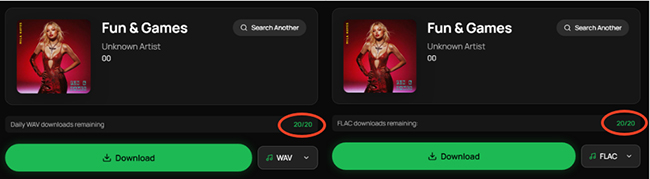
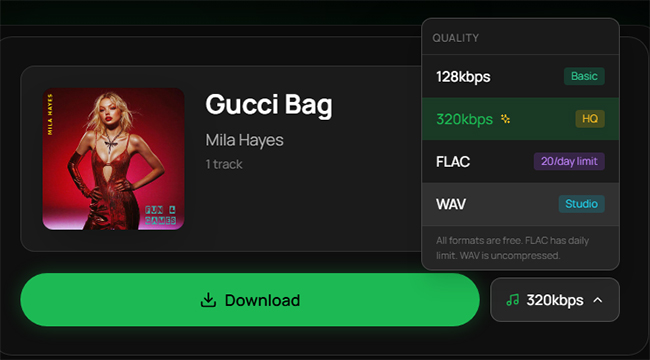
The free version of SpotiLab offers basic conversion features with specific daily caps. Users can convert playlists of up to 50 tracks into MP3 format, while higher-fidelity exports, such as WAV or FLAC, are restricted to 20 downloads per day.
Metadata Preservation
When converting Spotify tracks, SpotiLab doesn't just grab the audio, it also preserves essential metadata, including song titles, album art, and artist names. This ensures your music library remains organized, even after conversion.
Simple User Interface
The platform is designed to be intuitive, with a straightforward layout that makes it easy for both beginners and advanced users to navigate. The clean interface lets you search for Spotify content, select download preferences, and begin the conversion process with minimal hassle.
Part 3. SpotiLab's Usability and Audio Quality Audit (Real Tested)
This section focuses on real-world usage of SpotiLab, combining hands-on testing with practical performance observations. The evaluation was carried out in a controlled environment on Windows 11 using Chrome, covering both single-track and playlist scenarios.
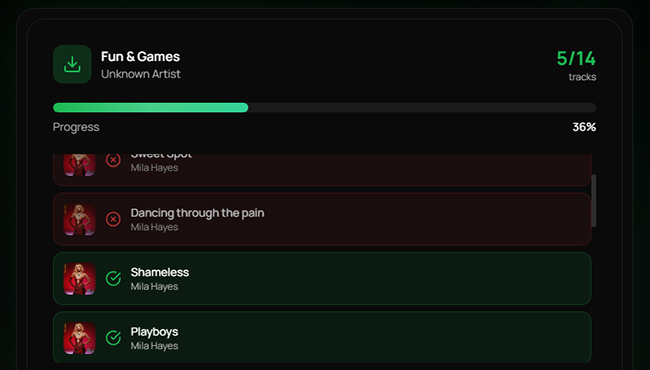
To ensure a realistic comparison, we tested an individual track ("I Forgot That You Existed") as well as a full playlist ("Mila Hayes' Fun & Games"), then reviewed both usability flow and output quality using Spek spectrogram analysis.
How to Use SpotiLab (Real User Experience)
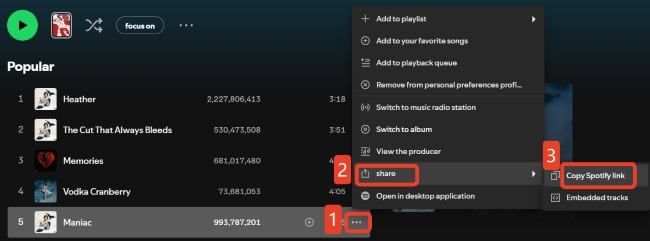
Step 1. Open your Spotify app or web player. Navigate to the specific track, album, or playlist you wish to convert, click the three dots (...), and select Share > Copy Link.
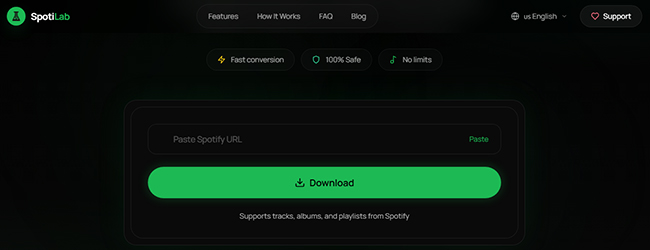
Step 2. Head to the SpotiLab website and paste the URL into the prominent search bar on the homepage. The server-side engine will automatically identify the metadata and locate a high-quality audio match.
Step 3. Once the track details appear, choose your preferred output format (such as MP3, WAV, or FLAC). If you are using the free tier, ensure your selection aligns with your remaining daily download quota.
Step 4. Click the Download button to save the Spotify audio to your local storage on your computer. The delivery method adjusts automatically based on your selection:
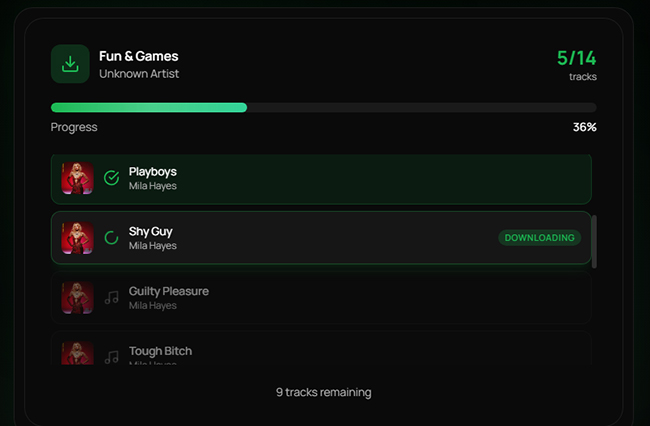
- Individual Tracks: Single songs are downloaded directly as standalone files.
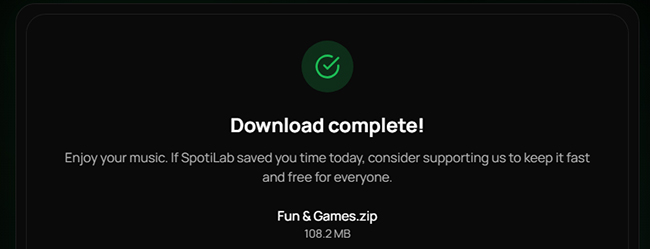
- Playlists & Albums: To keep your library organized and save time, SpotiLab packages multiple tracks into a single, compressed ZIP file. Simply extract the folder once the download finishes to access your full collection.
Check SpotiLab's Audio Quality via Spek
We tested several SpotiLab outputs using Sepk spectrum analysis to understand how the audio behaves across different formats.
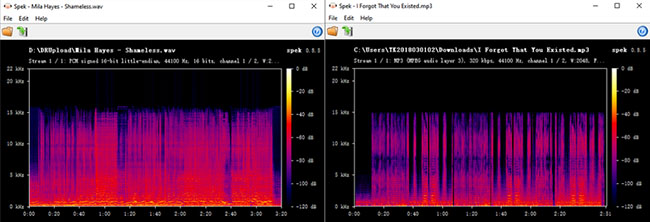
The spectrograms of SpotiLab-generated audio show a sharp low-pass cutoff around 16 kHz, with no energy present in the high-frequency band. This pattern is consistent with lossy audio sources such as low-bitrate MP3 or AAC files. True lossless WAV/FLAC files retain gradual spectral energy up to approximately 22 kHz without abrupt cutoffs.
Results were largely consistent across tested samples, suggesting the output is likely derived from already-compressed sources rather than genuine lossless audio streams.
Performance Stability
Our testing revealed a notable difference in reliability based on your selection:
- Individual Tracks: These generally download without issue across all formats.
- Playlists & Albums: We encountered occasional "failed downloads" when attempting to batch-convert large Spotify groups into WAV or FLAC formats.
Tips:
To ensure a stable conversion and avoid server timeouts, we recommend downloading tracks individually if you require high-fidelity formats like WAV or FLAC. For quick, bulk downloads, stick to the MP3 setting.
Part 4. Pros & Cons of Using SpotiLab
Every digital tool has its strengths and weaknesses. Here is a quick breakdown of what you can expect from SpotiLab.
Pros
 Format Versatility: Supports MP3, FLAC, and WAV output formats.
- Batch Processing: Saves time by downloading entire playlists or albums at once.
- Metadata Retention: Automatically embeds album art, artist names, and track titles.
- Intuitive UI: A clean, simple design that requires no technical expertise.
Cons
 Free Tier Restrictions: Daily download caps and limited features compared to the premium version.
- Low Audio Quality: Occasional lag or reduced speeds during large batch downloads.
- Performance Fluctuations: Occasional lag or reduced speeds during large batch downloads.
Part 5. SpotiLab Pricing & Value for Money
SpotiLab offers both free and premium versions, with the premium version unlocking additional features like unlimited downloads, and faster speeds Here's a breakdown of the pricing:
- Free Version: Limited features with restrictions on the number of tracks you can download. This is a good option for casual users or those testing the platform.
- Premium Version: Typically costs around $5 per 30 days, providing unlimited access to all features, faster download speeds, and more format options. This version is ideal for users who plan to download and convert a lot of Spotify music.
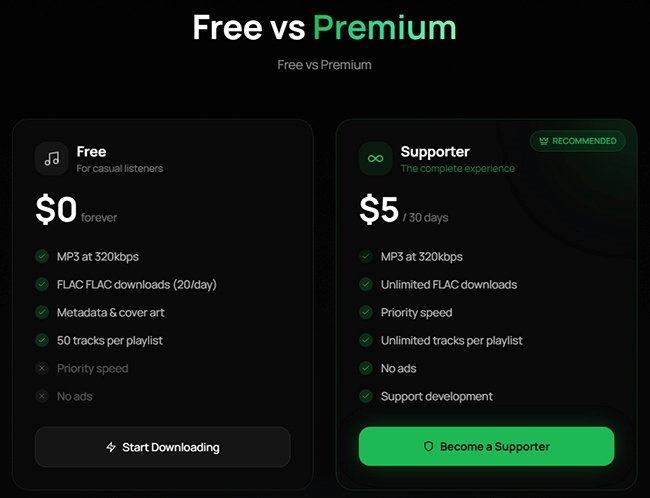
While the free version can give you a taste of what SpotiLab offers, the premium version provides the best value if you're a heavy user or need more flexibility.
Part 6. Best Alternatives to SpotiLab
While web-based tools like SpotiLab offer unmatched convenience, they often struggle with high-fidelity stability and strict daily limits. If you require a more robust solution, DRmare Spotify Music Converter is a commonly used desktop alternative.
Unlike most online tools that are limited to MP3 or have unstable lossless exports, DRmare is a dedicated desktop application designed for high-volume, high-quality library management. It utilizes advanced decryption technology to download music from Spotify with much higher precision.
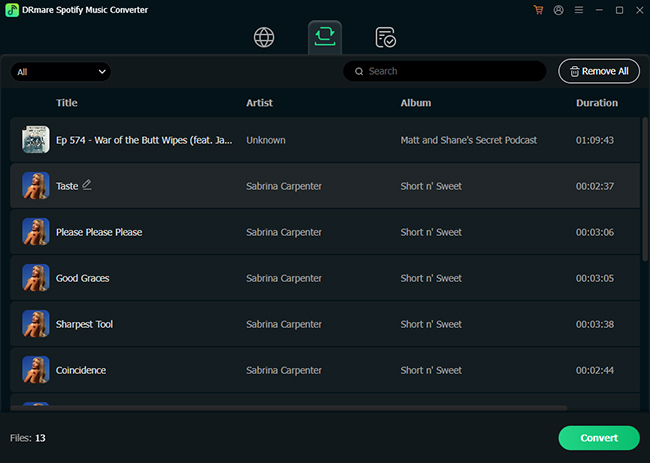
Key Features of DRmare Spotify Music Converter
- Comprehensive Format Support: It natively supports MP3, FLAC, WAV, AIFF, M4A, and M4B.
- True Lossless Quality: It is designed to preserve original quality as closely as possible, avoiding the upscaling issues often found in free web tools.
- 15X Conversion Speed: The software can process tracks at up to 15 times the normal playback speed.
- Zero Daily Limits: Unlike SpotiLab's free tier, DRmare allows for unlimited conversions once installed, without capping your daily WAV or FLAC downloads.
DRmare vs. SpotiLab: At a Glance
| Feature | SpotiLab (Web) | DRmare (Desktop) |
|---|---|---|
| Installation | None (Browser-based) | Windows & Mac Software |
| Max Quality | Variable (Matching) | 100% Original Lossless |
| Formats | MP3, FLAC, WAV | MP3, FLAC, WAV, AIFF, M4A, M4B |
| Daily Limits | 20–50 Tracks (Free) | Unlimited |
| Stability | Depends on Server Traffic | High (Local Processing) |
Quick Verdict:
If you only need a few songs for your phone, SpotiLab is the faster choice. However, if you are an audiophile looking to archive an entire library in FLAC or WAV without the risk of failed downloads, a dedicated tool like DRmare is the more reliable investment.
Part 7. In Conclusion
SpotiLab is an incredibly convenient, user-friendly tool for converting Spotify tracks into local audio files. Its browser-based design and solid ID3 tag retention make it a standout choice for quick, occasional downloads. The Supporter Tier also offers reasonable value for audiophiles needing bulk FLAC files. However, you should be aware of the potential legal implications and occasional performance issues.

 Home
Home





User Comments
Leave a Comment