





Spotify provides both free and premium services to cater to its users' needs. While free users can stream music online, premium subscribers enjoy additional benefits, such as the ability to download songs for offline listening. However, not everyone is willing to upgrade to a premium plan to access this feature.
This is where free Spotify music downloaders online come in. Several online tools claim to let users download Spotify tracks at no cost without requiring additional software installation — and SpotifyDown.com is one of the popular options.
Is SpotifyDown safe and legal to use? In this comprehensive SpotifyDown review, we'll put it through a series of hands-on stress tests to explore its advantages, limitations, security, legality, step-by-step usage guide, and suggest the best alternatives for a seamless experience.
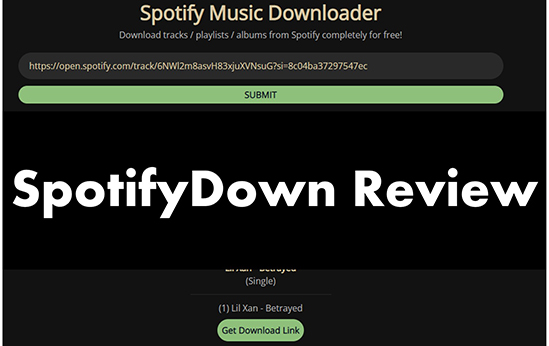
Part 1. Complete SpotifyDown Review: Key Features and Pros and Cons
🔗Website: https://spotifydown.com/ (https://spotifydown.org/)
| SpotifyDown | OS | Pricing | Download Speed | Audio Quality | Ease of Use |
|---|---|---|---|---|---|
| Features | Windows, macOS, Linux, Chrome OS, Android, and iOS | Free | Slow | Lossy (128kbps MP3) | ⭐⭐⭐⭐ |
SpotifyDown is a free online tool designed for music enthusiasts to effortlessly download Spotify songs, albums, and entire playlists without Premium to MP3 files.
Unlike other tools, such as SpotifyMate, which requires downloading playlist tracks one by one, SpotifyDown downloader supports batch downloads, making it a more efficient option for playlist management. Additionally, its conversion speed is up to five times faster than many competitors.
Whether you're an audiophile building an extensive offline collection or simply looking for a way to enjoy your favorite Spotify tracks without internet access, SpotifyDown offers a fast, efficient, and cost-free solution.
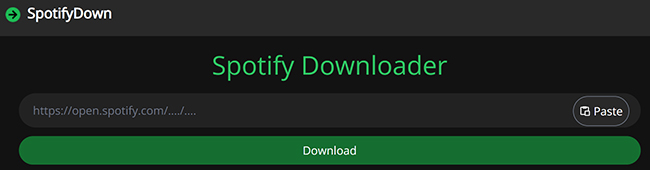
Key Features of SpotifyDown.com:
- Easy and Quick Conversion: It doesn't need you to authorize your Spotify account and install a Spotify app on your device. Just navigate to its website, and do a few clicks, and you can get all Spotify files locally.
- No Spotify Premium Required: It allows you to download Spotify music online even if you have a Spotify free account. During the conversion process, it will also block ads from Spotify to provide uninterrupted listening.
- MP3 Output Format: Convert all Spotify songs and playlists to MP3, making it easy to play downloaded music on different devices and media players.
- Wide Compatibility: Access Spotifydown.com website on your mobile devices and computers without any problem.
Pros
-
 Free and easy to use
-
No need to install extra apps
-
Can be used on both mobile and computer web browsers
-
Support Spotify tracks, albums, and playlists
-
Download tracks in bulk
-
Work speed is fast at 15X
Cons
-
 Have advertise on its website
-
The output quality is lossy
-
Performance depends on the network connection
-
Low success rate
-
Only support the MP3 output format
Note:
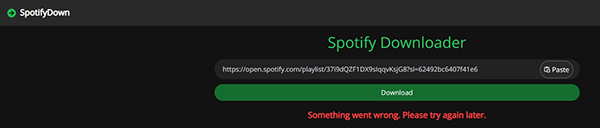
Like other online tools, SpotifyDown's stability depends on network speed. If you have ever used the this website, you may have noticed that it has a low success rate. It often says: Something went wrong, please try again later. If you want the conversion process to be smooth and successful, you can directly use its best alternative, DRmare Spotify Music Converter.
Part 2. Is SpotifyDown Safe to Use?
Is SpotifyDown.com safe? Unfortunately, it has a relatively low trust score of 42/100, placing it in the low-to-medium range. This score reflects potential risks and concerns based on various factors such as Tranco rankings, WHOIS data, and social media feedback.
While the site has not been flagged by any domain blacklisting services, additional risk indicators include:
- Suspicious Website Score: 21/100
- Threat Profile: 18/100
- Phishing Score: 18/100
- Malware Score: 11/100
- Spam Score: 1/100
Note:
These scores, rated on a scale from 1 to 100, measure associations with servers, IP addresses, or connections to potentially harmful websites. Generally, a score below 30 indicates a moderate to low risk.
SpotifyDown's growing popularity stems from its ability to download music from Spotify without requiring premium access. However, there are some concerns:
- New Website: The platform is still relatively young, being less than two years old.
- Ad-Heavy Interface: The site features numerous advertisements, and the safety of these ads cannot be guaranteed. During use, ads will also pop up suddenly.
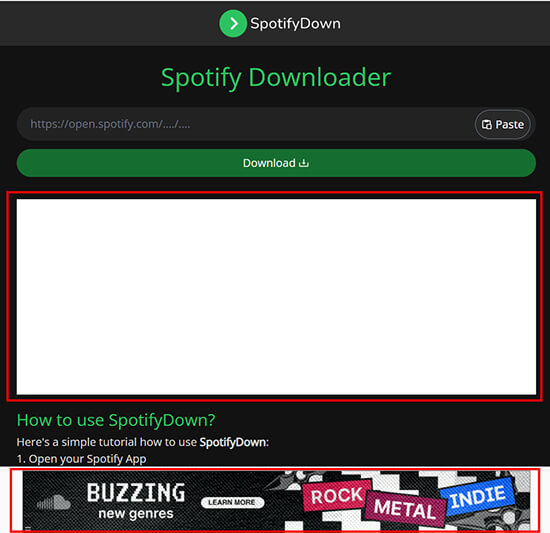
Given the trust metrics and associated risks, SpotifyDown Spotify Downloader should be approached with caution. Users considering the tool are advised to thoroughly research the site and take necessary precautions when accessing it.
Part 3. Is SpotifyDown.com Legal?
Is SpotifyDown legit to use? The legality is a complex issue and depends on several factors, including the terms of service of Spotify, copyright laws in your country, and how the downloaded content is used.
Using unauthorized SpotifyDownload to download music from Spotify directly violates Spotify's Terms of Service, which carries a minor risk of account suspension if detected. On the legal front, downloading copyrighted material without permission is generally unlawful in most jurisdictions, though some regions offer limited leniency for strictly personal, non-distributed use.
Therefore, it is acceptable if you use SpotifyDown for a specific purpose, and may not be distributed and shared with others.
Part 4. Hands-On Testing Results: The Reality of Using SpotifyDown
The most immediate hurdle we encountered was the sheer volume of intrusive advertisements. Navigating the interface requires dodging sudden pop-ups and invisible ad overlays before you can even initiate a conversion. Once we actually managed to start the process, the tool struggled significantly with batch processing. Instead of the advertised lightning-fast speeds, nearly 40% of the tracks in our test playlist returned a "Something went wrong, please try again later" error, forcing us to reload the page and start over.
When a download did succeed, we ran the resulting audio files through a spectral analysis tool to verify their quality. The results were underwhelming but expected for a free web ripper. The audio is rigidly capped at a 128kbps bitrate, which is a noticeable step down from Spotify's native high-quality streaming and lacks the depth audiophiles expect.
However, if you are simply looking to grab a few casual background tracks for a road trip, the lossy quality might be an acceptable trade-off for the zero-dollar price tag.
Part 5. How Does SpotifyDown Work to Download Songs and Playlists
If you are willing to navigate the ads and occasional timeout errors, you can follow the steps below to download Spotify music online with SpotifyDown.
Step 1.On your computer or mobile device, open a web browser and visit spotifydown.org. You must verify that you are a real person before entering this online site..
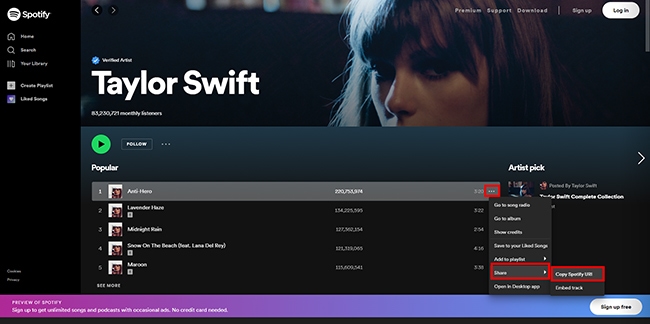
Step 2.Then open the Spotify app or its web player to search for the song you want to download. Then open click on the 'three dots' icon next to the music and choose 'Share' > 'Copy URL'.
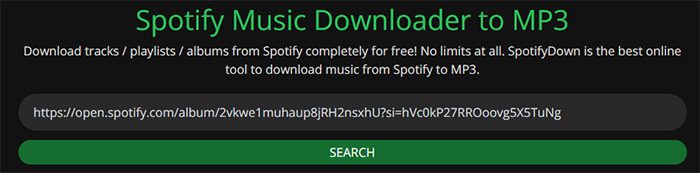
Step 3.Paste the URL into SpotifyDown and click on the 'Search' button. (The Search button has now become a Download button.)
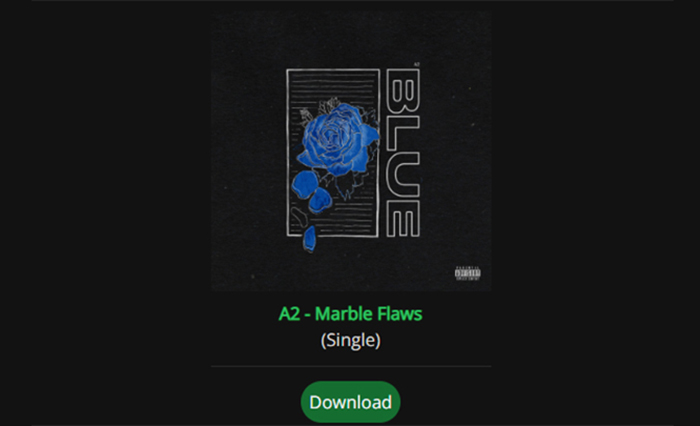
Step 4.Wait for it to find your music. When all results show, click on 'Download' button to download Spotify tracks as MP3.
Crucial 2026 Update: Are the Domains Still Active?
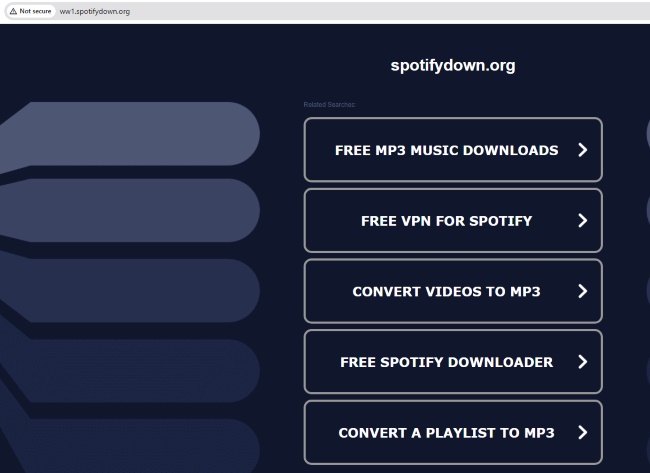
As of our latest testing in 2026, the primary URLs previously associated with this tool are no longer functioning as intended. Navigating to spotifydown.com now automatically redirects users straight to the official Spotify web player. Meanwhile, attempting to access the alternate domain, spotifydown.org, forwards your browser to a completely unrelated third-party website. Neither domain currently hosts a working interface to download music.
Part 5. How to Fix SpotifyDown Not Working
The original domains for SpotifyDown are currently redirecting users to unrelated pages or failing to load entirely. Since this is a server-side outage or a potential domain takedown, traditional troubleshooting steps, like clearing your browser cache or restarting your router, will not bring the site back online. Here are two common solutions to Spotifydown.com not working.
Wait for a Potential Fix or a Re-launch
If you are dead set on using SpotifyDown, the primary course of action is simply to wait and see if the original developers resurrect the project. Web-based audio rippers frequently go offline due to server overloads, hosting costs, or backend API changes from Spotify, and developers often need considerable time to code workarounds. Your primary course of action in this situation is simply to wait and take a few cautious steps:
- Check community forums like Reddit for announcements regarding a new official URL.
- Bookmark the old domains and check back periodically to see if the interface has been restored.
Use the Best SpotifyDown Alternatives
However, waiting indefinitely is rarely the most practical solution for your music library. When a tool goes completely dark, the most effective "fix" is to pivot to a reliable alternative. Dedicated desktop software or alternative web converters can immediately bridge the gap, allowing you to continue archiving your favorite tracks without relying on a single, unstable website. Here are two SpotifyDown alternatives you can use:
DRmare Spotify Music Converter
DRmare Spotify Music Converter is the standard upgrade path. Unlike browser-based SpotifyDown, this software is installed locally on your machine, it's 100% safe, 100% successful, and has no ads.
It features 15X faster download speeds and maintains lossless sound quality and all ID3 tags. It supports batch conversion of all Spotify tracks, playlists, albums, audiobooks, podcasts and any other audio content. Additionally, it supports multiple output formats including MP3, FLAC, AIFF, M4B, etc. This allows you to listen to Spotify music on any device or app. The only thing you need to do is install its professional software. Below is the download link for the free version of DRmare Spotify Music Converter.
- Step 1Add Spotify music to download
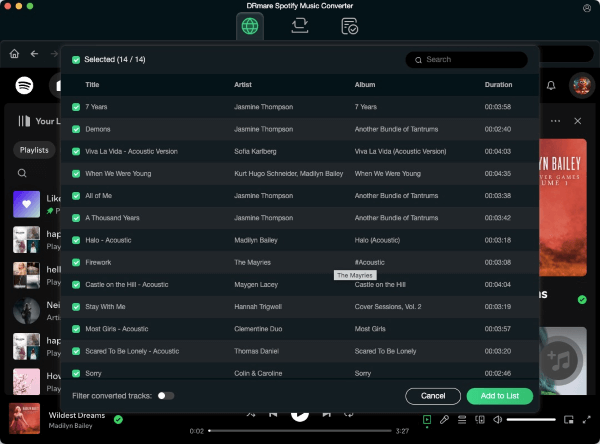
- Open DRmare Spotify Music Converter and you will see the integrated Spotify Web Player. Authorize your Spotify account and browse your library to find favorite songs to download. Click 'Add' > 'Add to List' button to load music.
- Step 2Set output parameters of Spotify files (Optional)
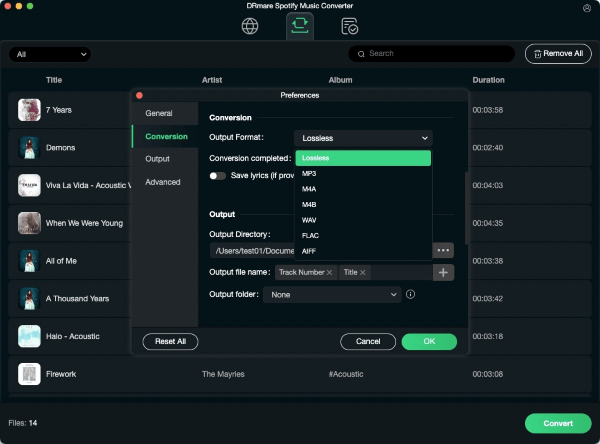
- It supports seven output formats for you to choose, respectively MP3, M4A, M4B, AIFF, Lossless, WAC, and FLAC. You can also change other output parameters including the channel, sample rate, and bit rate. To achieve this, select the 'three lines' icon at the top right and then choose 'Preferences' and 'Conversion' option.
- Step 3Download Spotify music to your computer
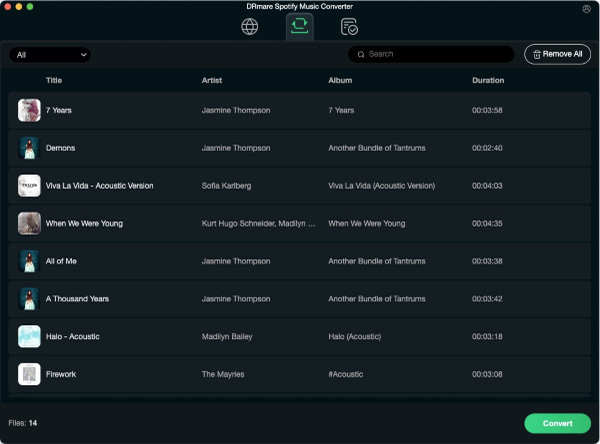
- Click on the 'Convert' button at the bottom right to start the super-fast 15X download process. When it ends, you can find the downloaded Spotify files in 'History' or 'Converted'. And you can listen to these Spotify songs offline without Premium on any device you want.
SpotDown
If you prefer to stick with web-based tools and want to avoid installing desktop software, SpotDown (https://spotdown.org/) is currently one of the most reliable direct alternatives functioning. Like the original SpotifyDown, it is a completely free, browser-based Spotify downloader that does not require you to log in or link your Spotify account. It allows you to convert individual tracks, albums, and playlists into MP3 files simply by pasting the sharing link.
Step 1. Open Spotify, find your desired song or playlist, click the three-dot menu, and copy the shareable URL.
Step 2. Visit the SpotDown website in your browser and paste the link into the prominent search box.
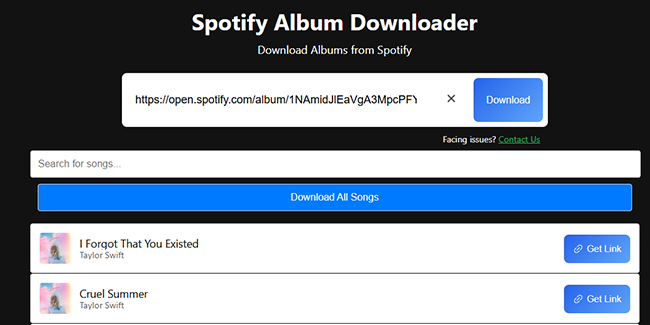
Step 3. Click the "Download" button, carefully close any unrelated pop-up windows that spawn, and then click "Get Link" > "Download Now" or "Download Now (All Songs)" to save the MP3 files to your device.
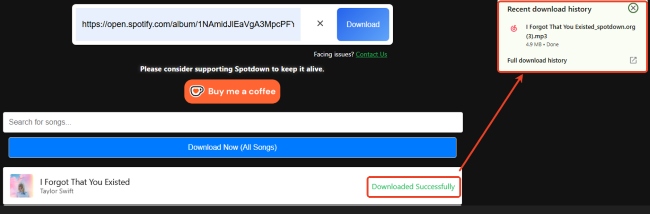
Tips:
While SpotDown handles single tracks well, large playlists might still experience occasional server timeouts. If you are looking to build a massive, high-fidelity offline library without the hassle of pop-up ads, you will eventually need to explore dedicated desktop software.
DRmare Spotify Music Converter (Desktop) vs SpotDown (Web)
| Features | DRmare Spotify Music Converter | SpotDown |
|---|---|---|
| Download Speed | 15X | Fast |
| Download Tracks/Playlists/Albums | ✔ | ✔ |
| Batch Download | ✔ | ✔ |
| Keep ID3 Tags | ✔ | ❌ |
| Download Audiobooks/Podcasts | ✔ | ❌ |
| 100% Safe to Use | ✔ | ❌ |
| Customize Output Parameters | ✔ | ❌ |
| Ads-free | ✔ | ❌ |
| Output Quality | 100% lossless | Lossy |
| Output Audio Format | MP3, FLAC, M4A, M4B, AAC, and WAV | MP3 |
| Success Rate | 100% working | Low |
| Support Systems | Windows/Mac | Mobile/desktop web browsers |
| Add Spotify Music | Input Spotify music link; doing clicks | Input Spotify music link |
| Rate | ⭐️⭐️⭐️⭐⭐️ | ⭐️⭐️⭐️⭐️ |
Part 6. FAQs about Using SpotifyDown
Do I need a Spotify Premium account to use these tools?
No. One of the main reasons these sites are so popular is that they do not require a Premium subscription. You only need a public, shareable link to the song or playlist. Because the tool operates independently of your personal Spotify account, you do not even need to log in to extract the audio.
Why does SpotifyDown not work?
Free web downloaders are notoriously unstable. It relies on cheap hosting servers that frequently buckle under heavy user traffic. If Spotify's backend API updates its security protocols, it breaks immediately and can remain offline for weeks while the developers scramble to write new code.
Can I download an entire 500-song playlist at once with SpotifyDown alternatives?
For a free online alternative, it offers a "Download All" button; attempting to rip large playlists usually results in browser timeouts or server crashes. But it often imposes a hard cap, recognizing only the first 50 to 100 songs of a long playlist. For massive batch downloads, you are almost always better off using dedicated desktop software.
Part 7. In Conclusion
While SpotifyDown or its alternatives offer a quick, free way to download Spotify tracks, they are plagued by frequent domain shutdowns in 2026, intrusive ads, and subpar 128kbps audio quality.
For a more seamless experience, DRmare Spotify Music Converter remains the superior choice. It bypasses the instability of web-based scraping to deliver high-fidelity, lossless audio with 100% reliable batch downloads and zero advertisements. Finally, you can choose the method that fits your needs, but always stay cautious of the security risks inherent in free online converters.

 Home
Home





User Comments
Leave a Comment