





If you are searching for a free way to download Spotify music without Premium, Spowload often comes up as a possible solution. As an online Spotify downloader, Spowload promises an easy way to convert Spotify songs and playlists to MP3 using nothing more than a link. But how well does it actually work, and is it a reliable option?
In this review, we'll take a closer look at Spowload, including its advantages and limitations, as well as the instructions on how to use it. The guide also explores the best alternative to Spowload for downloading Spotify music if you need a more stable or powerful workaround.
Part 1. Spowload Overview
Spowload is a free online Spotify downloader that makes it easy to download Spotify songs, playlists, and albums as MP3 files using only a link. As an online downloader, it works directly in your browser, so there is no Spotify account, Premium subscription, or software installation required. Simply paste a Spotify song's link on Spowload, and then you can convert songs from Spotify with ease, allowing you to save Spotify music for offline listening and play it on any device.
| Availability | Price | Downloadable Content | Speed | Audio Quality | Output Format | Batch Download | Ads-free |
|---|---|---|---|---|---|---|---|
| Online | Free | Spotify Songs, albums, and playlists | 1X | 128kbps | MP3 | ❌ | ❌ |
Key Advantages and Drawbacks of Spowload
After trying Spowload for downloading Spotify songs, we found that while it offers a free and convenient way to save Spotify tracks online, some noticeable drawbacks may affect your experience. The result may vary based on how it's used and what you expect from it. Below is a clear breakdown of Spowload's pros and cons to help you evaluate the tool more objectively.
Pros
 Works online on Android, iOS, Windows, and Mac
- No app installation or Spotify account needed
- Download Spotify songs, albums, and playlists
- Keep basic ID3 tags after download
- Free to use, no Spotify Premium required
Cons
 Contains many ads and redirect pop-ups
- Only supports downloading tracks one by one
- Output quality is lossy (MP3 only)
- Conversion speed can be slow
- Sometimes fails to parse Spotify links
Based on real testing, Spowload feels convenient at first, especially if you just want to grab a single Spotify song without paying for Premium. However, once you start downloading more tracks, the experience can quickly become frustrating. Frequent ads interrupt the process, and the lack of batch downloads means you have to save songs one by one, which takes time and patience. Overall, it works for occasional use, but if you plan to download playlists or albums regularly, you may find its limitations hard to ignore.
Part 2. How to Download Spotify Songs to MP3 Using Spowload
Getting Spotify music online with Spowload is simple. With just a Spotify link, you can convert your favorite Spotify songs, albums, or playlists into MP3 files for offline listening. Here's an easy guide to help you download your favorite Spotify music with Spowload.
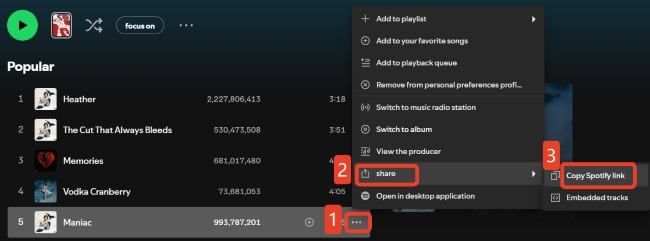
Step 1. Open Spotify and find the song, album, or playlist you want to download. Click the menu option with three dots next to it, select "Share", then tap the "Copy Link" icon.
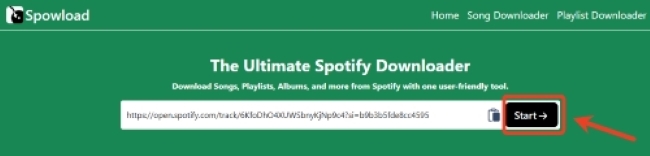
Step 2. Go to the Spowload official website and paste the copied link into the downloader. Click "Start" to begin converting the track.
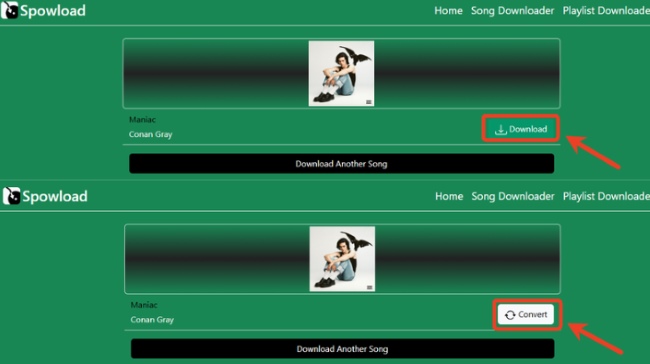
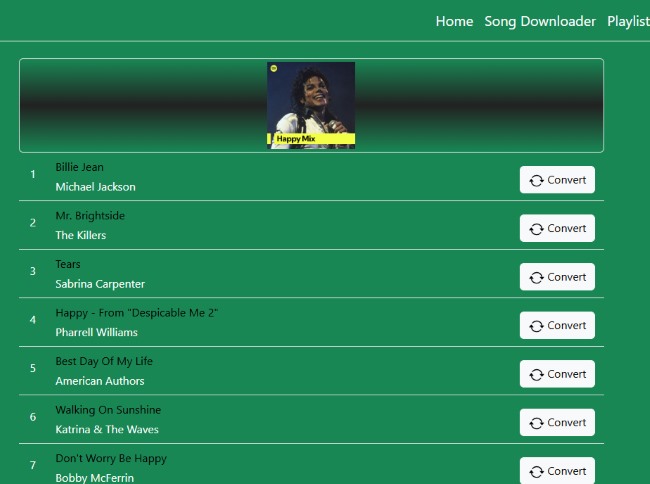
Step 3. Once ready, click "Convert" >"Download" and then confirm your choice in the pop-up window. Then the tool will convert the Spotify content to MP3 and save it to your device.
Step 4. For playlists, the process is the same: copy and paste the playlist link. But Spowload doesn't support batch downloads, so each track must be downloaded individually, just like downloading Spotify single songs.
Part 3. Best Alternative to Spowload for Downloading Spotify Music
Spowload can be useful for occasional downloads, but its drawbacks make it inconvenient, especially when dealing with playlists or albums, such as frequent ads, support for MP3 only, and the inability to download multiple tracks at once. If you want a smoother and more efficient experience, DRmare Spotify Music Converter can be a strong alternative.
DRmare Spotify Music Converter lets you convert Spotify music into a variety of formats, including MP3, FLAC, WAV, AIFF, M4A, and M4B. It preserves lossless audio quality and keeps ID3 tags intact, while supporting batch downloads at speeds up to 15X. Completely ad-free, allowing you to save Spotify songs and playlists locally for offline listening quickly and effortlessly, even without a Spotify Premium account.
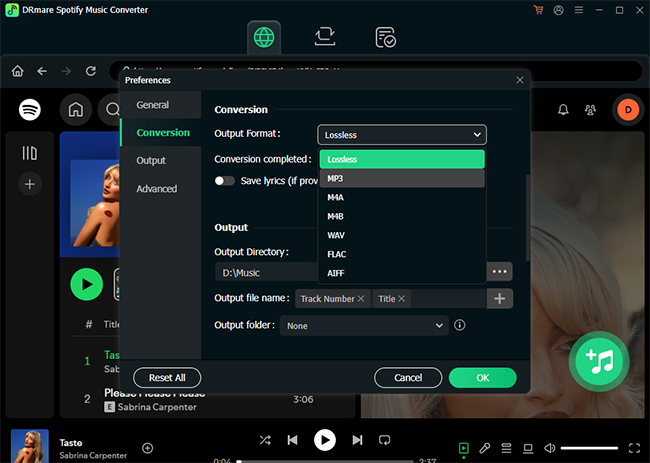
- Step 1Set Your Spotify Output Preferences
After launching DRmare, log in to your Spotify account within the app. Go to "Menu > Preferences > Conversion" to choose your desired output format, such as MP3, FLAC, WAV, AIFF, or M4A. You can also adjust settings like bitrate and sample rate to get the best audio quality.
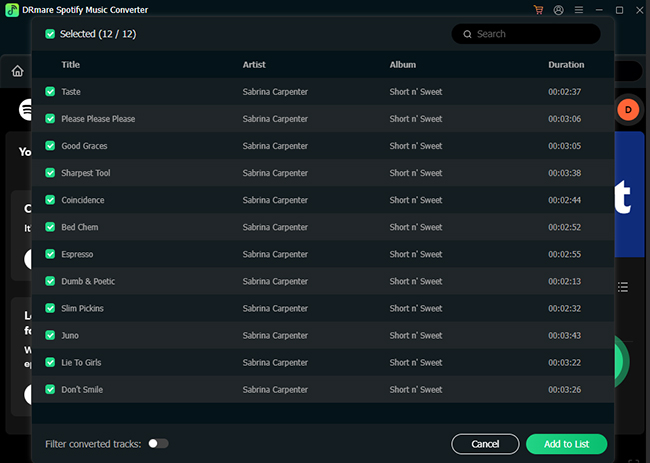
- Step 2Add Spotify Tracks or Playlists
Next, import the Spotify music you want to save. Drag and drop Spotify songs, albums, or playlists onto the green "+" button or just click it to add Spotify music. Then tap "Add to list" to queue multiple items at once, making it easy to handle entire playlists in a single batch. Besides, you can simply paste a Spotify link in the upper option to convert music from Spotify.
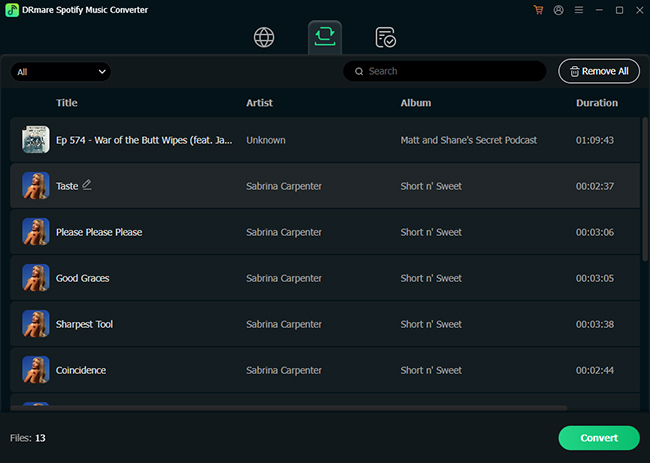
- Step 3Convert and Save for Offline Listening
Click "Convert" to start downloading your Spotify music. DRmare supports batch conversion at speeds up to 15X, so even large playlists can be downloaded quickly. Once finished, all your converted tracks will appear in the "Converted" section, ready for offline playback on any of your devices.
Part 4. FAQs About Using Spowload
Is Spowload legal to use?
It varies by region. In most cases, downloading copyrighted music from Spotify could breach local copyright laws and Spotify's terms of service. Make sure to follow your local copyright laws and keep downloaded Spotify music for your own personal use.
Is Spowload safe to use?
Spowload does not require you to log in to a Spotify account or install software, which reduces some security risks. However, it is an ad-supported online tool, and frequent pop-ups or redirect ads can pose potential risks, such as leading to unsafe pages if clicked accidentally. Check that your browser’s security protection is enabled, and use an ad blocker if possible.
Is Spowload free to use?
Yes, Spowload is completely free. You don't need to register or subscribe to start using the tool. Just paste a Spotify link into the downloader, and you can start converting tracks to MP3 right away.
Can Spowload download an entire Spotify playlist?
You can download songs from a Spotify playlist using Spowload, but each track must be converted manually one by one, as it does not support batch playlist downloads. If you want a faster and more convenient option, you can use DRmare Spotify Music Converter to convert and keep your Spotify playlists at once.

 Home
Home





User Comments
Leave a Comment