





If you are an Android user looking to bypass Premium restrictions, download Spotify songs without a Premium subscription for offline listening, and block intrusive ads, you have likely searched for a "Spotify Downloader APK". While there are dozens of tools out there, the reality is that many are outdated, filled with malware, or falsely advertise their audio quality.
To save you the hassle, we didn't just scrape information from the web. We installed these Spotify playlist downloader APKs on an Android 16 test device, downloaded identical tracks, and ran the output files through audio analysis software (Spek) to verify if you are actually getting true high-quality audio or just upscaled YouTube rips. Here is our definitive guide to the top Spotify downloaders for Android and the safest methods to get your Spotify music offline.
Expert Editorial Warning:
Whenever using third-party Spotify downloader Mod APKs that require logging in, always use a burner account. Never use your primary account linked to your credit card, as streaming platforms regularly conduct ban waves on accounts flagged for unauthorized API access.
Quick Comparison: Top Spotify Downloader APK for Android at a Glance
To help you navigate the landscape of Spotify downloader APKs, we have conducted an extensive hands-on analysis. Use the comparison table below to identify which tool aligns with your specific needs, whether you prioritize ad-free streaming, ease of use, or raw audio quality.
| Tools | Compatible OS | Output Formats | Audio Source | Tested Bitrate | Rating | Best For |
|---|---|---|---|---|---|---|
| xManager | Android | N/A (In-app) | Spotify Servers | 320kbps | 4.8/5 | Ad-free streaming |
| Fildo | Android, Windows | MP3, FLAC | 3rd Party Search | 96-320kbps | 3.5/5 | Local file collection |
| SpotiFlyer | Android | MP3, M4A | YouTube/JioSaavn | 128-160kbps | 4.0/5 | Multi-platform use |
| Spowlo | Android | MP3, FLAC, OGG | YouTube | 128-160kbps | 4.2/5 | Open-source fans |
| SpotDown | Android | MP3 | YouTube | 128kbps | 2.5/5 | Ease of access |
| SpotiSaver | Online | MP3, TXT | YouTube | 128kbps | 3.0/5 | Quick batch export |
#1. Xmanager Spotify
xManager Spotify is currently the darling of the Android modding community. It doesn't download MP3s directly to your local storage; rather, it is a manager app that patches the official Spotify APK to unlock Premium features (no ads, unlimited skips) directly within the streaming interface.
Our Real-World Test:
Installation requires enabling "Unknown Sources" and joining their Telegram or Discord for the latest patches. It works flawlessly for ad-free streaming, but offline downloading is strictly server-sided and remains unavailable.
- Audio Quality (Tested): Streams up to "Very High" (320kbps) natively.
Pros
 Exact same UI as the official app
- Completely ad-free
- Active developer community
Cons
 Cannot export music to local MP3 files
- Requires occasional manual updates via the xManager hub
#2. Fildo
Fildo has been around for years, which is a well-known Android application that functions as an MP3 and FLAC music downloader. However, a common misconception is that Fildo hacks Spotify to download tracks. In reality, Fildo is a massive third-party MP3 search engine. When you import your Spotify playlist into Fildo, it attempts to match the titles with its own external database (often NetEase or VKontakte) and then downloads Spotify music to their Android phones in either MP3 or FLAC format.
Fildo is not available on the Google Play Store due to policy restrictions, so you'll need to download the APK file from its official website. The developers have also introduced a lightweight version for Windows users, called Fildo Lite (Filte), expanding its utility across platforms.
Our Real-World Test:
UI feels dated and clunky. The matching process is hit-or-miss, it struggles significantly with niche indie artists or regional remixes.
- Audio Quality (Tested): Highly inconsistent. Spek analysis showed bitrates jumping anywhere from a heavily compressed 96kbps up to genuine 320kbps MP3s, entirely depending on the source file it found.
Pros
- Can work on Android devices and Windows computer
- Has a massive built-in search library
- No subscription required to download music as local files
Cons
- Only support MP3 and FLAC
- Audio files may differ in quality or metadata accuracy
- Does not download music directly from Spotify servers—relies on third-party MP3 sources
- Must be sideloaded from external sources, increasing security risk
- Some songs may not be available or accurately matched
#3. SpotiFlyer
SpotiFlyer is a highly versatile, open-source music downloader APK for Android that supports fetching audio from multiple streaming platforms, including Spotify, YouTube, Gaana, JioSaavn, and SoundCloud. Designed to help users listen offline without Premium, it allows you to download individual tracks, albums, and full playlists directly to your local device simply by pasting a shareable link.
Our Real-World Test:
The official documentation often implies it downloads directly from platform-specific links for better quality. However, our technical reality check reveals how it handles Spotify links: due to Spotify's strict DRM, SpotiFlyer actually uses the Spotify link's metadata to seamlessly fetch the matching audio track from unlocked sources like YouTube Music or JioSaavn.
It does a fantastic job of retaining full ID3 metadata (including titles, artists, and album artwork), making your offline library look completely native. However, while playback is ad-free, we did encounter annoying pop-up ads while simply navigating the app's interface.
- Audio Quality (Tested): Because it utilizes fallback sources for Spotify links, our Spek spectrogram analysis showed that the output files are 128kbps to 160kbps MP3/M4A, rather than Spotify's native 320kbps Ogg Vorbis.
Pros
- Supports multiple streaming services in one app
- Excellent at preserving ID3 tags and cover art
- Open-source and relatively lightweight
Cons
- Intrusive pop-up ads during app navigation
- Does not pull audio directly from Spotify servers (relies on YouTube/JioSaavn matching)
- Occasional failures when fetching massive playlists
#4. Spowlo
Spowlo is a versatile, feature-rich, and free Spotify song downloader APK for Android that allows users to download songs and playlists either by searching titles directly or by pasting Spotify track/playlist URLs. It's designed for users who want both flexibility and control over audio output, supporting a wide range of formats including MP3, FLAC, OGG, OPUS, and M4A.
Spowlo is powered by SpotDL, an open-source common-line tool hosted on GitHub. Instead of downloading files directly from Spotify, Spowlo locates high-quality audio equivalents on YouTube, then downloads the closest match to your Android device. Because of this method, the default quality often comes in 128K M4A or 160K OPUS, depending on what's available on YouTube.
Our Real-World Test:
We tested a 15-track playlist. Spowlo successfully identified 14 out of 15 tracks. However, our Spek spectrogram analysis confirmed a common open-source secret: Spowlo matches the Spotify metadata with YouTube Audio.
- Audio Quality (Tested): Output is 128kbps M4A (YouTube's standard audio bitrate), not direct Spotify server quality.
Pros
- Clean, ad-free interface
- Transparent open-source code
- Excellent ID3 tag matching
Cons
- Downloads from YouTube, not Spotify directly
- Occasional missing tracks if the YouTube search fails.
#5. SpotDown
SpotDown is marketed as a user-friendly and free Spotify music downloader Mod APK built specifically for Android users seeking a no-fuss experience. Unlike many third-party tools that require sideloading, SpotDown is conveniently available on the Google Play Store, making it highly accessible for beginners.
To use it, you simply paste the URL of a Spotify track into the app to process and download the MP3. A standout feature is its built-in preview function, which lets you listen to a snippet of the song before downloading to ensure it's the correct version, alongside a quick-share button to send downloaded tracks to friends.
Our Real-World Test:
How does a Spotify MP3 downloader APK survive on the official Google Play Store without being banned? Our technical reality check reveals the trick: SpotDown isn't actually a "Mod APK". It doesn't bypass Spotify's DRM or touch their servers. Instead, it acts as an automated search engine that reads your Spotify link's metadata and pulls the corresponding audio from public domains (like YouTube).
While the convenience of not sideloading is great, the app monetizes heavily. During our testing, the app served highly intrusive, unskippable full-screen video ads for almost every single track download we initiated.
- Audio Quality (Tested): Because it lacks advanced audio settings and relies on third-party video-to-audio conversions, our Spek analysis confirmed the output is standard-definition MP3 (128kbps). It is acceptable for casual listening but lacks the depth of true high-fidelity audio.
Pros
- No sideloading required (download directly from the Play Store)
- Simple, intuitive interface
- Handy preview and one-tap share features
Cons
- Does not support batch downloading for full playlists or albums (you must download song by song)
- Aggressive and intrusive advertising experience
- Zero advanced audio settings or format customization
#6. SpotiSaver
SpotiSaver is frequently discussed in Android modding circles as a convenient, often browser-based alternative for users who want to avoid sideloading heavy APKs. Instead of processing tracks one by one in a native app interface, SpotiSaver takes your Spotify playlist link and attempts to package the files for you to download in bulk.
It also features a unique utility that allows you to export your Spotify playlist data into a simple TXT file, which is surprisingly handy if you are just looking to back up your tracklists.
Our Real-World Test:
While the tool is functional, our hands-on testing revealed several frustrating limitations for free users. If you try to download a massive playlist, SpotiSaver enforces a strict hard cap: it only allows you to download up to 100 tracks per playlist, which it then compresses into a single ZIP file.
More annoyingly for users who care about an organized music library, the free version automatically injects a "spotisaver" promotional tag into every single downloaded filename (e.g., Artist-Track-spotisaver.mp3). You will have to manually rename every file if you want a clean local library.
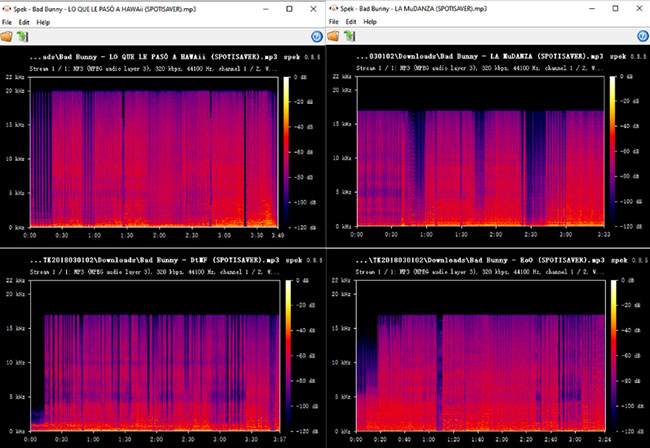
- Audio Quality (Tested): This is where SpotiSaver fails the "Audiophile Test." Our Spek spectrogram analysis consistently shows a hard frequency cutoff at 16kHz. This indicates that the audio is not pulled from high-quality Spotify servers, but is instead being transcoded from lossy, compressed web sources (like YouTube). While this may sound fine on cheap earbuds, you will notice significant lack of detail and muddy highs on quality headphones or home audio systems.
Pros
- Supports exporting Spotify playlist tracklists to a TXT file for easy backup
- Packages downloads into a convenient ZIP folder
- No complex sideloading required
Cons
- Strict 100-track limit per playlist download
- Free version forcibly watermarks filenames with a "spotisaver" tag
- Audio is matched and ripped from YouTube, not Spotify
The Ultimate Alternative: Why PC-to-Android is the Safest Route
If you've spent any time testing Spotify downloader APKs on your phone, you know the pain points: constant app crashes, aggressive pop-up ads, "parsing package" errors, and files that claim to be 320kbps but sound muddy because they were ripped from a YouTube music video.
If you want 100% stability, true high-fidelity audio, and zero risk of your main account being banned, the most professional workaround is to handle the downloading on your computer, and then transfer the pristine files to your Android device via USB or cloud drive.
Enter DRmare Spotify Music Converter
For users who want to build a permanent, high-quality local library without the headaches of mobile sideloading, DRmare Spotify Music Converter (available on Windows/Mac) is the ultimate desktop solution.
Unlike older software that required you to have the clunky Spotify desktop app installed and running in the background, DRmare now features a seamless built-in web player. You handle the entire process directly within the DRmare interface.
Why DRmare Beats Mobile Mod APKs:
- No App Dependency: Thanks to the built-in web player, you simply log in once, browse, and click download. No external apps required.
- True Audio Fidelity: Unlike Spowlo or Fildo which scrape YouTube, DRmare processes the audio streams at a genuine, stable bitrate, preserving ID3 tags and album art perfectly.
- Batch Processing Power: Downloading a 500-track playlist on a mobile APK often leads to app crashes or thermal throttling. DRmare handles massive batches at up to 15X speed on your computer.
How to Get Spotify Music on Your Android:
Step 1. Open DRmare on your PC/Mac and use the built-in web player to select your playlists.
Step 2. Choose your preferred output format (MP3, FLAC, WAV) and click "Convert" button to get your local Spotify tracks.
Step 3. Connect your Android phone via USB and drag the pristine, ad-free tracks directly into your phone's "Music" folder. Now, you can listen to Spotify offline on your Android device.
FAQs about Spotify Playlist Downloader APK for Android
What is a Spotify downloader APK?
It is an unofficial Android app that bypasses Spotify's Premium restrictions, allowing free users to download tracks as MP3s for offline listening. Because they violate store policies, they aren't on Google Play and must be sideloaded from third-party websites, carrying inherent security risks.
Is it legal to use Spotify playlist downloader APK?
No, using a Spotify downloader APK can violate both copyright laws and Spotify's terms of service. Downloading copyrighted music without permission or outside of Spotify's official channels is considered illegal in many regions.
Can I get banned from Spotify for using these APKs?
Yes. Spotify actively monitors unauthorized access and will permanently suspend accounts caught using cracked apps. Our Expert Advice: Always use a secondary burner Spotify account to log into these tools.
Is it safe to use Spotify downloader APKs for Android?
Not always. Many of these APKs come from unverified third-party sources and may contain malware, spyware, or adware. Additionally, some apps may collect your personal data without consent. Always proceed with caution if you choose to use them.
Do Spotify downloader APKs work on iOS?
Generally no. These APKs are designed specifically for Android. iOS has stricter app security, so using similar tools typically requires jailbreaking your iPhone, which carries its own risks and voids warranty.
Warm Up
In the end, finding a reliable Spotify downloader APK for Android comes down to balancing convenience, audio quality, and security. While tools like xManager, SpotiFlyer, and Spowlo each offer different advantages, most still rely on third-party audio sources rather than true Spotify streams. For casual offline listening, they can get the job done, but users should stay cautious about malware risks, intrusive ads, and potential account bans.

 Home
Home




User Comments
Leave a Comment