





For Android audiophiles, the quest for downloading Spotify songs and listen offline anywhere usually leads to one name: Spowlo. While Spotify Premium's "Offline Mode" keeps tracks tethered to its app via DRM, Spowlo promises a liberated library.
But as Spotify tightens its API restrictions in 2026, does this GitHub-born tool still hold up? In this deep dive, we verify Spowlo's performance, expose its quality limitations, and show you how to use it and supercharge it using Developer Credentials.
Part 1. What Is Spowlo?
Basic Info:
- Spowlo on GitHub: https://github.com/BobbyESP/Spowlo
- Spowlo Official Website: https://spowlo.com/en/
- Support Operating System: Android
- Support Spotify Content: Playlists, Songs, Albums
- Supported Output Formats: MP3, FLAC, OGG, OPUS, and M4A
- Fork: 38
- Star: 1.4k
Spowlo on GitHub is an open-source, free tool built on the spotDL framework, designed for users who want a flexible way to download Spotify music to their Android devices. Unlike "native rippers," Spowlo is a metadata matching engine.
How it works (The Truth): Spowlo scrapes the ISRC code and metadata from your Spotify link, then searches for the closest audio match on YouTube Music, SoundCloud, or Bandcamp.
Tips:
Spowlo also allows you to download music from Soundcloud, Bandcamp, Piped, Slider KZ.
Advantages of Spowlo Spotify
Here's a breakdown of what makes Spowlo special:
-

1. Customizable Audio Quality
Users can choose to retain the original download quality of 128K M4A or 160K OPUS. Although Spowlo allows for output up to 320kbps, increasing the bitrate doesn't enhance the original audio quality, it only increases file size.
-
2. Flexible Output Settings
Users can customize the output filename format and select from multiple audio formats, including MP3, FLAC, OGG, OPUS, M4A, and WAV. This flexibility is ideal for listeners who need compatibility with different devices.
-
3. Synced Lyrics
Spowlo supports the download of synced lyrics in LRC format, making it convenient for integration with third-party players like Aplayer that needs Lrc files for lyric display.
-
4. Retention of Metadata
It preserves all ID3 tags, including song title, artist, and album information, enabling better organization within music libraries.
-
5. Search and Download Options
Users can download music either by pasting a URL or through direct in-app search, making it convenient to find and save songs without needing the exact Spotify link.
-
6. Batch Download
Spowlo supports batch downloading, making it easy to download entire playlists or multiple songs at once.
-
7. Download Spotify Mods
It allows you to download Spotify Mods, which are developed by the Xmanager team.
Limitations of Spowlo Spotify
However, while Spowlo provides a convenient and versatile download experience, it also has some limitations.
1. Library Consistency
Spowlo primarily retrieves music from YouTube, which may lead to inconsistencies between the Spotify and YouTube libraries. This means the downloaded track might not always perfectly match the desired Spotify version.
2. Audio Quality Limitations
The original source audio from YouTube is restricted to 128K M4A and 160K OPUS. While this is sufficient for casual listening, audiophiles may find the audio quality lacking compared to higher-quality sources.
3. Platform Restriction
Spowlo is exclusively available as an APK for Android devices. This platform limitation means users on other operating systems, such as iOS or desktop platforms, cannot directly use the tool.
Overall, Spowlo serves as an accessible option for basic Spotify music downloading needs on Android, providing a blend of flexibility and ease of use for those seeking offline music access.
Part 2. How to Download and Use Spowlo on GitHub
Now that we understand what Spowlo is and its advantages and limitations, let's dive into how to actually use this tool to download Spotify music for offline listening. Follow these steps to get started:
How to Use Spowlo Spotify Downloader
Step 1. Go to the GitHub release page of Spowlo on your phone and download the latest Spowlo APK file.
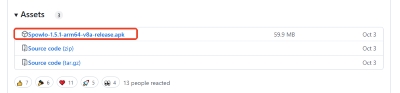
Tips:
Alternatively, you can download the spowlo APK file on your computer and transfer it to your phone for installation.
Step 2. After installation, copy the Spotify song, playlist, or album link you want to download and paste it into the search bar.
Step 3. Once you've pasted your Spotify link, tap the "Download" button at the bottom of the screen.
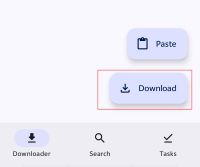
Step 4. Now you can customize your download parameters.
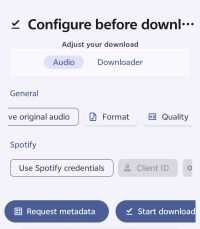
In the "Audio" section, you'll find several important options:
- "Preserve original audio": It's recommended to enable this option. Increasing the bitrate won't enhance audio quality; it will only create larger files.
- "Format": Choose your preferred output format here.
- "Quality": Specify the output bitrate in this section.
The "Use Spotify credentials" option helps fetch Spotify songs from YouTube more accurately. If you're interested in this feature, continue reading below.
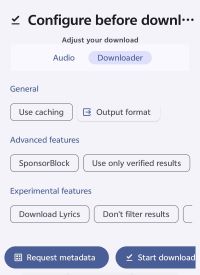
In the "Downloader" section, you can designate other options such as the output format for your Spotify music's filename. You can also choose whether to download the Spotify LRC lyrics file and cover art for your songs, among other settings.
Step 5. After customizing your download options, tap "Start downloading" and Spowlo will begin downloading your Spotify songs to your phone for free.
Tips:
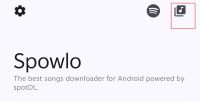
You can tap the music icon in the top-right corner of the Spowlo home page to view your download history.
Editor's Real-World Test Log of Spowlo(Android 16)
We installed the latest Spowlo APK on a Google Pixel 9 running Android 16. Here is our field report:
- Success Rate: 92% for mainstream hits; 65% for obscure indie tracks (due to YouTube matching errors).
- Battery Drain: High. We recommend disabling "Battery Optimization" for Spowlo to prevent the OS from killing long batch downloads in the background.
- Storage: Synced lyrics (.lrc) are saved in the same directory, which is a massive plus for library organization.
Part 3. How to Get Spotify Credentials to Improve Spowlo
For users looking to enhance their experience with Spowlo, obtaining Spotify credentials can offer a more seamless and customized downloading process. With Spotify credentials, Spowlo can access Spotify's metadata directly, improving the accuracy of track information, album art, and playlists. This setup minimizes the differences between Spotify's catalog and YouTube sources, allowing for a more precise download experience and a better-organized music library. Here's a step-by-step guide to help you acquire and set up your Spotify credentials for use with Spowlo.
Step 1. Go to the Spotify Developer Dashboard, sign in with your Spotify account, or create one if you're new to Spotify.

Step 2. Then click on your profile, select "Dashboard" in the dropdown menu.
Step 3. In the Developer Dashboard, click "Create an App" to start the process.

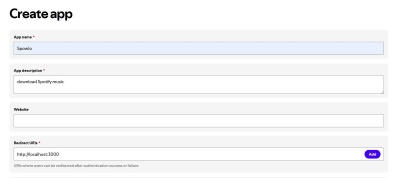
Step 3. Enter an "App Name" and "App Description" (e.g., "Spowlo Integration"). You can input the following address in the input bar for Redirect URL.
http://localhost:3000
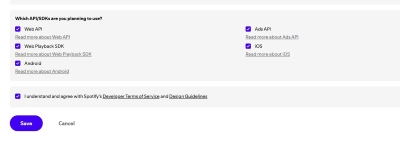
Step 4. Simply check all the box below and agree to the Developer Terms and Conditions, then click "Save".
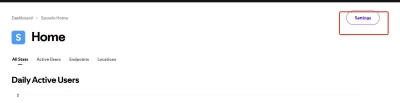
Step 5. Then you will be redirected to the home page of your newly created Spowlo app, click on the "Settings" button on the right.
Step 6. Voila! You'll now see the "Client ID" of your app at the top of the Basic Information section. Click on "View client secret" to reveal your app's client secret.
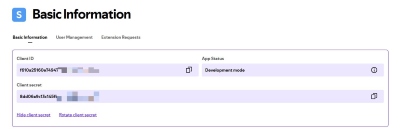
Step 7. Finally, input the acquired ID and secret into your Spowlo settings to enhance its functionality.
STATUS ALERT: Spowlo Maintenance Paused:
Please be advised that the developer of Spowlo (BobbyESP) has officially announced an indefinite hiatus from maintaining the project. Following Spotify's massive February/March 2026 API overhaul, which introduced strict "Development Mode" restrictions and Premium-only requirements, The app has faced significant stability issues. While the app may still function for some users with existing configurations, new users may find it increasingly difficult to set up. We recommend reading our Alternative Section below for more stable options.
Part 4. Best Spowlo Alternative for Downloading Spotify Songs
Spowlo is a simple, open-source tool for downloading Spotify songs from YouTube. However, it has some limitations. The audio quality is lower, typically 128K M4A or 160K OPUS, which may not satisfy users seeking high-fidelity music. It's only available on Android, limiting access for users on other platforms. Additionally, there might be occasional mismatches between Spotify and YouTube libraries. These drawbacks could affect the experience for discerning listeners.
For users seeking a higher-quality, platform-independent solution, DRmare Spotify Music Converter is a compelling Spowlo alternative. It offers a high-quality solution for downloading Spotify music directly, ensuring lossless audio, full metadata retention, and support for multiple formats like MP3, FLAC, and WAV. Unlike Spowlo, DRmare is available on both Windows and Mac, providing a platform-independent, reliable alternative that delivers a richer, well-organized music library for users seeking the best offline listening experience. If you meet Spowlo not working or downloading issue, you can also use this alternative.
How to Use Spowlo Alternative: DRmare Spotify Music Converter
- Step 1Add Spotify Tracks to DRmare Spotify Music Converter
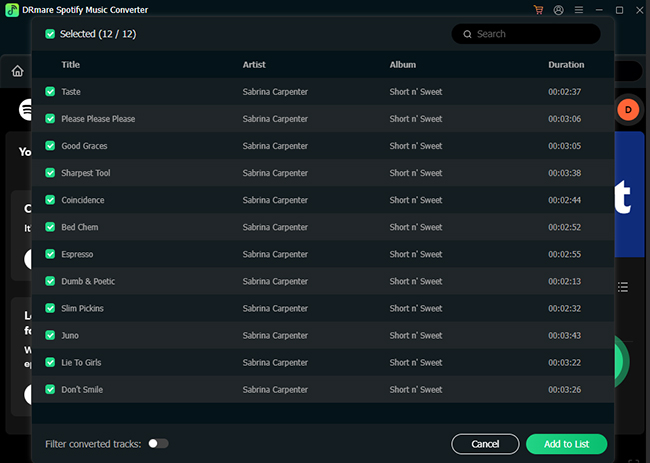
After opening DRmare Spotify Music Converter, the Spotify Web Player will be shown up in the main interface. To add music, you can authorize your Spotify account and browse your library. Tap the "Add" > "Add to List" button to load them to the conversion queue
- Step 2Set Output Preferences for Spotify Music
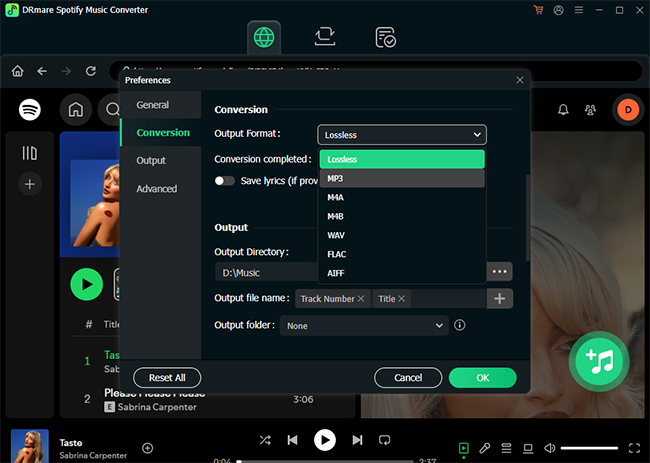
In the DRmare app, access the output settings by selecting "Preferences" from the menu at the top-left corner on a Mac or by clicking the "menu" icon on Windows and going to "Preferences" > "Conversion". Here, you can choose your preferred output format and adjust audio parameters for the downloaded Spotify songs.
- Step 3Start Downloading Spotify Songs for Offline Listening
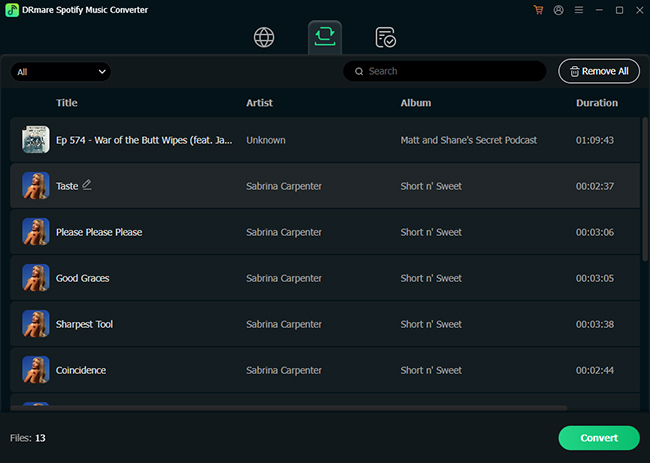
Click the "Convert" button to start the download process. DRmare Spotify Music Converter will save the selected Spotify tracks to your computer in batches. Once completed, you'll have ad-free Spotify songs ready for offline playback, even on a free account.
Part 5. Comparison Between Spowlo and DRmare Spotify Music Converter
| Feature | Spowlo | DRmare Spotify Music Converter |
|---|---|---|
| Platform Compatibility | Android only (APK format) | Windows and Mac |
| Audio Source | YouTube, YouTube Music, other platforms | Directly from Spotify |
| Reliability | Variable (API dependent) | High (Dedicated Engine) |
| Audio Quality | 128K M4A or 160K OPUS (YouTube-sourced) | Lossless, up to original Spotify quality (up to 320kbps) |
| Metadata Preservation | Basic metadata (may vary slightly) | Full metadata retention, including album art, artist, etc. |
| Output Formats | MP3, FLAC, OGG, OPUS, M4A, WAV | MP3, FLAC, WAV, AIFF, M4A, M4B |
| Batch Download | Yes | Yes |
| Customizable Settings | Limited (basic bitrate adjustment) | Extensive (output format, bitrate, sample rate, etc.) |
| Ad-Free Downloads | Yes | Yes |
| Ease of Use | Simple interface for Android users | User-friendly with a straightforward interface on PC/Mac |
| Availability for Free Accounts | Yes | Yes |
| Cost | Free | Paid, with a free trial available |
This table gives a clear overview of how Spowlo and DRmare Spotify Music Converter cater to different user needs, with DRmare offering higher-quality downloads and more customization options on both Windows and Mac platforms, while Spowlo remains a free, simpler option for Android users.
Part 6. FAQs about Using Spowlo on GitHub
Is Spowlo safe?
Yes. Being open-source, its code is audited by the community. Avoid "Modded" versions from third-party sites; only use the official GitHub releases.
Can Spowlo download entire Spotify playlist?
Yes, Spowlo supports batch downloading, allowing users to download entire playlists or albums with a single action, which is convenient for those who want to save larger collections of music.
What is the audio quality of Spowlo downloads?
Spowlo's downloads are typically capped at 128K M4A or 160K OPUS due to the audio being sourced from YouTube. Although it offers options to set output up to 320kbps, this does not improve the original quality but only increases file size.
Can I download Spotify songs for free using Spowlo without a Premium account?
Yes, Spowlo allows users with both free and Premium Spotify accounts to download songs without any cost. It does this by sourcing audio from platforms like YouTube, bypassing Spotify's built-in restrictions on free account downloads.
Can I use Spowlo on iOS or PC?
Currently, Spowlo is only available as an APK for Android devices. Users on other platforms, such as Windows or iOS, cannot use Spowlo directly. But you can consider using DRmare Spotify Music Converter as its alternative for downloading Spotify Music on other platforms.
Why does Spowlo download the wrong version of a song?
Because it searches YouTube for the title. If a "Remix" or "Live Version" is more popular on YouTube than the original, Spowlo might grab that instead. Use the Spotify Credentials method to minimize these errors.
Part 7. Final Verdict
Spowlo remains the best free tool for Android users who need quick, mobile-first downloads for casual listening. However, its reliance on YouTube means you sacrifice audio depth and 20% of your metadata accuracy.
- Choose Spowlo if: You want free Spotify music on your phone for gym sessions or commuting.
- Choose DRmare if: You are building a permanent high-quality Spotify library for home theater system.

 Home
Home




User Comments
Leave a Comment