





Audible offers a massive library of audiobooks for users to listen to. To enjoy audiobooks, you need to purchase them separately, or you can subscribe to Audible Plus or Premium Plus. In addition to listening online, you can also download them for offline listening. But many users are looking for Audible downloader to download audiobooks without subscribing to Audible. By using a downloader, they can save their favorite audiobooks locally on their device so they can listen to them on any device and software, not just on Audible. Today we will show you 3 best Audible downloaders for you to choose from.
Part 1. Free Online Audible Converters for Quick Tasks
When you only need to unlock a single audiobook and want immediate results, turning to a browser-based utility provides the fastest possible workflow. Kamsker stands out in this category as a uniquely privacy-focused online converter. This clever tool processes AA or AAX files directly within your local web browser, allowing you to easily convert your audiobooks into MP3, M4B, or FLAC formats.
How to Convert Audible AAX Files Online
Step 1. Download your purchased Audible audiobooks directly to your computer's local storage.
Step 2. Navigate to the Audible online downloader and drag your downloaded .aax file directly into the browser interface.
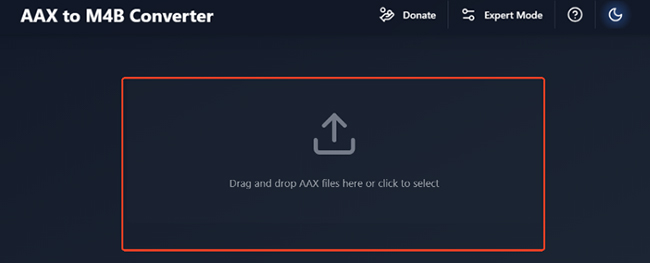
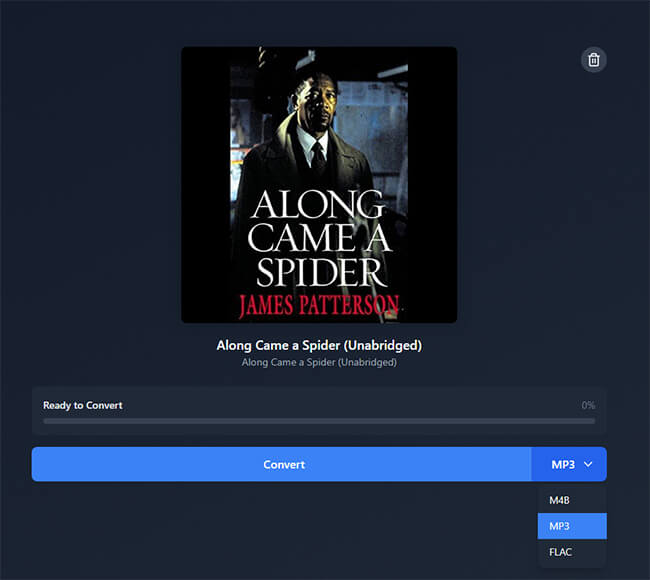
Step 3. Locate the format dropdown menu on the screen and select your desired output to download your Audible to MP3/M4B/FLAC files. Click the "Convert" button to initiate the automatic in-browser decryption process.
Note:
While this web-based approach is incredibly mobile-friendly and completely free, it relies entirely on your browser's RAM. If you attempt to process a massive audiobook, your browser is highly likely to crash or freeze.
Pros
 Cross-platform Access: Works instantly on Windows, Mac, Linux, Android, and iOS without extra apps.
- Free and Easy: Completely free to use with no hidden subscription fees.
- Multiple Output Formats: Supports lossless formats like M4B and FLAC alongside MP3.
Cons
 No Batch Processing: You can only process a single file at a time, wasting time for large library backups.
- Metadata Loss: Lacks advanced features like chapter splitting or ID3 tag editing.
- Catalog Restrictions: It does not support titles downloaded from the Audible Plus Catalog.
Part 2. Best Desktop Audible Downloaders for Lossless Audio
When web tools fail to handle massive, DRM-protected files, dedicated desktop software becomes an absolute necessity for you. DRmare Audible Converter acts as an all-in-one downloading and conversion suite that instantly removes playback restrictions. This allows you to permanently self-host your library and listen on any device. With original lossless audio quality and metadata perfectly preserved, it features advanced editing tools that allow you to split massive recordings seamlessly.
How to Download Audiobooks with DRmare Audible Downloader
- Step 1Choose Your Audible Audiobooks
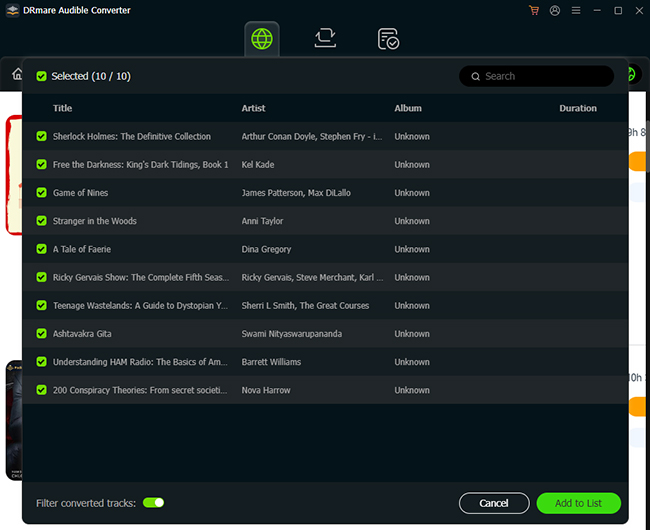
Launch the DRmare Audible Converter on your computer to access its integrated web player interface. Log in to your Audible account securely to view your complete library. Locate the specific audiobooks you want to download, then click the floating "Add" and "Add to List" icons to place them into the processing queue.
- Step 2Optimize Format and Metadata
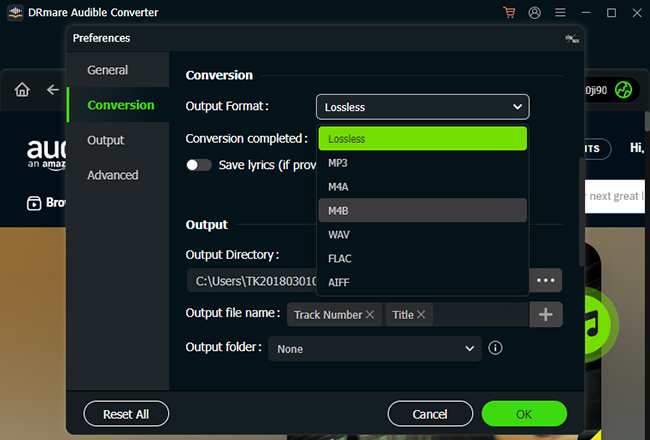
Navigate to the top menu, click "Preferences," and select the "Conversion" tab to customize your output settings. You can select formats from MP3, FLAC, WAV, AIFF, or choose M4B or M4A to perfectly preserve original chapter navigation markers.
- Step 3Extract and Save Your Audiobooks
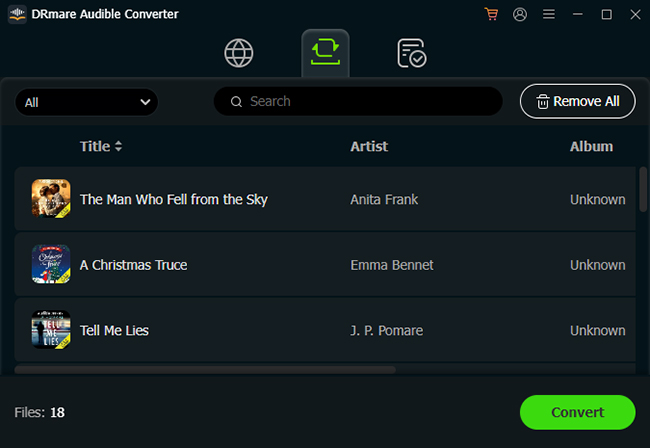
Click the "Convert" button at the bottom of the interface to begin the extraction process. The software will rapidly remove the DRM restrictions and save the high-quality, unprotected audio files directly to your local computer folder.
Pros
- Batch Processing: Converts Audible AA/AAX files at 100X speed 100% lossless audio quality.
- Advanced chapter splitting: Easily divides massive audiobooks by built-in chapters or custom time segments.
- Broad format and IDtags: Exports files into six universal formats with ID3 tags maintained.
Cons
- Premium Software: Requires a paid subscription (free trial available).
- Desktop Requirement: Only support used on a Windows or macOS computer.
- Storage consumption: Saving multiple lossless audiobooks requires significant local hard drive space.
Part 3. Open-Source Audible Converters for Free Access
For users who want to organize and manage their audiobook collections across different operating systems, open-source-inspired managers are a fantastic route. OpenAudible is a highly popular, cross-platform program designed specifically to help you view, download, and convert your Audible library. Available on Windows, Mac, and Linux, it acts as a comprehensive desktop hub for your digital audio assets.
Note:
While OpenAudible began as a completely free project, it now requires a paid license to unlock its full batch-conversion and management features. If you are searching for a free alternative, exploring other open-source tools like Libation is highly recommended.
How to Convert Audible Audiobooks with OpenAudible
Step 1. Go to OpenAudible's website to install this Audible downloader.
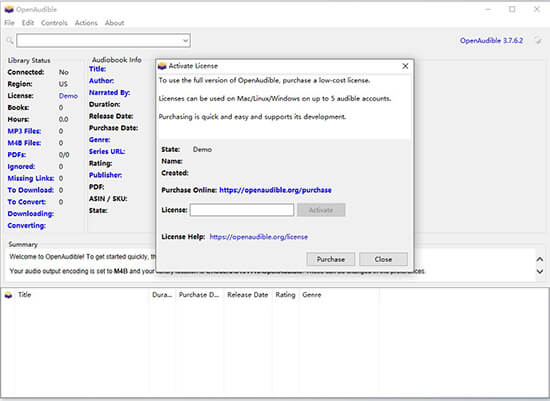
Step 2. Start OpenAudible and click 'About' > 'License' and enter your license code to activate.
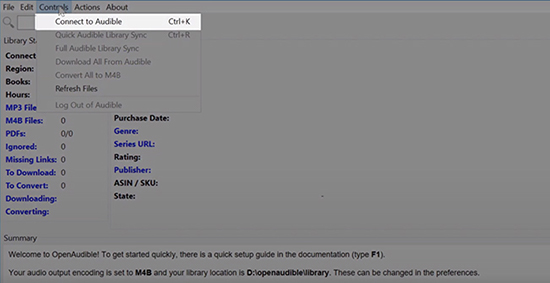
Step 3. Now click 'Controls' > 'Connect to Audible' to connect to your Audible account.
Step 4. After connecting, you will be asked to download all your Audible audiobooks. Just click 'Yes' and it will start the process.
Pros
- Library Management: Easily syncs your account and exports your database to spreadsheets or HTML.
- Cross-platform Compatibility: Runs smoothly across Windows, Mac, and Linux operating systems.
- Automated Workflows: Capable of automatically downloading new purchases and batch converting them.
Cons
- Paid License Required: Needs a paid license to unlock its full feature set.
- Cluttered Interface: The heavy focus on database management can feel overwhelming.
- API Dependency: It can temporarily break when Audible updates its backend servers.
Part 4. Command-Line Audible Tools for Advanced Users
For tech-savvy individuals who prefer bare-bones efficiency, command-line utilities are the ultimate playground. Book Lib Connect is a standout open-source downloader in this category. It operates as a standalone decryptor that pulls your audiobooks directly from Audible's servers. If you are comfortable tinkering with code, combining these methods with robust scripts like AAXtoMP3 offers unparalleled control over your audiobook extraction process.
How to Convert Audiobooks to M4B with Book Lib Connect
Step 1. Download the latest Windows setup package directly from the official GitHub repository and install the software. Launch the application, which will guide you to securely connect your Audible account via a standard web browser token.
Step 2. Once your account is synced, browse your loaded audiobook library and select the specific titles. Before proceeding, access the settings to choose your preferred output format, such as M4B files or raw AA/AAX exports.
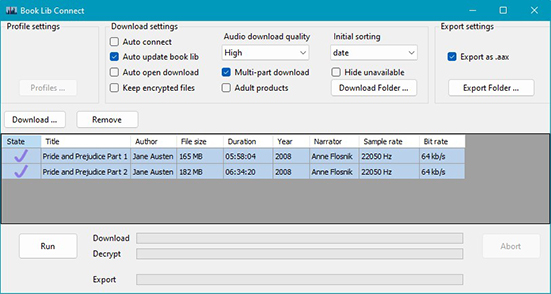
Step 3. Initiate the download process to pull the audio directly from the official servers. After the progress monitor completes, you can locate your Audible files on your local drive, complete with fully intact metadata that are ready for media player.
Pros
- Direct Server Access: Convert audiobooks as M4B from Audible's servers without requiring activation codes.
- Lightweight Performance: Runs efficiently with minimal system resources.
- Completely Free: Offers transparent code and costs absolutely nothing to use.
Cons
- Steep Learning Curve: Requires a certain level of technical comfort.
- Platform Restriction: Officially designed for Windows 7 and higher.
- No Official Support: Troubleshooting relies entirely on community forums.
Part 6. Top Audible Downloaders Comparison
| Feature | Kamsker | DRmare Audible Converter | OpenAudible | Book Lib Connect |
|---|---|---|---|---|
| Category | Online Tool | Desktop Software | Open-Source App | Command-Line Script |
| Price | Free | Paid (Free trial available) | Paid License | Free |
| Supported OS | Windows, Mac, Linux, iOS, Android | Windows, Mac | Windows, Mac, Linux | Windows 7+ |
| Batch Processing | ❌ | ✅ | ✅ | ✅ |
| Chapter Splitting | ❌ | ✅ | ✅ | ❌ |
| Output Formats | MP3, M4B, FLAC | MP3, FLAC, WAV, AIFF, M4B, M4A | MP3, M4B | M4B, AA, AAX |
| Ease of Use | Easy | Easy | Moderate | Hard |
| Best For | Quick, occasional mobile tasks | Lossless audio and massive libraries | Heavy database management | Advanced tech-savvy users |
| Ratings | 4.3 | 4.8 | 4.6 | 4.5 |
While free online Audible downloaders or open-source tools are great for occasional, single-file tasks, they often struggle with massive files and lack essential chapter preservation. For the vast majority of users, DRmare Audible Converter is the smartest choice. It converts Audible to multiple lossless files, making it the ultimate tool to effortlessly build your DRM-free local library.

 Home
Home





User Comments
Leave a Comment