





Music streaming makes it easier than ever to enjoy new songs, but you may still want to download your favorite tracks for offline listening. As a popular platform for discovering music, SoundCloud offers plenty of great content, yet downloading songs from SoundCloud to Android isn't always straightforward. Depending on whether you have a subscription or prefer a quick or more reliable solution, the available options can vary. In this guide, you'll explore five practical ways to download SoundCloud songs on Android, including official in-app downloads and third-party tools, along with their pros and cons, so you can pick the method that works best for you.
Part 1. Download Music from SoundCloud on Android via the Official Ways
If you're looking for a simple and secure way to listen to SoundCloud music offline on Android, you can start with the official options. With a Go or Go+ subscription, you can save your favorite tracks directly within the app, while users without a subscription can still take advantage of limited free downloads via the SoundCloud website. Below, you'll find step-by-step instructions for both approaches.
Download Songs from SoundCloud App on Android with Go/Go+ Subscription
With a SoundCloud Go or Go+ subscription, you can download music directly in the SoundCloud Android app for offline listening. However, these downloads stay inside the app and aren't saved as real audio files on your phone, which can't be transferred or played elsewhere.
Step 1. Open the SoundCloud app on your Android phone and log in with an active SoundCloud Go or Go+ account.
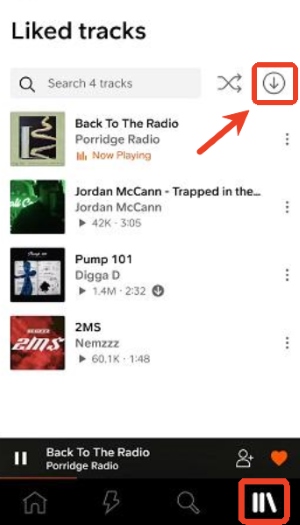
Step 2. Choose the SoundCloud playlist you'd like to listen to offline, and tap the "Download" icon to download SoundCloud tracks on your Android. If the songs you want are scattered across different playlists, you can add them to "Liked tracks" or create a new playlist since SoundCloud only allows downloading the whole playlists within your app on mobile.
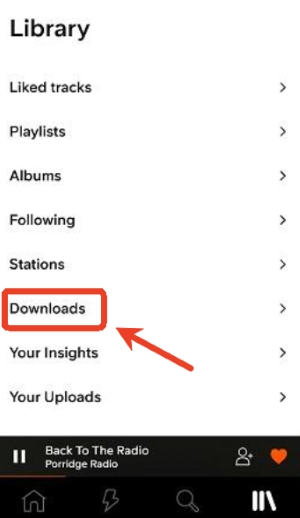
Step 3. Once the download is complete, head to your "Library" and select "Downloads". From there, you can play your saved tracks anytime, even without an internet connection.
Pros and cons of this method
Pros
 Official and secure
- Unlimited offline access
- No additional software needed
Cons
 Requires Go/Go+ subscription
- Downloads stay within the app
- cannot export audio files
Download Music from SoundCloud on Android for Free
On SoundCloud's website, some artists choose to make their tracks available for direct download, which means you can save the audio file to your computer for free. If you don't have a SoundCloud subscription, one alternative is downloading music on a computer first and then transferring it to your Android phone. However, only a small number of tracks support direct downloads, and most popular or major-artist releases don't offer this feature at all.
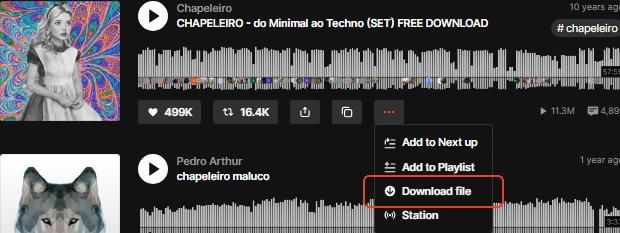
Step 1. Go to the SoundCloud website and log in to your account. Find the track you want to save. Click the "More" option and choose "Download file". The selected audio file will then be saved directly to your computer.
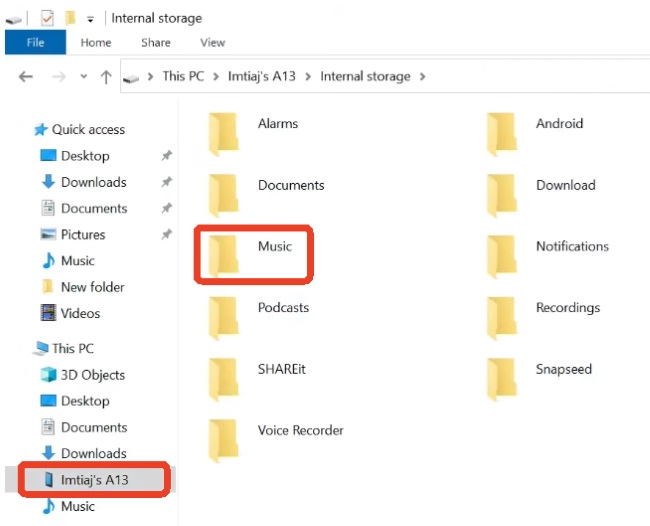
Step 2. Use a USB cable to connect your Android phone to your computer. Once connected, open "File Explorer" on your computer, locate your phone, and open the "Music" folder. From there, simply drag and drop the audio files from your PC into the folder, and that music will be transferred to your Android device.
Pros and cons of this method
Pros
- Free and official
- Simple download process
Cons
- Only a limited number of songs are available
- Downloads limited to individual songs
Part 2. Download All SoundCloud Songs on Android from Computer
If you don't have a Go or Go+ subscription but want to download all your favorite SoundCloud tracks, using a desktop downloader is usually the most dependable solution. This method lets you save songs from SoundCloud as real audio files that can be played anywhere. It provides lossless audio quality and complete playlist support, making it especially suitable for you to build a long-term offline music library on Android.
A reliable tool for this is DRmare Streaming Audio Recorder. With DRmare, you can download SoundCloud songs on Android by first saving them to your computer in high-quality formats like MP3, WAV, or FLAC, while keeping ID3 tags and metadata intact. This way, your SoundCloud playlists remain complete and fully accessible offline, making it easy to enjoy your music on Android without relying on a subscription.
How to Download and Transfer All SoundCloud Music to Android
- Step 1Set Your Preferred Audio Format and Sign in
Before downloading SoundCloud songs on Android via DRmare, adjust the output settings your like. Press "Settings" and choose "Music", and choose from formats such as MP3, FLAC, or WAV. You can also change audio quality and channels to ensure the downloaded music matches your preferences. Then log in to your SoundCloud account so the tool can access your playlists and tracks.

- Step 2Select Playlists or Favorite Tracks
Browse your key playlists or top tracks in the SoundCloud web player. Use "Add > Add to List" to import them into DRmare. This keeps your playlists intact and ensures all the songs you want to download from SoundCloud on Android are ready for offline saving.
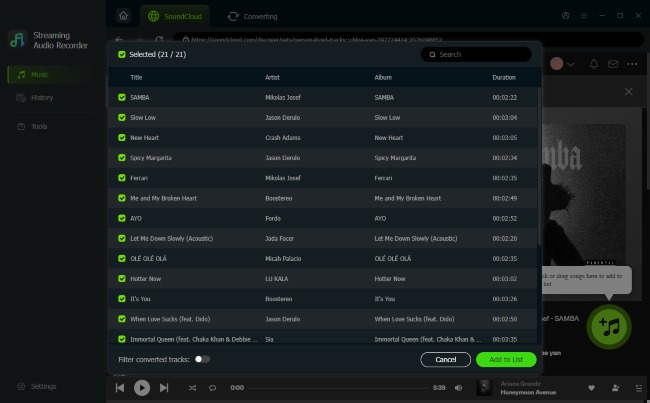
- Step 3Convert and Save SoundCloud Music Locally
Once your tracks are added, click "Convert" to download them as local audio files. After the process completes, find your SoundCloud music downloads under the "History" tab or in the designated folder on your computer.
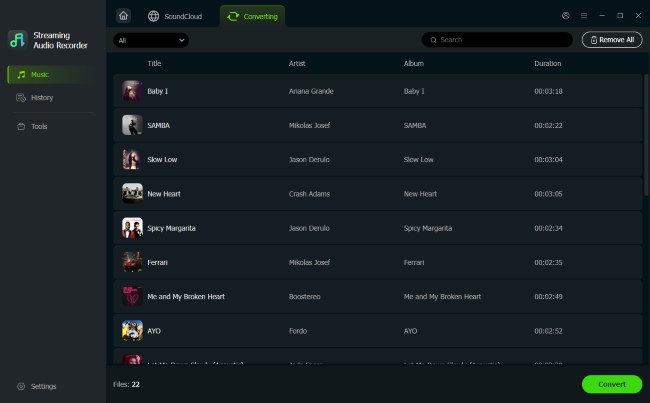
- Step 4Transfer and Save SoundCloud Music to Android
After downloading your playlists to your computer, connect your Android device via a USB cable. Open "File Explorer" on Windows or "Finder" on Mac and locate your phone. Then open the "Music" folder and drag the SoundCloud MP3 downloads into it. Once transferred, you can play the tracks offline on your Android device without needing a subscription.
Part 3. Keep SoundCloud MP3 Music via Online SoundCloud Downloader for Android
Online SoundCloud downloaders can be a quick workaround when you don't want to install extra apps. Websites like KlickAud, SoundCloudMate, and ForHub.IO let you download SoundCloud music directly on your Android through a browser by simply pasting a track link. This method is convenient for occasional use, but it does come with some clear drawbacks, such as frequent ads, MP3-only output, and single-track downloads.
How to Download MP3 from SoundCloud to Android Online
Step 1. To use an online downloader for SoundCloud, start by opening the SoundCloud app on your Android device, then find the track you want and copy its link.
Step 2. Switch to your browser on mobile and go to the KlickAud website.
Step 3. Paste the copied link into the search box, tap "Convert", then choose "DOWNLOAD THE SONG" to save the SoundCloud songs to MP3 on your Android phone.
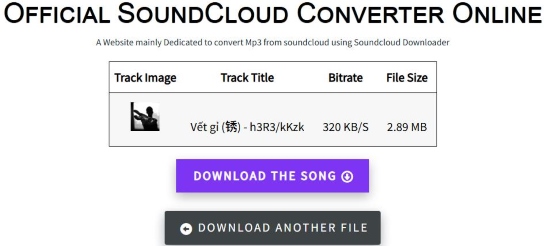
Pros and cons of this method
Pros
- Free and easy to use;
- No installation required;
- Works in any browser
Cons
- Supports only MP3 formats
- too many ads
- Single-track only without batch option
Part 4. Download SoundCloud Songs to Android Using Mod APKs
If you're looking for a way to save SoundCloud music directly to your Android device without relying on a subscription or transferring files from a computer, using a SoundCloud Mod APK is one option. These modified versions of the SoundCloud app can unlock features like offline downloads and playlist saving right on your phone. However, it's essential to be aware of the risks of Mod APK, including potential security issues and account restrictions.
Download SoundCloud Playlists to Android for Free
Step 1. First, open the device's Settings, go to Security or Privacy, and enable "Unknown sources" for the browser being used. This step enables the installation of APK files that are not from Google Play.
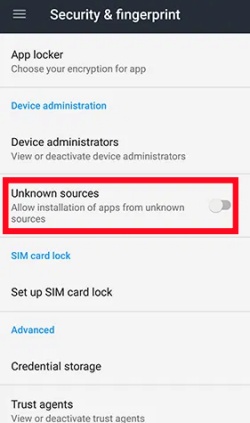
Step 2. Then, download a SoundCloud Mod APK from a relatively trustworthy website. Once the APK file is downloaded, open the browser's Download section and locate the file that was just saved. Open the APK file and follow the prompts to finish the installation. Here are two popular APKs you can try for your SoundCloud music downloads.
SoundCloud v2025.12.08 MOD APK
SoundCloud Premium v2025.12.10-release MOD APK for Android
Step 3. Once the app is installed, you can open the modified SoundCloud app and sign in. To stay on the safe side, it's usually better to sign in with a new SoundCloud account instead of your main one.
Step 4. After signing in, you can enjoy your music from SoundCloud as usual. Just tap the "Download" option, and the Mod APK will then keep those songs available for offline listening inside the SoundCloud app on Android, similar to how downloads work in the official SoundCloud app.
Pros and cons of this method
Pros
- Ad-free playback
- Unlimited offline access
- Full music library unlocked
- Higher audio quality (up to 256 kbps AAC)
Cons
- Account ban risk
- Security concerns
- Privacy exposure
- Unstable app performance
Part 5. Wrapping Up
| Method | Type | Formats | Best For | Ratings |
|---|---|---|---|---|
| SoundCloud Go/Go+ | Mobile | Not exportable | Users with a subscription who want offline listening inside the app | 4.6 |
| Direct Download via SoundCloud Website | Desktop | MP3 | Users without a subscription who want a few specific tracks | 4.3 |
| DRmare Streaming Audio Recorder | Desktop | MP3, FLAC, WAV, M4A, AIFF, and M4B | Long-term offline library and lossless quality | 4.8 |
| Online Downloaders | Online | MP3 | Quick, occasional downloads without installing software | 4.4 |
| SoundCloud Mod APKs | Mobile | MP3 within app | Users who want extra features without a subscription and accept risks | 4.5 |
As you can see, there are various ways to download SoundCloud songs on Android, which really depends on how you plan to use your music. The official Go/Go+ option is simple and safe to listen to SoundCloud music offline, but it is only available inside the app. Online downloaders are quick for saving an occasional song with ads. Mod APKs offer more features but also carry clear risks. If you want lossless quality and long-term access to SoundCloud music on your Android, using DRmare Streaming Audio Recorder remains the most stable and flexible solution.

 Home
Home





User Comments
Leave a Comment