





A Spotify Mod APK not working can mean very different things. You might be complete unable to install the Spotify Premium APK at all, or perhaps you can open it open the app but can't log in, play songs, or access Premium features that previously seemed to work. These problems are not always caused by a bad internet connection or corrupted cache. Changes to Spotify's authentication and playback systems, incompatible patched versions, Android app-signing rules, and server-side Premium restrictions can all play a role.
Before repeatedly reinstalling Spotify Mod or trying another APK, it is worth finding out which part is actually failing. You can use this guide to diagnose and fix the actual root cause and get things running smoothly again.
The Golden Rule of Troubleshooting
Before trying any fix below, do this one test: Sign into the official Spotify app or the Spotify Web Player with your account.
- If the official app fails too, the problem is with your account, region, or internet connection.
- If the official app works perfectly but the Mod fails, you can confidently narrow the issue down to the modified client itself.
Part 1. Quick Troubleshooting Checklist for Spotify APK Not Working
Fixing a broken Spotify Mod doesn't have to be a guessing game. Since different problems require completely different solutions, the first step is to identify exactly what is going wrong. Find your exact issue in the checklist below to see what is likely causing it and the very first thing you should do to fix it.
| Spotify Mod APK Problem | Most Likely Cause | What to Check First |
|---|---|---|
| "App not installed" error | Package/signature conflict | Uninstall any existing Spotify app. |
| App crashes immediately or won't open | Corrupted cache or incompatible build | Clear app data; check base version compatibility. |
| Login fails / Invalid session | Mod authentication spoofing is broken | Login method (use email instead of username). |
| Songs keeps skipping rapidly / won't play | Patch is outdated for Spotify's backend | Test playback on the official Spotify app. |
| "14 days abroad" error | Mod session issue (if not actually abroad) | Check your official account region settings. |
| Downloads / Lossless don't work | Server-side Premium restrictions | Check if the Mod genuinely supports native downloads. |
| Mod behavior changes on Spotify Connect | Playback is occurring on another device | Test playback directly on the phone |
Part 2. How to Fix Spotify Mod APK Won't Install
If Android displays "App not installed," "Package conflicts with an existing package," or refuses an update, don't assume the APK file itself is necessarily broken. Here are the most common installation barriers and how to resolve them.
Fix 1. Remove Existing Spotify Package
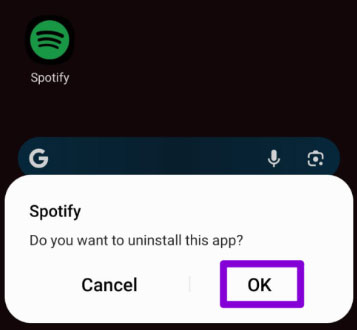
Android blocks installations if an app's digital signature doesn't match an already installed version. Because the official Spotify app and a Mod APK use different signatures for the same app ID, you cannot install a Mod directly over the official app. You have to completely uninstall your current Spotify app, restart your phone, and then attempt a clean installation of the Mod APK.
Note:
Also ensure your phone has sufficient storage, as a full drive can trigger the same error.
Fix 2. Check Android Version Compatibility
Don't assume that a "newer" Android version or a "newer" Spotify base means better compatibility. While the official Spotify app requires a minimum of Android 7.0, modified clients are built on specific base versions that might have stricter OS requirements. Your phone supporting Spotify does not automatically mean it supports a particular Spotify Mod build.
If an APK refuses to install, especially after a recent phone update, you have to check the developer's release notes to confirm that specific Mod build supports your current Android version.
Fix 3. Don't Disable Android Security Just to Install a Spotify Mod APK
Some guides recommend immediately switching off Google Play Protect when a sideloaded APK is blocked. That should not be the default troubleshooting step. If Android displays a severe security warning rather than a basic installation error, verify the source of your APK first. Only bypass Play Protect if you completely trust where the file came from.
Part 3. How to Fix Spotify Mod APK Crashing or Not Opening
An APK that installs successfully but closes immediately is a different problem from an APK that will not install. It usually points to corrupted local files or patch incompatibility.
Fix 1. Restart the App and Clear Spotify Mod Cache and Data
A corrupted cache or saved session can still cause ordinary Spotify problems. Spotify's own Android troubleshooting process includes clearing storage/cache, uninstalling the app, restarting the device, and then reinstalling. For a modified client, start conservatively:
Step 1. Force close Spotify Mod.
Step 2. Go to Android Settings > Apps > Spotify > Storage.
Step 3. Tap Clear Cache, then test the app.
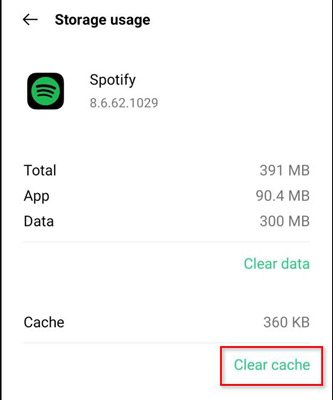
Step 4. If it still crashes, tap Clear Data (this will sign you out and reset local settings, which is more effective than just clearing the cache).
Step 5. Restart your phone and test the app again.
Part 4. How to Fix Spotify Premium APK Login Not Working
Login problems have become one of the more complicated Spotify Mod failures because the app, account, and Spotify authentication system can all be involved. Here is how to isolate and fix the problem.
Fix 1. Test Your Spotify Account Outside the Mod
Before resetting passwords or blaming the APK, test your account on the official Spotify app or the Spotify Web Player. If you cannot log in officially, you have an account issue. If official login works but the Mod fails, the Mod's authentication patch is likely outdated and you will need to find a newer build.
Tips:
ReVanced's Spotify patch history provides a real example: Spotify changes caused patched-client login problems, leading to several revisions of its login-spoofing approach.
Fix 2. Use Your Email Address Instead of Your Spotify Username
Spotify is changing username-based login. After September 1, 2026, Spotify says users should log in using their email address rather than their Spotify username. If you are using an older Mod that still presents a username login field, ignore it. Input your registered email address instead to bypass the outdated flow.
Fix 3. Reset the Spotify Session
If the account works officially but a modified client repeatedly logs out or holds an invalid session, signing out of Spotify everywhere can give you a cleaner starting point.
Step 1. Log into your Spotify account via a web browser.
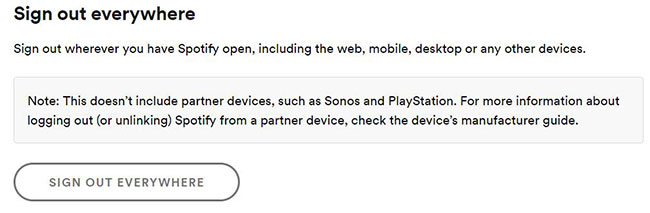
Step 2. Navigate to Security and privacy and click Sign out everywhere.
Step 3. Log back into the official Spotify app first to ensure the account is healthy.
Step 4. Open the Spotify Premium Mod APK and attempt to log in again.
Part 5. How to Fix Spotify Mod APK Skipping Songs or Not Playing Music
If you select a track and the app rapidly skips through the playlist without playing any audio, you are likely facing a patch compatibility issue, not a simple buffering problem. Follow this diagnostic order to fix it:
Step 1. Rule out basic connectivity or account restrictions first. Try playing the exact same songs on the official Spotify app, testing both Wi-Fi and mobile data.
Step 2. Sometimes a corrupted local session causes playback loops. You can clear the Mod's cached session to refresh the app's data.
Step 3. If the official app plays music perfectly but the Mod continues to rapid-skip, Spotify has likely updated its backend playback mechanics. You can require an update from the developer.
Part 6. How to Fix Spotify Mod "14 Days Abroad" Error
Spotify Free accounts normally have a 14-day streaming limit when traveling outside their home country. However, if your Mod displays this warning when you haven't traveled, it is usually a session authentication glitch rather than an actual location problem.
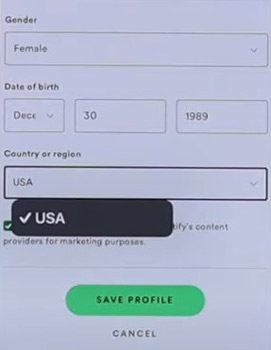
Fix 1. Verify Your Account Region
Step 1. Log into your Spotify Account page via a web browser and check your registered country.
Step 2. Test playback on the official Spotify app.
Step 3. If the official app also displays the travel warning, update your country settings directly in your account parameters to fix it.
Fix 2. Address Mod Session Glitches (Skip the VPN)
If the official app works normally and only the Mod shows the 14-day error, repeatedly changing your region or turning on a VPN will likely add unnecessary connection variables without fixing the issue.
You can treat this as an APK session bug. Log out of the Mod, clear its app data, or use "Sign out everywhere" from the official Spotify account page to force a clean authentication handshake.
Part 7. Why Some Spotify Mod Premium Features Don't Work
The biggest misconception about Spotify Mods is that a visible button means an active feature. You must understand the difference between Client-Side (what the app shows) and Server-Side (what Spotify's servers actually authorize).
- Offline Downloads: Native Spotify downloads are strictly managed by Spotify's servers and DRM authentication. A Mod might show the "Download" button, but it cannot force Spotify's servers to send the encrypted offline files to a Free account.
- Very High / Spotify Lossless Audio: Spotify gates its 320 kbps (Very High) and 24-bit/44.1 kHz FLAC (Lossless) tiers on the server level. If you select Lossless in a Mod and playback breaks, it is because the server refuses to send that high-tier stream to your account.
- Spotify Connect: When you cast music to a Smart TV or console via Spotify Connect, the receiving device talks directly to Spotify's servers, bypassing your phone. Therefore, any Mod benefits you have on your phone will immediately vanish on the connected speaker.
Part 8. What to Do If Spotify Mod APK Still Doesn't Work
If official Spotify works fine but every Mod APK continues to fail, endlessly downloading random unknown APKs adds security risks without solving the root cause. Consider these practical next steps instead:
Option 1. Switch Back to the Official Spotify App
Using the official app eliminates all signature, patching, and backend compatibility errors. While it won't unlock Premium features on a Free account, it guarantees a stable, fully functional streaming experience (requires Android 7.0+).
Option 2. Secure Your Account Immediately
If you have entered your login credentials into third-party or untrusted Mod APKs:
-
Change your Spotify password right away.
-
Go to your official Spotify Account page and select "Sign out everywhere".
-
Review connected applications and revoke access for unauthorized third-party apps.
Note:
Using modified clients violates Spotify's User Guidelines and carries account policy risks.
Option 3. Choose a Permanent Offline Solution
If your main goal is reliable offline listening across devices rather than customizing the app interface, modified mobile apps are inherently fragile.
- For official offline playback: Consider an official Spotify Premium subscription.
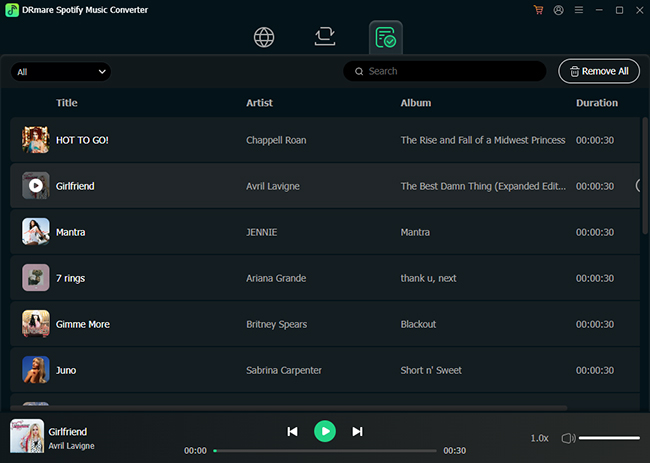
- For permanent local music: Use DRmare Spotify Music Converter to convert your Spotify music to standard local audio files (e.g., MP3 or FLAC). Building an independent local library ensures your offline music is completely immune to Spotify backend updates, app bans, or broken patches.
Part 9. FAQs About Spotify Mod APK Not Working
Why did my Spotify Mod suddenly stop working?
A Spotify Mod can stop working after changes to Spotify's authentication, playback behavior, or app compatibility. Local issues such as corrupted cache or an incompatible Android version are also possible.
Does Spotify detect modified APKs?
Modern app platforms provide mechanisms that can distinguish app identity and modified software, and ReVanced has discussed app attestation in connection with Spotify's modified-client restrictions. However, it would be too broad to assume that every Spotify Mod error proves Spotify has specifically detected and blocked that user.
Can Spotify ban my account for using a Mod APK?
Spotify's User Guidelines restrict modifying its software and circumventing advertisements. This means modified clients can create account-policy risk. However, Spotify does not publish statistics showing that every Mod APK user is automatically banned, so such claims should be treated cautiously.
Is xManager Spotify still working in 2026?
The Team-xManager GitHub repository was archived and made read-only on April 6, 2026, but the official xManager website remains accessible and continues to provide a download path. Therefore, the GitHub archive alone does not mean xManager Spotify distribution has completely stopped.
Conclusion
When Spotify Mod APK is not working, the fastest solution is not always another APK. First determine whether the failure comes from Spotify itself, Android installation, the modified client's session, patch/version compatibility, or a Premium feature that is authorized on Spotify's servers.
If the official Spotify app works but the Mod does not, focus on the modified client. If only Downloads, Very High, Lossless, or some Spotify Connect behavior fails, consider whether you are dealing with a server-side entitlement rather than a broken installation.
That distinction can save far more time than repeatedly clearing cache, switching VPN servers, or downloading one "fixed" APK after another.

 Home
Home





User Comments
Leave a Comment