





Spotify X is an unofficial Spotify Premium mod APK for Android that claims to unlock features such as ad-free listening, unlimited skips, and music downloads without a Premium subscription.
However, downloading Spotify music through a modified app is not the same as using official Spotify Offline Mode. During our hands-on testing, we found that Spotify X can download some tracks, but the feature comes with limitations, including download quantity restrictions, missing metadata, and an unreliable offline playback experience.
In this review, we tested Spotify X on Android to see what actually works, what doesn't, and whether it is worth using. Without further ado, let's see how to download and use Spotify X on your Android device.
Part 1. What Is Spotify X Mod APK? Detailed Review!
Spotify X is an unofficial Android modification of the Spotify app that attempts to unlock several Premium-like features without requiring a paid subscription. Unlike the official Spotify app, which limits features such as unlimited skips and offline downloads for free users, Spotify X modifies the app experience to remove some of these restrictions.
Similar to other Spotify mods such as xManager Spotify, Jojoy Spotify, or Spotilife, Spotify X mainly focuses on improving the free listening experience. Depending on the APK version, users may get access to features such as:
- Ad-free music playback
- Unlimited song skips
- On-demand playback
- Background listening
However, Spotify X has its unique ability. It can download Spotify songs directly to your Android device at 320kbps, the highest quality supported by Spotify. You can even batch-download songs from Spotify playlists, and all of this comes completely ad-free.
Difference Between Spotify X vs Spotify Premium
While Spotify Premium offers advanced streaming features, accessing them requires a monthly subscription fee of $12.99. Fortunately, Spotify X provides a cost-free alternative, allowing you to enjoy many of these premium features without the financial commitment. You can check the table below to view the differences between Spotify and Spotify X more straightforwardly:
| Feature | Spotify Premium | Spotify X |
|---|---|---|
| Price | Paid subscription | Free unofficial APK |
| Ads | No ads | Claims no ads |
| Offline listening | Official encrypted downloads | Unofficial download feature |
| Audio quality | Up to Spotify Very High quality | Claims 320kbps downloads |
| File export | No MP3 export | Limited/unclear |
| Security | Official app | Third-party risk |
Part 2. Spotify X Hands-on Testing: My Experience
To understand whether Spotify X actually delivers the Premium-like experience it promises, I tested the app on an Android device using a free Spotify account.
Test Environment
- Device: Samsung Galaxy S24
- Android Version: Android 15
- Spotify X Version: Latest available APK
- Spotify Account: Free account
- Test Content:
- 50-song playlist
- 10 individual tracks
- Different artists and albums
Instead of only checking whether the Spotify X app could open and play music, I focused on the features that most users care about: installation, account login, music playback, downloads, audio quality, and offline performance.
| Test Category | Result |
|---|---|
| APK Installation | ✅ Easy, but requires third-party APK source |
| Free Spotify account login | ✅ Worked with free Spotify account |
| Ad-free listening | ✅ Worked |
| Unlimited skips | ✅ Worked |
| Song downloads | ✅ Worked with limitations |
| Large playlist downloads | ⚠️ Limited batch processing |
| Offline playback | ⚠️ Not as reliable as Spotify Premium |
| Audio quality verification | ⚠️ Claims require further verification |
| Metadata preservation | Limited |
After installing Spotify X on my Android phone, the initial setup was straightforward. The app interface looked almost identical to the official Spotify app, which made navigation familiar. And it allows me to browse songs, play specific tracks on demand, and skip songs without the limitations in the free version.
The download button appeared on playlists and individual tracks. However, when testing a 50-song playlist, Spotify X only processed a small number of tracks at once. I had to manually restart downloads several times, which made it impractical for large libraries.
Therefore, Spotify X's download feature is better viewed as an experimental addition rather than a complete replacement for Spotify Premium offline downloads.
Tips:
While being able to download Spotify songs for free is fantastic, especially since other mods can't do this, it becomes tedious when dealing with large playlists. For such cases, you can use DRmare Spotify Music Converter to download the whole Spotify playlists automatically with no quantity limit for offline listening on the go.
Part 3. How to Download Spotify X Mod APK on Android
If you want to use the free Premium features with Spotify X, it's time to know the specific process to download and install it on your Android phone. Since the SpotifyX Mod APK is not available on the official Google Play Store, you can refer to the following two methods:
Install Spotify X through Third Party Website
Step 1. Go to this website: https://apkcombo.com/spotify-x/com.spoti.plus/
Step 2. Click on the "Download APK" button on the top.
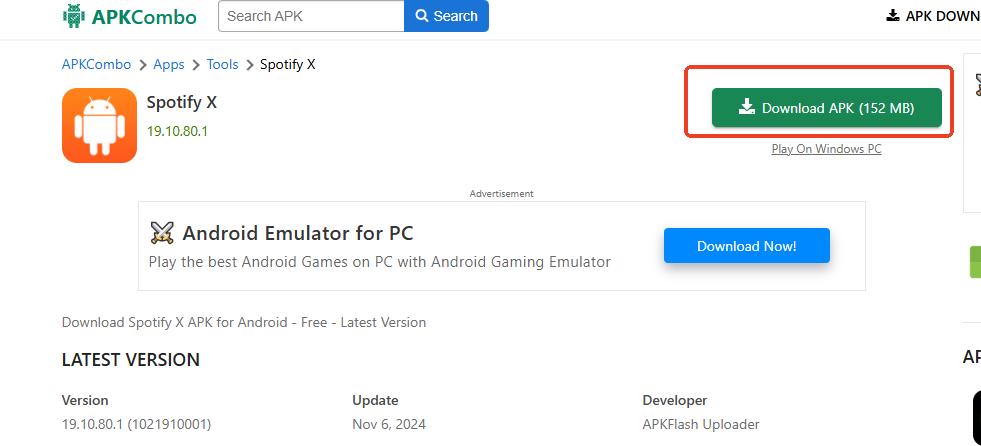
Step 3. Then click on the "Download" button to download the Spotify X APK file.
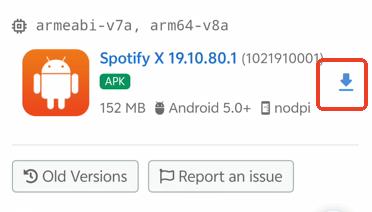
Step 4. Install Spotify X APK on your Android phone and login to your free account.
Tips:
While Spotify X doesn't support direct Google login, there's an easy solution. If you registered your Spotify account through Google, simply add an email login method in your Spotify account overview page. You can then use this email to log into Spotify X.
Install Spotify X through Jojoy
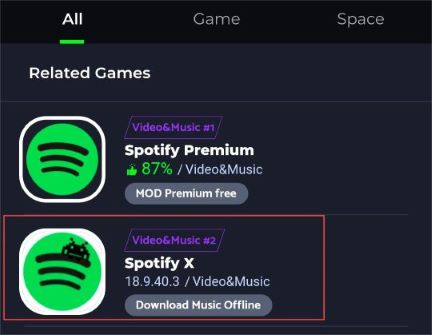
Step 1. First, go to jojoyapp.com to download Jojoy app store on your Android.
Step 2. Then go into the app and search for "Spotify"
Step 3. Choose the app "Spotify X" to install it on your Android device.
Part 4. How to Use Spotify X Premium APK on Android
After downloading the Spotify X APK on your device, you can learn how to use it. One of the most valuable features unlocked by Spotify X is the ability to download music for offline listening. Here, we will guide you through downloading individual Spotify songs and batch downloading on Spotify X.
How to Download Spotify Songs in Batch with Spotify X
Step 1. Go to one of the playlist in your Spotify library.
Step 2. Tap on the "Download" button under the playlist profile.
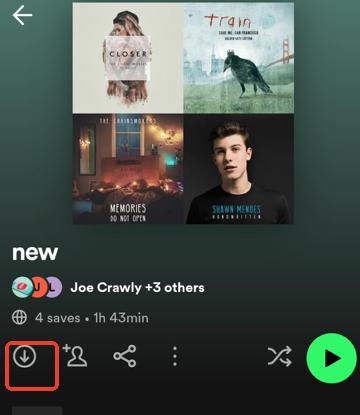
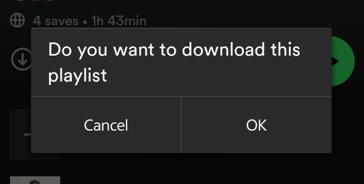
Step 3. It will ask you to confirm the downloading, hit "Yes" to confirm.
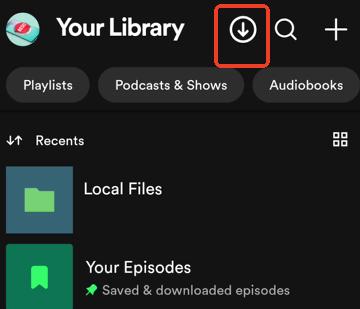
Step 4. You can go to library page, and tap on the "Download" icon on the top to view downloading progress and all the downloaded songs.
How to Download Individual Song in Spotify X
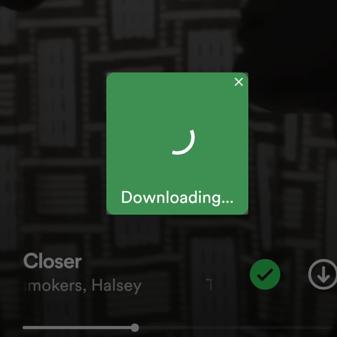
Step 1. Go to the now-playing page of the song you want to download.
Step 2. Tap on the "Download" icon on the left to download Spotify songs to your Android device.

Step 3. A downloading prompt will appear. Wait for it to complete, and the Spotify song will be saved to your phone.
Note About Spotify X Downloads
Although Spotify X displays a download feature, it should not be confused with Spotify Premium's official offline downloads. Spotify Premium downloads remain inside the Spotify app, while third-party mods may use different methods that can break after app updates.
Part 5. Is Spotify X Safe to Use?
Since Spotify X is an unofficial modified version of the Spotify app, safety is one of the most important concerns before installation. Unlike the official Spotify app, which is distributed through Google Play and regularly verified by Spotify, Spotify X APK files are usually shared through third-party websites, meaning the security level can vary depending on the source.
During our testing, we checked the APK source and compared the app permissions with the official Spotify application. The installation process itself did not show unusual permission requests beyond what a music streaming app requires. However, this does not guarantee that every Spotify X APK version available online is safe.
We could not independently verify every Spotify X APK copy distributed online. Safety depends heavily on where the APK is downloaded from and whether the file has been modified further by third parties.
Users should also keep several risks in mind:
- Modified app code: Because Spotify X changes the original Spotify application, there is no official guarantee that every modification is secure or works as intended.
- Account risk: Using unofficial Spotify clients may violate Spotify's terms of service and could potentially lead to account restrictions or suspension.
- Fake APK versions: Popular mod APKs are often copied and redistributed, increasing the risk of downloading altered or malicious files.
Overall, Spotify X may work as a modified Spotify client, but it should not be considered as safe or reliable as the official Spotify app. If you decide to test it, download APK files carefully, avoid unknown sources, and consider using a secondary Spotify account instead of your main account.
Part 6. Best Tool to Overcome Spotify X's Limitations
While Spotify X offers a free way to download songs, it quickly falls short for serious music listeners. As we discussed, its main drawbacks include a frustrating five-song download limit per session and the inability to process Spotify audiobooks. Furthermore, even official Spotify Premium users face an annoying 15-hour monthly cap on audiobook streaming.
To eliminate these restrictions and achieve true download freedom, you can use DRmare Spotify Music Converter. This powerful tool lets you download any Spotify content, including songs, playlists, podcasts, and audiobooks in a single batch. It's compatible with both free and Premium accounts. Unlike Spotify X, it preserves all ID3 tags and maintains the original audio quality up to 320kbps. With this tool, the process of downloading Spotify content will be as smooth as a breeze.

 Security verified. 6, 285,718 people have downloaded it.
- Remove ads and download Spotify music without Premium.
- Preserve ID3 tags for easy music library organization.
- Access flexible settings to customize output quality and format.
- Convert Spotify audiobooks, podcasts, and songs in one go.
Note:
To download Spotify audiobooks with DRmare Spotify Music Converter, you need to have a Spotify Premium subscription or purchase the audiobook title.
How to Download Spotify Songs without Limitations
While DRmare Spotify Music Converter is a powerful desktop application (available for Windows and Mac), you can use it to download Spotify content on your computer in advance. After that, you can transfer Spotify music downloads to your Android phone. Here is the straightforward process for setting up the software, configuring your files, and initiating the batch download.
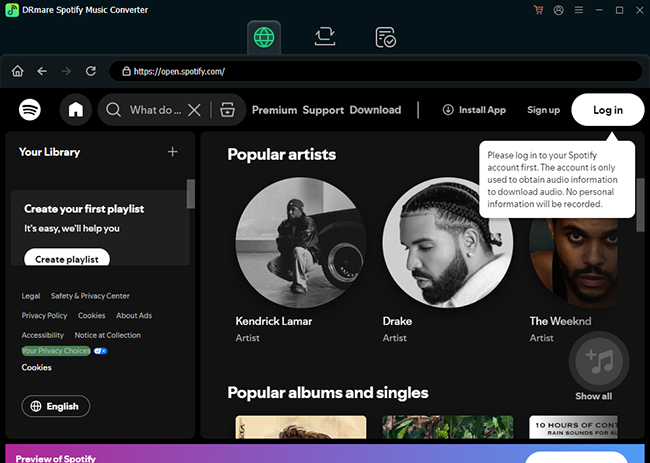
Step 1. Download the DRmare Spotify Music Converter software for your specific operating system (Windows or Mac) and install it on your computer. Launch it, and you will see its built-in Spotify Web Player. Click the "Log in" button and use your Spotify account credentials to log in to the integrated player.
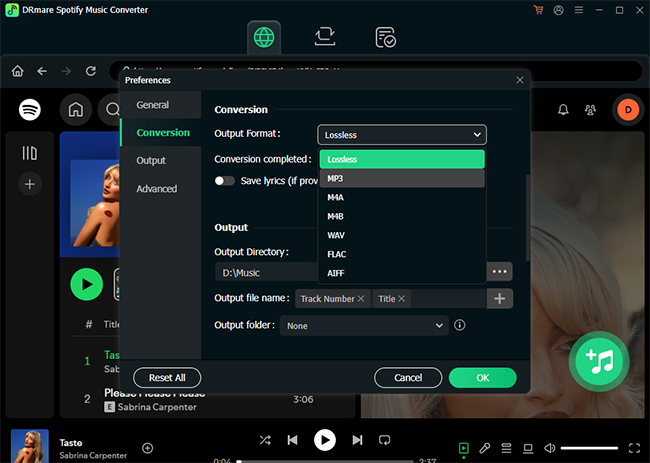
Step 2. Click the "Menu" icon and select "Preferences" > "Conversion" option to open the settings window. Here, you can select your desired output format, such as MP3, FLAC, WAV, or M4A, adjust the Bit Rate and Sample Rate, and choose the local folder on your computer where you want the converted files to be saved.
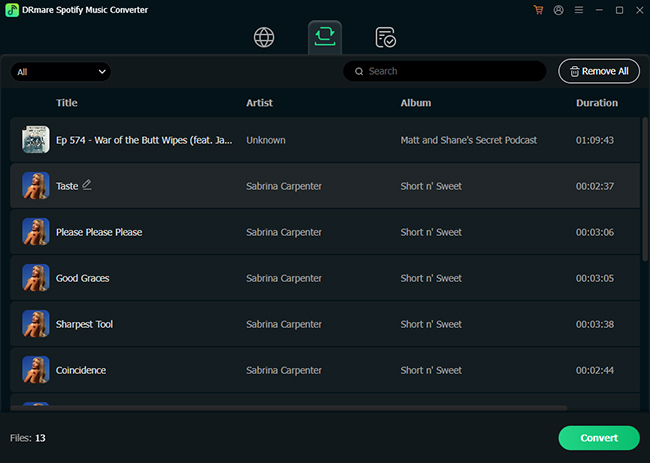
Step 3. Find the content you want to download within the built-in Spotify Web Player. Drag and drop the track, playlist, or album title directly onto the "Add" button in DRmare interface. Tap the "Add to List" button to load them, and then click the "Convert" button to download all the selected songs in a high-speed batch process on your computer.
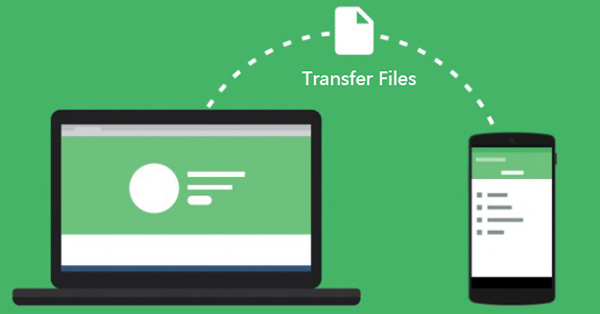
Step 4. Navigate to the "Converted" tab within the DRmare software. You can click the "Folder" icon next to any track to instantly open the local folder on your computer where your Spotify music files are now saved. Now, you can connect your Android phone with your computer via USB flash drive and transfer Spotify songs to it for completely unrestricted offline playback.
Part 5. FAQs about Spotify X Premium Mod APK
Does Spotify X really download Spotify songs?
Spotify X includes a download feature, but our testing showed that it has limitations. Large playlist downloads require multiple attempts, and the downloaded files do not provide the same experience as regular MP3 downloads.
Does Spotify X work without internet?
No. Although Spotify X has an "Offline listening" option, when you enable it, even downloaded songs won't play—the feature is currently not functioning.
Is there a Spotify X for iOS?
No, Spotify X currently is only available for Android devices. iOS and Windows, Mac users looking for similar functionality may need to explore other alternatives like Spotilife, Spicetify, though features may differ.
Will using Spotify X affect my regular Spotify account?
While I've been using Spotify X for some time and my regular Spotify account remains unaffected, there's a risk that accounts using this mod could be banned in the future. You should carefully consider these risks before using this modified version of Spotify. For a more secure alternative, try DRmare Spotify Music Converter.
Does Spotify X support high-quality audio streaming?
While Spotify X allows for downloading music at 320kbps quality, it doesn't support Spotify's "Very High" quality streaming option that's available with Premium. The streaming quality is limited to standard quality settings.
Part 6. In Conclusion
Spotify X is interesting because it attempts to bring Spotify Premium-like features to free Android users. During testing, the ad-free experience and skip controls worked as expected, but the download feature was not as convenient as expected due to playlist limits and unreliable offline playback.
For users who only want to experiment with Premium-style features, Spotify X may be worth trying. However, users looking for a stable way to manage offline music libraries should consider solutions designed specifically for music backup and conversion.

 Home
Home





User Comments
Leave a Comment