





If you ask someone to name a music streaming service, they will almost certainly say "Spotify". It is the Kleenex of streaming—the default choice for over 600 million people. But being the biggest doesn't always mean being the best.
The streaming landscape has shifted dramatically this year. With Spotify's Individual plan hiking to $12.99/month and the long-awaited (and practically mythical) Spotify Lossless finally rolling out to compete with Apple Music, the value proposition has changed.
As a long-time user who has spent thousands of hours curating playlists—and complaining about the price—I've broken down the real pros and cons of Spotify to help you decide if the Swedish giant still deserves your monthly subscription.
Part 1. The Pros: Why Spotify is Still the Industry Leader
Despite the competition, there is a reason we all keep coming back. Spotify's user experience (UX) is still the gold standard that others try to copy.
1. The Algorithm Just "Gets" You
While Apple Music and Amazon Music have improved, Spotify's discovery engine remains unmatched. In 2025, features like Daylist (which updates three times a day with hyper-specific vibes like "glum goblincore wednesday afternoon") and the AI DJ have transformed the app from a simple library into a personal companion.
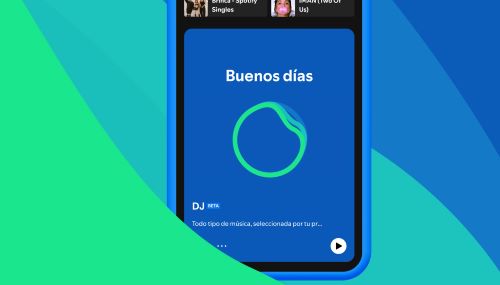
If you value discovering new music without doing the heavy lifting, Spotify is unrivaled. It feels less like an algorithm and more like a friend who knows exactly what you want to hear based on the weather and your mood.
2. Spotify Connect is "Magic"
This is the feature that keeps me locked into the ecosystem. Spotify Connect allows you to seamlessly switch playback between your phone, laptop, PS5, Sonos speakers, or Google Home without skipping a beat.
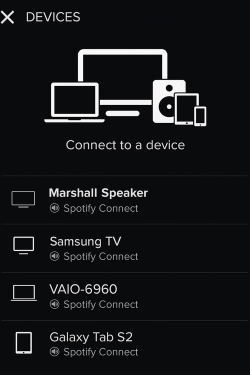
Unlike Apple's AirPlay, which streams from your phone (draining battery), Spotify Connect turns your phone into a remote control for the cloud. You can answer a call or scroll TikTok on your phone without interrupting the music playing on your TV.
3. Audio Quality Finally Catches Up
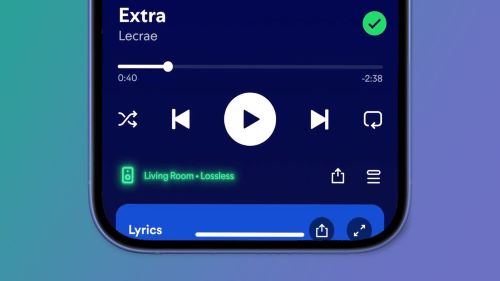
For years, the biggest "con" of Spotify was its capped 320kbps audio quality. However, the late 2025 rollout of Lossless Audio for Premium subscribers has finally closed the gap. While audiophiles might still argue that Apple Music's "Hi-Res Lossless" ecosystem is more mature, everyday users can now enjoy CD-quality sound without switching platforms.
Part 2. The Cons: Where Spotify Falls Short
No app is perfect, and Spotify's recent aggressive strategies have alienated some loyal fans.
1. App "Bloat" and Interface Clutter
Spotify wants to be the "everything app" for audio. Consequently, your music feed is often cluttered with Podcasts, Audiobooks, and Tik-Tok-style video feeds that you didn't ask for. If you just want a clean, dedicated music player, this aggressive push for non-music content can be frustrating and distracting.
2. The Price vs. Value Debate
At $12.99 for an Individual and $19.99 for a Family plan, Spotify is becoming expensive.
- Apple Music is often cheaper when bundled with Apple One (giving you TV+, Arcade, and iCloud).
- YouTube Music comes "free" with YouTube Premium (ad-free videos).
Spotify offers only audio for a similar or higher price, making it a harder sell for budget-conscious families.
3. You Don't Actually "Own" Anything
This is the biggest downside of the streaming era. You are renting your music. If you stop paying the $12.99 monthly fee, your offline downloads vanish, your ad-free experience disappears, and your carefully curated playlists become hostage to the "Shuffle" button.
Part 3. The "Free Tier" Dilemma: Better, But Still Restricted
One of the most searched topics is the pros and cons of Spotify Free. Spotify gave free users a bone: the "Pick & Play" update allows for some on-demand listening rather than forcing "Shuffle" on everything.
However, the major pain points remain:
- ❌No Offline Listening: You cannot save songs for the subway, a flight, or to save data.
- ❌Ads: They are frequent and interrupt the flow of listening.
- ❌Travel Limits: Free accounts often face usage restrictions when used abroad for more than 14 days.
This leads to a common frustration: How do you keep your music forever without paying a subscription for the rest of your life?
Part 4. The Solution: How to Get the Best of Both Worlds
If you love Spotify's discovery features (like the Daylist) but hate the lack of ownership or the restrictions of the Free plan, there is a third option. You don't necessarily need to switch to Apple Music or pay for Premium forever to enjoy high-quality music.
This is where a tool like DRmare Spotify Music Converter bridges the gap. It is designed to solve the "ownership" problem by allowing you to download and convert Spotify tracks into actual files (MP3, FLAC, etc.) that you can keep permanently.
Why Use a Converter?
- True Offline Freedom: Listen on MP3 players, old iPods, wearables, or in your car without needing the Spotify app or an internet connection.
- Backup Your Library: If you ever decide to cancel Premium, you won't lose the playlists you spent years building.
- Best for Free Users: You can download songs to remove ads and bypass the 6-skips-per-hour limit, essentially creating your own "Premium" experience offline.
How to Download Spotify Playlists to MP3
- Step 1Log In and Configure Settings
Launch the built-in Spotify web player within the software and log into your account. Click the menu icon in the top-right corner, select "Preferences," and customize your output format (such as MP3) and audio quality under the "Conversion" section.
- Step 2Select and Add Music
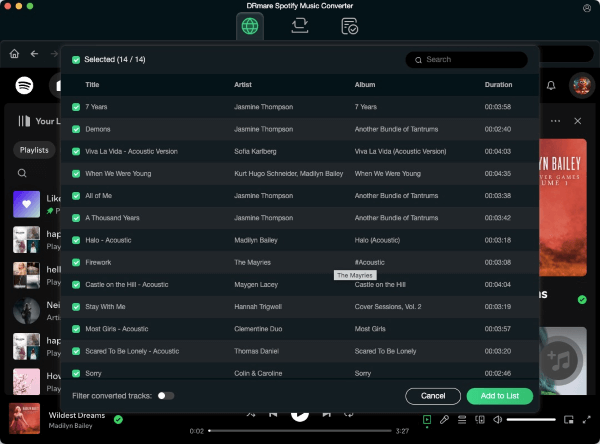
Browse for the tracks, playlists, or albums you wish to download. Drag and drop your selection onto the green "Music" icon located in the bottom-right corner, then click "Add to list" to confirm the batch for conversion.
- Step 3Convert and Access Offline Files
Click the "Convert" button to begin the download process. Once complete, navigate to the "Converted" tab to locate your unrestricted music files, which are now saved locally on your computer and ready for transfer to any device.
Part 5. Final Verdict: Is Spotify Right for You?
So, after weighing the pros and cons of Spotify, what is the verdict
- Stick with Spotify if: You value music discovery above all else, you use multiple devices (Connect is essential), and you want the best social sharing features.
- Consider Alternatives if: You are already deep in the Apple ecosystem (Apple One bundle) or you purely want high-res audio without podcasts cluttering your feed.
- Use the "Hybrid" Approach if: You love Spotify's playlists but hate the monthly fees or restrictions. Using DRmare to back up your favorite discovery playlists gives you the best of the algorithm with the freedom of ownership.
Spotify is still the King of streaming, but it's smart to know exactly what you are paying for—and how to get the most out of it.

 Home
Home





User Comments
Leave a Comment