





SpotMate has gained popularity among Spotify users. It claims to enhance the Spotify experience by enabling users to download music and playlists from the platform in various formats, such as MP3 or FLAC. But with so many similar Spotify downloaders online available, users naturally ask: Is SpotMate safe to use?
This comprehensive review delves into SpotMate's features, its safety concerns, user feedback, and legal implications to help you make an informed decision. Let's see if this tool is really worth your time and money.
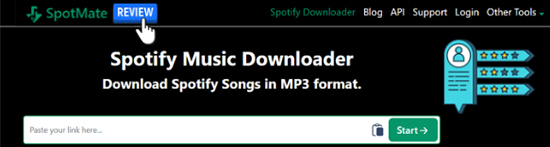
Quick Summary:
SpotMate is safe for your Spotify account since it does not require login credentials. However, our testing found download limits, intrusive ads, and signs of audio re-encoding. While downloaded files are labeled as 320 kbps MP3s, spectral analysis showed a high-frequency cutoff around 16 kHz, indicating that the actual source quality may be lower than advertised. For users who need higher audio quality, batch downloads, or a desktop-based workflow, dedicated Spotify converters may offer a more reliable experience.
Part 1. What Is SpotMate?
Basic Info:
- Link: https://spotmate.online/en1
- Availability: Android, iOS, Mac, and Windows
- Support Music Content: Playlists, Artists, Songs, Albums
- Download Output: MP3, ZIP
- Recommend Level:⭐⭐⭐
SpotMate is a web-based software tool designed to optimize the Spotify experience. It allows free and premium users to download and convert Spotify music, artists, playlists, and albums into downloadable MP3 or FLAC files, offering high combability for offline listening. This functionality appeals to those who want to listen to Spotify content offline without relying on the app's streaming service.
Key Features of SpotMate
- Spotify Music Conversion: Download and convert Spotify music into MP3 or FLAC formats with no Spotify account requirement.
- Album/Playlist Downloading: Supports downloading entire Spotify playlists or albums to ZIP, making it easier to manage your music offline.
- User-Friendly Interface: SpotMate is designed to be easy to use, with a simple ad-free interface for playlist conversions.
Note:
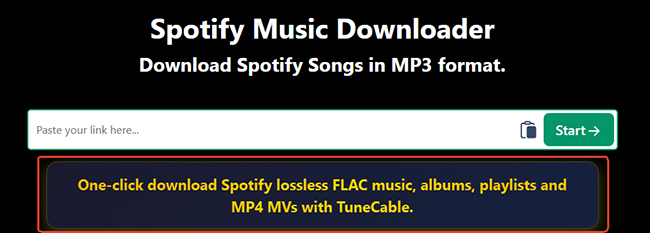
The "Spotify FLAC downloader" banner on the website's main interface is an advertisement; clicking it will redirect you to a third-party paid website. Do not click it.
How Does SpotMate Work?
Based on observed download behavior and audio analysis results, SpotMate appears to obtain audio from third-party sources rather than directly from Spotify streams.
Part 2. Is SpotMate Online Safe to Use?
When evaluating if SpotMate is safe to use, we must look at two distinct areas: your streaming account and your physical device.
Is SpotMate Safe for Your Spotify Account?
Yes. From an account perspective, the tool is exceptionally secure because it never requires you to log in or link your Spotify profile. Since there is no exchange of credentials, there is no risk of your official account being flagged or banned for using the service.
Is SpotMate Safe for Your Device?
Exercise caution. While SpotMate itself doesn't seem to contain malware, there have been reports from users experiencing issues with malware and phishing attacks associated with unofficial download tools. Furthermore, SpotMate doesn't offer clear information about how it handles user data, so there's potential for privacy issues.
Part 3. Usability and Audio Quality: Putting SpotMate to the Test
While the site often implies high-definition results, real-world performance shows a significant gap between marketing and reality.
SpotMate Test Setup
- Device: Windows 11
- Browser: Chrome 138
- Playlist: Taylor Swift's Love Album
- Single Songs: The Man and I Forget That You Existed
- Audio Analyzer Spek
Limited FLAC Format and ZIP Download
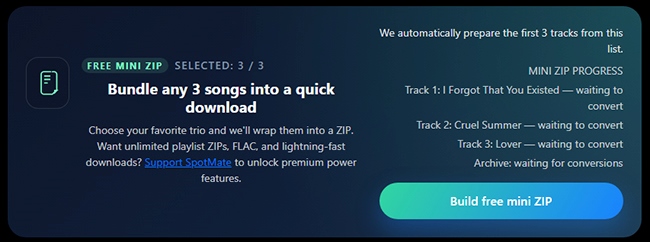
The free version of SpotMate restricts users to downloading only three songs from a Spotify playlist or album, and it supports MP3 format exclusively. To unlock unlimited playlist downloads in ZIP format, access to FLAC quality, and enjoy lightning-fast download speeds, you'll need to upgrade to the Premium version.
The Audio Quality Reality Check via Spek
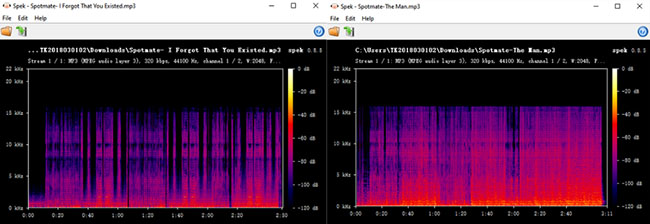
Using Spek 0.8.5, we analyzed multiple MP3 files downloaded through SpotMate. Although the files were labeled as 320 kbps MP3s, the spectral data revealed a sharp frequency cutoff at approximately 16 kHz. This is significantly lower than what is typically observed in genuine high-quality 320 kbps audio files, which usually retain content up to 19–20 kHz.
The results suggest that SpotMate may be sourcing audio from already-compressed third-party streams and then re-encoding them into 320 kbps MP3 files. While the files are perfectly listenable for casual use, they do not appear to deliver true high-fidelity audio quality and are unlikely to match the quality of original Spotify streams or lossless audio sources.
| Features | Result |
|---|---|
| File Format | MP3 |
| Reported Bitrate | 320 kbps |
| Sample Rate | 44.1 kHz |
| Effective Frequency Range | ~16 kHz |
| High-Frequency Extension | Poor |
| Evidence of Re-encoding | Strong |
| Likely Source Quality | Medium |
| Audiophile Grade | No |
Editor's Verdict:
SpotMate's downloaded files are encoded at 320 kbps, but the spectral analysis indicates that the underlying audio source is likely of lower quality. Users seeking genuine high-quality or lossless audio should not rely on SpotMate's advertised output specifications alone.
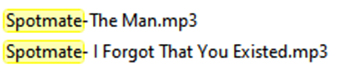
The SpotMate Tag in Download Filename
The downloaded files often include a "SpotMate" tag in the filename. This tag is added to indicate that the file has been processed by SpotMate. While this may help users identify files converted with the tool, it can also be a bit distracting for those who prefer a cleaner, more professional naming structure.
Part 4. How to Safely Test SpotMate Yourself
While SpotMate offers a convenient way to convert Spotify songs to FLAC or MP3, it is a high-risk platform known for intrusive advertising and inconsistent output quality. To use this tool without compromising your digital security, follow this defensive strategy.
Step 1. Open your Spotify app or Spotify Web Player and find the track you wish to download. Paste the URL into the SpotMate search bar.

Safety Tips:
Copy the URL for a single Spotify song rather than a massive playlist. Attempting to process large playlists often causes the web app to freeze, crash your browser tab, or trigger excessive ad scripts.
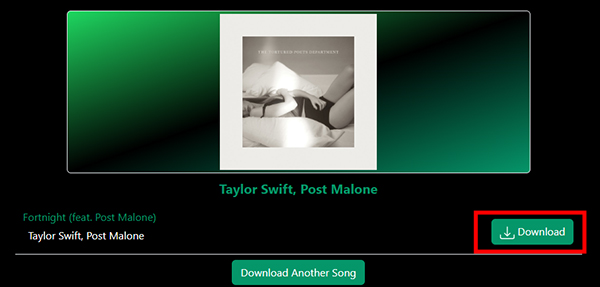
Step 2. Click the primary "Start" button and wait for the server to process the request. Tap the "Convert" > "Download" button to start the conversion process. You can also tap the "Build free mini ZIP" button to batch download three songs at once.
Safety Tips:
Before opening the file, check the file extension in your downloads folder. It should be .mp3. If the file ends in .exe, .zip, or .dmg, delete it immediately. These are likely malicious installers disguised as music.
Part 5. Pros and Cons of Using SpotMate Online
Every tool comes with trade-offs that users must weigh before diving in. Based on our hands-on experience, here is a concise breakdown of what to expect:
Pros
 No account login required
- Completely web-based with no installation
- Work on both mobile and desktop browsers
- Free to use
Cons
 Lossy audio quality
- SpotMate tag in filename
- Limited downloads for free users
- Intrusive third-party ads
Part 6. Best SpotMate Alternatives You Can Use
While SpotMate offers a quick, web-based fix, its technical limitations, specifically the 16 kHz cutoff output and lack of high-frequency detail, make it unsuitable for audiophiles or those building a permanent Spotify music library. If you require true stereo sound, verified lossless quality, and a more secure environment, these professional alternatives are highly recommended:
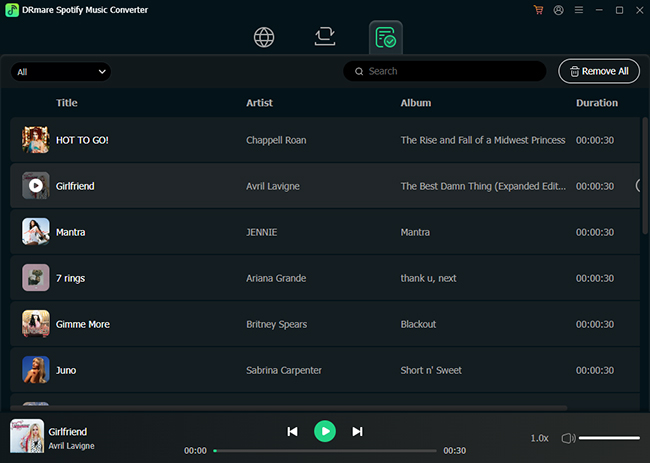
DRmare Spotify Music Converter
For users who find SpotMate's "three-song limit" and freezing issues frustrating, DRmare Spotify Music Converter offers a much more stable desktop experience. It is specifically engineered to handle bulk tasks without sacrificing system resources. It can batch-convert entire Spotify playlists and albums while maintaining full stereo imaging. It converts Spotify music into various formats including MP3, FLAC, WAV, and M4A, making it perfect for playing your library on Hi-Fi receivers or dedicated audio players.
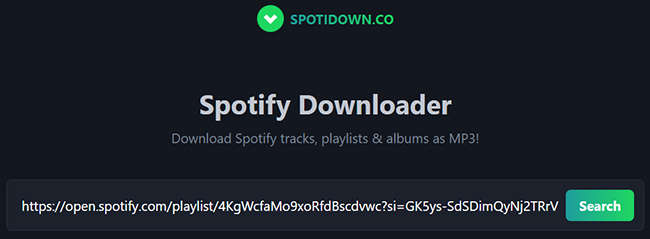
Spotidown.co
If you are looking for a completely web-based solution that avoids some of the limitations of SpotMate, SpotiDown is another popular entry-point for quick, browser-based conversions. It is a free online tool designed specifically for users who need to grab a track or an entire playlist without installing software or creating an account. It positions itself as a streamlined competitor to SpotMate, focusing on speed and a cleaner user interface.
SpotMate vs DRmare Spotify Music Converter vs SpotiDown.co
| Feature | SpotMate Online | DRmare Spotify Music Converter | SpotiDown.co |
|---|---|---|---|
| Audio Channels | Mono (Merged L/R) | True Stereo | Aim to Preserve Stereo Imaging |
| Audio Quality | Weighted Low-end (Muffled) | Original 320kbps / Lossless | High Quality |
| Batch Support | Limited (3 songs for free) | Unlimited Playlist/Album Batching | Allow for Longer Playlist Parsing. |
| Safety | High-risk (Ads/Pop-ups) | Secure (No Ads/Clean Install) | Low-risk |
| Metadata | Basic (Have SpotMate Tag) | Advanced ID3 Tags & Lyrics | Basic |
Part 7. SpotMate Pricing: Is It Worth It?
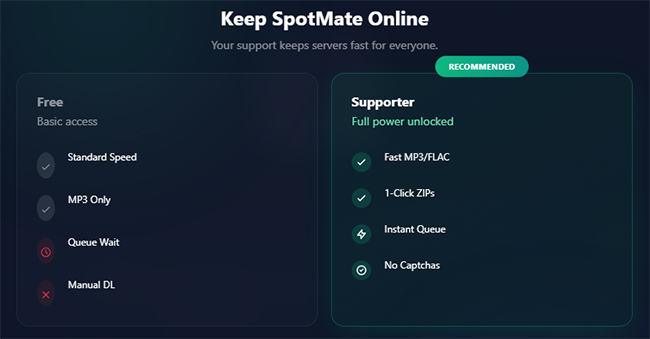
SpotMate offers both a free version and a premium version. The free version is limited in terms of conversions, and users often face interruptions with ads. The premium version, however, unlocks unlimited conversions, higher quality downloads, and removes ads.
Free vs. Paid SpotMate Version
- Free Version: Limited downloads, ads, and occasional pop-ups.
- Premium Version: Unlimited downloads, higher quality, no ads.
Is the Premium Version Worth the Price?
The premium version is affordable, costing $5 per 31 days, but whether it's worth the cost depends on how much you value security and reliable performance. If you're willing to take the risk, the premium version gives access to more features.
| Feature | SpotMate Free | SpotMate Premium |
|---|---|---|
| Single Songs | ✅ | ✅ |
| ZIP Playlist | Limited | Unlimited |
| MP3 | ✅ | ✅ |
| FLAC | ❌ | ✅ |
| Ads | Yes | No |
Part 8. In Conclusion
SpotMate offers a convenient way to download and convert Spotify playlists for offline use, but it's not without its risks. The security concerns, potential legal issues, and occasional performance failures may make it a questionable choice for some users.
If you're looking for a reliable, safe Spotify downloader, you may want to consider alternatives like DRmare Spotify Music Converter or SpotiDown. However, if you're on a budget and don't mind the occasional ads and slower conversions, SpotMate could still serve your needs.

 Home
Home





User Comments
Leave a Comment