





When searching for a SpotyLoader review, most users want to know one thing: does SpotyLoader actually work as a free online Spotify downloader, and is the downloaded audio quality worth it?
To answer these questions, I tested SpotyLoader with different Spotify content types, including individual songs, playlists, albums, and artist pages. I also downloaded files in MP3, M4A, and FLAC formats and analyzed the output using Spek to check the actual audio characteristics.
The results are mixed. This SpotyLoader review covers the complete testing process, including supported content, download experience, audio quality analysis, and who should consider using this tool.
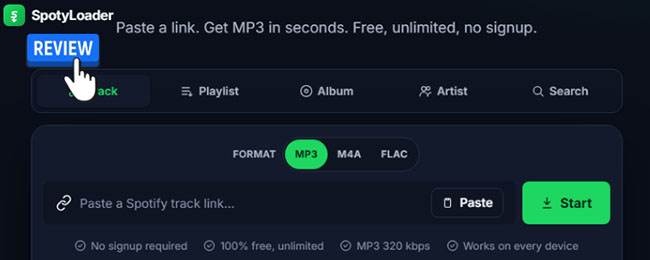
Quick Summary:
SpotyLoader is convenient because it requires no installation, registration, or subscription. However, the testing also revealed several limitations, including the lack of true batch downloading, unsupported Spotify podcasts and audiobooks, poor file naming, and questions about whether its FLAC output represents genuine lossless Spotify audio.
Part 1. What Spotify Content Does SpotyLoader Actually Supports? Tested!
A major part of this SpotyLoader review was testing which Spotify links the service could actually recognize. I ran a series of tests using different types of Spotify links, specifically focusing on BTS content. The platform easily recognized individual songs like "Swim," full albums like "ARIRING," and even broader artist and playlist links. It parsed the data quickly and generated the corresponding download options without much fuss.
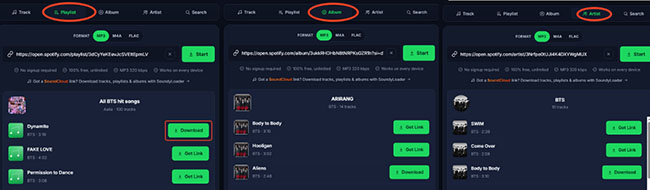
The results showed that SpotyLoader works well with regular Spotify music content but has limitations outside of songs. If you are hoping to grab spoken-word content, you will run into a wall.
- Audiobooks: Completely unsupported.
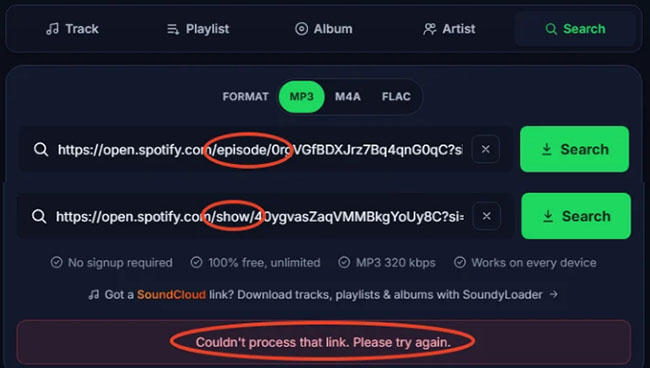
- Podcasts: Fails to load entirely.
When attempting to process these specific link types, the site immediately kicks back an error message stating, "Couldn't process that link. Please try again". This suggests that SpotyLoader currently focuses on music tracks rather than supporting the entire Spotify content ecosystem.
| Spotify Content Type | Test Content | Test Result |
|---|---|---|
| Individual songs | BTS "Swim" song | ✅ Successfully recognized |
| Playlists | BTS playlist | ✅ Recognized |
| Albums | BTS "ARIRANG" album | ✅ Recognized |
| Artist pages | BTS artist page | ✅ Recognized |
| Podcasts | Spotify podcast links | ❌ Not supported |
| Audiobooks | Spotify audiobook links | ❌ Not supported |
Part 2. My Real-World SpotyLoader Download Test Experience
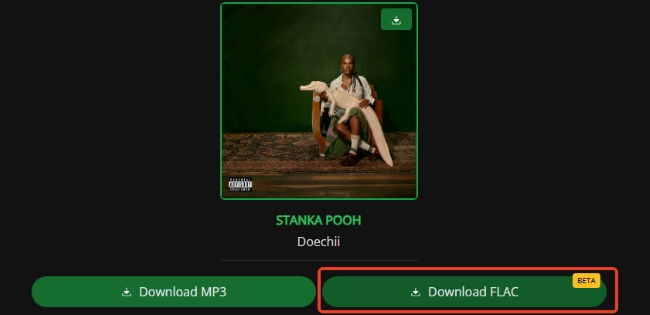
While grabbing music is generally straightforward, the actual download process changes slightly depending on the audio format you choose. The site offers MP3, FLAC, and M4A options, but navigating the interface requires a bit of patience. Occasionally, clicking the link generation button triggers a new page to pop open. You simply need to close this new tab and return to the main SpotyLoader screen to continue.
How to Download Spotify Music to FLAC/MP3 via SpotiLoader
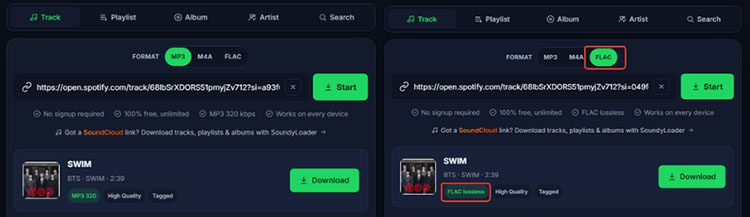
For standard MP3 and FLAC files, the process is very linear.
Step 1. Copy your desired Spotify link, paste it into the SpotyLoader search bar, and click the Start button.
Step 2. Once the track information loads, click Get Link while making sure to close any stray tabs that might pop up here.
Step 3. Click the final Download button to download Spotify music to MP3 or FLAC file on your device.
How to Download Spotify Music to M4A via SpotiLoader
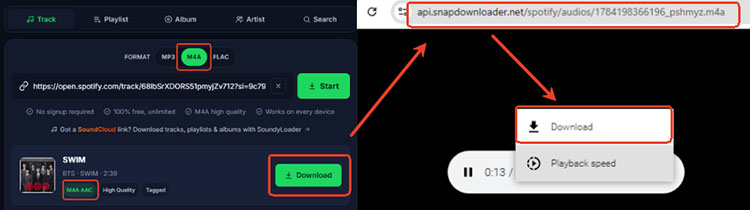
If you prefer the M4A format, the workflow takes a slightly unexpected turn. Instead of serving you a direct download button, the site routes you through a built-in media player.
Step 1. Paste your link into the search box and click Start.
Step 2. Click the Get Link > Download button, and wait for the system to automatically redirect you to a completely new playback page.
Step 3. Click the three-dot icon on the media player and select the Download option to save the Spotify audio track as M4A file.
Part 3. SpotyLoader Limitations Found During Download Testing
Despite its impressive format support, SpotyLoader has a few significant friction points that power users need to know about.
No Batch Download for Playlists/Albums/Artists
The platform completely lacks a batch download feature. While it successfully reads entire playlists or albums, there is no one-click option to download an entire playlist or album. You are forced to individually click the download sequence for every single track. If you are trying to back up a 50-song playlist, this repetitive clicking becomes incredibly tedious.
Unexpected Pop-up Redirects
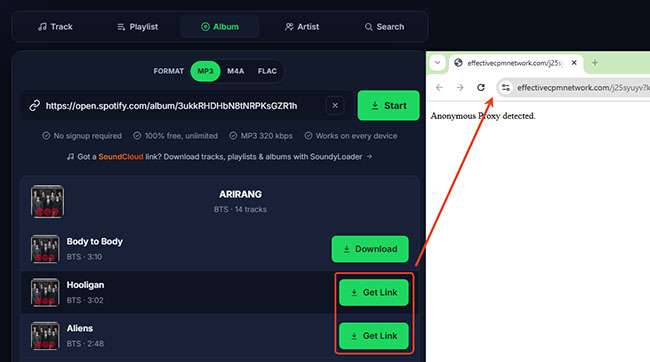
During testing, clicking Download occasionally opened a new browser page. You need to
-
Close the newly opened page.
-
Return to the Spotyloader download page.
-
Continue the download process.
Although this did not prevent downloads from working, it creates unnecessary friction during the user experience.
File Naming and Metadata Problems

Another limitation discovered during testing is file organization. When you finally get your downloaded track, the file name is completely stripped of its original title and artist information. Instead, the songs are saved as a long string of random numbers. For example:
- 1784198207381_fku26j.mp3
- 178419366196_psmhyz.m4a
- 1784198564464_36dgid.flac
You will have to manually rename every single file and edit the ID3 tags yourself if you want an organized local library.
Part 4. Spotyloader Audio Quality Test with Spek
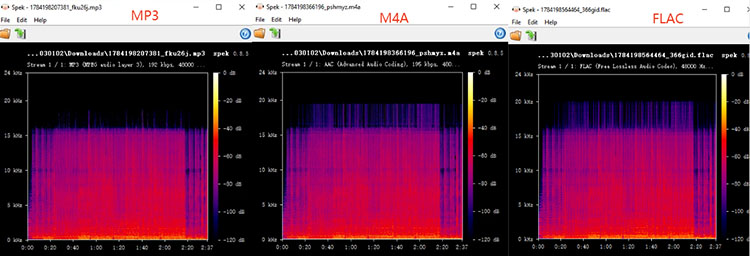
Anyone who cares about their music library knows that a file's extension doesn't always guarantee its actual bitrate. To verify that SpotyLoader wasn't just upscaling low-quality audio and slapping a FLAC label on it, I ran the downloaded files through Spek, a specialized acoustic spectrum analyzer.
| Format | MediaInfo Result | Spek Observation | Quality Assessment |
|---|---|---|---|
| MP3 | 192 kbps | Cutoff around 16 kHz | Standard lossy quality |
| M4A | AAC ~195 kbps | Extends near 20 kHz | Better compression efficiency |
| FLAC | FLAC container | Similar cutoff to compressed files | Likely not true lossless |
However, despite being labeled as FLAC, the spectrum shows a frequency cutoff around 20 kHz, similar to the AAC output. This suggests that the FLAC file may not be a true lossless copy of the original Spotify source. It appears to be an upscaled or converted lossless container rather than genuine CD-quality or Hi-Res lossless audio.
Part 5. Is SpotyLoader Safe and Free?
Cost and safety are usually the biggest concerns with these types of web tools. During testing, SpotyLoader worked without requiring payment or registration. The service provides:
- ✅ Free access
- ✅ No subscription
- ✅ No signup requirement
- ✅ No daily download limit observed
They manage to cover their server costs with a small, non-intrusive set of sponsorships shown on the homepage. This approach is refreshing, as it spares users from the aggressive and often malicious advertisements found on similar websites.
However, Spotyloader presents a mix of safety benefits and standard internet risks. Because it is an unofficial web tool, comprehensive security audits from third-party cybersecurity firms are not widely available, but its safety can be evaluated based on its known daily operations.
Positive Safety Indicators
- No Data Harvesting: Spotyloader does not require registration or login credentials. This ensures your personal data and Spotify account remain completely uncompromised.
- No Financial Risk: The service operates without a subscription model. Because you do not enter any payment information, there is zero risk of hidden charges or credit card theft.
- Clean Core Interface: The platform covers its costs through small, non-intrusive sponsorships on the homepage, avoiding the aggressive, deceptive banner ads that frequently plague similar downloading websites.
Potential Risks to Consider
- Pop-up Redirects: The most significant safety concern is the occasional pop-up. Clicking the "Get Link" button can sometimes trigger a new browser tab to open. These third-party pop-ups are a common monetization tactic but can occasionally host aggressive adware or misleading prompts.
- Terms of Service Violation: Ripping audio from streaming platforms technically violates Spotify's Terms of Service and raises copyright concerns. While this represents a legal and account risk rather than a direct device security threat, it is still an important factor to consider.
Part 6. Pros and Cons of Spotyloader
After testing SpotyLoader across different Spotify content types, download formats, and audio outputs, it is clear that the tool offers both convenient features and noticeable limitations. The following pros and cons summarize the key strengths and weaknesses to help you quickly decide whether SpotyLoader matches your downloading needs.
Pros
 Free Spotify downloader with no registration
- Works directly in a browser
- Supports Spotify songs, albums, playlists, and artists
- Provides MP3, M4A, and FLAC options
- No software installation required
Cons
 No true playlist or album batch downloading
- Podcasts and audiobooks are unsupported
- Downloaded filenames lack useful metadata
- Occasional redirect pages appear
- FLAC output does not show clear evidence of genuine lossless quality
Part 7. SpotyLoader Alternatives: Who Should Use Which Tool?
If SpotyLoader's limitations are dealbreakers for you, there are several other tools on the market that cater to different needs.
-
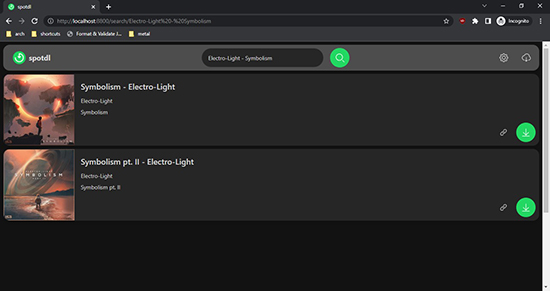
SpotDL: This is a command-line tool that downloads songs from Spotify by sourcing the audio from YouTube, automatically matching tracks and embedding metadata.
-
SpotiDownloader: It allows you to batch download Spotify tracks, albums, and playlists in ZIP MP3 format.
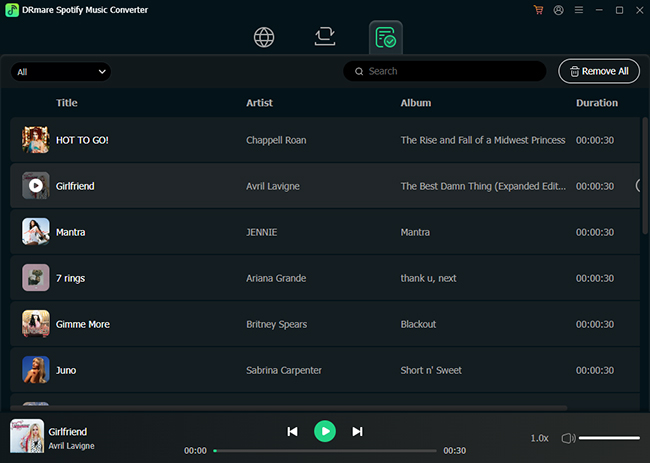
- DRmare Spotify Music Converter: For desktop users willing to use dedicated software, this program provides a perfect solution for downloading Spotify tracks, playlists, albums, audiobooks, and podcasts as 320 kbps MP3s, FLAC, WAV, M4A, M4B, and AIFF in batch.
Each of these alternatives addresses some of the shortcomings found in basic web tools. For instance, command-line and desktop software options generally support batch downloading and proper metadata retention.
Part 8. Final Verdict
SpotyLoader is an excellent free tool that delivers satisfying audio quality without pestering users with malicious ads. It is an ideal choice if you simply want to download a handful of specific tracks.
However, if you plan to archive massive playlists or prioritize features like out-of-the-box song metadata retention, the tool's limitations, such as the lack of batch processing and file-numbering capabilities, might make it feel like the trade-offs aren't worth it. All in all, it remains a fantastic option for quick, occasional downloads.

 Home
Home





User Comments
Leave a Comment