





Severance is one of the most gripping Apple TV original series, drawing viewers in with its unique storyline and suspenseful atmosphere. However, you may not want to pay for an Apple TV plan if you're only interested in watching Severance. Then you'll look for practical ways to watch Severance without an Apple TV plan. This guide shows you how to stream Severance for free using official options and how you can enjoy the series offline without an active Apple TV subscription.
Part 1. Can I Watch Severance without an Apple TV Plan
No, you generally need an Apple TV subscription to watch Severance, as it's an exclusive Apple Original, but you can often get free trials or download it to watch it without an Apple TV plan for the long term. If you're wondering where to watch Severance, you can easily access the show through the Apple TV app on Roku, Fire TV, and various Smart TVs, or simply stream it via your web browser.
Part 2. How to Watch Severance on Apple TV App for Free
Whether you're looking for a quick binge-watch or a long-term plan, you can leverage several official methods to stream Severance on Apple TV. Here is how to watch Severance with an Apple TV subscription for free.
Watch Severance with Apple TV Free Trial
The most straightforward way to watch Severance on Apple TV is to take advantage of official free trials for Apple TV. For new subscribers, Apple offers a standard 7-day free trial, which is perfect for binge-watching. Since Severance has two seasons available as of early 2026, you can easily finish the series within a week. Just remember to cancel your Apple TV subscription at least 24 hours before the trial ends to avoid the monthly fee.
Stream Severance Free via Device Promotions
You can qualify for an extended period of free access to Apple TV content through Apple Device Promotions. If you have purchased a new iPhone, iPad, Mac, or Apple TV box within the last 90 days, you are eligible for 3 months of Apple TV for free.
Beyond Apple's own ecosystem, you can also keep an eye on limited-time promotions from Roku and PlayStation (PS4/PS5), which frequently provide 3-month extended trials to their customers.
Watch Severance via Apple Family Sharing
If you have a friend or family member who already pays for the Apple TV service, joining an Apple Family Sharing group is obviously the best way to watch Severance for free. This Family Sharing feature allows up to six people to share a single Apple TV subscription without any extra cost.
Everyone maintains their own private profile and individual watch history, so you don't have to worry about syncing progress. Once the family organizer adds you to the group, you can dive into the mysteries of Severance using your own Apple account.
Note:
You have to enable this feature on your iPhone, iPad, or Mac, as you can't start the group directly from the Apple TV box or app.
Step 1. The organizer with the active subscription needs to set up the group first. They just need to head to "Settings > Your Profile", then click "Family Sharing" and tap "Add Member" to send you an invite.
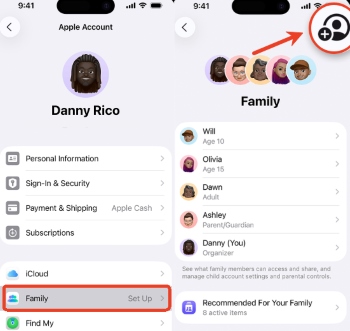
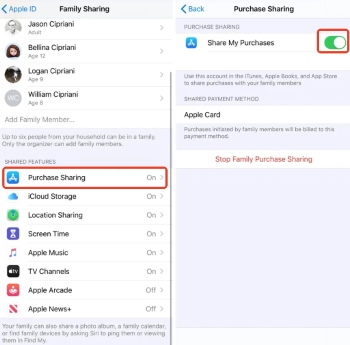
Step 2. To make sure you can actually see the show, the organizer needs to ensure "Purchase Sharing" or "Subscriptions" is enabled within the "Family Sharing" menu.
Step 3. Open the Apple TV app on your device and then sign in with your personal Apple ID.
Step 4. Once logged in, simply search for Severance or look under the "Originals" tab to start watching.
Where can I watch Severance without the Apple TV app?
If the Apple TV app is unavailable on your device, there are three effective workarounds to stream Severance:
-
The quickest fix is to visit tv.apple.com on your device, allowing you to watch both seasons without installing any extra software.
-
You can access Apple TV as a subscription channel within the Amazon Prime Video app, letting you watch Severance season 1 and 2 using Amazon's stable interface and native player.
-
To bypass app and internet restrictions entirely, use the tool mentioned in Part 3 to download Severance without the Apple TV plan limitation so that you can enjoy it whenever you want.
Part 3. How to Watch Severance Without an Apple TV Subscription Offline
While Apple TV allows you to download episodes for offline viewing, those files are strictly tied to your active subscription. Once your Apple TV plan ends, those "locked" downloads become unplayable due to DRM restrictions. Then how to watch Severance without subscripton restiction? DRmare Apple TV Downloader offers a reliable solution. It enables you to bypass DRM and convert Apple TV episodes into MP4 or MKV files at 5X speed for permanent backup. By using it during your trial period, you ensure that you have access to Severance when your plan expires.
- 1080P HD & 5.1 Surround Sound: It perfectly preserves the original video quality and supports EAC3 5.1 or AC3 5.1 surround sound audio tracks, ensuring you still enjoy a cinematic audiovisual experience even while watching offline.
- Watch on Any Device: You can easily transfer them to a USB drive and play Apple TV on an Xbox console, a car, or smart TVs, without any restrictions.
- Keep Multilingual Subtitles and Tracks: The tool allows you to retain all original subtitles and multiple language tracks, allowing you embed them into the video, or save as independent SRT files.
Ultimate Guide: Download Severance for Permanent Playback
- Step 1Configure Your Output for Apple TV
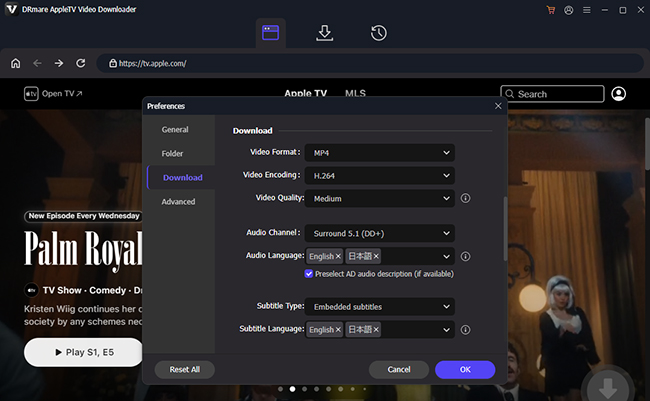
Launch Drmare and use the built-in browser to sign into your account. Before you search for watching Severance, head over to the menu in the right upper corner, and choose "Preferences" and the "Download" tab. Here, you can set the output format to MP4 to ensure maximum compatibility, as well as adjust the video resolution and select your preferred languages.
- Step 2Add Severance for Conversion
Now, browse the Apple TV library to find the Severance show. When you locate the series, you can tap "Download" to save the episode or use the "Add to List" feature to batch-select multiple episodes.
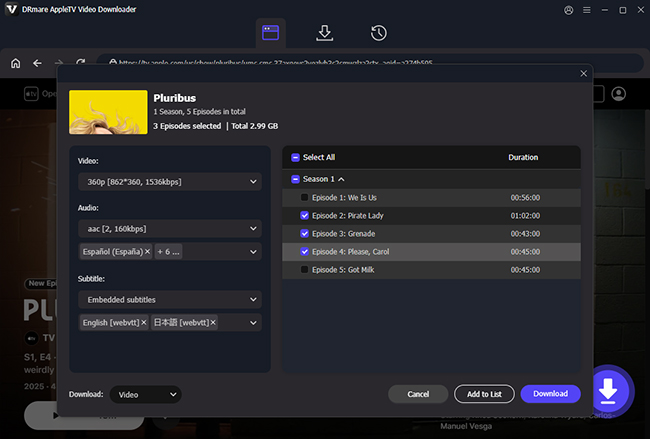
- Step 3Start the DRM-Free Conversion
Once you've lined up your episodes, click the "Download" button in the top-right corner. The DRmare Apple TV Downloader will begin stripping the DRM protection and saving the episodes as standard files on your computer.
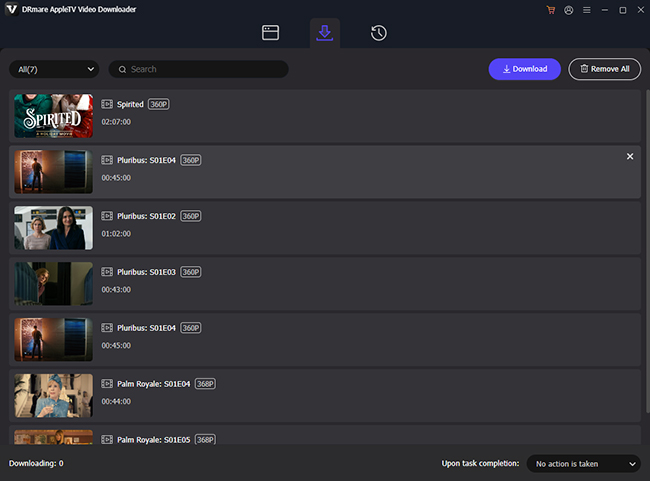
- Step 4Enjoy Apple TV Offline
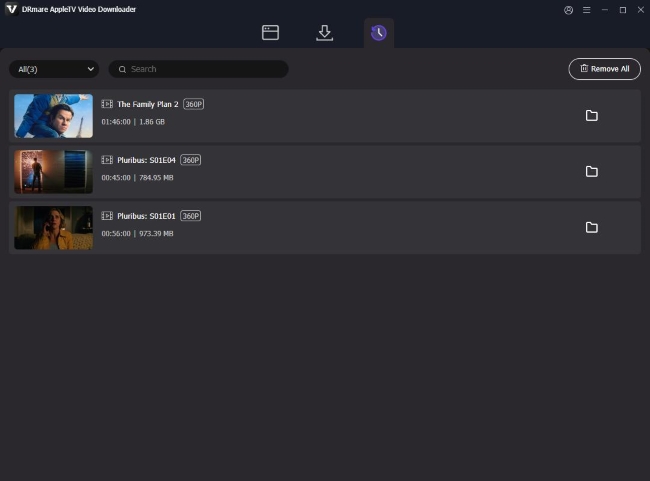
After the process finishes, navigate to the "History" tab or your chosen local folder to find your video files. Since these are now DRM-free MP4s, you can transfer them to a tablet, car, or TV via USB, and then enjoy the Apple TV shows without an active subscription.
Note:
The DRmare tool is intended for personal use. Please ensure it is not used for redistributing copyrighted material or for any commercial activities.
Part 4. FAQs About Watching Severance Without Apple TV
Can You Purchase Severance Episodes Instead of Subscribing?
No. Severance is an Apple Original exclusive, which means you cannot buy individual episodes or seasons. Unlike some shows that are available for "digital purchase" on platforms like Google TV, the only official way to access Severance is through an Apple TV subscription.
Is Severance Available on Netflix or Amazon Prime Video?
Severance is not available on Netflix. However, you can watch Severance on the Apple TV channel inside your Amazon Prime Video with an active Apple TV plan.
Can I watch Severance after the subscription ends?
No, once your subscription expires, you lose access to all Apple TV content, including your downloads. However, if you use DRmare Apple TV Downloader to save the Apple TV movies and shows as local files, you can watch them forever on any player, free from the subscription.
When does Severance season 3 come out?
There isn't an official release date yet, but the current timeline points toward a mid-to-late 2027 premiere. With filming expected to run through most of 2026, we likely won't see the next chapter until Summer or Fall 2027.

 Home
Home





User Comments
Leave a Comment