





SpotiDost was working during our latest test on July 31, 2026. The browser-based tool accepted public Spotify track, album, playlist, and artist links. It provided individual MP3 downloads, batch playist ZIP downloads for collections, and a separate option for saving Spotify cover artwork.
We also examined 23 downloaded MP3 files with Spek. All tested downloads were 128 kbps MP3s with a 44.1 kHz sample rate, and each displayed a similar frequency cutoff near 16 kHz. The downloaded filenames also included the word "SpotiDost."
This review explains how SpotiDost works, which Spotify links it supports, its tested audio quality, potential safety concerns, and the limitations to consider before using it.
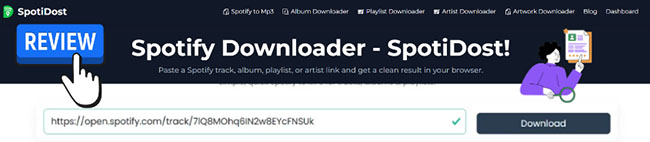
Our Hands-on Test: Does SpotiDost Really Work?
Test Environment:
- Browser: Google Chrome
- Test Content: Spotify tracks, albums, playlists, and artist links
- Download Format: MP3 files, ZIP archives, and cover artwork
- Evaluation Focus: Download speed, audio quality, metadata, ads, stability
Yes. SpotiDost was operational during our July 31, 2026 test and successfully processed several types of public Spotify links. During our test, the service supported:
- Spotify tracks, albums, playlists, and artist links
- Individual MP3 downloads and batch ZIP downloads
- Separate Spotify cover-art downloads
However, the audio quality was limited in our test. All downloaded files were encoded at 128 kbps rather than 320 kbps. Google sign-in was also required before the download options became available.
| Test item | Result |
|---|---|
| Service status | Working during our test |
| Spotify track links | Supported |
| Spotify album links | Supported |
| Spotify playlist links | Supported |
| Spotify artist links | Supported |
| Individual downloads | MP3 |
| Batch downloads | ZIP |
| Cover-art downloads | Supported |
| Tested audio bitrate | 128 kbps |
| Tested sample rate | 44.1 kHz |
| Spotify login required | No |
| Google sign-in required | Yes |
| Ads observed during testing | None |
| Filename branding | "SpotiDost" included |
These results reflect our test session and may change if the website updates its download system.
What Is SpotiDost?
SpotiDost is an independent online tool that processes public Spotify links through a web browser. It is not an official Spotify product and does not require users to install desktop software or a browser extension.
The basic idea is straightforward. You copy a public Spotify URL, paste it into SpotiDost, and wait for the service to display the available tracks. Depending on the type of link, you can then download an individual MP3 file, save a cover image, or package multiple songs into a ZIP archive.
SpotiDost does not ask for your Spotify username or password. However, it currently requires users to sign in with a Google account before downloading files.
Is SpotiDost an Official Spotify Downloader?
No. SpotiDost is a third-party service and is not developed, approved, or operated by Spotify. That distinction matters because Spotify does not normally provide unrestricted MP3 exports through its official apps. Spotify Premium downloads are stored for playback inside the Spotify application and are not delivered as ordinary MP3 files.
Users should only download content they own, have permission to use, or are otherwise legally allowed to save. Copyright rules and streaming-service terms can differ by country and use case.
How to Use SpotiDost to Download Spotify Music
SpotiDost, a free online Spotify downloader, works entirely inside a web browser, so no desktop installation is required. The following steps apply to public Spotify URLs.
Step 1. Copy a public track, album, or playlist link directly from the Spotify application or web player.
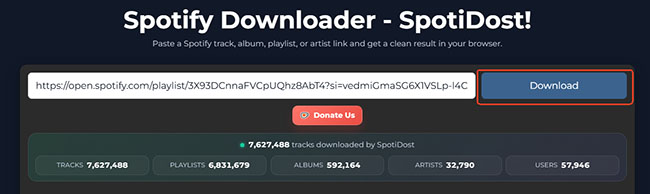
Step 2. Paste the URL into the SpotiDost input box and click the Download button. The service then attempts to analyze the link and generate a downloadable result.
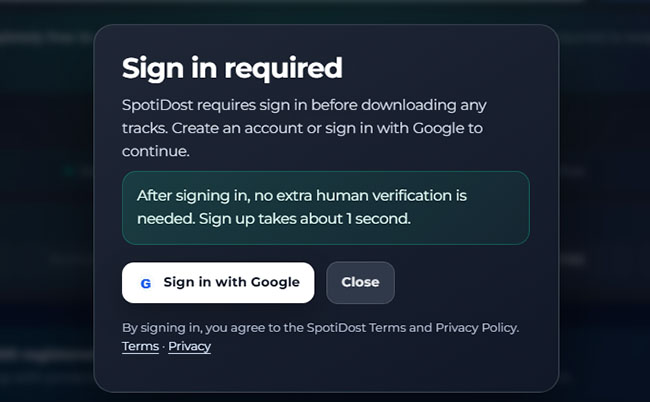
Step 3. SpotiDost will require Google sign-in before displaying or activating its download controls. Review the information and permissions shown on the Google authentication screen before continuing.
Note:
The service did not request our Spotify login credentials during testing. You don't need to enter your Spotify password into an unrelated download website.
Step 4. Review the generated result card to ensure the cover art and title are correct, then select the MP3 or Bulk ZIP option to convert Spotify tracks to MP3. SpotiDost also provides a Download Cover option. You can choose it to download Spotify album cover art to your computer.
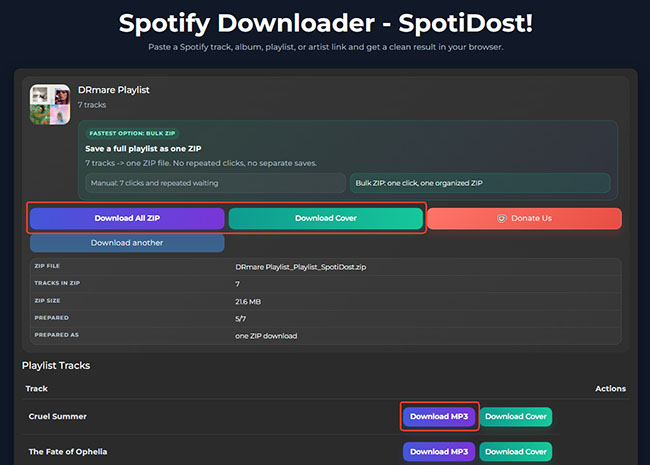
After downloading a ZIP archive on your computer, you can easily extract it and verify that the expected tracks are present.
Note:
Every MP3 filename during our test included the word SpotiDost. For example: 1_Cruel_Summer_SpotiDost.mp3.

This branding does not affect playback, but users who organize large local libraries may want to rename the files after downloading them. A music-library manager or batch-renaming utility can remove the extra text from multiple filenames more efficiently.
SpotiDost Audio Quality Test
The test was conducted on July 31, 2026. We downloaded 23 different tracks and opened them in Spek, a program that visualizes an audio file's frequency spectrum. Spek identified all files as MPEG Layer III files encoded at 128 kbps with a 44.1 kHz sample rate.
The following three files illustrate our results:
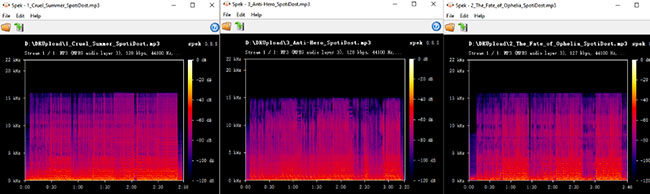
- 1_Cruel_Summer_SpotiDost.mp3
- 2_The_Fate_of_Ophelia_SpotiDost.mp3
- 3_Anti-Hero_SpotiDost.mp3
SpotiDost Bitrate Results
All three tested files produced the same main technical result:
| Test file | Format | Bitrate | Sample rate | Approximate cutoff |
|---|---|---|---|---|
| Cruel Summer | MP3 | 128 kbps | 44.1 kHz | Around 16 kHz |
| Anti-Hero | MP3 | 128 kbps | 44.1 kHz | Around 15–16 kHz |
| The Fate of Ophelia | MP3 | 128 kbps | 44.1 kHz | Around 16 kHz |
The similar frequency cutoffs suggest that the three files were produced using comparable encoding settings. The files did not show the broader high-frequency range often associated with higher-bitrate MP3 encodes. However, a spectral graph alone cannot definitively establish the quality of the original source.
Note:
This does not prove that every file downloaded from SpotiDost will always be 128 kbps. It does show that 128 kbps was the consistent result across our 23-file sample.
Is SpotiDost Safe to Use?
SpotiDost did not request our Spotify username or password. This reduces the risk of directly exposing Spotify login credentials to the downloader. However, that alone does not prove that the entire service is completely safe. Website safety, account privacy, file safety, and copyright compliance are separate issues.
Account Safety
The tool needs only public Spotify URLs, so never enter your Spotify password on this site. SpotiDost does require a Google sign-in to download files. Carefully check the authorization screen to confirm exactly what data you are sharing before proceeding.
Privacy Risks
Depending on the permissions requested, signing in with Google may share basic profile information, such as your name and email address.
- Limit access: Only approve strictly necessary permissions.
- Deny sensitive requests: Stop immediately if the service asks for access to your Gmail, Google Drive, or contacts.
File Safety
While MP3s and images are generally safer than software, proceed with caution on any third-party site. Keep your browser and security software updated to reduce the risk of malware infections. Avoid clicking on misleading ads, decline browser notifications, and never accept unexpected executable files when you only intended to download audio.
Copyright Rules
Being able to download a file doesn't mean it is legally permitted. Music available on Spotify is generally protected by copyright, and its use is also governed by Spotify's terms. Only use SpotiDost for music you own or have explicit permission to download. Never distribute copyrighted material without proper authorization.
SpotiDost Pros and Cons and Our Verdict
SpotiDost is convenient, but its limitations are important for users who care about sound quality, account privacy, or library organization.
Pros
 Works in a browser without desktop installation
- Supports track, album, playlist, and artist links
- Offers individual MP3 and batch ZIP downloads
- Includes a separate cover-art download option
- Does not request Spotify login credentials
Cons
 All tested files were limited to 128 kbps
- Downloaded filenames included SpotiDost branding
- Google sign-in was required
- Availability may change when the website experiences technical issues
| Category | Rating |
|---|---|
| Ease of Use | ⭐⭐⭐⭐⭐ (5/5) |
| Download Speed | ⭐⭐⭐⭐☆ (4/5) |
| Audio Quality | ⭐⭐⭐☆☆ (3/5) |
| Metadata | ⭐⭐⭐☆ (4/5) |
| Playlist/Album Support | ⭐⭐⭐⭐☆ (4/5) |
| User Experience (Ads) | ⭐⭐⭐⭐☆ (4/5) |
| Overall | ⭐⭐⭐⭐☆ (4/5) |
Our Verdict:
SpotiDost is highly convenient for everyday music downloading, as it runs entirely within the browser and supports batch downloading of entire Spotify playlists as ZIP files. However, users seeking high-fidelity audio quality and flawless metadata should opt for other tools.
Top SpotiDost Alternatives
SpotiDost is most suitable for quick browser-based downloads when convenience is more important than maximum audio quality. An alternative may be more appropriate when you need higher-quality output, cleaner filenames, detailed metadata, or more predictable processing for large playlists.
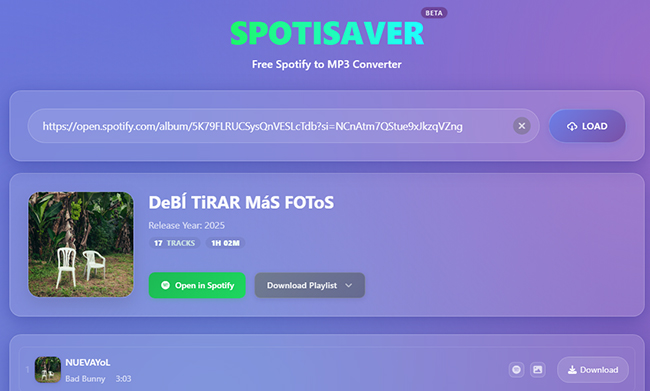
SpotiSaver
For users who want to stick to web-based tools without installing anything, SpotiSaver offers a clean, ad-free interface. However, be prepared to do some manual clicking, as many free web alternatives may not provide SpotiDost's convenient Bulk ZIP functionality.
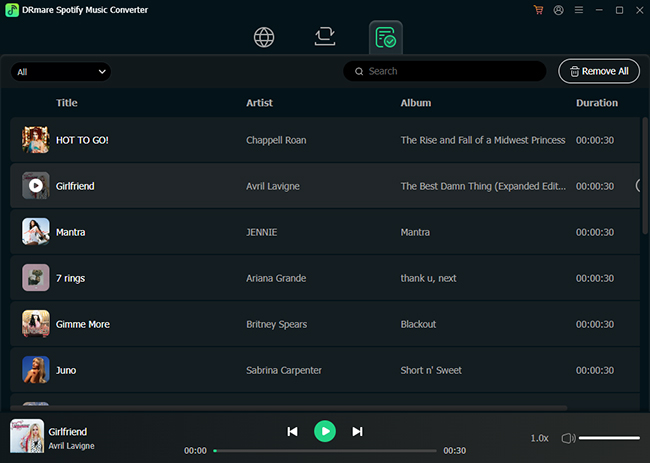
DRmare Spotify Music Converter
DRmare Spotify Music Converter provides more control over output folders, naming rules, metadata, and batch organization. This can be helpful for users who frequently manage albums or long playlists. It can convert Spotify tracks to MP3, FLAC, WAV, M4A, M4B, and AIFF for playback on compatible devices and media players.
Conclusion
SpotiDost is a convenient browser-based tool that supports Spotify track, album, playlist, and artist links. It offers individual MP3 downloads, batch ZIP files, and separate cover downloads without requiring a Spotify login.
However, all files tested in our sample were 128 kbps MP3s, not 320 kbps, and their filenames included SpotiDost branding. It is suitable for quick, casual downloads, but users seeking higher audio quality or cleaner metadata may prefer an alternative.

 Home
Home





User Comments
Leave a Comment