





Downloading a full Spotify album sounds simple until you want the songs outside the Spotify app. A dedicated Spotify album downloader can turn an album link into local MP3, FLAC, WAV, or ZIP files, but the experience varies considerably between desktop software and free online tools.
We tested the actual album-download workflow of each tool rather than relying only on its advertised features. We checked whether a full album could be processed, whether batch or ZIP downloading worked, what formats were available, how metadata and filenames were handled, and what limits, redirects, or paid restrictions appeared during use. Here are our top 6 picks for the best Spotify album downloaders for MP3, ZIP, and online free.
Disclaimer:
This article is for informational and educational purposes only. The tools mentioned were tested for their features and usability. Please use Spotify album downloaders responsibly, respect copyright laws and Spotify's Terms of Service, and download only content you have the right to use.
Best Spotify Album Downloaders at a Glance (Tested List)
Whether you prioritize the stability of a dedicated desktop Spotify downloader for album or the no-install convenience of online software, the table below breaks down the top tools based on actual performance.
| Spotify Album Downloader | Best For | Full-Album Download | Output Formats | Free Limit We Confirmed | Main Drawback |
|---|---|---|---|---|---|
| DRmare Spotify Music Converter | Best overall | Yes | MP3, FLAC, WAV, AIFF, M4A, M4B | First 30 seconds per track in trial | Desktop installation required |
| SpotiDownloader | Free ZIP downloads | Yes | MP3, ZIP | No album-count limit found in our test | Adds branding to filenames |
| SpotiSaver | Browser and mobile users | Yes | MP3, ZIP | Up to 100 tracks | Slower free processing |
| SpotiLab | FLAC/WAV options online | Yes | MP3, FLAC, WAV, ZIP | 50 tracks; high-quality formats have usage caps | Limits vary by format |
| SpotiDown.co | Simple batch downloads | Yes | MP3, ZIP | 50 tracks per ZIP in our test | Larger batches require payment |
| SpotiSongDownloader | Bitrate and metadata options | Limited on free tier | MP3, M4A, ZIP | 2 album tracks in our test | Full ZIP access is restrictive |
How We Tested These Spotify Album Downloaders
To make the comparison useful, we focused on the parts that matter when downloading an album rather than a single song. Each service was checked with Spotify album links, and we recorded what happened after the link was submitted. Our main test criteria included:
- whether the complete album could be detected and downloaded in one session;
- whether ZIP or other batch-download options were actually available;
- supported audio formats, metadata, album artwork, and filename changes;
- free-user limits, CAPTCHA requirements, redirects, processing stability, and paid restrictions.
Pricing, track limits, and web-tool behavior in this guide reflect what we encountered during our latest tests. Online free Spotify downloaders change frequently, so some limits may be adjusted by their operators later.
1. DRmare Spotify Music Converter — Best Spotify Album Downloader Overall
- Availability: Windows, macOS
- Download Content: Albums, playlists, songs, podcasts, audiobooks
- Output Formats: MP3, FLAC, WAV, AIFF, M4A, M4B
- Best For: Users who regularly download complete Spotify albums and care about format control, metadata, and stable batch processing.
- Recommendation: ⭐⭐⭐⭐⭐
DRmare Spotify Music Converter is the strongest option in this comparison when the priority is downloading an entire album consistently rather than handling tracks one by one. Unlike web-based Spotify album downloaders free that often match Spotify metadata with audio from another source, DRmare handles albums through its built-in Spotify web player. A Spotify Free or Premium account can be used, and complete albums can be added directly to the conversion queue.
The software also gives you substantially more control over the exported files. MP3 is the most practical choice for broad device compatibility, while FLAC, WAV, AIFF, M4A, and M4B are also available. Bitrate, sample rate, channel settings, and other parameters can be adjusted before conversion.
Our Test Experience of DRmare
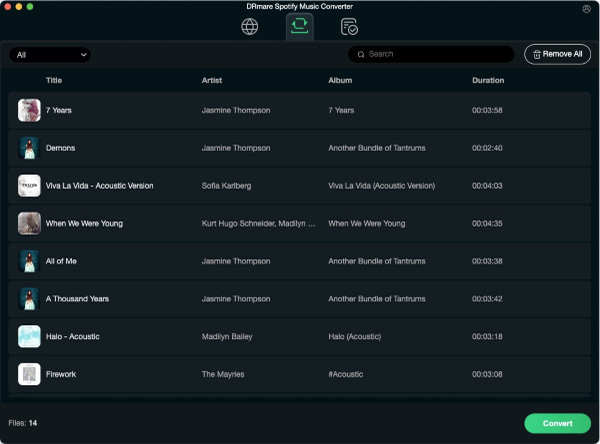
During our album tests, DRmare loaded the complete track list rather than forcing us to add songs individually. Batch conversion remained stable, and the exported files retained useful information such as song title, artist, album details, and cover artwork.
Conversion can run at up to 15X speed depending on the environment and settings. That makes a noticeable difference with longer albums and multi-disc releases, where recording or downloading tracks in real time would otherwise become tedious.
The main limitation is the free trial. It lets you test the workflow and output quality, but only the first 30 seconds of each track are converted until the software is activated.
How to Download a Spotify Album to MP3
Step 1. Install and open DRmare Spotify Music Converter. Sign in through the built-in Spotify web player, locate the album you want, and choose Add > Add to List.
Step 2. Open Preferences > Conversion and select MP3, FLAC, WAV, or another supported format. You can also change bitrate, sample rate, and channel settings if necessary.
Step 3. Click Convert. After processing is complete, open the Converted section to find the album as local files.
Pros
 Processes an entire Spotify album in one conversion queue.
- Supports six common audio formats and adjustable output settings.
- Retains album artwork, artist information, track details, and other metadata.
- Faster and more consistent for large album libraries than browser-based alternatives.
Cons
 Available only on Windows and macOS.
- The free trial converts only the first 30 seconds of each song.
- Requires software installation.
2. SpotiDownloader — Best Free Spotify Album Downloader Online for ZIP Files
- Availability: Web (Windows, macOS, Android, iOS)
- Download Content: Albums, playlists, songs
- Output Formats: MP3, ZIP
- Best For: Users who want a free, browser-based way to package an album into one ZIP file.
- Recommendation: ⭐⭐⭐⭐
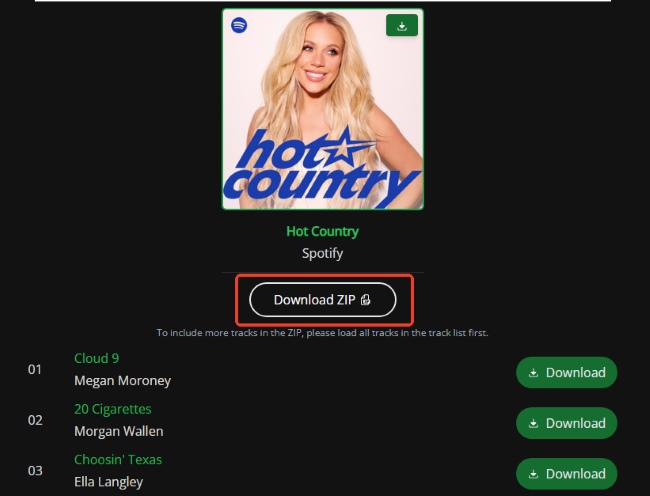
SpotiDownloader is one of the more practical online choices if you do not want to install desktop software. Its biggest advantage for album users is the Download ZIP option.
Instead of saving every song manually, you can paste one Spotify album link, let the site process the track list, and package the songs into a ZIP archive. This is much more convenient for albums than online downloaders that display only individual MP3 buttons.
Our Test Experience of SpotiDownloader
In our test, the service accepted complete Spotify album links and generated both individual-track download buttons and a ZIP option. We did not encounter an album-count limit during normal use, although a CAPTCHA verification was required before downloading.
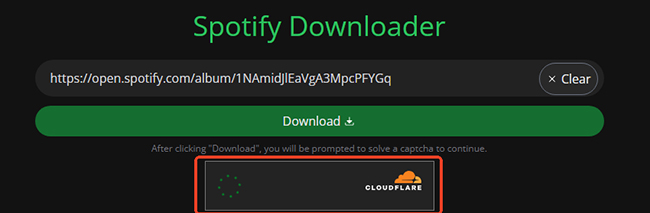
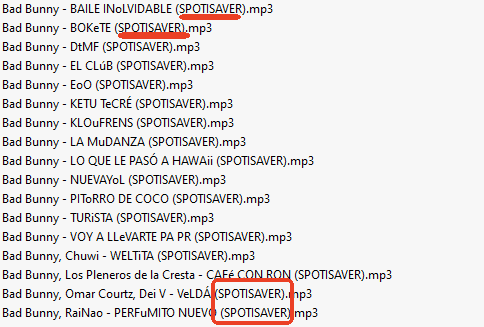
Downloaded filenames included a SpotiDownloader identifier. That does not affect playback, but users who maintain a carefully organized local music library may want to rename the files afterward.
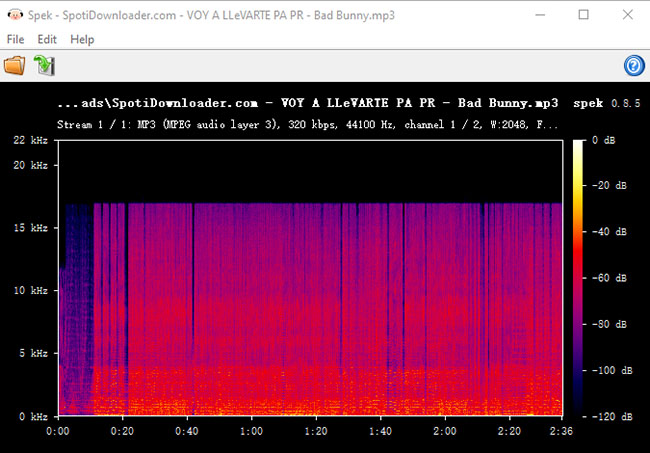
We also found that the audio does not necessarily come directly from Spotify. Like many browser-based tools, the service can match Spotify track information with audio available from another source. As a result, a live version, remix, edit, or similarly titled recording may occasionally be matched incorrectly.
How to Download a Full Spotify Album as ZIP
Step 1. Open the album in Spotify and copy its share link, paste the link into SpotiDownloader, and choose Download. Complete the verification if prompted.
Step 2. After the album is processed, choose Download ZIP to save the tracks together.
Pros
- Full-album ZIP downloading worked in our test.
- No Spotify account login is required on the downloader site.
- Works on both desktop and mobile browsers.
- Useful for occasional free album downloads.
Cons
- CAPTCHA verification may interrupt the process.
- Filenames contain SpotiDownloader branding.
- Audio matching can occasionally return a different version of a track.
- Large albums depend on server availability and may process less consistently.
3. SpotiSaver — Best Online Spotify Album Downloader for Mobile and Browser Use
- Availability: Web; Windows, macOS, Android, iOS
- Download Content: Albums, playlists, songs
- Output Formats: MP3, ZIP
- Free Album Limit Tested: Up to 100 tracks
- Best for: Users who mainly download Spotify albums from a phone or browser and want a relatively generous free batch limit.
- Recommendation: ⭐⭐⭐⭐
SpotiSaver offers one of the more straightforward album workflows among browser-based tools. There is no application to install, and the same site can be used from a desktop computer, Android phone, or iPhone.
Its free tier supports albums of up to 100 tracks, which is enough for almost any standard studio album and many box sets. A complete album can also be packaged into a ZIP file instead of being downloaded song by song.
Our Test Experience of SpotiSaver
The tool successfully parsed album links and retained useful information such as track title, artist, and album artwork. Free downloads also included SpotiSaver branding in the filename, which is worth knowing before downloading a large library.
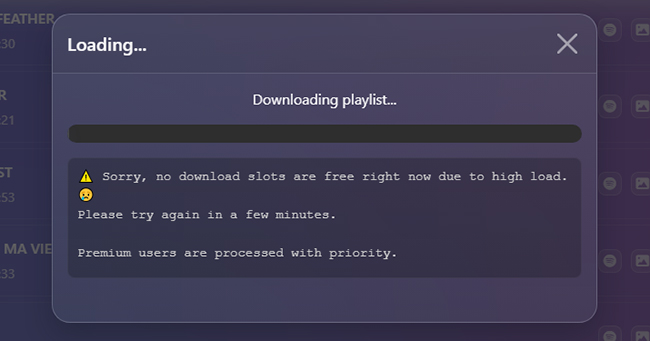
Processing on the free tier was slower than the desktop software we tested. That was more noticeable with long albums, where browser-based server processing adds extra waiting time.
How to Download a Spotify Album Online
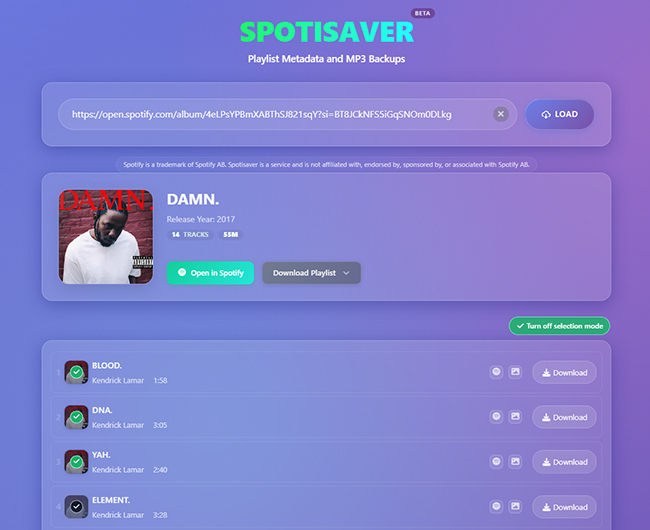
Step 1. Copy and paste the Spotify album URL into SpotiSaver and press LOAD.
Step 2. Use Download ENTIRE PLAYLIST and Download ZIP to create a ZIP archive containing the available tracks.
Pros
- Works directly in mobile and desktop browsers.
- Up to 100 album tracks were supported on the free tier during our test.
- ZIP downloading reduces repetitive manual downloads.
- Basic metadata and artwork are retained.
Cons
- Free processing can be relatively slow.
- Adds SpotiSaver branding to downloaded filenames.
- Audio is matched from external sources rather than being a direct Spotify file export.
4. SpotiLab — Best Online Spotify Album Downloader for FLAC and WAV
- Availability: Web (Windows, macOS, Android, iOS)
- Download Content: Songs, albums, playlists, artists
- Output Formats: MP3, FLAC, WAV, ZIP
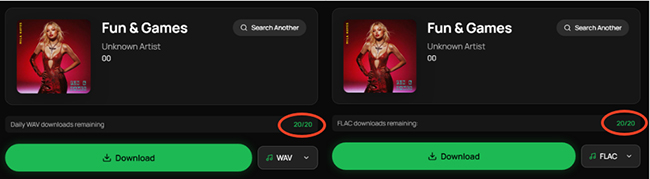
- Free Limit Tested: 50 tracks for album/playlist processing; separate 20 download limits for high-quality FLAC/WAV downloads
- Best for: Users who want a browser-based Spotify album downloader with more format choices than a MP3 converter.
- Recommendation: ⭐⭐⭐⭐
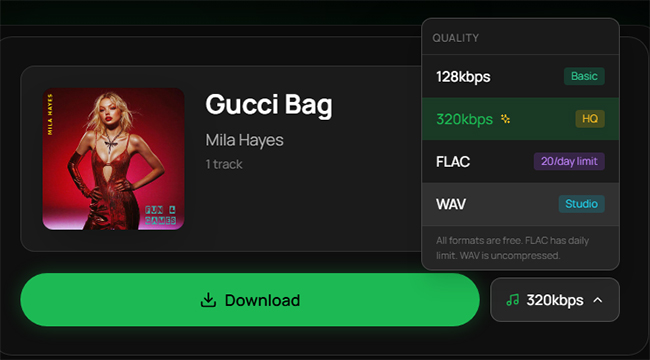
SpotiLab stands out because it offers more than the usual MP3 output found on free Spotify album downloader sites. During our test, MP3, FLAC, and WAV options were available, making it more flexible for users who prefer a particular file format. Album and playlist URLs can be processed as a batch, and metadata such as cover artwork and track information is generally retained.
Our Test Experience of SpotiLab
The free version allowed albums or playlists containing up to 50 tracks. We also encountered separate daily usage restrictions for some higher-quality output options, including FLAC and WAV.
Note:
The ability to choose FLAC or WAV is useful, but the format needs to be interpreted correctly. A FLAC or WAV file is not necessarily the same thing as lossless Spotify source audio.
How to Download a Spotify Album to MP3, FLAC, or WAV
Step 1. Copy the Spotify album URL and paste it into SpotiLab.
Step 2. Let the site analyze the album and choose the available MP3, FLAC, or WAV option.
Step 3. Download tracks individually or use the available batch option when supported.
Pros
- Offers MP3, FLAC, and WAV rather than MP3 only.
- Supports complete album and playlist links.
- Retains useful album metadata.
- Works without installing software.
Cons
- Free albums/playlists are limited to 50 tracks in our test.
- Higher-quality output options are subject to additional usage caps.
- A FLAC export does not guarantee that the original audio source was lossless.
5. SpotiDown.co — Best Simple Spotify Album Downloader for Batch Downloads
- Availability: Web (Windows, macOS, Android, iOS)
- Download Content: Albums, playlists, tracks
- Output Formats: MP3, ZIP
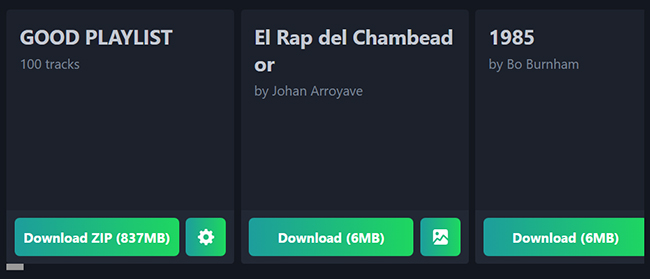
- Free ZIP Limit Tested: 50 tracks
- Best for: Users who want a quick browser tool for ordinary albums without advanced settings.
- Recommendation: ⭐⭐⭐
SpotiDown.co keeps the workflow deliberately simple: paste an album URL, let the site process it, and download either individual files or a ZIP package. That simplicity makes it useful as a backup when you only need an occasional album and do not want to install a program.
Our Test Experience of SpotiDown.co
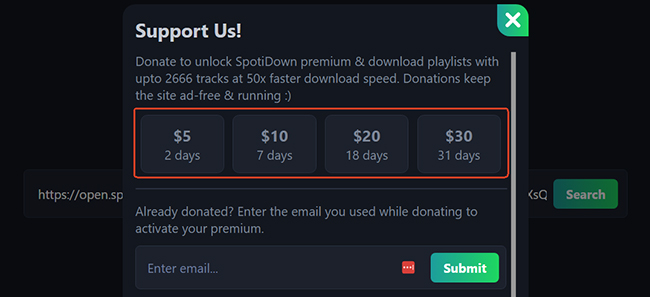
During our test, the free batch option processed up to 50 tracks per ZIP file. Albums within that range were relatively straightforward to handle. For larger batches, the site presented a paid option. We encountered pricing of approximately $2 per day for unlocking higher limits during testing.
How to Download a Spotify Album in Batch
Step 1. Copy the Spotify album URL, paste it into SpotiDown.co, and choose Search.
Step 2. Once the track list appears, use Download ZIP to save the batch.
Pros
- Very simple interface.
- No software installation or Spotify login is needed on the downloader site.
- ZIP downloading works well for normal-sized albums.
- Mobile browsers are supported.
Cons
- Free ZIP batches were limited to 50 tracks in our test.
- Larger downloads may require a paid upgrade.
- Provides fewer output and metadata controls than desktop software.
6. SpotiSongDownloader — Best for MP3 and M4A Output Choices
- Availability: Web; Windows, macOS, Android, iOS
- Download Content: Albums, playlists, songs
- Output Formats Tested: MP3, M4A, ZIP
- Free Album Limit Tested: 2 tracks
- Best for: Users who value bitrate and metadata options and do not mind paying when downloading complete albums.
- Recommendation: ⭐⭐
SpotiSongDownloader has a more polished feature set than many basic Spotify link downloaders. It supports higher-bitrate MP3 output, M4A, metadata, artwork, and ZIP packaging. The problem is that its free album functionality was much more restrictive in our test.
Our Test Experience of SpotiSongDownloader
When testing a full Spotify album, the free workflow allowed us to download only two tracks before requiring an upgrade for broader album access. The ZIP feature was therefore less useful for free users than the ZIP options offered by SpotiDownloader or SpotiSaver.
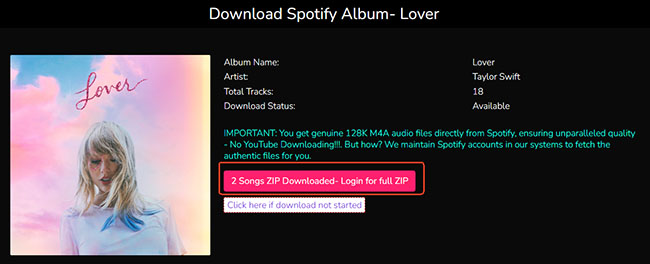
The service did a relatively good job with track information. Artist names, release information, artwork, and track numbering were preserved in the files we checked.
It also offered output choices including 320 kbps MP3 and 256 kbps M4A. These bitrate settings are useful for compatibility and file-size control, although a high bitrate alone does not prove that the source audio has identical quality to Spotify's stream.
How to Download a Spotify Album to M4A/MP3
Step 1. Copy an album link from Spotify, paste it into SpotiSongDownloader, and click the Download button. The service will load the track list.
Step 2. Individual tracks can be downloaded from the result page, while broader ZIP access depends on the available free or paid limits.

Pros
- Offers MP3 and M4A choices.
- Preserves relatively detailed track metadata.
- ZIP support is available.
- No desktop software is needed.
Cons
- Free album downloading was limited to two tracks in our test.
- Full-album ZIP downloading therefore has limited value without upgrading.
- Album parsing can take longer than simpler download sites.
- Downloaded filenames may contain website-related prefixes.
Other Limited-Batch Spotify Album Downloaders We Tested
Some online Spotify album downloaders technically support album links but become inconvenient once the number of tracks increases. They may still be useful if you only want a few songs from an album rather than the entire release.
| Tool | Free Batch Capacity Tested | What We Found |
|---|---|---|
| SpotMate | 3 tracks | Very restrictive batch size; site branding is added to downloaded metadata/files. |
| SpotiDown.app | 5 tracks | Processing was quick, but redirects appeared and filenames included site branding. |
| SpoMP3 | 9 tracks | More generous than the other two; redirects were still part of the workflow, while downloaded files had fewer intrusive naming tags. |
For a normal 10-track album, these limits mean repeating the same process several times. That weakens their value as true Spotify full album downloaders, even if they remain practical for downloading selected tracks.
FAQs About Spotify Album Downloaders
Is it safe to use Spotify album downloaders?
Not always. Established desktop tools are generally safer, while free online Spotify album downloaders may include ads, redirects, or misleading buttons. Avoid services that request your Spotify password or unnecessary permissions.
What is the best Spotify album downloader online free?
SpotiDownloader and SpotiSaver were the most practical free browser options in our tests. SpotiDownloader is better if you primarily want a simple ZIP download, while SpotiSaver's 100-track allowance is useful for longer releases and compilations.
Can a Spotify album downloader save an album as ZIP?
Some browser-based downloaders can. SpotiDownloader, SpotiSaver, SpotiLab, SpotiDown.co, and SpotiSongDownloader all provided some form of batch or ZIP functionality during testing, although their free limits were different.
Are online Spotify album downloaders actually downloading from Spotify?
Not necessarily. Many online tools use a Spotify URL to obtain track metadata and then match the audio with material from external sources.
Which Spotify album downloader works best on iPhone or Android?
Browser-based services such as SpotiSaver, SpotiDownloader, SpotiLab, and SpotiDown.co can be accessed from mobile browsers without installing a desktop program.
Final Verdict
The best Spotify album downloader depends largely on how often you download full albums and how much control you need over the resulting files.
- Best for Quality & Batch Stability: DRmare Spotify Music Converter delivers unmatched desktop performance, precise format selection, and complete ID3 metadata retention.
- Best for Free ZIP Downloads: SpotiDownloader is the most practical web tool for packaging entire albums without installation.
Best for Mobile & Browser: SpotiSaver offers a seamless smartphone experience, while SpotiLab provides web-based FLAC/WAV options.
Ultimately, look beyond the advertised speeds on a homepage. The right tool is the one that consistently processes your batch limits with verified output quality.

 Home
Home





If you maintain local music libraries across multiple streaming services, this is the superior all-in-one alternative. It allows you to download everything from Spotify, Amazon Music HD, Apple Music, to Tidal HiRes FLAC with ID3 tags fully intact.